
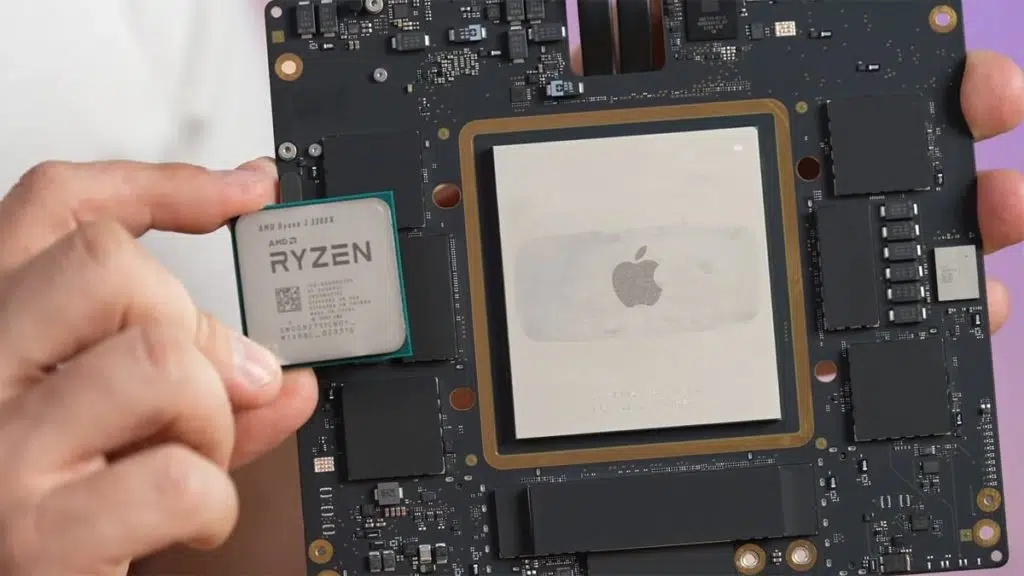
Apple may have overestimated the performance of its Mac Studio, but if there’s one thing that the company didn’t exaggerate, it’s the size of its M1 Ultra chip, according to a teardown of the system shared by Max Tech’s Vadim Yuryev that provides a clear look at how massive the SoC actually looks in person. As shown at the end of the video, Apple’s M1 Ultra chip completely dwarfs one of AMD’s Ryzen 3 3300X desktop processors, overshadowing red team’s relatively diminutive CPU by almost three times.
“And just to show you guys the difference, here is a Ryzen processor, the whole package compared to Apple’s M1 Ultra package,” Yuryev said in his teardown below, showing off the size difference between the two chips and prompting some laughter from an associate.
“That is crazy. But at the same time, you see the size difference. Apple has the RAM in there, the controllers in there, everything is in there. […] So they have an incredible, incredible design.”
Apple’s M1 Ultra comprises two M1 Max chips that are connected using UltraFusion, the company’s fancy name for its custom-built packaging architecture. The M1 Ultra is almost three times as large as a Ryzen processor, occupying around 25% of the Mac Studio’s motherboard.
Yuryev’s breakdown also provides a look at the system’s modular SSDs, which, naturally, use a proprietary form-factor due to the controller residing in the SoC. According to Apple, the drives cannot be upgraded by users, so accessing them is likely to void the warranty.
Mac Studio Dissected: M1 Ultra About 3x Bigger Than AMD’s Ryzen CPUs (Tom’s Hardware)
The Mac Studio features a minimalistic design that looks pretty humble compared to modern workstations like other Apple devices. But what these design hides are Apple’s massive M1 Ultra processor package that occupies around one-fourth of the motherboard, a very complex voltage regulating module (VRM), and two user-accessible SSDs.
Apple’s M1 Ultra processor is two M1 Max system-on-chips (SoCs) in TSMC’s CoWoS-S (chip-on-wafer-on-substrate with silicon interposer) 2.5D interposer-based package. The two SoCs feature memory subsystems. They are linked together using the company’s UltraFusion interprocessor interconnection that offers a bandwidth of 2.5 TB/s, enough to present two GPUs and two memory subsystems as one to the OS. We expected Apple’s M1 Ultra to be massive given such an architecture.
Indeed, the M1 Ultra is massive. Compared to an AMD Ryzen processor in an AM4 form-factor, it is about three times larger. One M1 Ultra occupies around 25% of Mac Studio’s motherboard. Since we are two M1 Maxes, the M1 Ultra has two rather complex VRMs that can feed the two-headed beast and ensure high-quality power to let it run at high clocks. It, of course, means that we are dealing with a very complex motherboard, but if you need to maximize performance, this is the way to go.
Discussion (19 replies)
Join Discussion →Surprise surprise. I bet peak power consumption is high too.
Maybe that's what they meant by it out-powering a 3090. ;)
No surprises really. Remember the GPU, system controller, and DRAM are also in that package. The only thing not in there is the power regulation and the SSD. So if you really wanted to compare to a PC you’d need to look at the entire motherboard, not just the CPU.
Apple also disclosed the Ultra’s TDP to be 60W. Not unbelievable really - the M1 Max MBP was measured by Anandtech and pulled peak 40W from the wall during their benchmark runs. I haven’t seen a similar test for the Studio yet.
I am not unimpressed by the studio systems. Honestly if I had the cash to burn I would totally buy one to play with. Hummm... maybe I can convince work to get me one... what do you all think? Many of our software developers use mac book laptops... hummm.
I've owned several Mac Minis. Those machines are awesome, and I've used them as everything from a HTPC to a mail server to industrial controller. Just the right size where it can pack some power and not be too expensive, and small enough that you can toss it behind the screen or tuck it out of the way. The Studio is a bit more of an investment though, and a bit taller.
I can also say the regular M1 is no slouch. Having ... 6 (+/- ?) of them ... might just be overkill. Unless, of course, you are actually crunching 8K video or training AIs or doing something real. Yeah, I would love to own a studio - but I have no idea what I would do with it. Kinda like a boat - I'd love to own one, but no idea when I'd ever get it out on the water.
I have a M1 13" MBP. I can say hands down it's the best laptop I've ever owned. I wouldn't call it the fastest computer I've ever owned, but it's snappy, gets great battery life, doesn't get hot or loud, feels extremely solid and well built, and runs Office, email, web browsers, and has a native Unix terminal -- all the things I really look for in a laptop
I do have two reservations about it though. I wish I had the 16", coming from a long line of 15" I have a really hard time adjusting to the smaller screen. That, and I have a large library of x86 virtual machines that I use for various things at work that I can't run on it any longer - I have a cheapo $350 laptop just for the purpose of running those tools when I absolutely need them, which is unfortunate, but not a frequent occurrence. I need to get around to trying ARM Windows and see if that software will run there, but haven't fooled with it.
Why can't you run x86 vm's on the macbook? Is the virtual PC software (that I forget the name of) not capable of emulation on the MBP yet?
Correct.
Parallels will run the ARM version of Windows, and then you rely on Windows' ARM->x86 emulation layer to run x86 software. VMWare doesn't support it yet, saying Windows doesn't have an official licensing path for their ARM version to support it. But that isn't the same thing as running x86 VMs, which is what all of my VMs currently are.
I don't know if any Hypervisor is exploring using Rosetta to enable running x86 VMs or not, but I suspect not, as then you aren't really running on a CPU, your trying to run on an emulation layer.
Tough to tell from pictures, but it looks similar in size to my threadripper.
Even if you could though, why would you want to?
I mean, sure, emulation will work in a pinch, if you absolutely need to run something, but usually efficiency and performance are killed by any hardware emulation, unless you are trying to emulate something really old.
Because I don’t want to go through the hassle of setting up those VMs again. Which is why I bought a second laptop just to run them.
My 3080 12GB FTW3 can pull 450W, and the 12700K 280W, and that's just with taking the power limiters off, not real overclocking.
And this would still run circles around that for actual content-creation workloads aside from maybe 3D rendering. It'd be slower for gaming of course and probably a few other things, but otherwise?
Apple could make an M1 variant today that'd run typical office productivity stuff in a laptop run a week on battery just by optimizing for battery life.
I'm really wondering if that isn't their next step, and I'm also wondering when they're going to reattack the corporate workstation market.
It's very nearly there today if you enable Low Power mode. It has no impact on typical Office applications. Might be able to get about the same on the M1 iPads as well - the battery is a bit smaller, but so is the screen and the hardware is a lot more compact, and Office runs over there as well - just have to deal with the touchscreen instead of a mouse.
The screen shot is my MBP right now - last charged date is accurate. I've only used it for light email and browsing since then, but on Day .. 4?
That's the basic idea - scale back on processing cores, especially GPU and AI, maybe some of the transcoding stuff and memory and storage bandwidth and optimize for a lower TDP - and maybe dial back on display quality etc., and you have a US$500 MSRP laptop that's built to the highest QC standards and runs everything most consumers / office workers ever need. For a week, unplugged.
Apple's not really known for catering to lower-budget markets on a regular basis, but with their current architecture they're actually the best suited to do so, simply by leveraging their current R&D and command of component supply.
I didn't look up actual dimensions, but I was wondering which was bigger, this or EPYC/Threadripper.
M1 Ultra is around 860mm2, Epyc/TR package comes in at just over 1,000mm2, so it is a bit larger.