
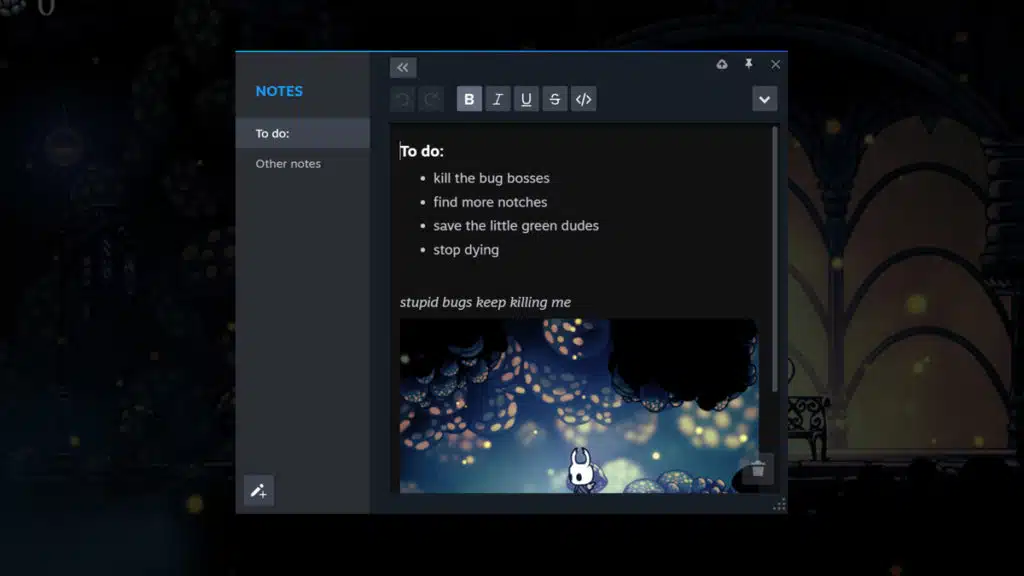
Valve has announced that the major update it’s been working on for the Steam Desktop client has finally left beta and should now be available to all users. Aside from a very long list of fixes, per the patch notes, the new update officially introduces some long-requested features, including an improved in-game overlay that now allows users to pin select windows. These include the web browser, Guides, Discussions, Achievements, and Notes, which is basically Valve’s version of Notepad, with support for rich text formatting, images, and more. The Steam UI has also received a bit of a makeover, with nicer fonts and other cosmetic changes, coupled with improved notifications.
Steam Client Update Highlights
- Updated Steam Client notifications, with additional settings allowing you to choose which notifications you’ll see, and where you’ll see them
- Visual and usability improvements in dialogs, menus, fonts, and colors – including screenshot manager, achievements, and more
- An overhauled in-game overlay (accessible via Shift+Tab), with an updated design, new features, and more customizability
- New notes functionality with rich text formatting, image pasting, and offline functionality. Multiple notes can be saved per-game, and they are accessible via the in-game overlay, desktop client, and Steam Deck
- New pinning functionality – panels from the in-game overlay can now be “pinned” (with adjustable opacity) so they are viewable while in-game
- Updated controller configurator is now part of the overlay when a gamepad is connected
- Mac & Linux versions of Steam have been updated to enable hardware acceleration
From a Steam post:
General
- Display an error if the user is trying to log in anonymously in the client. This mode is only supported for steamcmd.
- Uninstalling a game no longer displays a modal dialog
- Fixed “Manage Storage” button opening the storage settings page
- Fix soundtrack cover art not appearing in content management panel
- Fixed popup menus opening at the wrong DPI in multi-monitor mixed-DPI configurations.
- Fixed some context menus opening incorrectly when the opening window is maximized.
- Fixed in-client link to support FAQ detailing Windows 7/8/8.1 end-of-life.
- Fixed login refresh dialog not showing in overlay when a game is launched by a second Steam session while a game is running
- Fixed issue where viewing app properties caused the Steam client to be unusable
- Fixed download rate limiting not working in some cases
- Fixed error when navigating the game list with arrow keys and landing on a category header.
- Fixed issue where clicking on store or community links in a news post within the client would not navigate to the website
- Fixed a crash that could occur if toggling bandwidth limits while a game download is in flight, or if cloud syncs while a game download is in flight.
- Fixed issues in sign in UI when switching between entering a Steam Guard code and entering a backup code
- The game is ready for preload & game released spotlight in the library will no longer show for users who own the game through family sharing
- Fixed close button on the Update News dialog starting at the top of the dialog, then moving down to the bottom when the content loaded
- Fixed category capsules overflowing into the app details page when the window is very narrow
- Added new Achievements popup accessible from the game details page
- Fixed “View Updated Items” context menu items in the Downloads section for games that have updated Workshop items
- Moved 24hr time setting from Friends & Chat to Interface
- Stopped forcing 12-hour clock display if the user did not explicitly select the 24-hour clock. The default is locale dependent.
- Fixed incorrect UI state when a game is purchased while the user is in a timed trial
- Updated URL for store checkout process.
- Added a tooltip to “Other” section in storage settings to explain what it contains
- Fixed occasional crash when toggling a game’s favorite status through the play bar on the game details page.
- Added a setting to let a user decide whether Ready to Play should include streaming and whether the local computer should be the default in details. This defaults to true on desktop and false on Steam Deck.
- Fixed game list unnecessarily flickering to top when selecting a game that’s in a collection.
- Fixed artwork modal sizing height based on screen width, fixes close button being off-screen on taller images.
Friends & Chat
- Fixed issue where “Invite to Play” was not available in the Friends List for some games (e.g. CS:GO)
- Fixed issue where going idle would cause Friends & Chat to reconnect when offline
- Fixed chat tabs sometimes overlapping window controls if a lot of tabs are open.
- Rearranged and reworded several items on the friends list context menu to make them more clear.
- Fixed the friend menu causing a black bar on the underlying chat or group window in some cases.
- Improved performance of the interface in the overlay when animated Steam avatars are enabled
Big Picture Mode
- Removed support for -oldbigpicture command-line option
- Fixed some styling issues in the Quick Access Menu Friends List
- Fixed some issues with notification toasts appearing in the wrong location in multi-monitor setups or with different DPI settings
- Apply text filtering preferences in Guides in the Overlay
- Removed soundtracks from All Collections since it has its own tab
- Fixed an issue where two settings pages could be visible at once
- Fixed the switching of monitors when going in/out of BPM at start up
- Fixed overflowing friends list when sharing a screenshot
- Expand the hitbox of buttons in the footer to make them easier to click
- Fixed showing notifications in the Big Picture Mode game overlay
- Improved performance of dual trackpad typing in the Virtual Keyboard
- Fixed crash when after funding the Steam Wallet when attempting to make an in-game purchase in the Overlay
- Fixed issue where the Main Menu and Quick Access Menu stopped working after selecting a custom startup movie
- Any button press will now cancel the Wake custom startup movie
- Fixed a black screen freeze when clicking on a store widget within a news post
- Changed game invitations to show the launch option dialog instead of using the first option in the list. If the user has selected an option and asked to remember it, that option will be used instead of showing the dialog.
- Fixed issue where selecting a group chat showed an endless loading throbber until another chat was selected
- Added support for Mouse4 (Back) as B button in the interface
- Fixed opening the “Reorder controllers” dialog in the main Big Picture Window when a game is running
- Search will now return tags in addition to games. You can search for categories like “Free to Play” or individual tags like “survival” or “zombies”.
- Enabled additional toast notifications that were previously only visible in Desktop mode
- Restored display of Special Offers in the What’s New section of the home screen.
- Fixed a navigation issue in the Quick Access Menu showing the last section, instead of the Performance section, when selecting the Battery icon in the header
- Fixed inability to click on Steam notification toasts (eg. wishlist, comment).
Steam Input
- Increase responsiveness of the “Joystick Deadzone” visualization
- Gyro As Joystick can now optionally output to Left Joystick
- Fixed Gyro’s Left/Right Stick Deflection Modifier not working
- Fixed Modeshift bindings not being removable when viewing the command on the input
- Fixed a case where hitting the “apply configuration” button before a configuration preview was loaded could select the wrong configuration
- Fixed a case where an autosave could get lost while editing
- Fixed the DualSense configuration preview not showing Mute button bindings
- Fixed bug causing DualSense triggers to only read as 0/100%
- Fixed error when viewing a configuration in the “Search” tab of the config browser
- Added several missing Steam Link App virtual controller-specific settings to the configurator
- Added new config export path that works while offline. In personal configuration dropdown the options are now “New Personal Save”, which is this new option and “New Sharable Personal Save”, which uses the existing Steam Workshop backend.
- Filter the configuration export options based on whether the device is connected to Steam/Offline
- Fixed some flashes when adjusting sliders in the Quick Settings section of the configurator
- Fixed moving right in the mode settings page not jumping to the appropriate settings sub-page
- Fixed turning off the Dual Sense Edge controller
- Added binding listener dialog that lets you bind inputs by hitting a mouse button, keyboard key, or gamepad button
- LED Color/Brightness Action reinstated as a bindable action. Find the Action settings inside the Game Pad tab when selecting an action binding (available on controllers with LEDs only)(except Switch Pro).
- Fixed cases where alt-tabbing between the stand alone instance of the desktop configurator and a game would not update the in-game layout
- Added missing inputs to the “Listen” dialog
- Fixed a bug where repeatedly opening the configurator to the same config could cause edits to not stick
- Fix Right Trackpad Click in the controller binding listening page being bound to Left Stick Click.
- Ongoing rumble is now interrupted when switching away from the app that requested it.
- Reduced maximum individual SIAPI rumble requests from 10s down to 3 seconds.
- Fixed crash on macOS when using a PS4 controller
- Updated Controller Summary page so that it scales better at different sizes
- Added mouse position dialog to configurator w/ support for transparency to the game or using your screenshots for position
- Fix rotation settings when binding Gyro to Mouse output
- Nintendo Switch Pro and JoyCons Gyroscopes now have sensitivities that are roughly equal to all other controllers as we step toward a Natural Sensitivity Scale (i.e. real world rotations result in roughly the same in-game output, regardless of controller used). Steam Input sensitivities on SwitchPro and JoyCon configurations will be automatically updated to compensate.
- Fixed Joystick Dead Zones in Calibration Screen triggering a controller-specific default to be used when a game was launched, instead of the value specified, if the value was less than 2048.
- Fix for gyro Smoothing settings not updating when switching to shifted modes.
- Fixed detection of the Steam Virtual Gamepad on macOS.
- Gyroscope as Joystick/DPad/Buttons/Lean were using yaw correction-to-the-average-heading, causing subtle drift over time, especially in games which involved a lot of turning in one direction (driving games, flight sims). This was also used in GetMotionData (Steam Input API) affecting titles which used the sensor fusion quaternion for aiming. The correction toward the average has now been removed.
- Deferred Sensor Fusion: Accelerometer correction (i.e. pitch correction from gravity sensors) for these modes is applied opportunistically – when the controller is rotating fast, or the controller is stationary (determined by stationary noise tolerances in the calibration page). This reduces noticeable “ouija effect” during fine aiming in our experiments. Note, none of the above gyro changes affect “Gyro As Mouse”, which only uses Gyroscope readings, not Accelerometer.
- The top allowed noise threshold for gyroscope in the Gyro Calibration page has been increased 3 fold to allow abnormally noisy gyroscopes to pass the drift correction/calibration process.
Steam Deck
- Fixed issue where a game’s specific uninstall UI was not visible
- Added support for notification types shown in the Desktop Client and Mobile app: Wishlist, Trade Offer, Steam Turn, Help Request, Major Sale, and Comment.
- Added a bell icon to the header when there are new notifications, and a green indicator to new notifications in the notifications list.
Linux
- Fixed an issue that prevented the steam client from immediately reconnecting to the steam servers when resuming the system from sleep.
- Fixed an intermittent crash when the OS audio server restarts.
- Fixed a case where the per-app Steam Play compatibility tool override dropdown would not appear.
- Fixed ‘Delete Proton Files’ not cleaning files that contain : in the path.
- Fixed a crash when steam fails to connect to the pulseaudio server.
- Added a ‘Compatibility’ tab to Settings where SteamPlay settings can be changed.
- Steam will now use the system’s global scale factor as configured in KDE settings. Specifically org.gnome.desktop.interface/text-scaling-factor.
- Added a commandline switch to override the window scaling factor: “-forcedesktopscaling “.
- Dynamically update the UI’s scaling factor when the KDE system scaling setting changes.
- Fixed issue preventing locally installed tools from being used as default steam play option.
- Fixed issues with listing and adding flatpaks as non-Steam shortcuts.
- Fixed Steam Linux Runtime compatibility tools not being installed to support a title in some cases.
- Known bug: Enabling hardware acceleration on Nvidia GPUs may cause Xorg to crash. On this platform hardware acceleration is disabled by default, but it can be enabled Settings-Interface or by opting into the beta branch.
- Known bug: dpi scaling may not work correctly when hardware acceleration is disabled.
- Use the system file picker instead of the built-in file picker if desktop portal is available.
Remote Play
- Fixed the remote player getting “host busy” dialog after the overlay is dismissed
- Show MB/s instead of KB/s in the bandwidth rate settings.
Discussion (10 replies)
Join Discussion →I saw something was weird when steam updated yesterday. Solution to a non-problem. I mean what is the differrence between using ALT-TAB or another key combination to bring up the steam UI? To me in game overlays are just unnecessary clutter. I quickly turned it off in the AMD driver too on my newly acquired AMD GPU.
I'd call it harsher instead, the UI has much higher contrast now, frankly it is hurting my eyes.
According to my brother, who has a Steam Deck, Valve is trying to make the PC and mobile versions of Steam more like the Steam Deck version of the UI. Whether that's good or bad, I don't know. I've barely used the Steam Deck. I have a few friends that own 'em, but all have been heavily customized. I also have not yet tried out this new version of Steam on PC. Valve does have a history of fixing what ain't broke, sometimes making sh1t worse in the process. I hope that didn't happen this time.
Honestly surprised that Steam on Linux did not already have hardware acceleration. I guess I never noticed that.
In-game overlays can cause issues with the game too. You're right, just f*cking Alt+Tab out of the game if you need to access Steam or a web browser. Made all the easier if you use borderless window mode for every game like I do (well, for the games that support it). I run multiple monitors, so using borderless window mode is practically a necessity for me.
Honestly I forget the Steam in-game overlay even exists. I disabled it years ago. The built-in web browser was trash too.
Who needs that note-taking function? Just Alt+Tab out of the game and open up Notepad or Wordpad or whatever. Although I did see that Valve's note-taking program/Steam widget/whatever saves your notes in the cloud, so you can access them from any system you're logged into. So uh like Evernote or something? Except of course way less fully-featured.
I just realized, maybe all this stuff above is a lot more helpful on Steam Deck, if you're playing in handheld mode, and you're in SteamOS mode and not in the normal PC mode where you have the KDE Plasma 5 desktop environment.
Sheesh, even graphics card manufacturers have in-game overlays now?! I also forgot about the Win10 one, the "Game Bar" or whatever the f*ck it's called. I only used it once, to check DX12 Ultimate and DirectStorage status when I got a newer graphics card:
If you are in full screen mode or running HDR it makes the monitor reset, especially if you are gaming at a resolution different than your desktop.
I see it happen sometimes just mousing or alt-tabbing to something over on a second monitor with HDR enabled even in “borderless windowed” mode
First world problem, but kind of annoying - that said, I do agree, the fix was not to cram an overlay full of junk
I have never even seen a steam deck in the wild, I'm not the target audience. 99.99% of the time I play on desktop, and for the remaining 0.01% I use my laptop in some hotel. There is no scenario where I'd want a handheld PC.
Reviewers, I guess, or shall we call them influencers? This is another thing I've been mad about: More often than ever these people get preferential treatment like early access to games before the plebs. This make me feel like a second class citizen, or gamer in this case. Nothing pisses me off more than seeing a clown with a million followers play a game 2 months early that he obviously has zero interest in playing. While I'm dying to get my hands on it. It is like eating a juicy meal with disgust in front of a starving person.
Now it seems even valve is developing steam specifically for them instead of the actual paying customer. :mad:
HAHAHAHAHAHAHAHA interesting way to put it!
Huh.
I noticed the client got somewhat reskinned the other day when it updated, but I didn't notice the changes to the overlay, largely because I never use any overlays while running games. Not Steam, not AMD, nothing. I don't alt-tab away either.
When I am playing a game, I am playing a game, and I am dedicated to it with 100% of my attention. If I cant dedicate 100% of my attention to my game, I don't play it.
The whole Windows environment I boot into is dedicated to games. Nothing else is installed. I never needed Microsofts "Game mode" that prioritizes the game over other processes, because I never run anything in the background, not even a browser. Back in the day I used to always disable the steam overlay because I didn't want it to mess with the games, but at some point it turned itself back on again (probably a reinstall) and I haven't bothered lately.
I guess it was a habit learned back in the single core days when we didn't have as much RAM as we have today. I remember methodically going through task manager and killing all non-essential tasks before running a game making sure as close to 100% of system resources were available to the game as possible. When the overlay first launched it was just another thing that would take away resources from my game.
Probably not necessary anymore on my 24C/48T Threadripper with 64GB of RAM, but I guess old habits die hard.
Same, except I haven't played a game on a laptop in a hotel room in over a decade.
For me games happen in one place and one place only. On my desktop in my office. If I am away, I'll just wait to play games until I get home.
I do not want games in my living room, or on my phone. Games to me are a solitary in my office at a proper desktop experience, and I don't want it any other way.
I was thinking this might be useful for running benchmarks. More people than just reviewers run benchmarks. I tend to do it every system upgrade when I am tweaking and setting up my machine to make the most out of it.
That said, if the overlay takes any performance away from the game, then it's going to be a no from me.
They don't bother me in large part because I never watch them.
I tend to take the approach that if a game is good today, it will be good tomorrow, or in a few months, or a couple of years. No rush to get a new game. It will go on sale eventually.
No need to rush. I can wait for it to go on sale. Patience pays off. And since I don't watch any streamers/influencers, I don't have to worry about spoilers.
Only time I pay anywhere even remotely near full price for a game is if my backlog has dried up and I need something to play, but even then I usually just fall back on starting a Sid Meiers Civilization game on Marathon while I wait for the next big sale.
I don't have to watch them for the trend to annoy me. It bothers me on principle, that some gamers are more equal than others.
I don't really care for waiting, if I'm interested in a game I'd rather have it sooner than later, before inevitably it gets spoiled. In some cases they get spoiled even before release. When so many are getting early access, one is bound to break NDA, and the more of them are out there, the harder to find who was the leaker. It's not like giving early access to influencers is a proven pro for sales anyway.
I'm not interested in waiting for a sale, there are hardly any new games coming out, that I really want. Maybe one or two a year on average. We are playing on PCs worth thousands, I think we can afford to spend $120 on new games in a year. I'll wait for sales for games that I only have a mild interest in, but not must haves.
I came to the conclusion that my backlog exists because they were duds. I thought I'd want to play them, or did actually play them 1-2 hours but never cared to continue. Nothing in my backlog is a substitute for new games I actually want to play.
Old games that I sometimes return to are an entirely different category, not part of the backlog. While I do enjoy them in small doses, it is a wholly diffent experience than a brand new game where everything is new. Including the game mechanics, the story, the environment, even the character tree and character creator.
I sometimes joke that my Windows install is my game "console" since 99% of the time I boot into Windows just to play games. That said, I do actually have Win10 set up as my main OS, even though it's not, just in case I have to linger around Win10 for some reason or another. Only when I am absolutely sure that I'm not gonna be gaming anymore do I go back to Linux. It gets annoying jumping back and forth between OSes, even with today's fast SSD boot times. I also do have a scant few programs I only run in Windows cuz I don't wanna run them in Wine (or they don't work well/at all in Wine). The overwhelming majority of the time though I am in Linux, and days or even weeks can go by without me booting into Win10. I even run some lighter games in Linux, games where I don't need insane performance. The less often I have to boot into Windows, the better.
That sh1t never really worked well anyways. It was kinda wonky, and I recall some situations where it actually decreased performance, or caused other issues.
Yeah sometimes it will get reactivated after Steam updates, so you gotta go back into the settings and disable it again.
Same deal with me. I will wait as long as I need to. I'm in no rush to play ANY game. I would much rather wait for sales, and also for devs to fix their buggy broken-@ss games (or for the community to do it). It doesn't matter to me if I wait a few months to play a game, or a year, or 5 years, or 20 years.
When I was in college I did somewhat have to be concerned about spoilers from classmates, but overall it wasn't a big deal. Aside from that, I never ever run into situations where a game can get spoiled for me. On the other hand, I have a friend who often complains about his co-workers spoiling games for him.
What really bothered me was 2020-2022 when regular people couldn't get their hands on graphics cards, but of course "influencers"/YTers/streamers had no problem getting their hands on 'em. The only people who had an easier time getting graphics cards in those years were cryptocurrency miners.
This right here has soured me to the graphics card industry more than anything else.
Agreed.
I mean, no one should ever expect anything from a business other than it following the money, but if anyone ever doubted this, this should have put the dissent to rest once and for all.