
Stock Clock Testing
For our stock clock testing, we have configured our CPU to run at factory settings for speed, voltage. This yields an approximate power at the wall of 185w under load (a 127w differential from idle, which pulls about 58w). This results in the CPU running at 3.7GHz on all cores during the looping rounds of Cinebench R20.
Max Fan
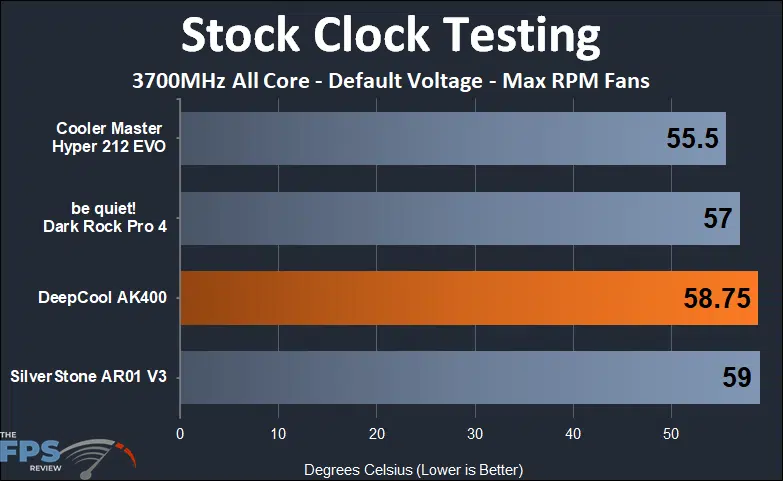
We started our testing today by turning the fans up all the way to 11. This brought the DeepCool AK400 to 58.75 degrees Celsius which bested the SilverStone AR01 V3’s 59 degrees Celsius. However, the Cooler Master Hyper 212 EVO and be quiet! Dark Rock Pro 4 did a cooler job at 55.5 and 57 degrees Celsius, respectively.
We noted that the max fan speed on the DeepCool AK400 topped out at 1850RPM, the Cooler Master Hyper 212 EVO topped out at 2050 RPM, and the SilverStone AR01 V3 topped out at 2150RPM, and the be quiet! Dark Rock Pro 4 has the lowest max fan rpm at 1500 RPM.
1500 RPM Fan
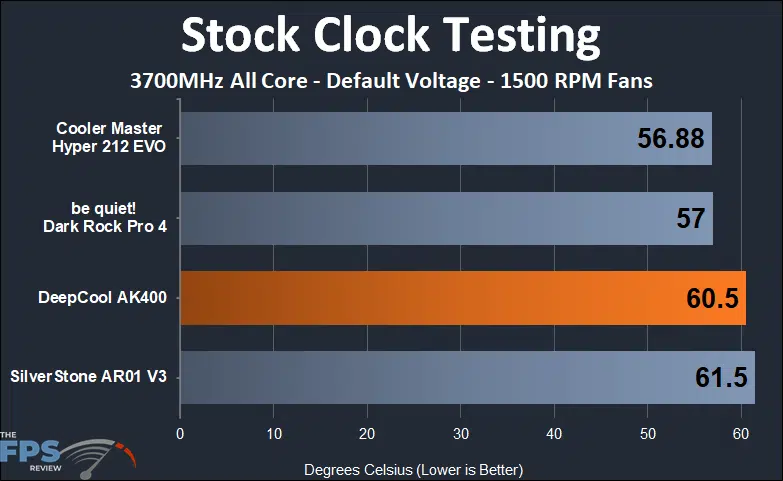
Dropping the fans slightly to 1,500 RPM didn’t shake up the field by much at all, with three of the coolers giving up ground against the Dark Rock Pro 4 which was still operating at its maximum fan speed.
The DeepCool AK400 came in at 60.5 degrees Celsius while the Cooler Master Hyper 212 EVO and be quiet! Dark Rock Pro 4 edged it out at 56.88 and 57 degrees Celsius, respectively. The SilverStone AR01 V3 brings up the rear at 61.5 degrees Celsius.
1000 RPM Fan
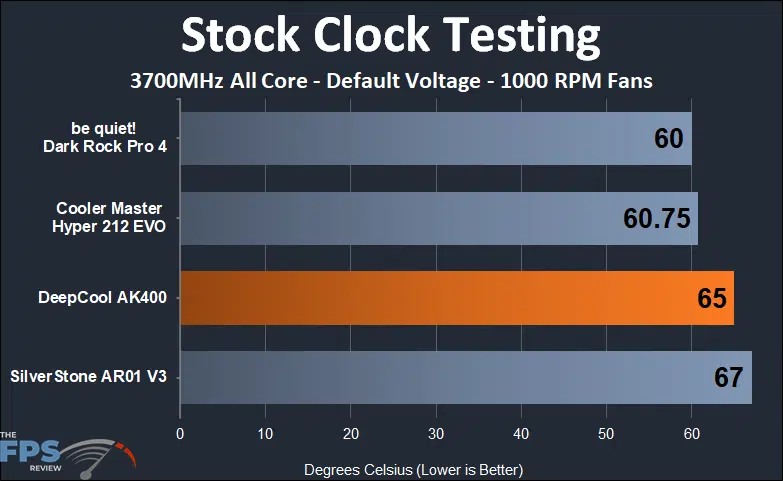
Lowering the fans RPM further to 1,000 RPM sees the DeepCool AK400 coast up to 65 degrees Celsius. The Dark Rock Pro 4 takes the lead at 60 degrees Celsius, just behind the Cooler Master Hyper 212 EVO at 60.75 degrees Celsius. The SilverStone AR01 V3 holds up the rear at 67 degrees Celsius.
600 RPM Fan
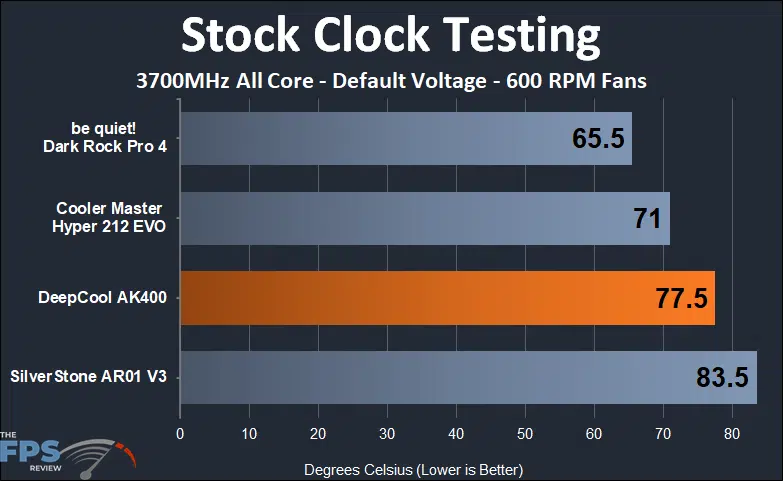
Finally, down at 600 RPM, the DeepCool AK400 spikes up to 77.5 degrees Celsius compared to the Dark Rock Pro 4 and Cooler Master Hyper 212 EVO’s 65.5 and 71 degrees Celsius respectively. The SilverStone AR01 V3 lands last again at 83.5 degrees Celsius.
Let’s move on now to look at some overclocking results with our coolers.
Discussion (3 replies)
Join Discussion →The 212 has been out for how long now? 2007? Sure, it's showing it's age a bit with noise levels, but man... it's just become so ubiquitous and the cost was never huge, it was the go-to for a lot of my builds that weren't going for cutting edge performance.
It's very nice to see this come out and be extremely competitive against what I consider to be the de facto entry-level standard. Great writeup, looks like a decent product. It's amazing how the basic design of these coolers is essentially the same - 4 heat pipes and some fins on a copper block; but they still have so much variance. I suspect we are seeing differences associated with the fans that are provided with the HSFs moreso than anything -- if you used the same fan with each run, I bet the results would be a lot closer. I know you're testing at static RPMs, and I think that's good, but different fan blade designs are going to push different CFM and static head with various noise levels for a given RPM as well. Whichever HSF has more pipes and more useable fin area will win every time if the fans are the same. Not saying you should adjust your testing -- I think testing with the fan provided with the unit is appropriate, just commenting to hear myself talk.
Also, I really appreciate that you have a steady test bench setup. It may not be cutting edge hardware, but I don't think it needs to be - the consistency matters more, especially if you start comparing reviews done today to reviews done 2-3 years from now.
It does make me think about Alder Lake and some of the issues it's having with it's design though... a drawback to this methodology is that you aren't able to identify or account for things like that. However, this is a review of the HSF, not Alder Lake, so I think that drawback is worth the consistency it gets you.
Heh. One of the criteria for the 2700X is we're not using it for GPU reviews anymore, might as well put it to work doing something else!
The thing that's really really really challenging with cooler reviews (in my opinion) is comparability. In today's more "modern" systems, there's a ton of variables that can get tweaked that will ultimately impact the overall performance of a given cooler. There's boost optimization for the CPU, there's fan speeds, there's the overall temperature of the CPU as well.
At default in the 2700X's case, it tends to start thermally throttling itself in the low 60's and really won't let itself get up over 80 degrees Celsius under load (probably for good reason as it starts crashing around 83c). Pair with that some arbitrary motherboard fan curve, and you'll end up with results that look quite similar between good and not-so-good coolers. It took a while to take those variables out of the game - running a set voltage, set frequency and getting around the CPU fan curve to allow for higher temperatures solves that particular comparison data issue, but of course, it creates another one.
The downside now is that the testing that we do does not necessarily relate to real-world usage of the product, though, I'd like to think the data points presented would be helpful to someone that is trying to customize their fan curve for the given cooler.
I think that's perfectly ok in this case --- you are looking for something representative of the cooler and it's performance; not how well any particular platform advantages or energy profiles play to that. Those will be consistent to your particular platform, and as you say - can mask the problems that a lesser cooler would exhibit over a better cooler.
Particularly today with chips that will run with some mayonaisse slathered on a metal lunchbox -- the only difference being how long and how high it will boost --- systems will work, and often work decently well under lightly loaded scenarios, with any old cooler that is at least connected to the socket properly. But a ~good~ cooler will get you better boost speeds and for longer times. But you won't know what a good cooler is from a bad cooler without some baseline info - which is what I appreciate your benchmark system providing.
If you tried to review a HSF under those conditions - they would all look about the same, because the chip would throttle out at some temp and you'd have to look at other parameters than just temperature and/or noise to determine what was working (and what was not).