
Test Setup
Please read our test setup information carefully below, we are using Windows 11 Pro, and each testbed is customized for each CPU platform being compared. There are common components such as cooling and power.
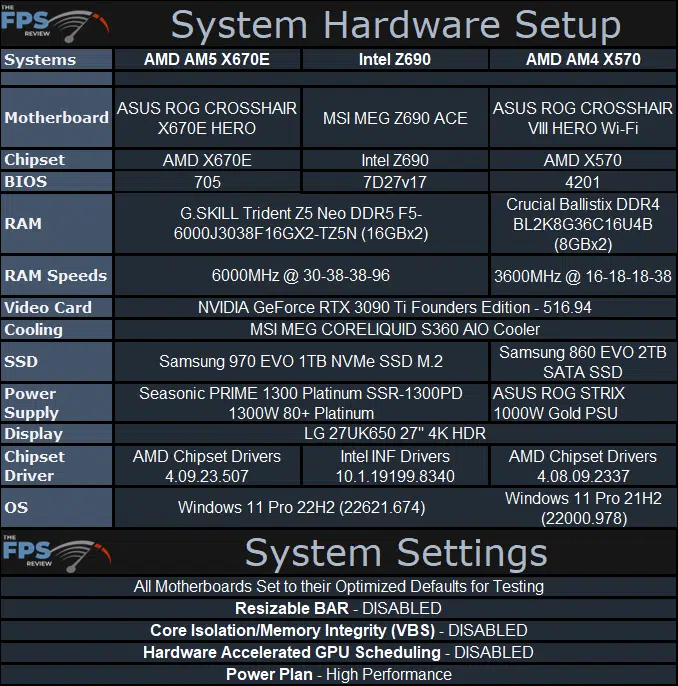
System Config
Take note that the same G.SKILL DDR5-6000 memory kit is being used on the Intel Raptor Lake platform and AMD AM5 platform. We are using the same memory profile on both systems at the same frequency and timings. Naturally, for the AMD AM4 system, we are using a fast DDR4-3600 kit. We have updated the BIOSs on every motherboard to the absolute latest BIOS versions. We are using the same CPU cooler MSI MEG CORELIQUID S360 AIO Cooler on all CPUs. We are also using the same GeForce RTX 3090 Ti Founders Edition video card on all systems.
Note that we installed a fresh copy of Windows 11 Pro and applications and games on each platform tested. With each new platform, we set up, a new fresh copy of Windows and games was put on. Also, take note of the motherboard settings we have disabled. Firstly, we did set each motherboard to its “Optimized Defaults” before testing each CPU. We utilize the default motherboard settings across all CPUs.
However, we did specifically disable PCI-Express Resizable BAR in the BIOS. The reason for this is so that we can isolate CPU performance only when it comes to gaming performance differences. We did not want Resizable BAR to add to, or interfere with the CPU performance in games. We wanted to isolate the CPU differences so you see what the real CPU performance is bringing to the table, not what PCIe Resizable BAR is adding to it.
The same reasoning is also why we disabled Hardware Accelerated GPU Scheduling on the GeForce RTX 3090 Ti FE in Windows. In addition, Virtual Based Security is also disabled so it doesn’t interfere with performance. We are using the “High Performance” power profile on all CPUs.
Again, we want to isolate CPU performance, and this was the goal of turning these features off. In our GPU reviews, we ALWAYS have Resizable BAR enabled, so if you want to see what performance in games is with that feature enabled, all of our GPU reviews have it enabled and will continue to in the future.
Discussion (4 replies)
Join Discussion →I love the graph at the bottom that shows how you came up with the review score - awesome review.
Thanks, @Brent_Justice for the great review! I'm keeping a keen eye on all these new processors as I gather knowledge for my next build. I can't wait to see what the 3D Cache 7000 series does.
Nice review... yea I'm definitely skipping this generation of CPU's my 5900x is plenty fast for what I do at 1440p.
Great review! Now how do I cool the stupid thing? And is my "old" 800w power supply going to keep up?
Microcenter has the 7950x + 32gb ddr5 6000 gskill ram for $567, and the 7900x same ram bundle at $469. Looking at those gaming charts, 4k is totally GPU bound, but 1440p seems to be the sweet spot. I think I would swing for the 7900x personally.
I also play (more than I should) a fair amount of Civ 5 + Vox populi.... it is my understanding it is a mostly single threaded game. I have cranked my 5700x to the max while playing, trying to cut down on the time between turns when AI is working.... doesn't seem to make much difference. I see one or 2 cores pegged out and the rest do nothing. So I'm not even sure the $567 upgrade (and $250+ for a new mobo) would make a difference. I generally prefer AMD to Intel these days, but it seems like Intel does better on the single threaded stuff?