
Power and Temperature
To test the power and temperature we perform a manual run-through in Cyberpunk 2077 at “Ultra” settings for real-world in-game data. We use GPU-Z sensor data to record the results. We report on the GPU-Z sensor data for “Board Power” and “GPU Chip Power” when available for our Wattage data. For temperature data, we report the GPU (Edge Temp of the GPU or Package Temp) as well as Hot Spot (Junction Temperature) when available for our temperature data.
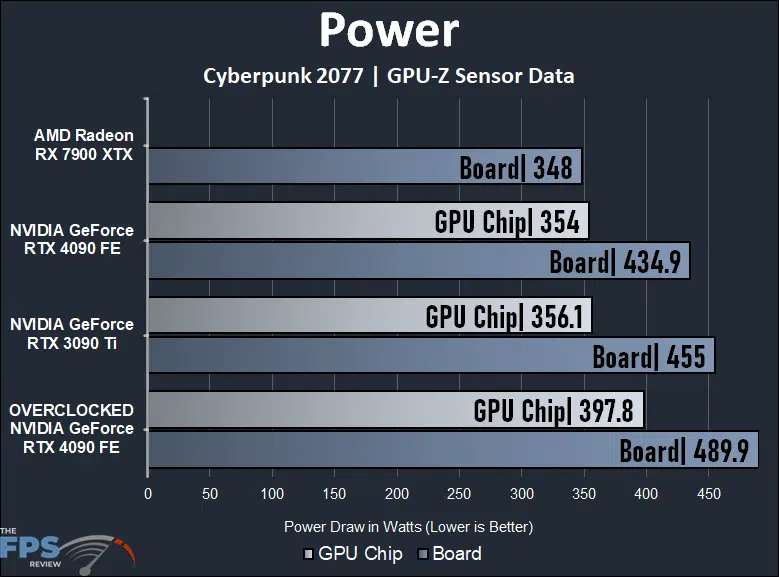
By default, the NVIDIA GeForce RTX 4090 Founders Edition pulled 434.9W board power, and 354W GPU chip power. This puts it under the power draw of the GeForce RTX 3090 Ti which has a board power of 455W and GPU chip power of 356.1W. The GeForce RTX 4090 FE, at stock settings, uses 4% less board power, so it is quite a power-efficient video card when not overclocked. The GeForce RTX 4090 FE does use 25% more power than the Radeon RX 7900 XTX, which sits at 348W board power.
When we overclocked the GeForce RTX 4090 FE board power rose to 489.9W, an increase of 8% board power or 34.9W of board power. This is exactly in line with the performance increase we received, so the power increase vs performance increase is nearly a 1:1 ratio. At 490W the GeForce RTX 4090 FE uses 41% more power than the Radeon RX 7900 XTX.
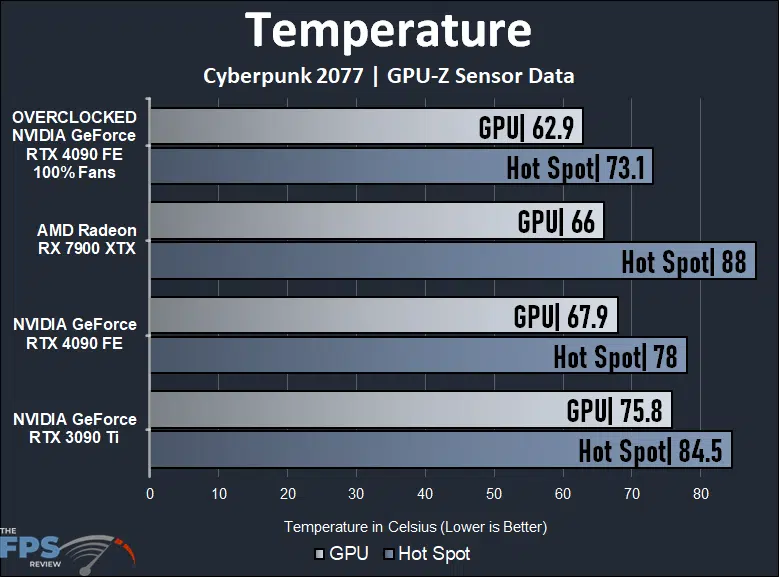
At stock settings, the GeForce RTX 4090 FE has a GPU temp of 67.9c and a Hot Spot of 78c. This again runs cooler than the GeForce RTX 3090 Ti which is at 75.8c GPU and 84.5c GPU. The Radeon RX 7900 XTX has a cooler GPU temp of 66c, but the Hot Spot on the Radeon RX 7900 XTX runs much hotter at 88c and is the highest on our graph.
Granted, the fans are running at 100%, but when overclocked the GeForce RTX 4090 FE is running at 62.9c GPU and 73.1c Hot Spot. These temperatures are the lowest on the graph, so we can see that the cooler configuration is not holding back overclocking potential.
The memory temperature on the GeForce RTX 4090 FE at stock is 80c and overclocked with 100% fans it was 72c. The GeForce RTX 3090 Ti FE memory was at 88c.
GPU-Z Sensor Data
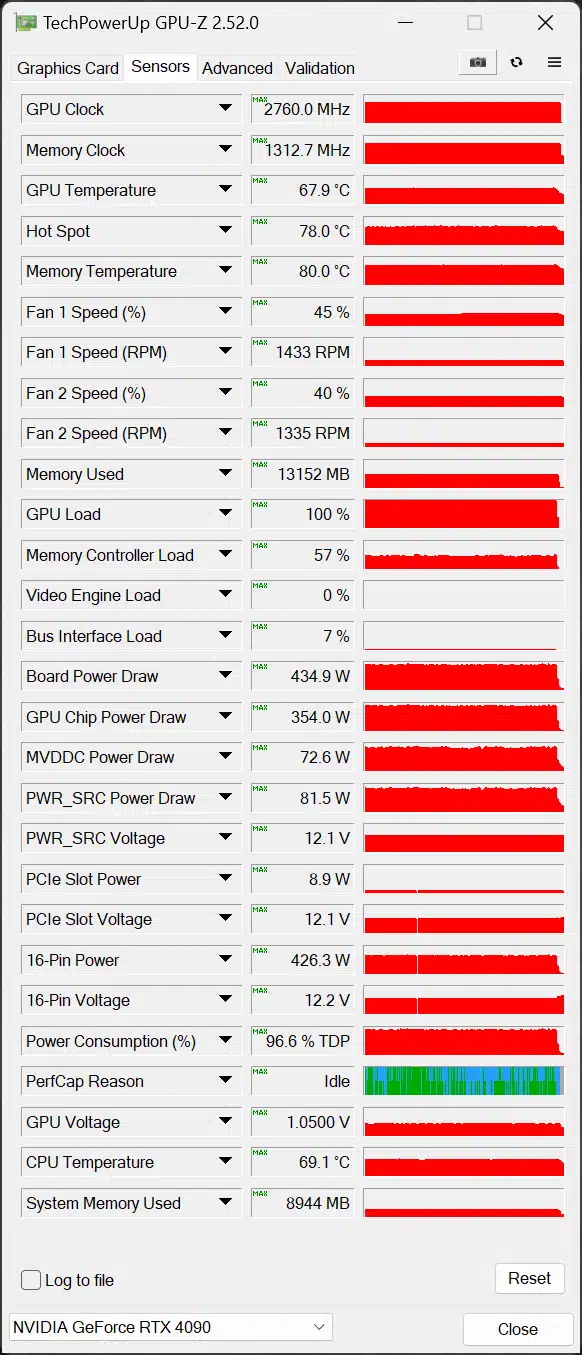
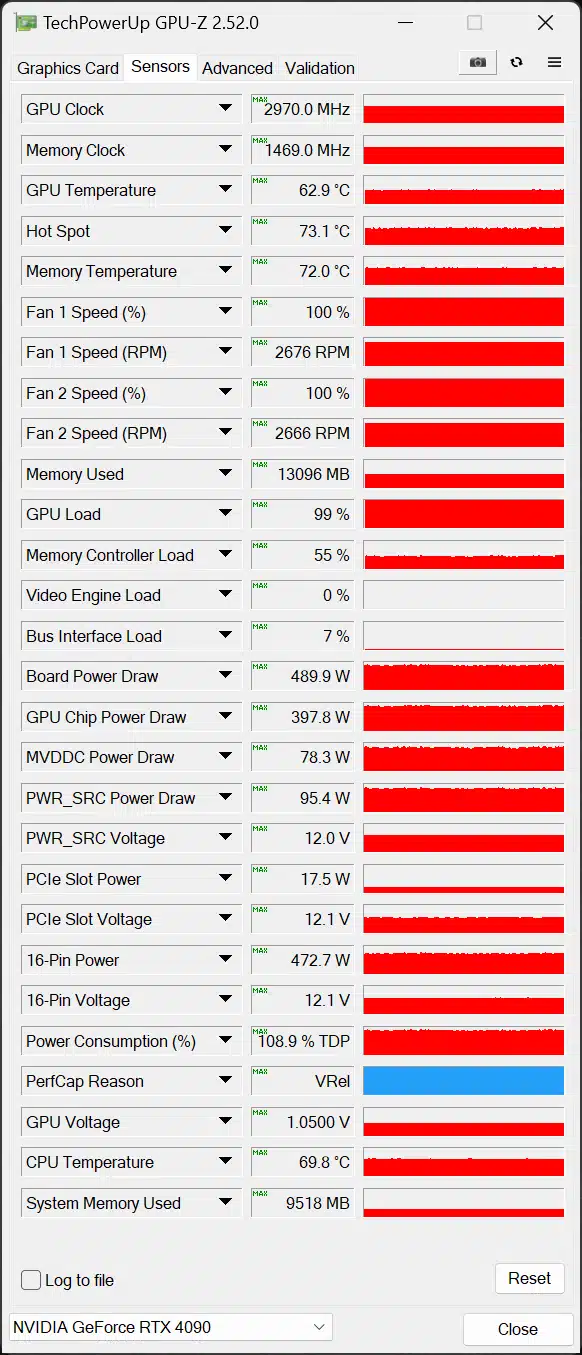
The first screenshot of GPU-Z above is at Default, and the second screenshot of GPU-Z is at Overclocked.
Discussion (3 replies)
Join Discussion →Nice read. Thank you and job well done.
As always thanks! Can't wait to get home and try your settings.
I used some less aggressive settings with my Suprim Liquid X and had similar results but Afterburner only let me increase its power target by 110%. However, my core clock is only ~75 MHz lower (2860 to 2885) than this but the Suprim hybrid cooling solution keeps it cool and quiet (using stock fan curve and it rarely goes above 50% while keeping it in the 60s or lower. Power draw for me has mostly been in the 430s with occasional spikes just over 500W and not uncommon to even see it drop below 400. So far, the only game I've tested that kept it up there was RE3 where I cranked the IQ setting to 200%. It loaded the VRAM to 18GB and the power draw pinged 499-530W. FPS dropped to 50-55 but man it looks good. I did some testing with Metro Enhanced as well and it's so nice to finally be able to crank everything and turn off DLSS. I'm planning on doing another playthrough real soon. I did see it pull upwards of 500W at times but have only barely done some real-world play testing with it.
Well, I had a little time to experiment while dinner was cooking last night. I'm pretty sure I was hitting a power wall but I was mostly able to replicate this. I only spent maybe 20 minutes of testing but got to a seemingly stable point with +185 on the core and +1200 for mem which got me to 2940-2955 w/ occasional spikes to 2970 and mem at 11400.
The Suprim X only allows a +110 (even with X1). It was fun to see the upper limits of what this card can do but I doubt I'll use these as my gaming settings. The cooling solution was still amazing but with the stock fan settings I saw, interestingly, both the temp and fan usage go to 66-67 but at that point, it started to pull down the core clock to something like 2910. When I cranked fans to 100% temps dropped to 50-55c and the core was back to maxing. I've heard that in limited power situations it's a good idea to dial back the mem clock to free up power for the GPU hence why I had it at 1200 but I might take it back a little more just to see if it can reach 2970 more easily. However, I ran about 10 benches with Metro Exodus Enhanced, and a few with CB 2077, the same settings Brent used with mostly the same results but TBP was hanging 510-520W. My other overclock settings with core at 2860-2885 and mem at 11000 used less power and the stock fan curve was more than enough to keep it quiet too so I'll probably just stick with them. I figure I'm only losing out on maybe less than 1% of an OC gain while retaining all the benefits of why I wanted the Liquid X.
BTW I ran the SOTR benchmark and it was hilarious. At 4K, Q. DLSS, and everything but post processing stuff maxed, it ranged 185-250 FPS with some spikes upwards of 300 FPS. I still remember watching this game bringing a 2080 Ti to its knees. This a game you can play w/o DLSS at well over 60 FPS on a 4090 w/ smaa x2(maybe 4-can't remember the limit here) and looks great but it's just hilarious to see such FPS at 4K with almost everything else maxed.
On the note of a power wall, I came across this chart on TPU a couple of months back when researching this, and other cards. It could be useful for those wanting to tinker with their 4090s and wondering about power variants.
Just to add, that I was able to get mem to 11700 but at that point, I started to dial it back in favor of getting the core to max out.