
Gameplay Performance at 4K with Ray Tracing
For this section, we enable Ray Tracing in the game. All the settings otherwise remain unchanged, 4K with all the dials turned up as high as they go. DLSS and FSR are once again utilized where it is suitable and supported by the game.
F1 2022
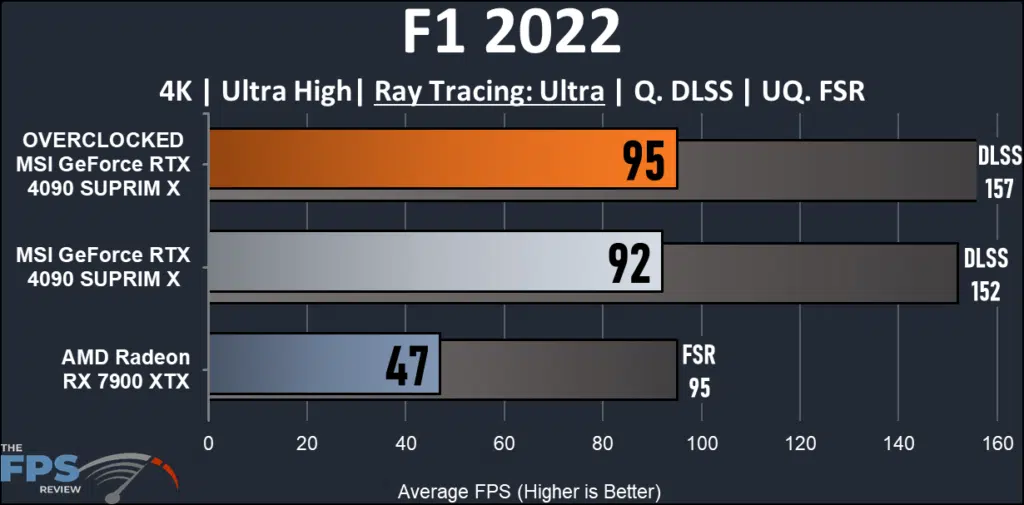
We can see how taxing the effect of Ray Tracing is on even the most complete video cards available. The frame reduction is 4X the result is seen in the 4K raster. Nonetheless, the MSI GeForce RTX 4090 SUPRIM X is 50% faster, with very playable results, even without upscaling. Overclocking gains 3%.
Dying Light 2
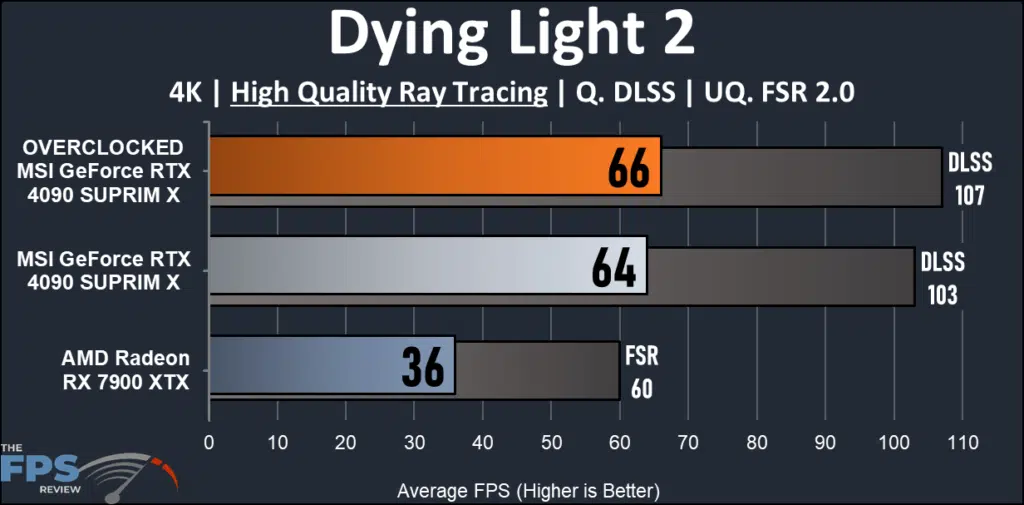
The demands of this game are also quite evident. Here the reduction is 2X over plain rasterization. The MSI RTX 4090 SUPRIM X is 50% faster once again. Overclocking adds 3%.
Far Cry 6
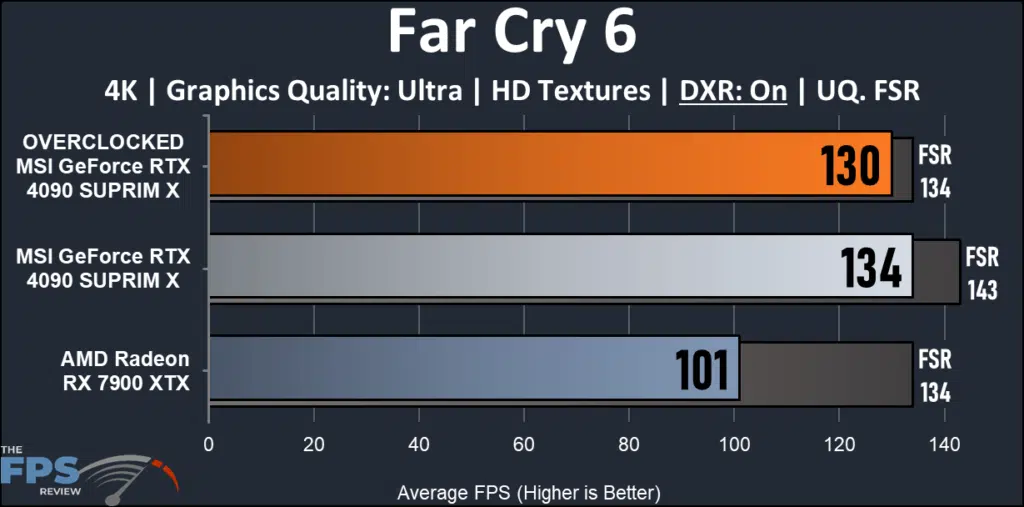
DXR effects are not quite as punishing in Far Cry 6. The overall reduction in FPS is just at 18% on the MSI RTX 4090 SUPRIM X and 24% on the AMD RX 7900 XTX. The MSI RTX 4090 SUPRIM X is 24% faster and just 6% better with upscaling. Both cards show fast performance and the game is beautiful.
Cyberpunk 2077
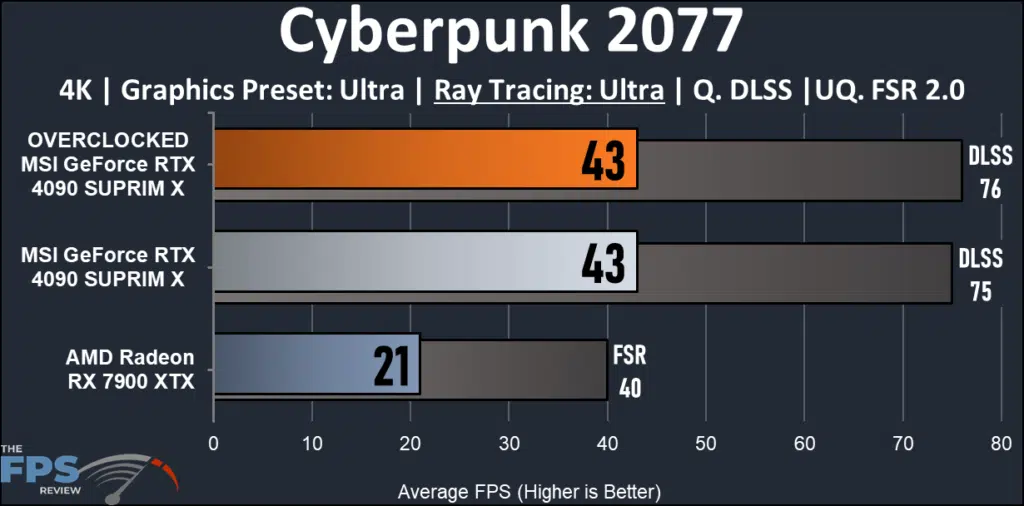
This game is the one to own them all. Even the best video card there is can’t achieve a playable framerate without help. DLSS is necessary to boost the framerates into a playable range. But it can be done here. The MSI RTX 4090 SUPRIM X is twice as fast as the AMD RX 7900 XTX.
Watch Dogs Legion
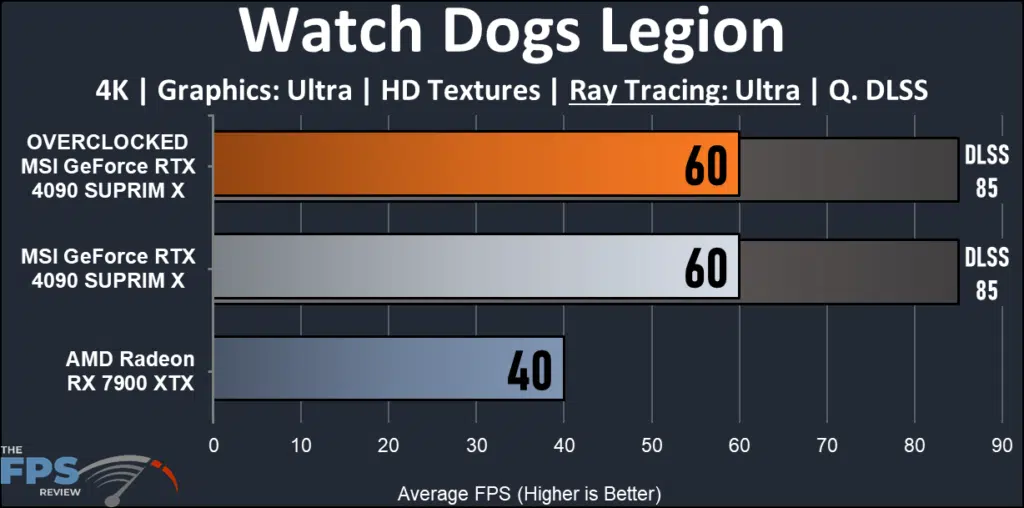
Watch Dogs Legion is very tough with Ray Tracing enabled. The reduction is 40% across the board. The MSI RTX 4090 SUPRIM X wins out here by 33% and of course, there is no FSR. No matter what, the RTX 4090 SUPRIM X is still able to make the 60FPS level without any help.
Metro Exodus Enhanced Edition
This game includes a very nice benchmark mode. It leans very heavily into Ray Tracing and is demanding. We run the benchmark on the “Extreme” settings and use “Ultra” Ray Tracing. DLSS is supported, Hairworks and Physx are also supported.
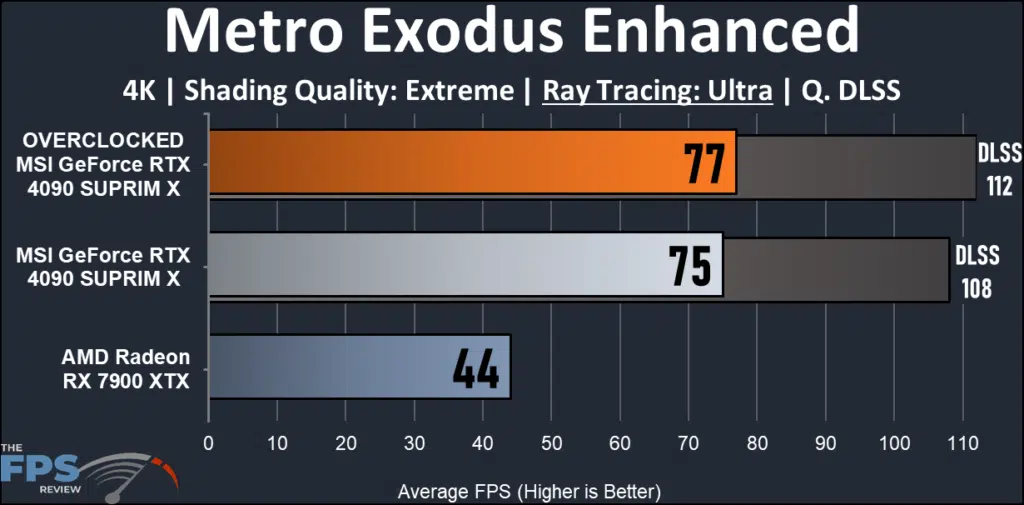
Our review card once again flexes its Ray Tracing muscle. The gap here is 45% over the RX 7900 XTX. The MSI RTX 4090 SUPRIM X is nicely playable without help from DLSS but is very fast with it. No FSR here, sorry.
Discussion (4 replies)
Join Discussion →Nice review. I remember really wanting this card when the 4090's came out, but couldn't find one. I ended up with the Gigabyte card instead which was fine. Now I own the Asus card which is a great card as well, so basically you can't go wrong with a 4090 right now.
Thanks for the great review @magoo ! I know that I really love the Liquid cooled version of this card. In terms of overclocking, I mostly had the same exact experiences as you but had to dial it back a little more for complete stability for all the games I play. I think I've got something like +120 on the core, don't remember the voltage but it ends up being ~1.050V as well, and averages 2850-2925 MHz. I was able to break 3000 MHz but Witcher 3 was very cranky with it. With the liquid version, I just leave the fan profile at stock and I've never seen it go above 66c but usually hangs 62-65 during extended gaming sessions. I also found the overclocking the memory didn't seem to provide any real gains so I leave it at stock. I also have seen pretty much the exact same power draw with my system.
I got my first Suprim X card, a 3090, a couple of years back and have become a fan of the line since. The build quality just blew me away but they are huge and heavy. If I didn't already have so many great cards in the house, plus some debt to pay off, I'd consider getting a 2nd Suprim X liquid for the 3700X rig but at this point, it wouldn't really make sense. However, when the time comes it'll inherit the one in the other rig whenever I do upgrade that one.
Nice writeup! I've got the same card and it's performed admirably (and better, for what it cost).
A few super minor bits I noticed while reading - on page two, the test system lists an "Enegmax" AIO, which I assume is an Enermax. :D
Resizeable BAR is also detailed there as being enabled for all testing, but the GPU-Z screenshot on page three shows it as being disabled.
Which BIOS was used for the testing? The card has a switch that can select two profiles, silent and game. The silent BIOS has a slightly lower power limit (480W) than the game mode (520W). I freely admit that I may have overlooked this part, but the note near the end about not seeing board power higher than ~420W during testing got me thinking about it. Either way, there's virtually no difference between them if you're not hitting power limits with something like 3DMark's Port Royal test (where I have seen 500W+). The fan curves are so close in both modes - which is to say, quiet - that I couldn't tell them apart if you paid me.
Again, great review as always.
@AKBrian , ReBar is enabled on my system, double checked, I saw that too.
Gaming BIOS used throughout.
As for Enegmax.....I suck at typing.