
Test Setup
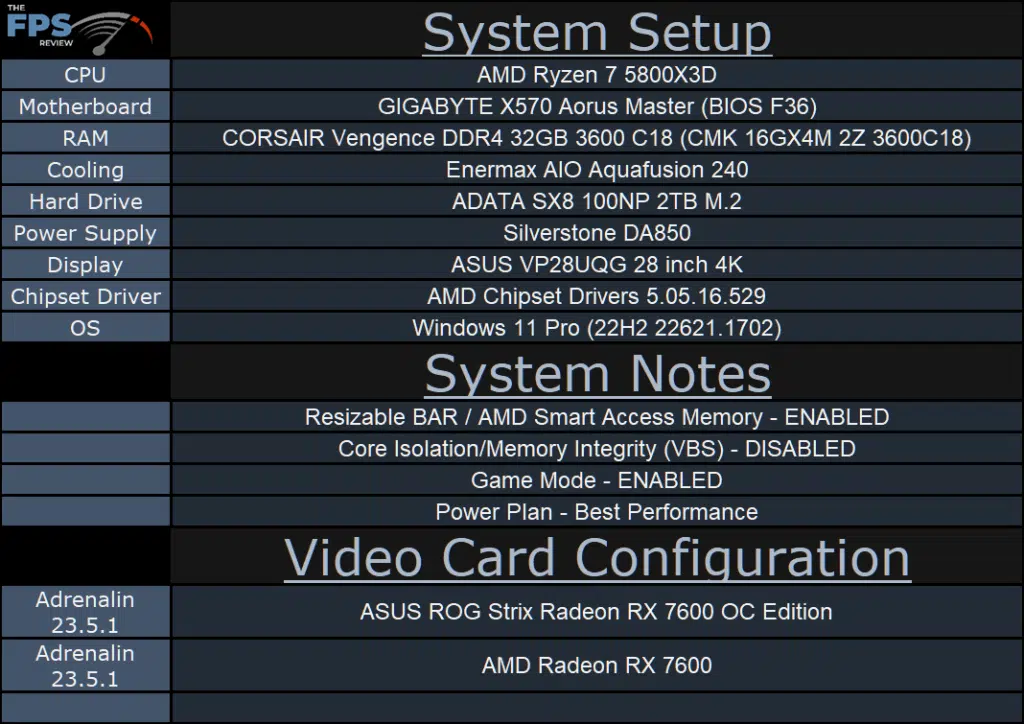
More information on our GPU testing can be found here. We are using the motherboard’s current default BIOS settings on the latest official release BIOS. We have enabled PCI-Express Resizable BAR in the motherboard BIOS. This means we are utilizing Resizable BAR on NVIDIA GPUs and AMD Smart Access Memory on AMD GPUs in all of our testing. We have enabled DOCP in the BIOS for the memory. We are using a fresh install of Windows 11 Pro with the latest Windows Updates, and drivers installed including the latest chipset drivers from AMD. We are using the “Best Performance” power profile in Windows Settings. We have Hardware Accelerated GPU Scheduling at the default setting, which is ENABLED. VBS is DISABLED and Game Mode is ENABLED.
Discussion (4 replies)
Join Discussion →Thanks for the review. Nice read through and seems well done.
Maybe get your 'here, here ,and here' hotlinks in place in the forum post too. Threw me off for a moment.
That box above is just the copy of the opening statement. If you want the links, I guess you have to go to the actual front page......never really thought much about it.
That's a limitation of the free plugin that makes threads. It literally counts characters and chops at the next word. The paid plugin that we used to have was a little better but went unsupported shortly after buying and broke the site under load (hooray for $300 gone). There's really not many other options than say, adding a Discus comment replacement on the articles, but then again, at our page view levels that isnt cheap...
Fair.. just figured you could add the hotlinks easy enough. But automation is king.