
Subsystem Testing
M.2 Performance
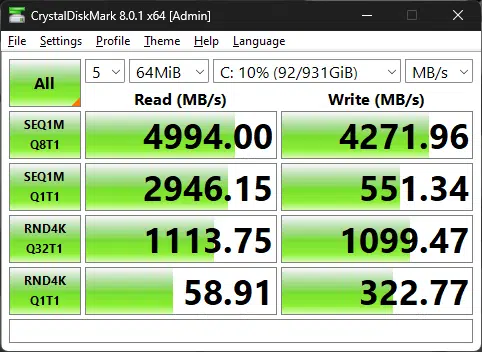
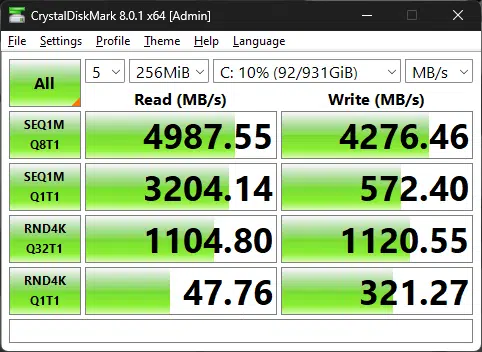
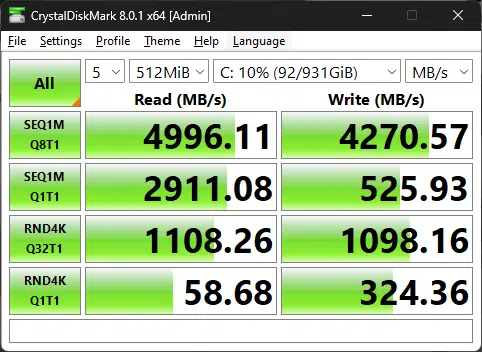
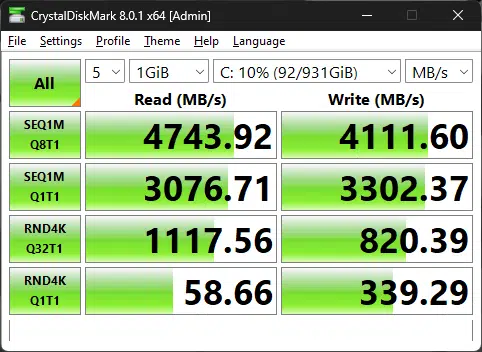
In these tests, we can see the Corsair MP600 1TB M.2 NVMe SSD is performing just like it should be based on the specifications provided by the manufacturer. Unlike mechanical drives, the performance is much more consistent between motherboards ensuring there are no weird design elements or firmware problems that interfere with performance on this motherboard. In other words, I would look at these results as more of a function check rather than something you would look at between motherboards in search of a performance metric.
DPC Latency
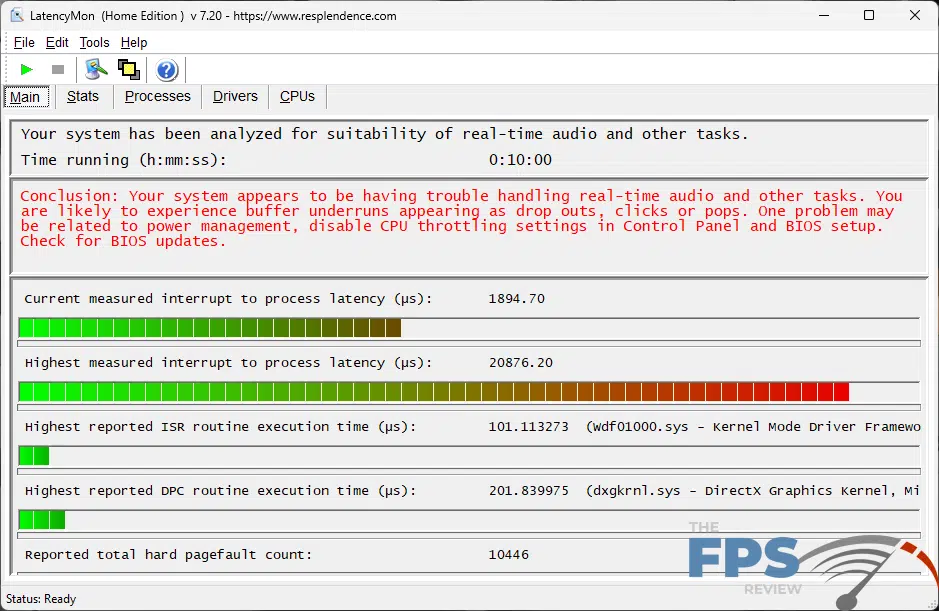
Unfortunately, as you can see DPC latency is abysmal according to the tests. Whenever I see horrendous DPC latency issues, we check to ensure that we aren’t seeing actual problems in video and audio playback. Be it gaming, watching videos, streaming audio, or video, I didn’t see any actual audio dropouts or unsynchronized audio playback. I’m unsure why the most recent crop of motherboards have all tested badly, and it might simply be the benchmark itself reporting the results incorrectly. As you can see, it’s beyond the realm of where it should be according to the application.
Memory Bandwidth
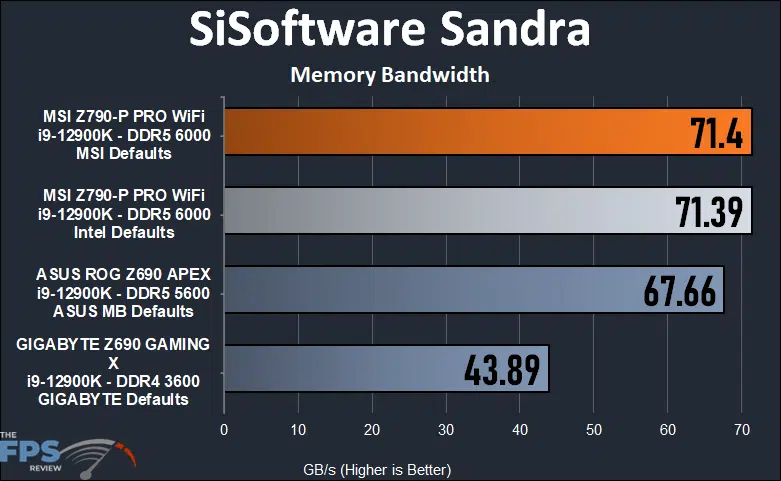
In the Sandra memory bandwidth test, we naturally see a huge advantage for the DDR5 motherboards. The DDR4 board is really only there for reference as it simply can’t compete here. We haven’t tested a lot of DDR5 motherboards, especially not at this price point. Because the motherboard was able to run higher memory speeds more consistently, the MSI Z790-P PRO WiFi edged out the older ROG Z690 APEX.
AIDA64 Memory Read
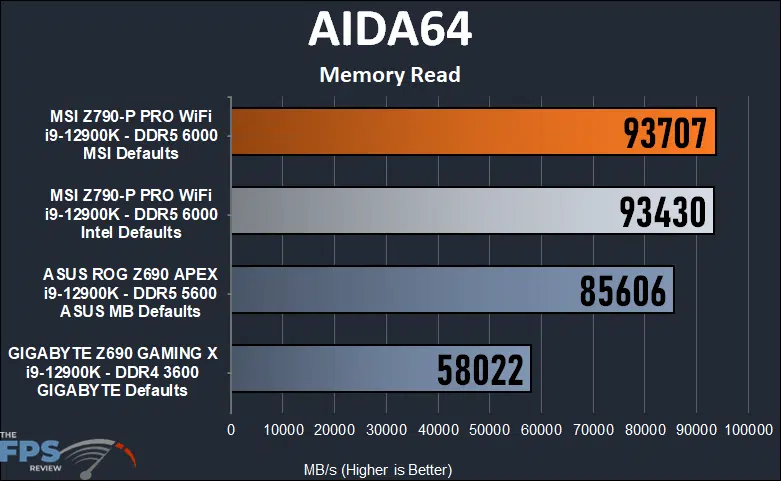
As expected, we saw a result of 93,707MB/s using the MSI default values for our RAM. At DDR5 6000MHz the lower result of 93,430MB/s is within a reasonable margin of error. Essentially, for all practical purposes running Intel defaults or MSI’s default values makes no difference in this test.
AIDA64 Memory Write
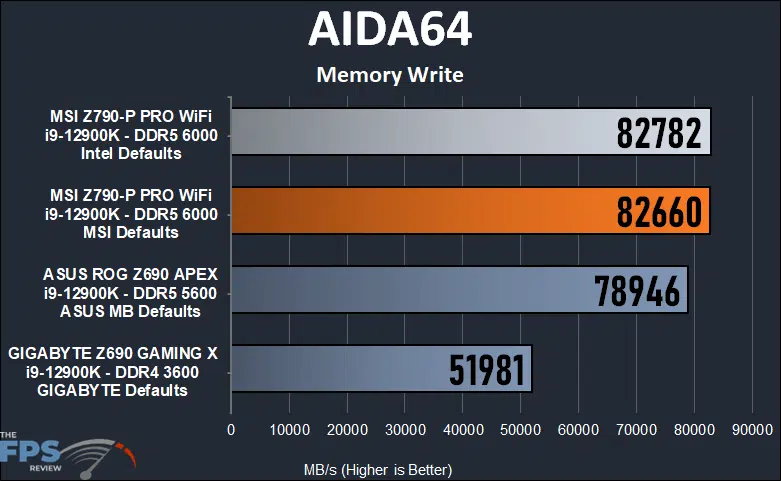
In our AIDA64 memory write test we see a virtually insignificant difference between running at Intel default settings for power and CPU settings versus MSI’s default values. The APEX board with its DDR5 5600MHz memory isn’t really all that far behind. Meanwhile, the DDR4 board is way at the bottom. Naturally, this is to be expected.
AIDA64 Memory Copy
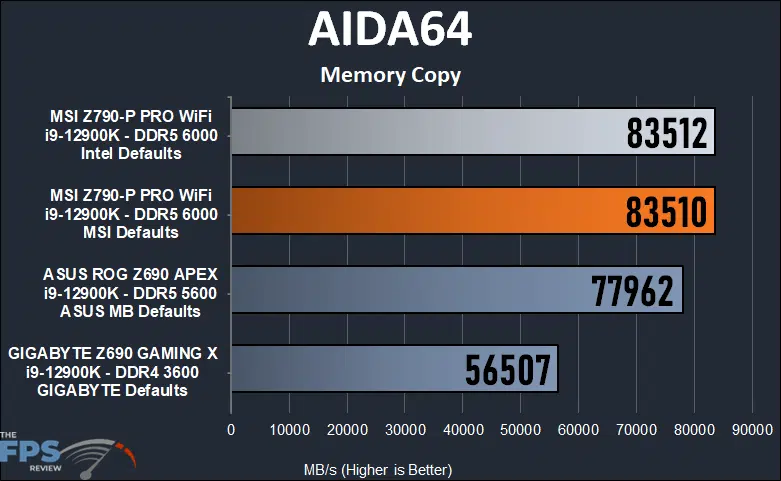
The results between the Intel and MSI settings for the Z790-P PRO WiFi are even closer in this test. The difference is within a margin of error for the test software itself. The APEX board keeps up fairly well here once again but it’s noticeably slower. The DDR4-based GIGABYTE Z690 GAMING X lags the pack which is no surprise.
Discussion (7 replies)
Join Discussion →Intel's i225v & i226v have proven to be junk that should be avoided. Intel is probably giving them away. Any manufacturer using them should be called out.
Yea I wouldn't get another pro series from MSI. I had the x570 pro-a. Was always solid but I always worried about the caps.
Just curious (as I haven't been looking for a little while now), but what Networking Controller would you trust if the i225v and i226v's are junk?
Thanks @Dan_D for the awesome review.
I took a chance on not one but two Pro Series motherboards for a couple of my rigs and so far they've done well. Quite frankly I was on a tight budget in upgrading two rigs right after each other so I was looking for the cheapest motherboard I could find with the features I was after. I don't know if they've got the Intel NIC chipset or not but one is plugged in while the other is using Wifi and both have done well with transfer speeds but I'm not constantly having to push either except for game downloads.
I have been a little worried about power but they seem to be doing alright with the 5800X3D. According to MS AB, it mostly averages around 50-60W and occasionally jumps to ~85W during heavy loads but so far, so good.
I've had an on-again off-again experience with them. I've found that if they're acting up, the interface can be popped and they come back to life.
I feel that it's a driver / firmware issue; it's certainly not expected for Intel to fumble NICs, as they're sort of the consumer / prosumer / entry enterprise option of choice. Their WiFi modules are still stellar, from what I've seen hands on.
From what I can tell, the i225v / i226v work pretty well under Linux too.
As a rule, AM4 boards were all questionable. Some X370 boards were rock solid, some X570 boards weren't. Brand and tier irrespective.
With LGA1700 and AM5, both Intel and AMD asserted significant control as to the 'minimums' acceptable for boards sporting their halo chipset, I've observed. Unless you are truly scraping the bottom of the barrel, any Z or X board for the new sockets is good to go from a base functionality perspective.
US$200 and US$1200 boards will perform exactly the same for consumer usecases. You'd need to push into extreme OC of the CPU (i.e., sub-ambient using LN2 or water chilling), or trying to set memory overclock records with DDR5, in order to need a 'better' board.
Where boards differentiate mostly is in terms of features, with stuff like 10Gbit Ethernet, TB4 / USB4, post code readers, power and reset buttons, more controllers for fans and water pumps and temperature probes, etc. If you don't need any of that stuff, a 'Pro' board like this one is all you could ever need. Aesthetics aside, of course.
Mine are B550's, but so far they're doing well. If I remember correctly they came out after the 570's and perhaps some improvements were made despite being the lower tier. Seriously, plug and play with the 5800X3D. Didn't even have to update the firmware on the first power-ups for either and XMP was ready to go, just had to click on it in the BIOS. I paid $120 for each and I'm smiling over it.
The B550 came later, and there was also an X570S that provided a lower-power update (and hopefully other fixes) to X570.
The bigger problem was just the inconsistency of the boards. Some were great, others not so much; we don't see that with AM5, thankfully.