
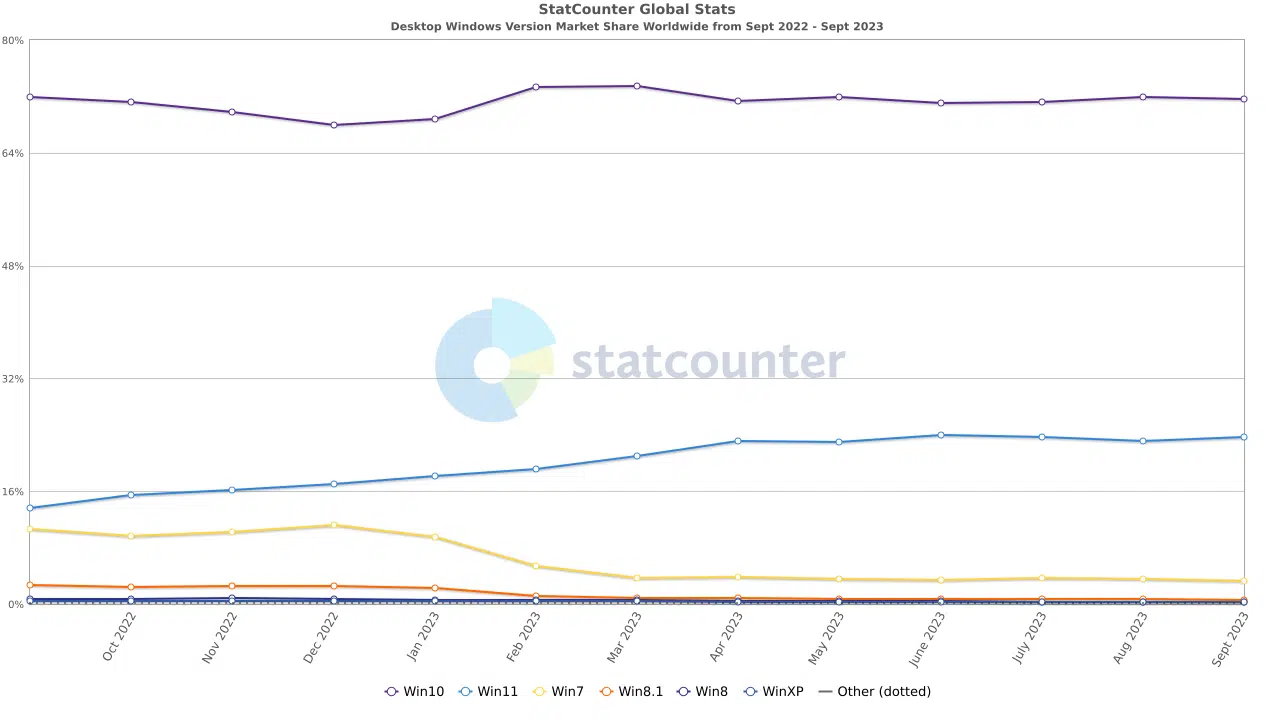
When is Windows 12 coming out? Intel seems to know the answer, as Dave Zinsner, Executive Vice President and Chief Financial Officer at Intel, had mentioned during the Citi 2023 Global Technology Conference last month that a “Windows Refresh” is coming as early as 2024 next year. While Zinsner doesn’t actually namedrop “Windows 12” anywhere during his talk, some publications have pointed out that Windows Refresh happens to be the term that Microsoft used to describe Windows 11 before it was officially announced in 2021. Windows 10 currently enjoys a desktop market share of nearly 72% percent worldwide, while Windows 11 lags behind with 23.61%, according to the latest statistics from Statcounter.
We’ve gotten, I think, much more focused in terms of providing value to customers, getting a stronger engagement with the customer base. I think that’s also helped a lot in terms of rectifying things. I think at this point, based on where we sit on share, we feel pretty good. I mean, we feel like we’ve really righted the ships on the client side of the business and now it’s a matter of just continuing to execute on the products, continue to bringing them out with new processes.
And I think that business will largely be defined on how the market grows. We actually think ’24 is going to be a pretty good year for client, in particular, because of the Windows refresh. And we still think that the installed base is pretty old and does require a refresh and we think next year maybe the start of that, given the Windows catalyst. So we’re optimistic about how things will play out beginning in ’24.
Discussion (19 replies)
Join Discussion →And if they turn it into a cloud based subscription product as rumored I will die before I ever use it.
over my dead body
Microsoft should go back to basics. Create a local machine first OS without any internet integrations, cloud integrations, AI, automated assistant or automated background tasks, and no ecosystem of apps. Let users just get a base OS and install on top of it the programs they want to use, the way computers are supposed to be.
I'll stick with the pro non cloud versions. I already have a office 365 subscription. I have cloud integration with one drive. I'm happy with that. I don't want my OS running from the cloud for needed elements.
There are no needed elements in the cloud. There is no cloud. It's just someone else's computer.
I absolutely refuse to use a Microsoft account. I don't have one, and don't want one. Onedrive gets uninstalled the first thing I do, and I will never subscribe to any software. Not Adobe, not Game Pass, not Microsoft.
These things are just plain evil as far as I am concerned, and I want them GONE.
I'm fine with people adding software to do this on top of an OS as an option if that is something they want, but this garbage should not be part of any base install, and it should certainly not be permanently installed such that it can't be removed.
It's enough to make me pull my hair out.
I think there needs to be a three way "Volcker Rule" of sorts but for operating systems. You can develop/release an OS OR you can develop/release programs/services. You can't do both. Oh and if you do either, you can't operate a store (other than to sell your own products). If you want to operate an app/software store you have to be completely independent of either OS or Software. (oh and partnered programs/services may not be included with the OS, everything comes barebones)
And it should apply both to phones and to computers. That would vastly improve the tech world from this slow dystopian spiral we have been in since at least 2007.
I would by regulation force these companies to pick which business they are in:
- Operating System
- Software/Service
- App Store
Pick one and only one. Controlling all three or even just two of them is too much power for any one entity to have.
Meanwhile, 2025 is supposed to be EOL for Windows 10. I still haven't dug into 11 but I think I'm about to since I'm hoping to get a new laptop in the coming months.
I've mostly tried to avoid having an account but I will say it sure has come in handy when I do a new build, sign in, and everything is activated. Otherwise, though, I agree and have also tried explaining to people that the "cloud" is just a server somewhere else. However, I'm getting to the point where I'm tired of fighting so many things and doing things manually so slowly giving in, just so I can move on to more important things in my life, but even then there will still be limits and 12 might be the one to go too far.
I only just moved to Win11 (note my intentional avoidance of the word "upgrade" as it is at best a sidegrade)
The only thing that made me do it was that I just bought a 42" LG C3 to use as a screen, and one of the features Win11 has that Win10 doesn't is good HDR calibration and AutoHDR for games.
If not for that feature and me getting the C3, I probably would have kept Win10 until the bitter end.
I hope you enjoy it as much as I've enjoyed mine. I forgot about the Windows 11 HDR feature. Not about to upgrade my main rig to it but I'll definitely check it out when I do.
Learn to love Win-Alt-B
I haven't read the article, but just generally speaking, rushing an OS out the door to make up for shortcomings is never a good idea.
I wouldn't call it rushed. Windows 11 has had a couple of years out there to marinate.
Yeah, but it still didn't launch in the best state, but could've been far worse. However, it took the better part of a year after 10 to get that build patch (2H22?) rolling. Granted though, new OSes always have their fun times during the first couple of years.
Didn't know that trick and had to google what you meant. Going to try that when I get home but not something I normally need.
Here's a trick I just learned that could be usefull for overclockers and testers:
Win + ctrl + shift + B = restart GPU driver
I just tried it and it works.
In liking it (mostly) thus far.
I had been interested in an LG OLED for years, but I had a working monitor, and I had some concerns about burn-in, so I never pulled the trigger.
Then I had an "oof" moment.
You know those two metal prongs on top of "snap in" style Dell LCD screens?
Well, I slipped and knocked one over, and my Asus XG438q became instantly familiar with them :/
It doesn't look too bad in the pic, but the panel was damaged underneath, so it needed a replacement.
I usually research these things to oblivion before buying, but I only had about a half an hour for this purchase, as I needed something for work Tuesday morning, and the Best Buy order for pick-up next day clock was ticking.
It is absolutely brilliant in games with good HDR design (which it turns out is definitely not all of them)
I'm not thrilled with it on the desktop though. White highlights are too bright and bothersome to my eyes. Maybe I'll get used to it though.
I have started using a black background with a auto-hiding task bar, and no icons to try to avoid burn-in. No idea if that is necessary though
There are some minor annoyances because it is a TV and not a monitor (you know, having to use the remote for power, not obeying screen sleep, etc, but other than that, not a big deal.
The HDR in good games that support is is amazing though!
I don't use Windows for anything but games, so I just leave the HDR on, but if I had to use the Windows desktop, I'd turn HDR on and off every time I got ready to play a game. I find HDR absolutely positively bothersome on the desktop.
It's blindingly bright and uncomfortable to look at.
I used this guide to set it up, and it seems pretty good, though I turn the brightness down in SDR mode for my linux desktop much lower than he does
[embedded media]
Microsoft might have been prophetic about Windows 10 being the last windows. It might as well turn out to be the last usable Windows.
Windows 11 lacks too many features that I can't imagine using a computer without. There might be third party tools to bring those back, but I'm not comfortable doing that. It is one thing to mod games, if the worst thing happens you just reinstall the game. But if the OS stops working due to unofficial mods, that is not something I want to deal with.
My computer needs to be dependable and reliable, and unsupported modifications and cloud requirements do not fit into that equation. Which is why I'll never use a microsoft account to sign in on my own computer either.