
File Copy and Workstation Performance
DiskBench
With DiskBench we run two different tests. First, we place a 50GB single file onto the test drive. We copy this file from the test drive to a new folder on the test drive, volume to volume. This tests the performance of the drive’s ability to copy a single large file from itself to itself as if you were copying files on the same drive, it replicates this drive being your primary and only drive. Second, we do the same thing but with the SteamLibrary folder. The SteamLibrary folder is a 243GB folder containing 570 smaller files. This replicates a folder with varying different file sizes and copying those files.
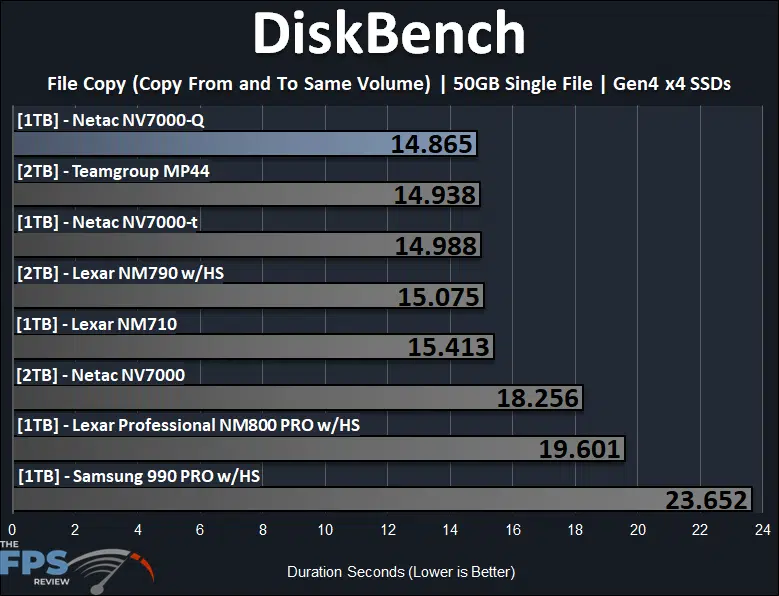
Copying a large 50GB file from volume to volume on the Netac NV7000-Q 1TB PCIe Gen4x4 NVMe SSD the copy time was excellent, with the fastest reported time at 14.865 seconds. This is faster than the Netac NV7000-t and 19% faster than the Netac NV7000. It’s up there with the Teamgroup MP44 and even beats the Samsung 990 PRO which had an unusually long copy time.
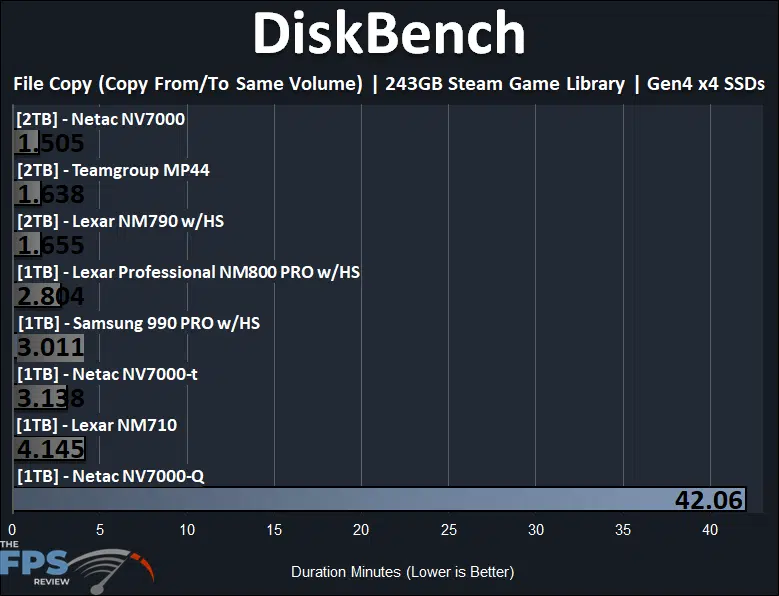
What you are seeing above is not an error. This is where the nature of a QLC-based SSD is shown. With such a large file copy as this, 243GB copying on the same volume, the SSD literally runs out of cache and buffer space quickly with its 4-bit per cell operation. Once those caches are cleared, the SSD grinds to a halt past a certain point and falls flat on its face with performance pretty much as slow as a spinning rust hard disk. Let’s show an example below.
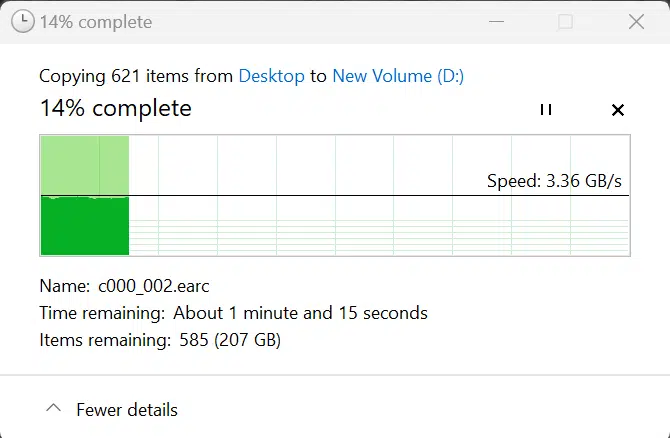
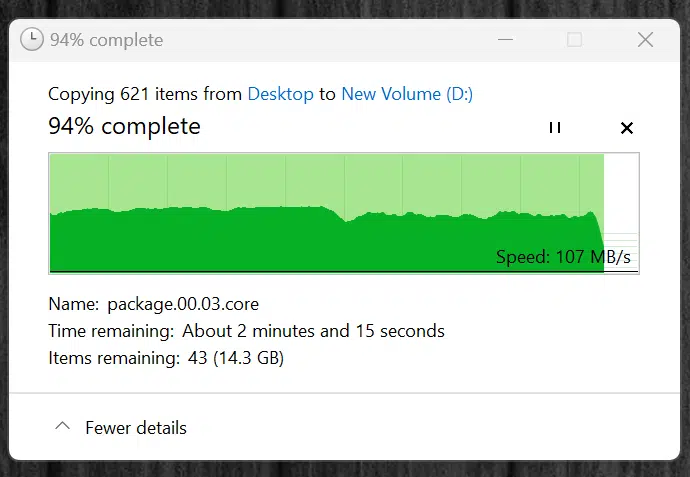
In the first screenshot above, we start our very large file transfer that has varying sizes of files from small to large, with many types of files. It starts out great at well over 3GB/s copying from our primary 1TB SSD to the Netac NV7000-Q 1TB SSD. However, notice that after a certain time the Netac NV7000-Q chokes on this file transfer and drops as low as 100MB/s of copy performance. This is sadly, the nature of QLC drives and the result of SLC caching, buffers, and such filling up and hitting bottlenecks.
The good part is, if you stick to smaller file sizes, it is ok. As you saw above, with a 50GB file copy it had a very fast file transfer time and wasn’t bothered. In most scenarios, like gaming with this drive, you won’t have file transfer like this happening, so it will perform as a high-performance drive in most scenarios. However, there are situations like content creation, that could bring the SSD to a half with large file manipulation and transfers.
SPECworkstation 3.1
We are using SPECworkstation 3.1 and specifically the WPCstorage test. “The storage workload is based on storage transaction traces from a wide variety of professional applications engaged in real work.” It includes media and entertainment, product development, life sciences, energy, and general operations. Each program receives a score, and they are averaged together for an overall score, higher is better.
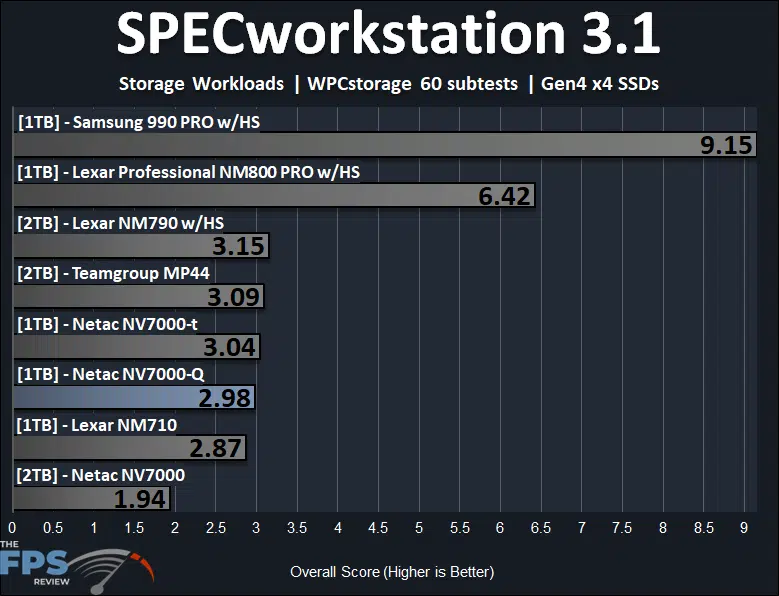
In SPECworkstation 3.1 WPCstorage testing, the Netac NV7000-Q 1TB PCIe Gen4x4 NVMe SSD performs the third slowest, coming in under the Netac NV7000-t but beating the Netac NV7000 by a whopping 54%. The Netac NV7000-Q is not positioned as a professional workstation drive, so these numbers are not surprising, but it is nice to see a large improvement over the Netac NV7000. If you really want a workstation class-performing drive, the Samsung 990 PRO is the way to go.
Discussion (2 replies)
Join Discussion →More options are obviously great, but I have to admit, I am a little bit paranoid about losing my data, which is why I view drives from new brands with a lot of skepticism.
Heck, even more established brands have problems sometimes.
I mean yes, I backup all of my non-replaceable data. At least most of it, but it is still a real pain in the ass to have to re-install windows and reconfigure things when things go wrong.
I periodically dump drive images to my NAS, but realistically this does not happen every day, every week or even every month. When my 2TB Sabrent Rocket 4 died, I didn't lose any files (those were all on the NAS) but I had to revert to an 8 month old drive image. I had done some config changes since, and had some game progress in my user folder that I ultimately lost.
The biggest annoyance was the downtime. I decided to not wait for Sabrent's RMA, and just went and bought a Samsung 990 Pro at Microcenter to get myself going again immediately. When I got the Sabrent Rocket 4 back, I had some trust issues, so I only used it as a Steam library drive, figuring that if it died, worst case I'd leave my machine on overnight and download everything again. That was a good call, as that RMA drive started failing as well, and is no longer in use.
Which brings me back to Netac. Maybe they are good, maybe they aren't. This review isn't bad, but who knows what will happen after 2 years of use? I don't know. Some might trust them just because they use established Phison reference drives, but so was the Sabrent Rocket 4....
Back before I bought eh Sabrent Rocket 4 I had a philosophy of only trusting two SSD brands. Samsung, and Intel. Every other drive from every other brand I had tried (especially OCZ) had failed on me within two years. This was back in the SATA era though. The companies and controllers have changed since then, and this dataset is likely no longer relevant. Especially since Intel sold its SSD brand to SK Hynix, and Samsung has had some high profile firware bugs in its 980 Pro and 990 Pro drives causing extremely premature drive ware. (Some have also had some real problems with Samsung NVMe drives in Windows Server for some reason)
This requires establishing a new rule of thumb, which is still maturing for me.
If I require a drive that is high performance, I will probably stick to a brand that designs, develops and uses their own controllers.
Crucial/Micron, SK Hynix, WD/Sandisk, and yeah, Samsung (though with less confidence than in the past).
Samsung drives still perform better than anyhting else out there on the market (other than discontinued Optane drives) likely in large part due to very high 4k random read performance.
If Intel's Optane DC 5800x drives ever come down in price to more sane levels, I'll be snapping up one of those too.
I have yet to test any Crucial/Micron or SK Hynix drives, though I want to at some point. I have been putting a pair of 4TB WD Black SN850x drives through their paces, and they seem very reliable and perform well. This may become a go-to brand for my NVMe buying in the future.
As for these budget brand engineered Phison reference design drives, they have their place.
I've actually had really good luck with my twelve old Inland Premium drives ranging in size from 256GB up to 2TB. I have absolutely hammered them without ever having a bad issue, and no eexcessive drive wear. They appear to be reference Phison E12 drives manufactured by Team for Microcenter (Inland is Microcenters in house brand) The Inland Premium drives had a very good reputation out there on the forums though, which is why I was willing to give them a chance. Sadly, while there are other rebadged Inland branded reference drives, the "Inland Premium" models which were well regarded seem to ahve been discontinued.
As for other budget unknown brand reference Phison design drives, I'd probably only use them as a Steam library drive on a cheap gaming system. At least unless associated with the large volume of positive long term reviews from actual users on forums I trust the Inland Premiums got. That minimises risks.
Brent, this looks like both the flash and the controller (and its firmware) are produced in China by a Chinese company, correct? They've got the whole stack in house, a la Samsung?
Also nice to see QLC flash being mostly competitive outside of sustained high-speed write scenarios, which is useful for most consumers when price is a factor.