
Synthetic System Benchmarks
On this page, we will show synthetic benchmarks, some that test a variety of system use-case scenarios, and others that test specific multi-core and single-core/thread workloads to hone in on performance differences. Note that the graphs are arranged from fastest to slowest. The Intel Core Ultra 9 285K and 245K are highlighted in blue for the Windows 11 Power Mode: “Best Performance” and they are highlighted in orange for the Windows 11 Power Mode: “Balanced.” All CPUs on the graph are tested in Windows 11 Power Mode: “Balanced” for comparison. In the graphs “Win11: PM” stands for Windows 11 Power Mode.
PCMark 10 Express
PCMark 10 Express tests workloads as follows: PCMark 10 Express is a benchmark that focuses on basic work tasks. It is a good choice when tendering for PCs for general office use. The PCMark 10 Express benchmark focuses on the performance needs of a typical office worker. It tests Essentials and Productivity.
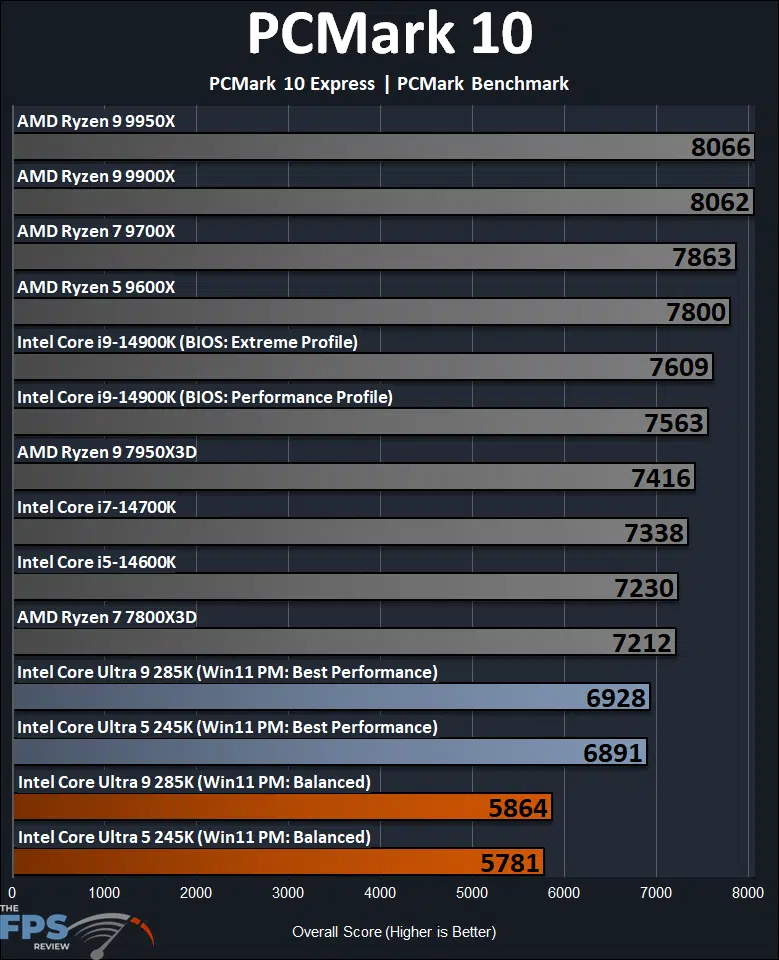
PCMark 10 Express highlights the single-core/single-thread performance of CPUs. From this, the first thing to notice is that there is a pretty major difference in performance between the Intel Core Ultra 9 285K and Intel Core Ultra 5 245K between the “Balanced” Windows 11 Power Mode profile, and “Best Performance.” This extreme difference is not experienced on the other CPUs, which performed as expected on the Windows 11 defaults of “Balanced” Power Mode. It is such that the Intel Core Ultra 9 285K is 15% slower on “Balanced” compared to “Best Performance”, and the Ultra 5 245K is 16% slower.
If we straight up compare ‘equal’ Power Mode settings at “Balanced”, the Intel Core Ultra 9 285K is 23% slower than the last generation Intel Core i9-14900K on the default “Extreme Profile” in BIOS. In the Performance Profile in BIOS, it is 23% slower. The Intel Core Ultra 9 285K ends up being 27% slower than the AMD Ryzen 9 9950X.
If we, however, compare the Intel Core Ultra 9 285K using “Best Performance” Win11 Power Mode profile, then the 258K is 9% slower than the Intel Core i9-14900K in the Extreme profile, and 8% slower in the Performance profile. Overall, even at the 285K’s best, it is still slower than the 14900K, even in the more capped Performance Profile. Compared to the Ryzen 9 9950X, the 285K is 14% slower, at its best.
Looking at the Intel Core 5 245K, we find that in the Windows 11 Power Mode of Balanced profile, the 245K is 20% slower than the Intel Core i5-14600K from the last generation. In the Windows 11 Power Mode of Best Performance, the 245K is 5% slower than the Intel Core i5-14600K. Compared to the AMD Ryzen 7 9700X the 245K is 26% slower in Balanced profile mode, and 12% slower than the 9700X with the 245K in Best Performance power profile mode. Therefore, even at the 245K’s best, it is still slower than the competition’s 9700X.
Geekbench 6
We are using Geekbench version 6.3.0 for our testing. We will show Multi-Core (nT) and Single-Core (1T) performance in separate graphs.
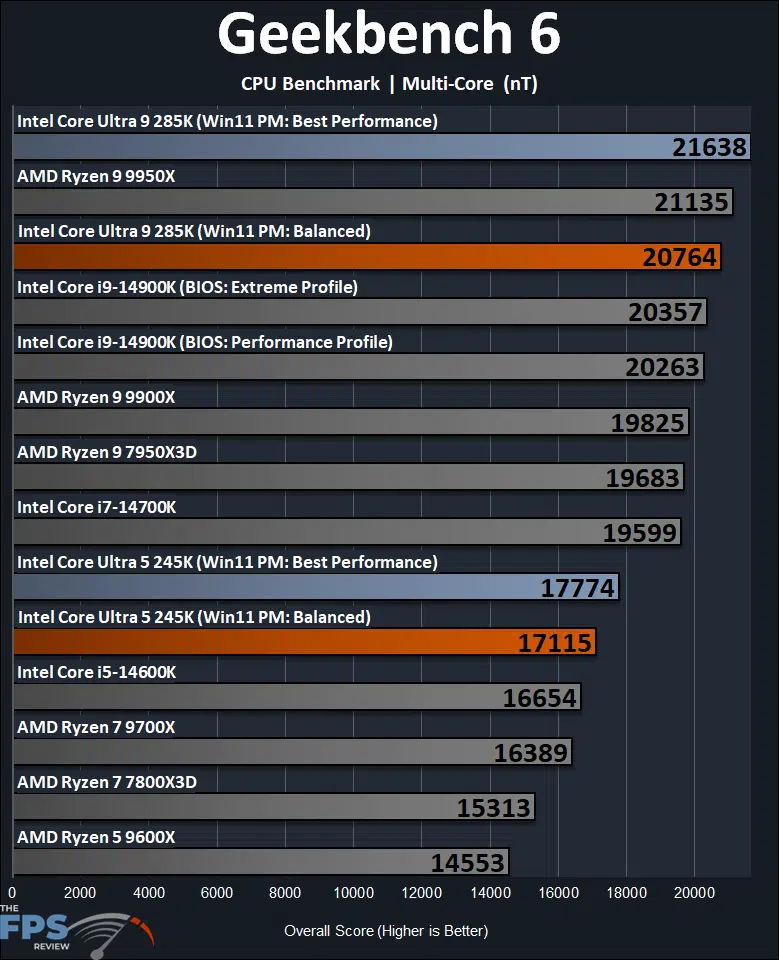
In Geekbench 6, we are looking at multi-core performance above. We do see a difference between the Windows 11 Power Mode profiles, but it is less pronounced in multi-core performance than it was in single-core performance. Again, all the other CPUs for comparison are in “Balanced” mode above. The Intel Core Ultra 9 285K is 4% slower in Balanced mode, and the 245K is also 4% slower in Balanced mode.
Comparing CPUs, the Intel Core Ultra 9 285K ends up being just 2% faster than the Intel Core i9-14900K, when the 285K is in Balanced mode. However, in the Best Performance mode, the 285K ends up being 6% faster than the Intel Core i9-14900K. Compared to the competition, the 285K is 2% slower than the Ryzen 9 9950X when the 285K is in Balanced mode, but that switches in Best Performance mode, where the 285K ends up being 2% faster than the 9950X, when the 285K is in Best Performance mode, still overall, very close performance either way.
The Intel Core Ultra 5 245K ends up being slightly faster than the Intel Core i5-14600K in either performance profile mode of Windows 11. It’s about 3% faster in Balanced mode, and 7% faster in Best Performance power mode. The 245K also appears to be faster than the Ryzen 9 9700X. In Balanced power profile, it is 4% faster than the 9700X, and in Best Performance power profile it is 8% faster than the 9700X.
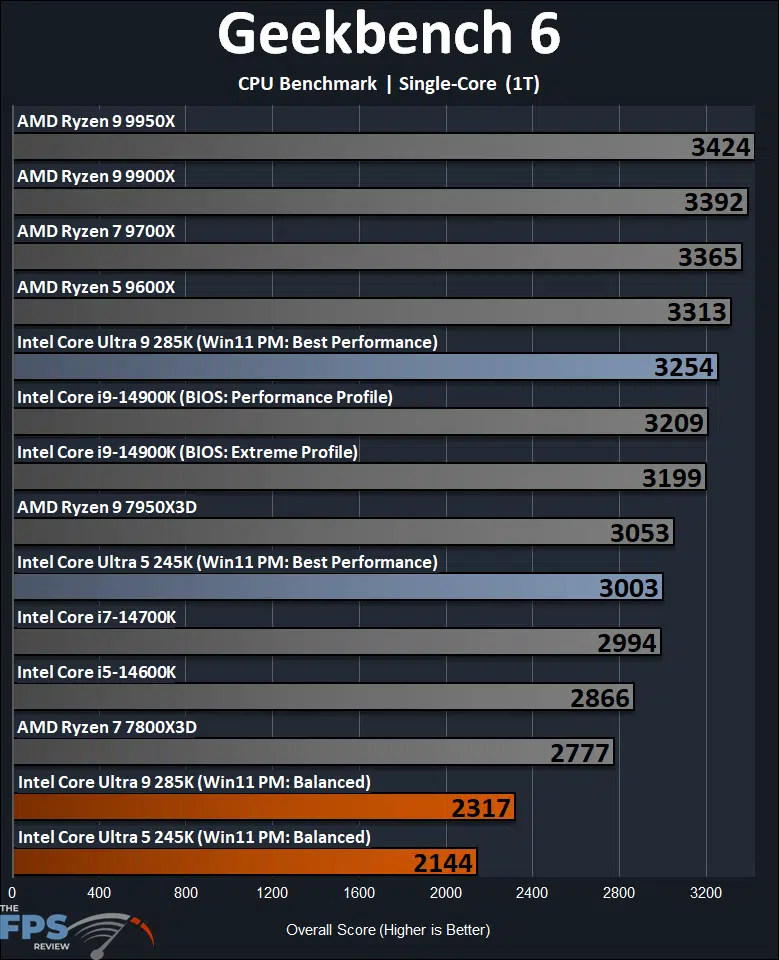
The graph above illustrates how devastating the “Balanced” power profile is on the new Arrow Lake CPUs in single-core (1T) CPU performance. Here, we find the Intel Core 9 285K is 29% slower in Balanced profile compared to Best Performance, and the 245K is also 29% slower. A reminder that the comparison CPUs on this graph are all in “Balanced” power profile, and did not experience this odd shifting.
If we keep like-for-like, and compare at the “Balanced” power profile, then the Intel Core Ultra 9 285K is 28% slower than the last generation Intel Core i9-14900K, and 32% slower than the Ryzen 9 9950X. However, if we compare the 285K at the “Best Performance” power profile, then the 285K is a small 1.4% faster than the Intel Core i9-14900K in 1T CPU performance, a very minor difference, in the best case scenario. This still makes the Intel Core Ultra 9 285K 5% slower than the Ryzen 9 9950X.
Looking at the Intel Core Ultra 5 245K in a like-for-like “Balanced” power profile, then the 245K is 25% slower than the Intel Core i5-14600K, and 36% slower than the Ryzen 7 9700X. When we set the 245K to the “Best Performance” power profile the 245K is now faster than the 14600K by 5%. However, it is still slower than the Ryzen 9 9700X by 11%.
3DMark CPU Profile
We are testing 3DMark’s CPU Profile which tests Max Thread performance and Single Thread performance, we are reporting both on separate graphs.
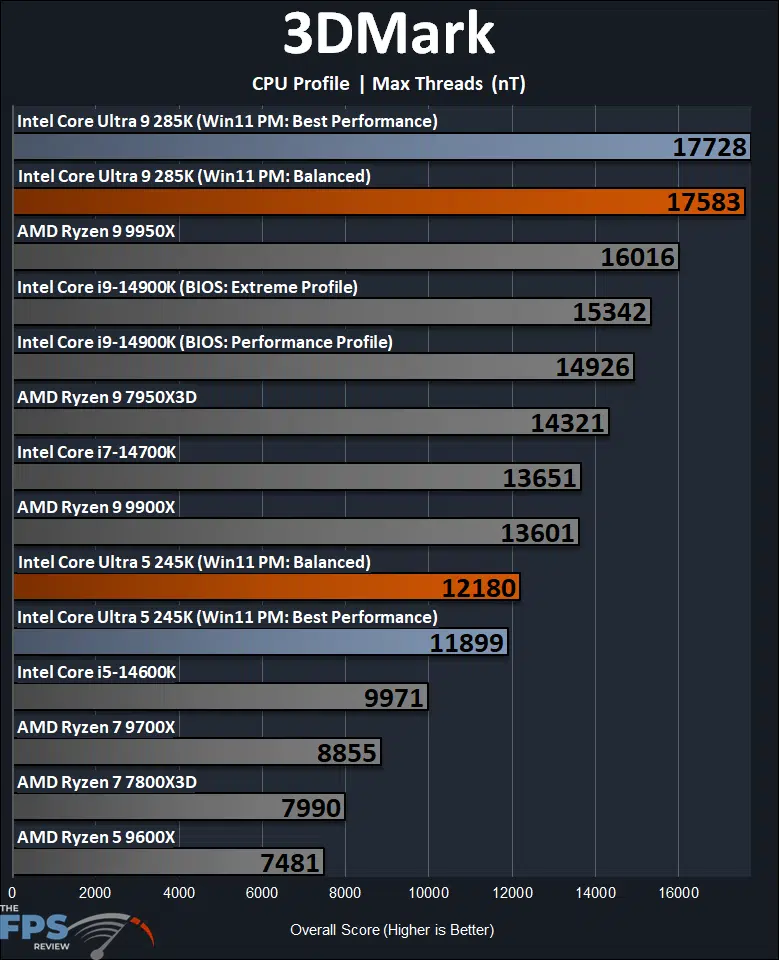
In 3DMark CPU Profile testing, with nT (multi-core) performance, we also see again that the power profile modes do cause a performance difference, but it is more minor than the single-core performance. Still, the Intel Core Ultra 9 285K is 1% slower in Balanced power profile, and the 245K actually flips around by 2% as well, with Balanced being faster than Best Performance.
Overall, this particular “Max Threads” test, indicates that the Intel Core Ultra 9 285K does quite well compared to the last generation and the competition. Even in “Balanced” power profile, the 285K is 15% faster than the 14900K, and 10% faster than the 9950X. The Intel Core Ultra 5 245K is also showing very well here, with it being 22% faster than the 14600K in “Balanced” profile, and 38% faster than the 9700X.
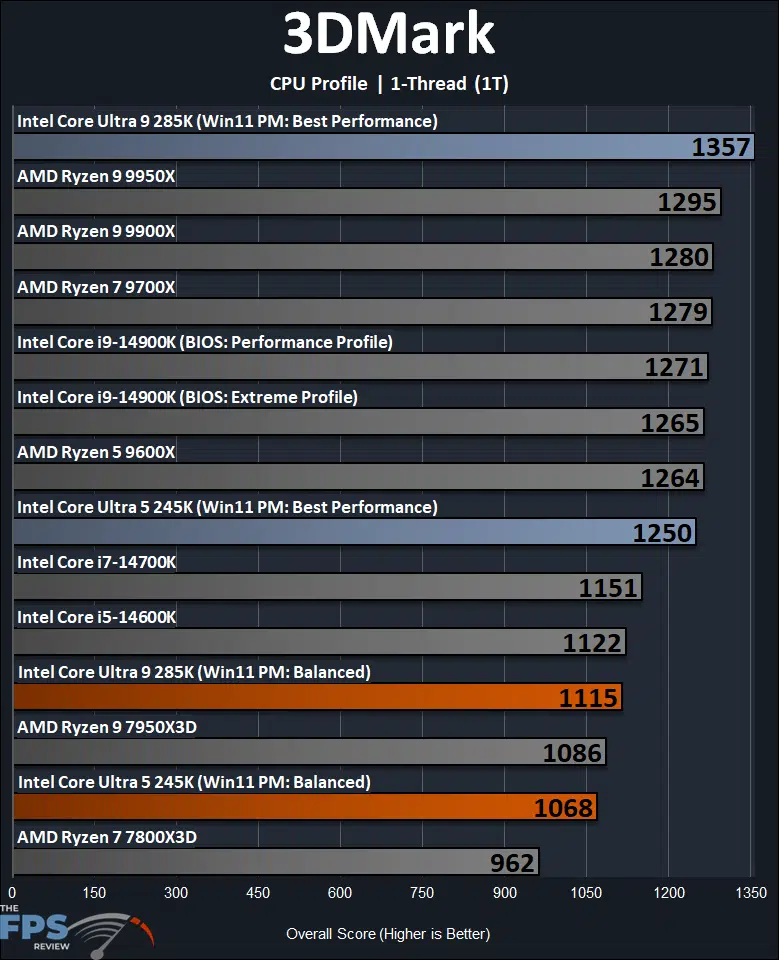
Once again, in the 1-thread (1T) single-thread testing, we see the devastating nature of the “Balanced” power profile on the Intel Core Ultra 200S series CPUs. The Intel Core Ultra 9 285K is 18% slower in Balanced power profile, and the 245K is 15% slower in Balanced.
Comparing like-to-like power profiles, the Intel Core Ultra 9 285K is 12% slower than the Intel Core i9-14900K, and 14% slower than the 9950X. The 245K is 5% slower than the 14600K and 16% slower than the 9700X. When we flip the 285K into the Best Performance power profile, however, that performance shoots up and now it is 7% faster than the 14900K and 5% faster than the 9950X (which were both on Balanced).
Discussion (19 replies)
Join Discussion →Those are some dissapointing results for gaming, kinda leaves me at an annoying point, 9800X3D is only an 8 core providing it launches when it's rumoured to (early november) rest is early next year and I don't realy want to go previous gen.
Also like I said in the other thread, the ultra 9 and 5 are already sold out at some outlets around here. intel still going strong (or no stock to speak off)
There are people who will buy Intel even when they have no logical reason to do so. I work with a guy like that. He won't buy anything else because of the reputation non-Intel CPU's had in the 1990's.
Gotta know supply to gauge demand...
My take: This is a transitional product that lays the ground work for future releases. This isn't remotely the first time Intel has done this. The Wilamette Socket 423 Pentium IV's were such a product. It introduced RAMBUS memory and they were often out performed by their Pentium III counterparts, especially Tualatin CPU's. The socket Northwood Socket 478 stuff was a lot better. The Prescott core CPU's were also kind of transitional as these were built with even deeper pipeline stages to ramp the clocks up even more. Their EM64T extensions were present on the core but weren't enabled (excluding one model) until the transition to LGA sockets.
Unfortunately, the only real benefit to these is that they shouldn't have any degradation and stability issues in games where as the 13th and 14th generation CPU's did prior to microcode updates and BIOS updates were created to mitigate them. Assuming your CPU wasn't degrading to start with.
Not competitive, high price, a short lived platform and Win 11 is a mess. Nothing ever works as intended at launch. What is wrong with these companies? Fumbling the ball at the 1-yd line seems to be the norm. Bush league overall...
@Brent_Justice - what I'm seeing about is that by decoupling the memory controller from the compute die, Intel has added latency to main memory access. Do we know if this is reflected in say AIDA64?
@Dan_D - looks like we're going to have to see if Intel can overcome the above latency issue the same way AMD did when they went to chiplets with Zen.
I think they can. How they would be able to mitigate this is unclear to me but this is the type of thing Intel is typically good at engineering their way through historically. Generally speaking, Intel's CPU's have not been effected by latency to the same degree as AMD's. AMD for one reason or another has always dealt with that to some degree. AMD's answer for the most part was simply to throw L3 cache at the problem which doesn't work in all scenarios.
Though throwing L3 cache at the problem is a simple fix, but its a costly one.
AMDs use of stacking for the L3 cache on a CCD, which in turn they can use for gaming SKUs as well as enterprise (which they originally created them for), is genius.
Imagine slow(er) Zen 3 and Zen 4 cores (both clockspeed and IPC vs. Alder/Raptor P-cores) not only outrunning them but also doing so at 1/2 the power draw for gaming.
Now imagine Intel P-cores backed up by enough L3 cache to make memory latency irrelevant.
I think Intel needs to copy AMD here (or emulate? imitate?) and find a way to get that cache in a die with broader market appeal (i.e. also usable in Xeons). Their chiplet setup should enable them to do so.
One thing that's been sticking in my mind with the Arrow Lake release is that this is the first time Intel has decoupled their memory controller from their compute dies since... Core 2? At least in the consumer space (so not talking about buffered DIMMs). AMD did with Zen 2 IIRC. Intel has been using IMCs since Lynnfield in the i7 870 from 2009, 15 years ago!
I'm not sure that this is even possible. I think there are probably scenarios where simply adding cache doesn't help.
Well, AMD had an integrated memory controller since the Athlon 64 days. However, Intel's Core 2 Duo/Core 2 Quad were the last CPU's to have an off-die memory controller. Though it was in the chipset at the time and not anywhere on the CPU itself.
I believe its two things:
1. Consumers buy products that suck on the promise that they will be fixed later
2. Development practices that involve the term: MVP (Minimum Viable Product)
Number 2 combined with number 1 just continuously lowers the bar for number 2.
Thanks, @Brent_Justice for the very detailed review of these CPUs and extra testing with both power modes. It's a shame that APO isn't supported for the games reviewed, especially since they are popular titles that users are likely to have in their libraries. I wonder if Intel will be able to provide updates later on which might improve those results. Really interesting how CB2077 has a prioritize P-core option that only further proved there are other potential gains to be had.
A lot to unpack with these and obviously Intel is experimenting with a number of strategies with them.
I will have more information in an upcoming review, but installing some DDR5 CUDIMMs 8400, but running at 8200 MT/s currently, AIDA64's Cache Mem latency result is 88ns this is at 8200MT/s CL40-50-50-128 CR2. I will have some memory comparison data in an upcoming article at 6400, 8200, 8400 and 8600 on this motherboard with this RAM kit, so stay tuned. But my first reaction is that this isn't bad latency, I think it was worse at the beginning of all this, but as new BIOS's have come out, latency has improved. MSI's fix notes state XMP and memory performance optimization with the new BIOS releases I'm using.
I really want an all P-Core option, an 8-Pcore only or 12-Pcore only CPU would be a great option for gaming.
I am NOT a fan of big.LITTLE / hybrid architecture on x86 desktops. Intel please give us P-core only options!
I would prefer only p-cores too, but due to the lack of HT would we not require like at least a 10 or12 core if you need 8 for games already.
I mean testing conditions is one thing, but a real everyday use system usually has more running in the background then just the bare minimum.