
Overclocking
We don’t expect the AMD Radeon RX 9070 GRE to have much overclocking potential, primarily due to the power constraints of the design, and we were right. On this page, we will explore the default clock frequency the video card operates at, as well as our overclocking attempts utilizing AMD Radeon Software’s Performance Tuning. However, as you will see, we were limited by the overall power target ability, thus limiting our potential for overclocking very high, which yielded very little performance gain. We have included some benchmarks below to show how little it actually helped in our testing, and this is why we didn’t include overclocking throughout all the game testing.
Default Clock Speed
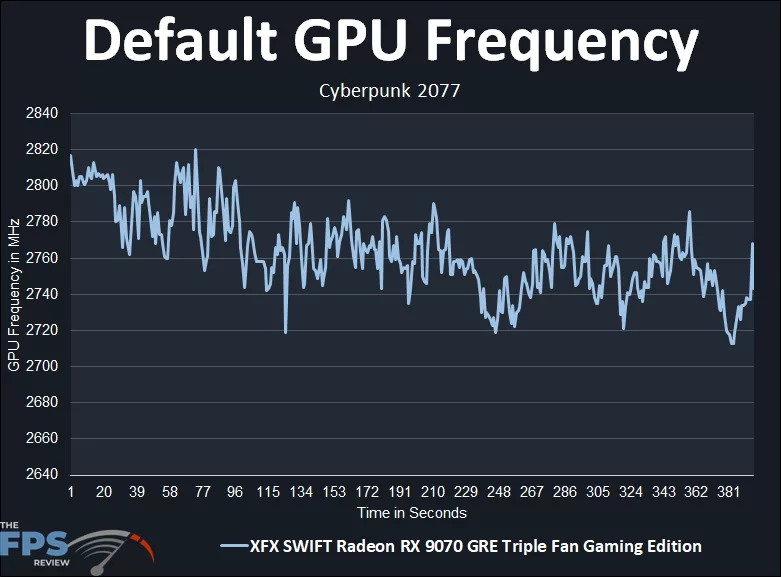
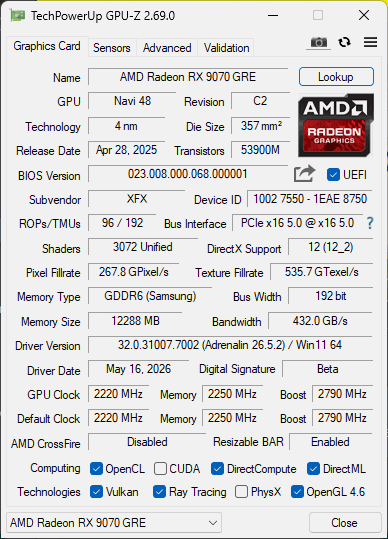
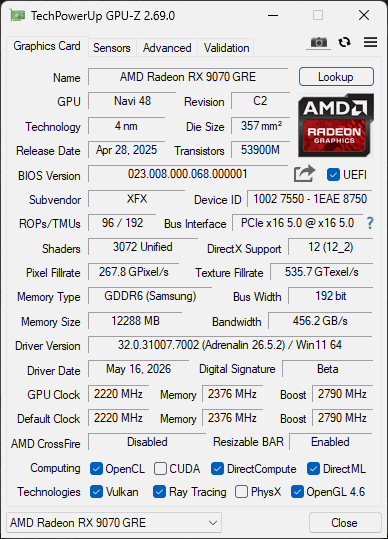
Let’s start by looking at the default GPU clock speed. The XFX Swift Radeon RX 9070 GRE Triple Fan Gaming Edition has the reference Boost Clock of up to 2.79GHz, but the Game Clock is actually specified at 2220MHz. In our default GPU frequency testing, in a game, we are seeing it start off pretty high at around 2800MHz (the max boost), but then it quickly diminishes over time, settling between 2760MHz-2720MHz while gaming. If we take an average of the clock speed, it comes out to an average of 2763MHz as the default average clock speed.
Highest Overclock
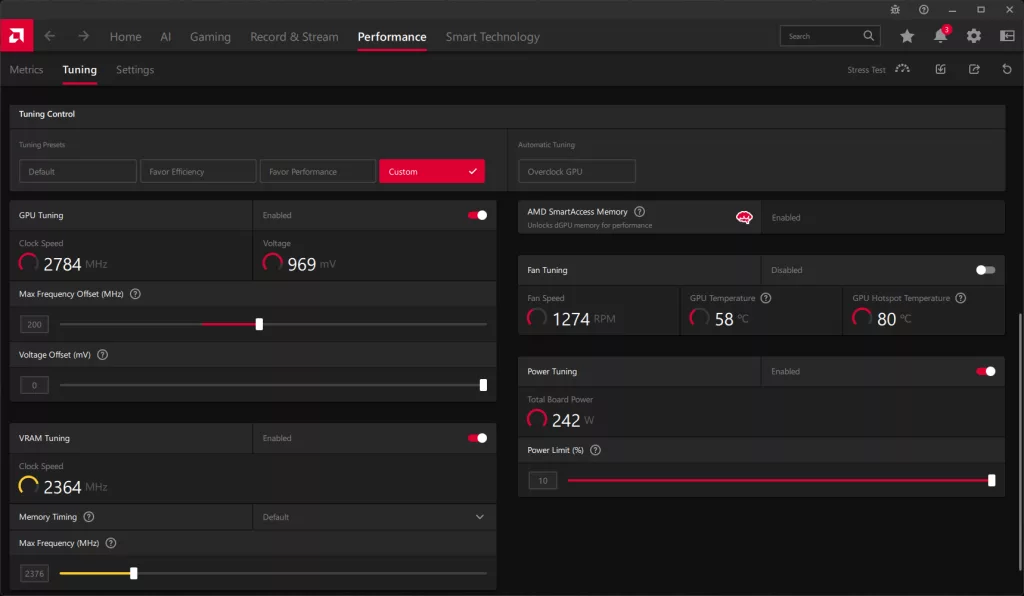
Utilizing AMD Radeon Software’s Tuning Control settings for GPU, we were only able to set up to a maximum of 10% Power Limit, which isn’t really enough to push the video card very far. We did have enough headroom on the sliders themselves to play with much higher memory frequency or Max Frequency Offset, but it didn’t really matter because we couldn’t go very far with the GPU frequency anyway.
We pushed up the Max Frequency Offset until the video card stopped gaining MHz frequency in-game. We then upped the Memory Frequency until it started to negatively affect the GPU frequency. We found that this resulted in about a 200MHz Max Frequency Offset, but of course, that doesn’t mean +200MHz, it’s just a headroom slider to allow the GPU to scale up if it wants to.
On the memory side of things, we were actually able to overclock the video card well past 18Gbps, 20Gbps, and 21Gbps were possible, BUT, this drastically reduced the GPU frequency since it capped out the Power Target of the video card. Therefore, to keep the GPU frequency UP, we had to keep the memory frequency tame, in this case, just 19Gbps compared to the default 18Gbps. That is a bandwidth of 456GB/s compared to the default 432GB/s.
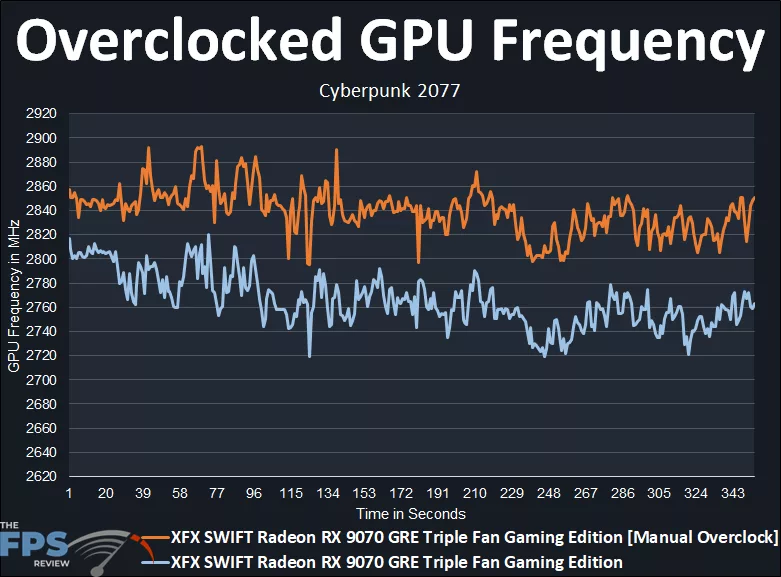
The graph above is the result of our overclock. You can see that it was boosting upwards from the default for sure, but not really far. We wanted to keep the GPU frequency higher, so that is why we capped the memory at just 19Gbps. The overclock starts around 2860MHz and generally keeps to around 2840MHz, except maybe dipping down to 2820MHz, but still all higher than the default. The exact average of the overclock is: 2837MHz. Therefore, the overclock brought an increase of 74MHz on average, or just 3%, so you can see how little that actually is in reality, and this is mainly due to the power limits.
Overclocking Game Performance
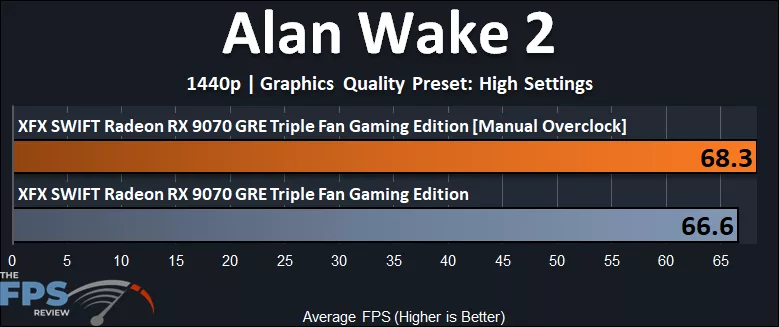
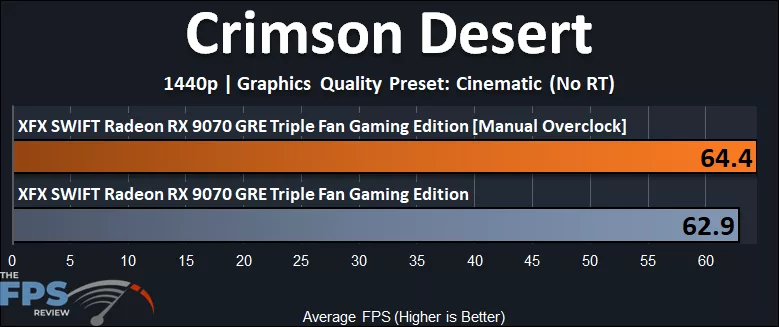
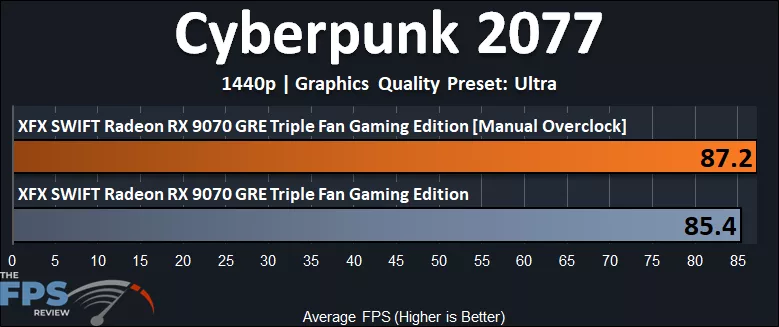
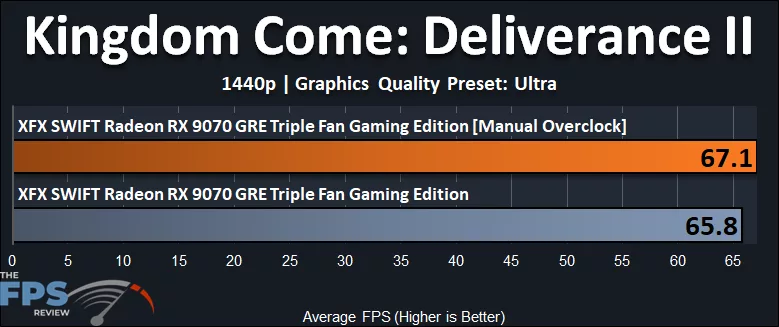
Below, you will see that the overclocking performance difference is only 3% at best, and this is with the GPU and memory overclocked, again limited by power limits.
GPUz
Discussion
Join Discussion →No replies yet. Be the first to reply on the forum.