
Power and Temp
On this page, we will explore the power and temperature of the XFX Swift Radeon RX 9070 GRE Triple Fan Gaming Edition in a game. We have also included the manual overclocked results as well, to see the difference the small 3% gain from overclocking adds to power and temp.
Power
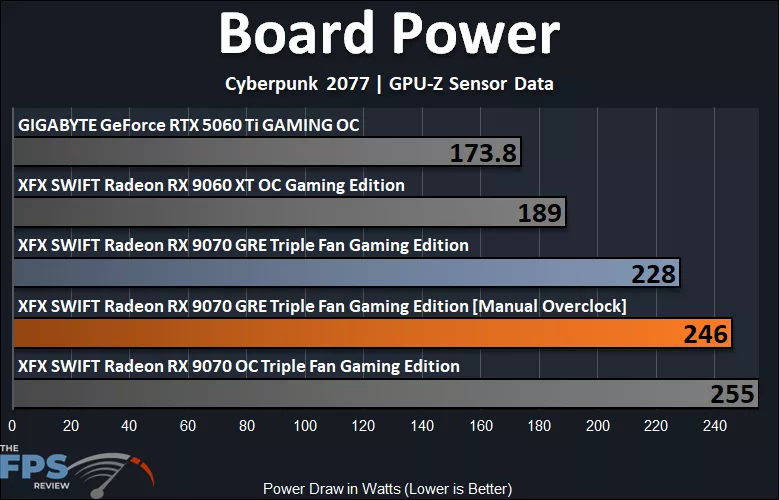
The TDP of the XFX Swift Radeon RX 9070 GRE Triple Fan Gaming Edition is 220W. In our testing, the maximum peak board power Wattage we hit was 228W, so I’d say this is very much in line with specs. At this rating, the XFX Swift Radeon RX 9070 GRE Triple Fan Gaming Edition does use more power than the GeForce RTX 5060 Ti and Radeon RX 9060 XT, in fact, a lot more than the GeForce RTX 5060 Ti. However, it is less than the Radeon RX 9070.
The XFX Swift Radeon RX 9070 GRE Triple Fan Gaming Edition uses 21% more power than the Radeon RX 9060 XT and 31% more power than the GeForce RTX 5060 Ti. However, it uses 11% less power than the Radeon RX 9070. When we overclock it, the power increases by 8%, so that power gain really isn’t worth the 3% performance gain with this particular video card.
Temperature
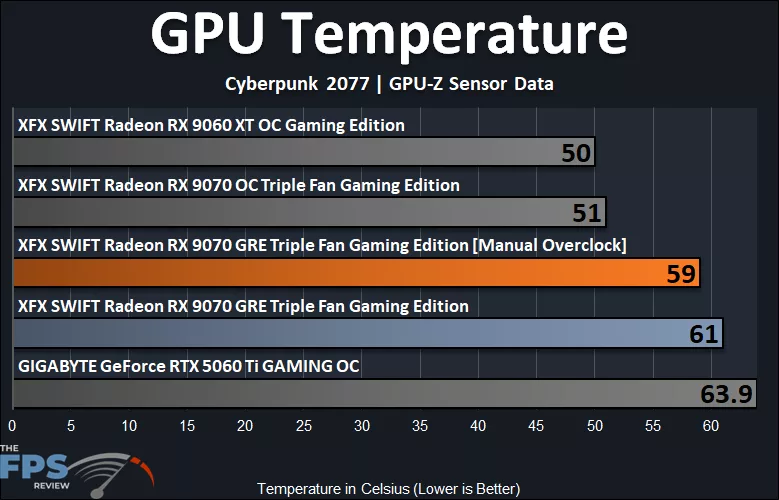
All the video cards used in this review are custom AIB video cards with custom cooling of different configurations, so the cooling will be determined by the individual card’s design. The XFX Swift Radeon RX 9070 GRE Triple Fan Gaming Edition itself runs the warmest next to the GeForce RTX 5060 Ti, interestingly, despite it being a large 3-fan design. Whereas the Radeon RX 9070 Triple Fan and Radeon RX 9060 XT Triple Fan actually run very cool on GPU temperature. The XFX Swift Radeon RX 9070 GRE Triple Fan Gaming Edition is about 20% warmer on the GPU than the 9060 XT and 9070, but the GeForce RTX 5060 Ti does run the warmest. However, that all said, these temperatures are not overall hot at all, in the 60’s is actually rather good as a whole.
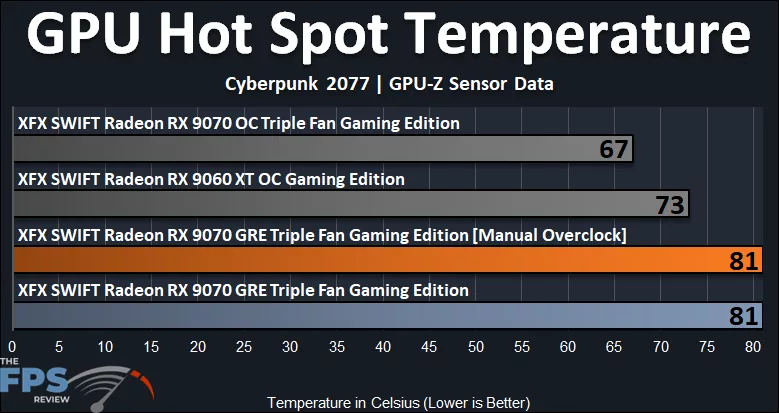
The Hot Spot temperatures, however, are possibly a bit concerning. The XFX Swift Radeon RX 9070 GRE Triple Fan Gaming Edition is running up to 81c on the Hot Spot temperature, which is a larger increase over the Triple Fan Radeon RX 9070 from XFX, which runs at a cool 67c. Is it possible there might be some thermal paste or mating issue? A re-application of thermal paste might be a good idea on this video card to achieve better Hot Spot temperatures.
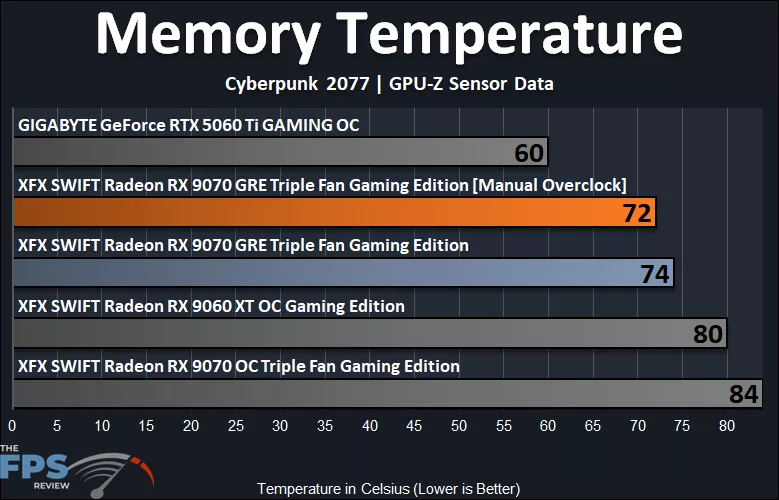
The memory temperatures are running very well, though, on the XFX Swift Radeon RX 9070 GRE Triple Fan Gaming Edition. It is actually the Radeon RX 9060 XT from XFX and the Triple Fan Radeon RX 9070 that have the warmest memory temperatures, while the XFX Swift Radeon RX 9070 GRE Triple Fan Gaming Edition is actually very good here. Perhaps a reseating of pads and heatsink on the XFX Radeon RX 9070 would do it some good.
GPUz
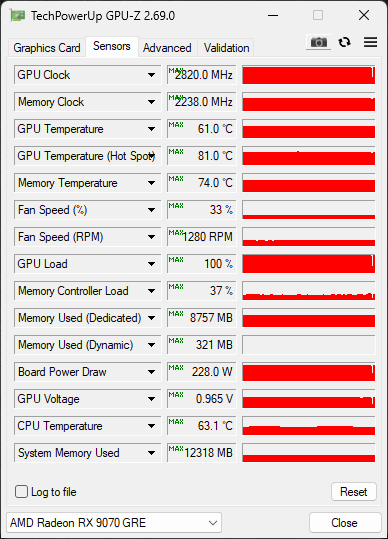
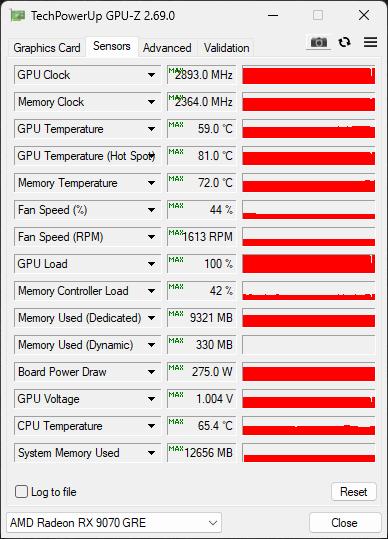
In GPUz, we can see that at default, the GPU Voltage of the XFX Swift Radeon RX 9070 GRE Triple Fan Gaming Edition is 0.965V, and when overclocked, that did auto-increase to 1.004V. The default fan speed was around 33%, and when overclocked, it auto-increased to 44%.
Discussion
Join Discussion →No replies yet. Be the first to reply on the forum.