
Gaming Performance (Cr-Dy)
Take note that we will be breaking up the performance graphs for each game into separate “Native Resolution,” and “Upscaling,” and “Ray Tracing + Upscaling” graphs. That is, instead of typically having native resolution and upscaling compared on the same graph, now each graph is either native resolution or upscaling and ray tracing, standing alone. In this way, we can show you both the AVG FPS and the 1% Low performance of each video card, both at Native Resolution and at Upscaling, in separate graphs. We will also have the Ray Tracing + Upscaling graph included under each game as well. This means each game will have several graphs, and there will be a lot of graphs on each page in total to scroll through across multiple pages.
For all of our game testing, we are testing at 1440p resolution. We will test with a combination of Native Resolution and Upscaling. When using Upscaling, we are either using DLSS for NVIDIA or FSR for AMD. We have FSR 4/4.1 enabled where supported in games. The video cards being compared are all AIB video cards, except for the GeForce RTX 5070, which is a Founders Edition. Some have a factory OC, except the XFX Swift Radeon RX 9070 GRE Triple Fan Gaming Edition. The video card models and VRAM capacity are listed in the graphs. We have sorted the graphs from fastest to slowest. All games use manual run-throughs for benchmarking. Keep in mind that some games have Ray Tracing built into the game/engine, and always on, while others do not.
Crimson Desert
Native Resolution
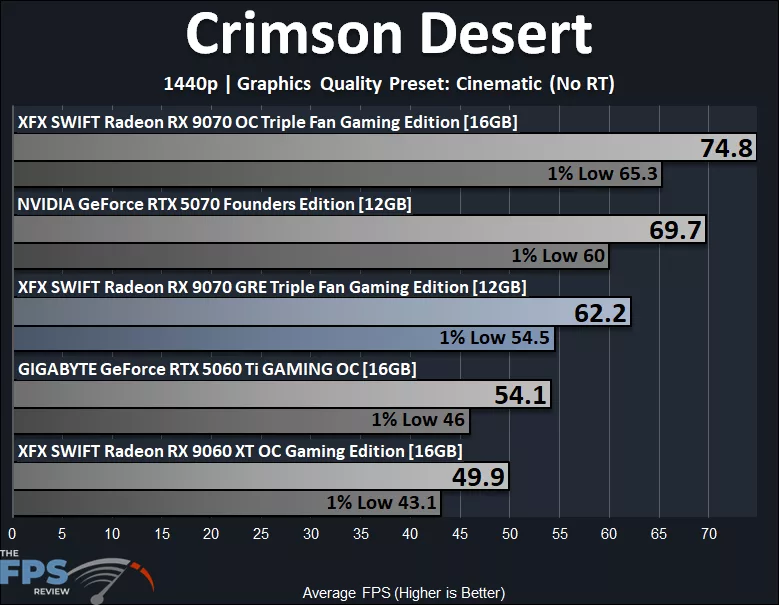
In Crimson Desert, we are running at 1440p Native Resolution at the highest Cinematic quality preset, but we have disabled Ray Tracing for this test. We can see that the AMD Radeon RX 9070 GRE is playable at just above 60 FPS, and the 1% Lows are not too bad at 54 FPS. It does not appear to be bottlenecked by VRAM in this scenario. Compared to the GeForce RTX 5070, the Radeon RX 9070 GRE is 11% behind the RTX 5070 on AVG FPS and 9% behind on 1% Lows. Compared to the Radeon RX 9070 OC, the Radeon RX 9070 GRE is 17% behind the RX 9070 OC on AVG FPS and 17% behind on 1% Lows.
Upscaling
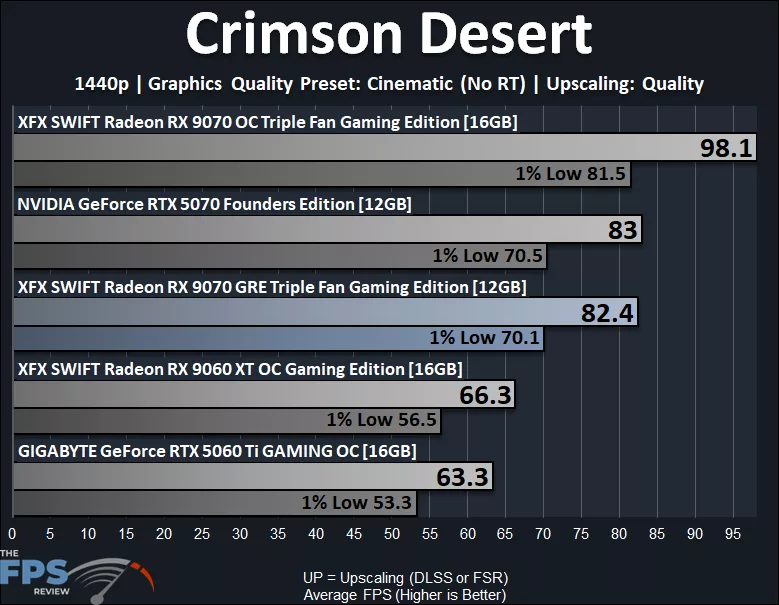
When we enable FSR Upscaling, the Radeon RX 9070 GRE now has 1% Lows as high as 70 FPS, and the game is very smooth. With Upscaling, the Radeon RX 9070 GRE actually performs at the same performance as the GeForce RTX 5070, on both AVG and 1% Lows. The Radeon RX 9070 GRE is 16% behind the RX 9070 GRE on AVG and 14% on 1% Lows.
Ray Tracing
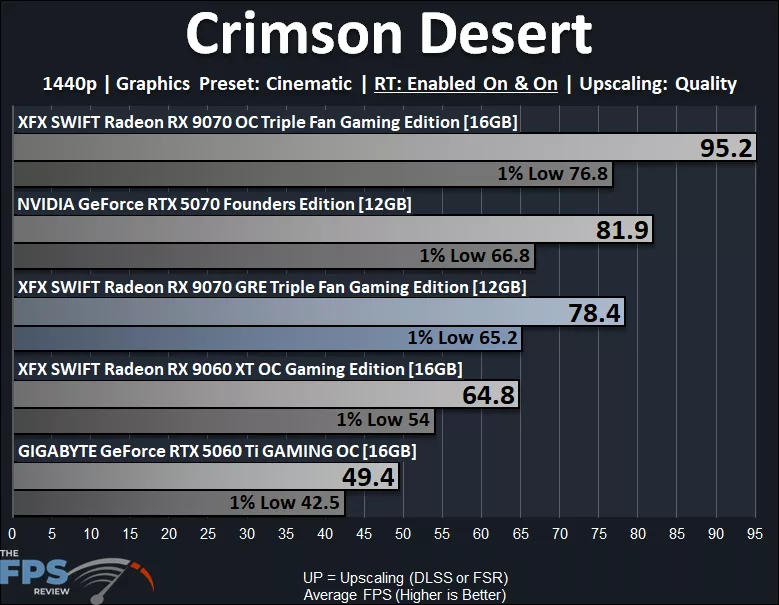
In the above graph, we have enabled both Ray Tracing options to enabled, and we do have FSR Upscaling enabled as well at Quality. The Radeon RX 9070 GRE is still very playable with Ray Tracing, with 78 FPS AVG and 1% Lows above 60 FPS. The Radeon RX 9070 GRE is only 4% behind the RTX 5070 on AVG and 2% behind on 1% Lows, so they are very similar. The Radeon RX 9070 GRE is 18% behind the RX 9070 OC on AVG and 15% behind on 1% Lows.
Cyberpunk 2077
Native Resolution
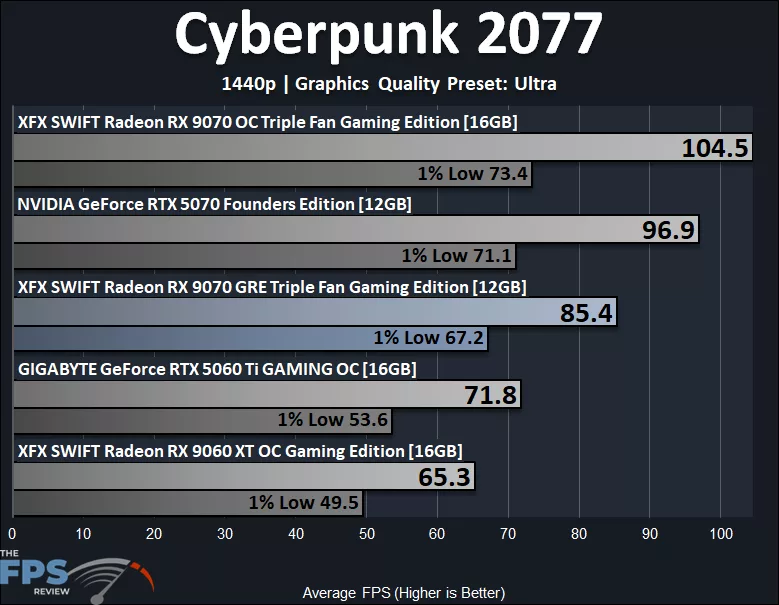
In Cyberpunk 2077 at 1440p Native Resolution at Ultra settings, the AMD Radeon RX 9070 GRE is very playable. It is playable at 85 FPS AVG FPS and well above 60 FPS AVG 1% Lows. The Radeon RX 9070 GRE is 12% behind the GeForce RTX 5070 on AVG FPS and only 5% on 1% Lows. The Radeon RX 9070 GRE is 18% behind the Radeon RX 9070 OC on AVG FPS and 8% on 1% Lows.
Upscaling
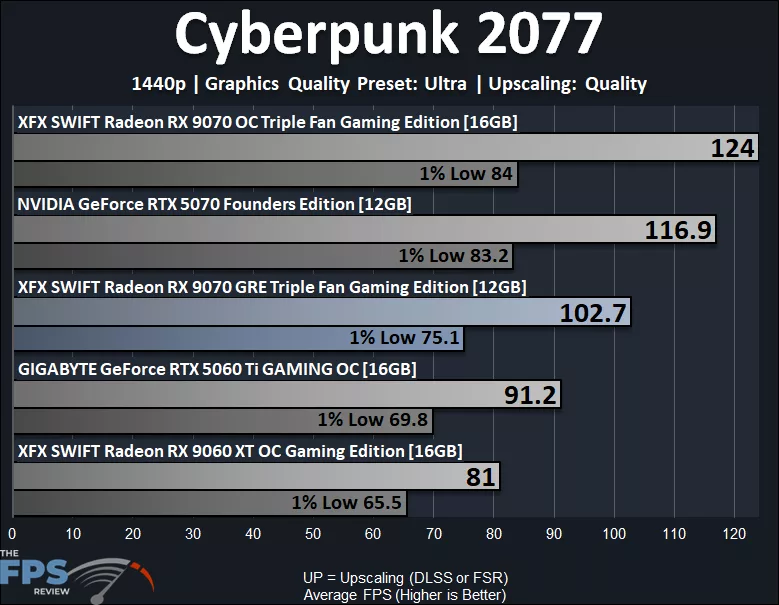
When we enable FSR Upscaling, performance only improves even more, with 1% Lows above 70 FPS. The Radeon RX 9070 GRE is 12% behind the RTX 5070 on AVG FPS and 10% on 1% Lows. The Radeon RX 9070 GRE is 17% behind the Radeon RX 9070 OC on AVG FPS and 11% on 1% Lows.
Ray Tracing
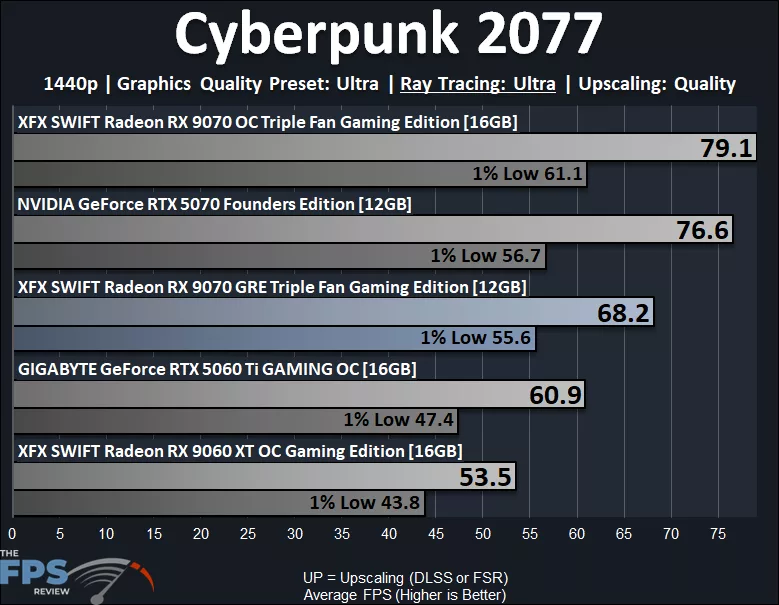
Now we have enabled “Ultra” Ray Tracing preset in Cyberpunk 2077 at 1440p, and we have FSR Upscaling Quality enabled. The Radeon RX 9070 GRE has playable average framerates at 68 FPS, but it does fall below 60 FPS for the 1% Lows, however, not far below. The Radeon RX 9070 GRE still feels playable, but it is on the edge with Ray Tracing. We don’t see it being bottlenecked by VRAM; however, the same for the GeForce RTX 5070 in this game. The Radeon RX 9070 GRE is 11% behind the GeForce RTX 5070 on AVG FPS and has nearly the same 1% Lows. The Radeon RX 9070 GRE is 14% behind the Radeon RX 9070 OC on AVG FPS and 9% on 1% Lows.
Doom The Dark Ages
Native Resolution
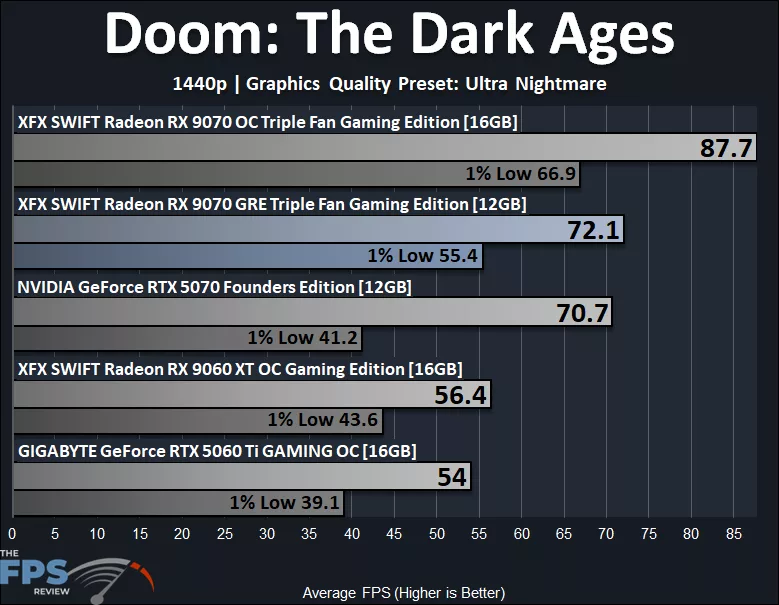
In Doom: The Dark Ages, we are running the game at the “Ultra Nightmare” preset at 1440p Native Resolution. Now, in this game, if there was going to be a VRAM bottleneck, it would be here at the Ultra Nightmare setting. For the Radeon RX 9070 GRE, we are seeing that it is actually the second-fastest video card here, sitting above the GeForce RTX 5070, especially on 1% Low performance. The Radeon RX 9070 GRE is 34% faster than the GeForce RTX 5070 on 1% Low performance! The GeForce RTX 5070 actually looks like it is hitting a VRAM capacity bottleneck, whereas the Radeon RX 9070 GRE is managing that VRAM capacity better, at least in this game. The Radeon RX 9070 GRE is 18% behind the Radeon RX 9070 OC on AVG FPS and 17% on 1% Lows.
Upscaling
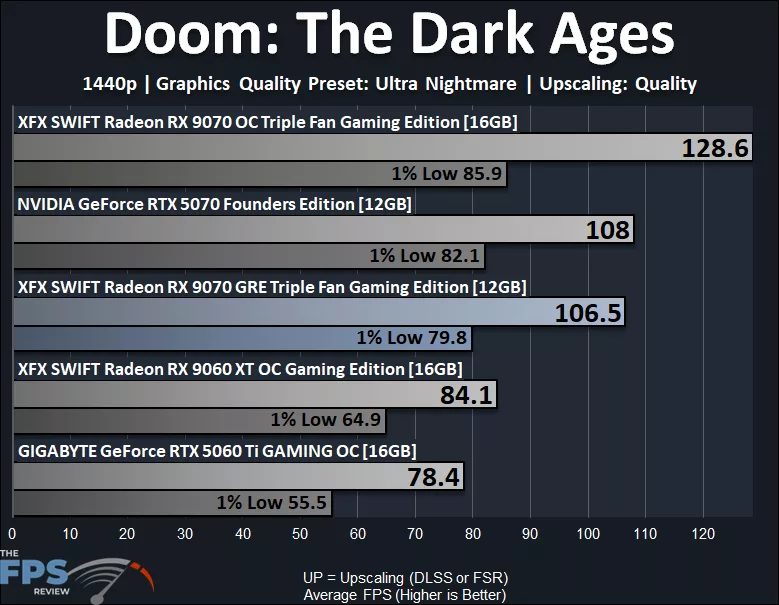
Now, when we enable DLSS Upscaling on the GeForce RTX 5070, that VRAM capacity bottleneck is alleviated, and now the GeForce RTX 5070 is slightly faster than the Radeon RX 9070 GRE. The Radeon RX 9070 GRE is only 1% behind the RTX 5070 on AVG FPS and 3% on 1% Lows. The Radeon RX 9070 GRE is 17% behind the Radeon RX 9070 OC on AVG FPS and 7% on 1% Lows.
Dying Light: The Beast
Native Resolution
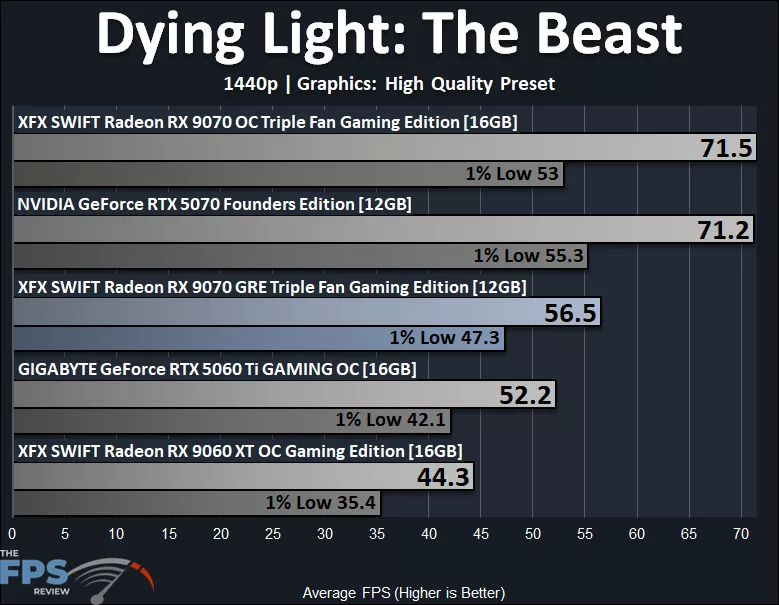
In Dying Light: The Beast, we see that AMD video cards seem to struggle in this game; perhaps some driver optimization or game optimization needs to take place, as NVIDIA GPUs do outperform them quite a bit. With that in mind, at 1440p Native Resolution at “High” quality preset, the Radeon RX 9070 GRE cannot quite reach 60 FPS AVG and falls into the 40’s on 1% Lows. However, it doesn’t appear to be due to VRAM capacity limitations. Therefore, the GeForce RTX 5070 actually ends up performing exactly the same as the Radeon RX 9070 OC, which shows the disparity here. At any rate, the Radeon RX 9070 GRE is 21% behind the RTX 5070 and RX 9070 OC on AVG FPS and 14% behind on 1% Lows.
Upscaling
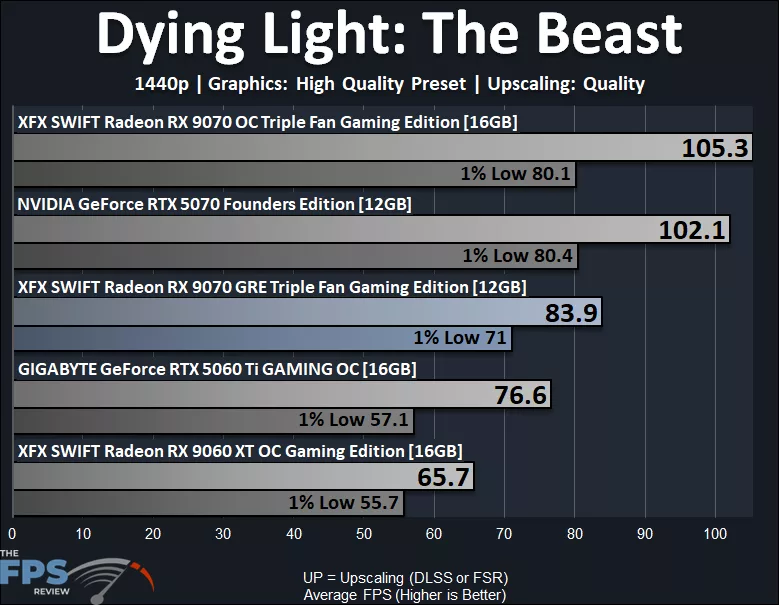
When we enable FSR Upscaling at 1440p, it certainly helps the Radeon RX 9070 GRE big time, and this game does support FSR 4.1 natively. With FSR enabled, the Radeon RX 9070 GRE is playable at 83 FPS AVG and 71 FPS 1% Lows, so the game is super smooth. The Radeon RX 9070 GRE is 18% behind the RTX 5070 on AVG FPS and 12% on 1% Lows. The Radeon RX 9070 GRE is 20% behind the Radeon RX 9070 GRE on AVG FPS and 12% on 1% Lows.
Ray Tracing
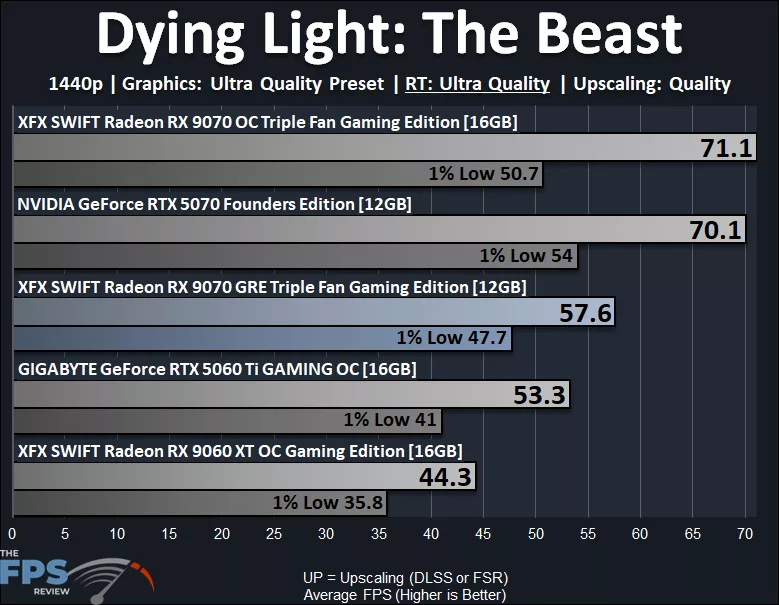
This game does support Ray Tracing, and it does hurt the Radeon RX 9070 GRE pretty badly here, even with FSR Quality Upscaling. The Radeon RX 9070 GRE is still not really playable with Ray Tracing enabled here, not breaking 60 FPS, and 1% Lows are lower. However, enabling “Balanced” FSR 4.1 is playable and brings it up to a playable performance. The Radeon RX 9070 GRE is 18% behind the GeForce RTX 5070 and RX 9070 OC on AVG FPS and 12% on 1% Lows.
Discussion
Join Discussion →No replies yet. Be the first to reply on the forum.