
Power, Temp & GPU Frequency
On this page, we will explore the power and temperature of the GIGABYTE GeForce RTX 5090 GAMING OC 32G in a game. We have also compared the GPU Frequency with the GeForce RTX 5090 Founders Edition.
GPU Frequency
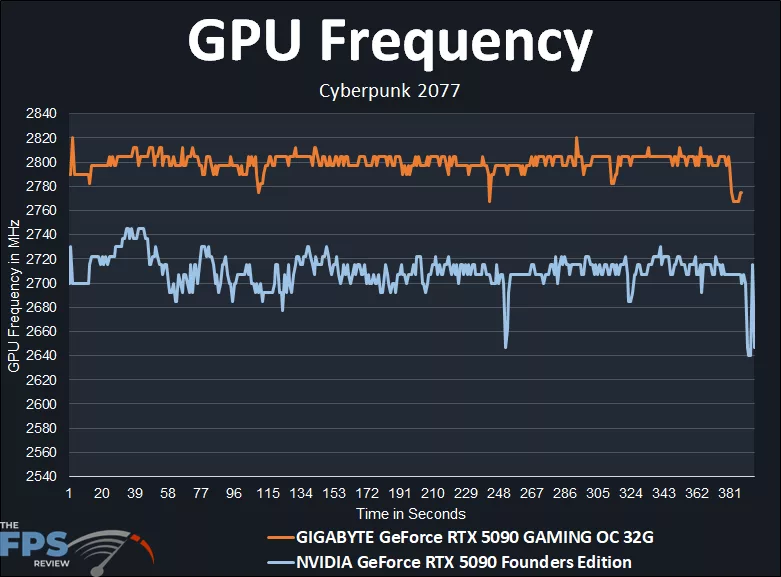
The first thing we want to look at is the real-world, in-game GPU frequency of the GIGABYTE GeForce RTX 5090 GAMING OC 32G while playing a game. The GIGABYTE GeForce RTX 5090 GAMING OC 32G carries a factory overclock with the GPU Boost at 2550MHz compared to the GeForce RTX 5090 Founders Edition, which is clocked at 2407MHz. This GPU Boost factory overclock, combined with the higher TDP, allows a higher GPU frequency, as we can see in the graph.
The GIGABYTE GeForce RTX 5090 GAMING OC 32G starts at around 2780MHz, and rises up to peaking at 2820MHz, and is mostly just above 2800MHz while gaming. The average clock speed of this was: 2800MHz. Therefore, the GIGABYTE GeForce RTX 5090 GAMING OC 32G is operating well above the GPU Boost and sustaining consistent frequencies; as we can see, they are much smoother than the GeForce RTX 5090 Founders Edition.
The NVIDIA GeForce RTX 5090 Founders Edition starts off well at 2700MHz and varies a bit more between 2700MHz-2720MHz while gaming. The exact average clock speed of this was: 2710MHz. Therefore, the GIGABYTE GeForce RTX 5090 GAMING OC 32G was running about 90MHz-100MHz faster than the Founders Edition while gaming. There is a clear difference between the GIGABYTE GeForce RTX 5090 GAMING OC 32G factory overclock and the Founders Edition.
Board Power
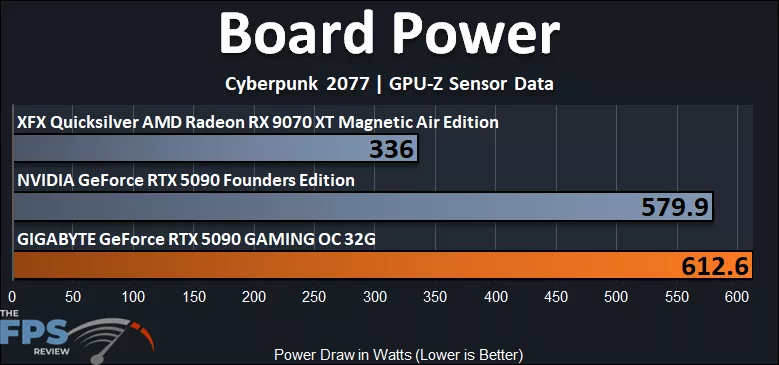
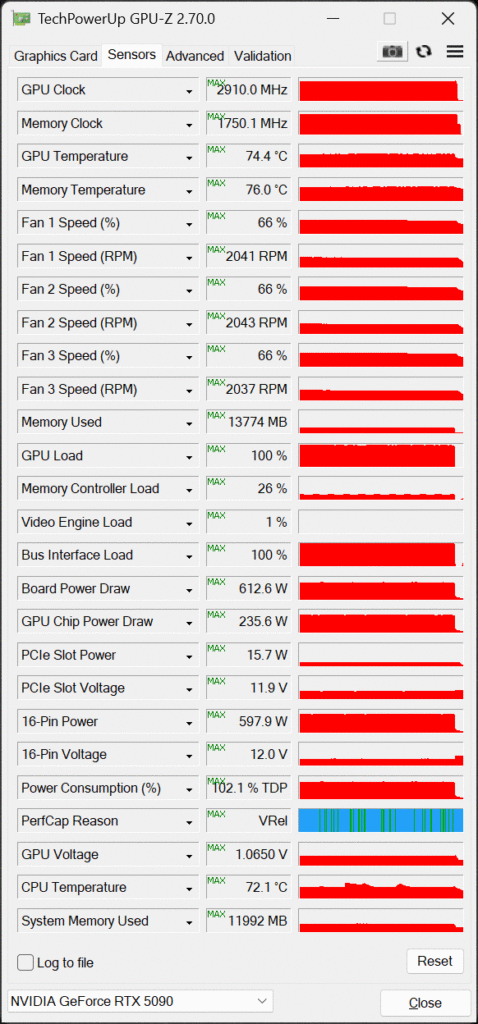
The NVIDIA GeForce RTX 5090 Founders Edition TDP is 575W. We can see that ours is hitting 580W, so it is on target with the official TDP spec for total board power. The GIGABYTE GeForce RTX 5090 GAMING OC 32G beats that by a lot. The GIGABYTE GeForce RTX 5090 GAMING OC 32G consumes, and is able to consume, a lot more power, exceeding 600W. In this test above, we are running Resident Evil Requiem at 4K with Path Tracing turned on with DLSS Quality Upscaling, so it is pushing the video card as hard as possible in a game. There are other games where it isn’t as high, but it can still reach 600-603W while gaming. In all of our testing, it wasn’t hard to get the GIGABYTE GeForce RTX 5090 GAMING OC 32G to the 600W board power range. This means the GIGABYTE GeForce RTX 5090 GAMING OC 32G can consume 6% more power, or 33 more Watts.
16-Pin Power
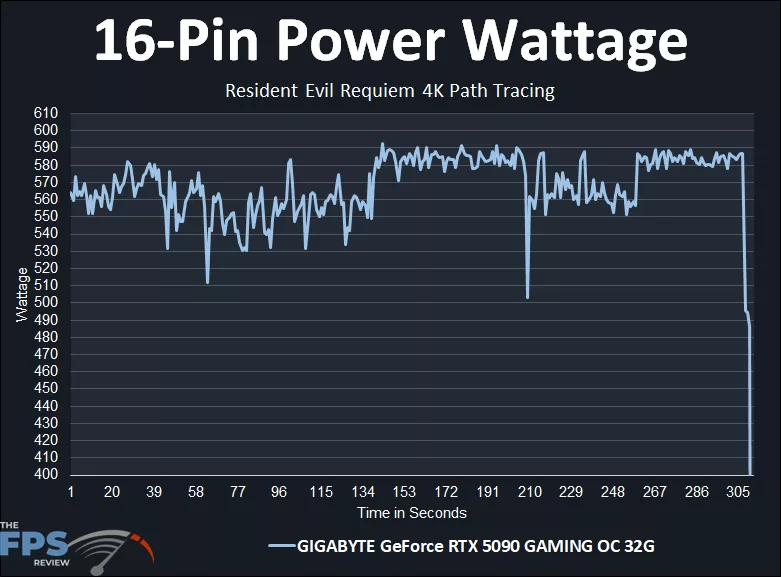
Now, the scary thing with the GIGABYTE GeForce RTX 5090 GAMING OC 32G is the amount of power on the 12VHPWR 16-pin cable. According to GPU-Z, while gaming in Resident Evil Requiem at 4K Path Tracing, we are hitting very close to that 600W edge on the 16-pin power cable. It peaked just over 590W, leaving very little room for a safety margin with the 600W-rated maximum of the 16-pin cable. We just wanted to show you this because it was interesting and is worth noting before you decide what’s best for you. Be sure to use a high quality power supply with the GIGABYTE GeForce RTX 5090 GAMING OC 32G, and use the native power supply cable if you can, make sure it’s plugged in all the way, tight, and don’t put any strain or bends on it, no pressure, keep the case well ventilated, and that’s about the best you can do, the rest is just going to be up to fate.
GPU Temperature
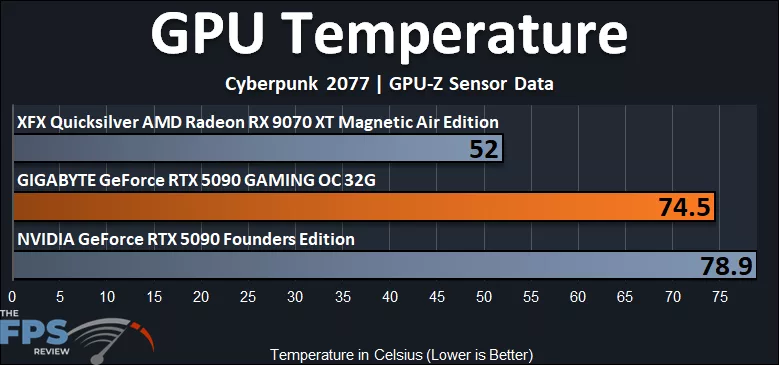
The NVIDIA GeForce RTX 5090 Founders Edition ran the warmest at near 80c GPU Temperature, not hotspot. The GIGABYTE GeForce RTX 5090 GAMING OC 32G actually improves upon this! The GIGABYTE GeForce RTX 5090 GAMING OC 32G’s cooling brings the GPU temp down to 74.5c, about 4 degrees cooler, so it is definitely working and has a positive cooling effect.
Memory Temperature
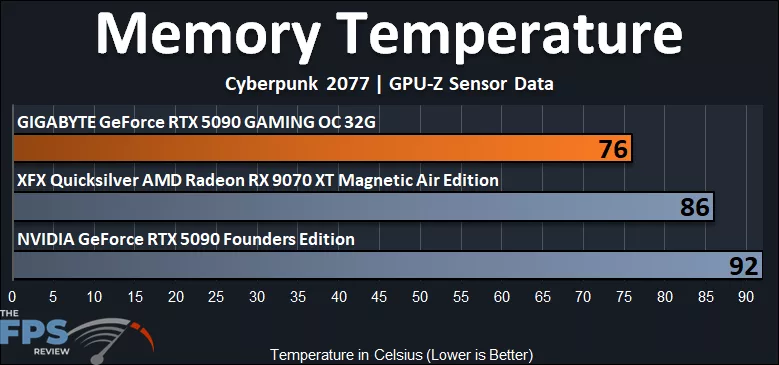
We were also impressed by the Memory Temperatures. The GIGABYTE GeForce RTX 5090 GAMING OC 32G improved over the NVIDIA GeForce RTX 5090 Founders Edition memory temperatures by a large margin! The NVIDIA GeForce RTX 5090 FE had temperatures hit 92c on the memory. The GIGABYTE GeForce RTX 5090 GAMING OC 32G, however, only hit 76c, lending to the much better cooling of the VRAM on the GIGABYTE GeForce RTX 5090 GAMING OC 32G, so that in itself is worth it to provide longevity to the memory.
Fans Speeds
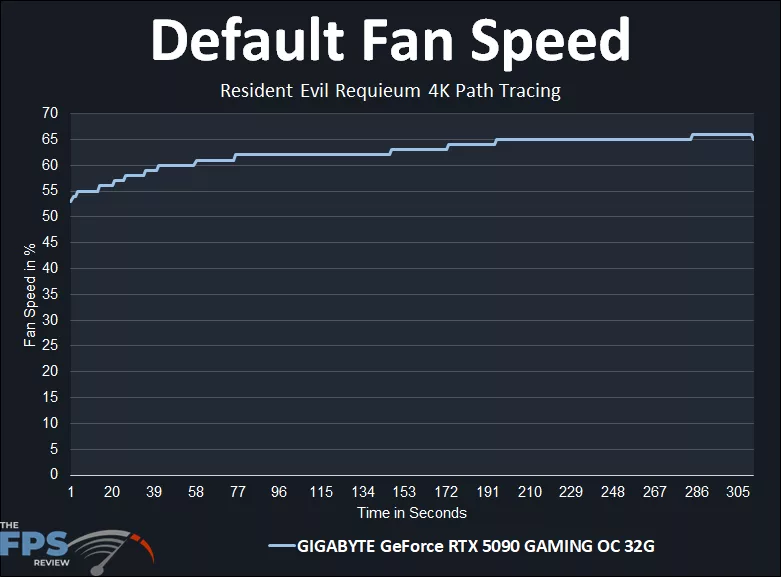
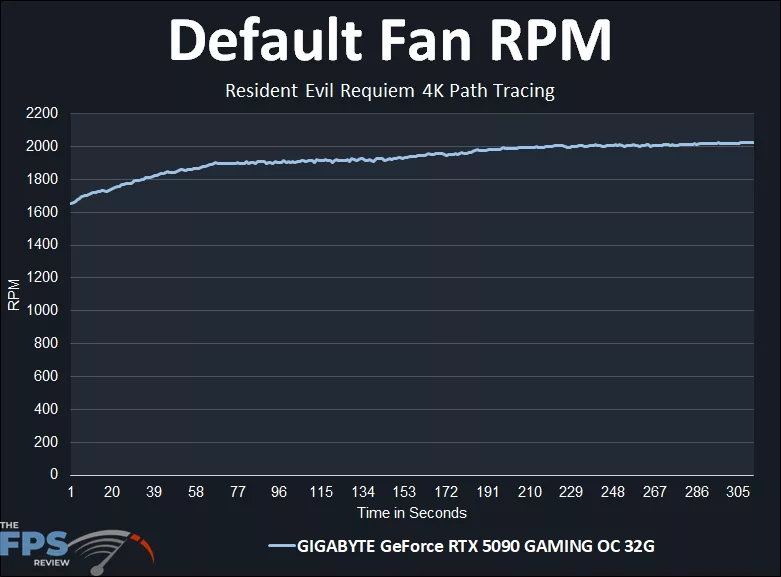
The fans on the GIGABYTE GeForce RTX 5090 GAMING OC 32G ran up to 65% fan speed while gaming, with a very consistent gradual climb- nothing jarring. The RPMs hit up to 2000RPM.
Discussion (10 replies)
Join Discussion →This price is just too high. The current price retail is now exceeding the scalper prices at release-time...... I thought I paid way too much for mine, which now feels like a bargain. The current situation has just put these video cards out of reach......and this card is at Gigabytes low end of 5090s......ouch.
I've got the lowly MSI Ventus 3X OC, but I only paid $2,600 for it around launch. I had to buy it as part of an MSI bundle to do it, but I still got the card for what was about MSRP at the time. The prices of 5090's (and most everything else) now is utterly insane. I make good money at my job, but I wouldn't be able to justify a top end gaming build right now.
Your at ******* Alienware and Falcon Northwest pricing a few years ago just to DIY a top end PC build now.
Finally!
It is indeed a good card, but I'm having power issues. I set a PL at 80% so I don't damage anything.
I bought a Wireview pro II to measure the amps on each pin and pin 3 always reads low while pin 6 will read high, even higher than 10a which causes the WVP2 to cut the power.
I'm using the stock cable that came with the card plus 4x 6+2 PICe cables (straight cables, none have two plugs). My PSU didn't come with a native 12VHPRW cable.
So I'm looking for advice on a quality cable I can buy or maybe I should just buy a new PSU. It's a Seasonic Platinum 1300W.
Nice to see tje new round of testing done. :)
You should check and see if a 12 pin cable is available for your unit. Cablemods makes some if I recall correctly, but a lot of PSU manufacturers started making them as well. That said, depending on how old your unit is, I'd go ahead and replace it. The fact is, transient response for the high end video cards tends to damage some older PSU's over time. Granted, the 3090 is the king of doing that, but the 4090 and 5090 aren't slouches for it either.
Getting a newer high quality PSU with the proper connector is NEVER a bad idea.
I agree. I do need to replace it. Speaking of the 3090, that's what I had in this system originally.
Since my favorite PSU reviewer hasn't done any PSU reviews in a while I don't know what to buy honestly.
I was using a CORSAIR HX1200i (2025) power supply I purchased last December, so it's rather new. I used the native 16-pin cable with it. I didn't have any issues, but I do not have a Wireview, so I couldn't see per-pin Voltages. That uneven Voltage across the pins is the common issue with RTX 5090s, so I am not surprised, and that is what can cause them to burn up. I would highly suggest a high-quality power supply from a good manufacturer. I would hate to spend that much money on a 5090 and risk it. My suggestion: go with the PSU upgrade.
Does this GB card suffer from the same TIM gel slippage some of their other 5090's suffer from, and the over application of of TIM?
My MSI card thus far feels solid, but I am using an Lan Li edge 1300 watt platinum power supple with special PSU ports and cables for the 5090 and like cards I am running and so far knock on wood it's been a beast. And I loved working with the edge power supply as well. bonus the new editions have a detachable USB 2 header splitter/bank you can use to get more USB2 header ports in your system. (Mine is integrated.)
I intend to water cool this thing, but it'll be a while before I get around to doing it. Probably a month+ as I will be working 30 days straight starting tomorrow out of town.
Ordered this PSU.