
Gaming Performance (Al – Cy)
We are going to focus on the 4K gaming experience with the GIGABYTE GeForce RTX 5090 GAMING OC 32G, and run every game at 4K Native Resolution as well as with DLSS Quality. In addition, we will turn on Ray Tracing in supported games and have DLSS Quality enabled with that. We will also run Path Tracing where available. We’ve got 10 games to show you, and we are using manual run-through for benchmarking. We are including an NVIDIA GeForce RTX 5090 Founders Edition to compare to. In this way, we can see the advantage the factory overclock makes with the GIGABYTE GeForce RTX 5090 GAMING OC 32G over the Founders Edition. We are also including an XFX Quicksilver AMD Radeon RX 9070 XT Magnetic Air Edition as a baseline for comparison. The Radeon RX 9070 XT does not compete with the GeForce RTX 5090 on pricing or performance; it is here as a representative of the fastest from AMD and to provide an idea of how much faster the GeForce RTX 5090 is in gaming performance.
Alan Wake 2
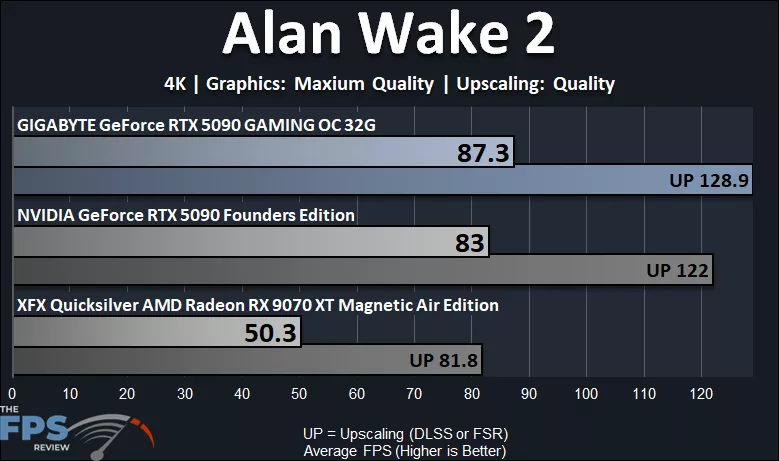
The GIGABYTE GeForce RTX 5090 GAMING OC 32G allows a playable gameplay experience in Alan Wake 2 at 4K native resolution with the highest game settings, giving us an average FPS of 87FPS. When we enable DLSS Quality, we can get over 100FPS up to 128FPS. We can see that the GIGABYTE GeForce RTX 5090 GAMING OC 32G is indeed faster than the NVIDIA GeForce RTX 5090 FE, providing 5% faster performance at native resolution and 6% faster performance in DLSS Quality. Naturally, the GIGABYTE GeForce RTX 5090 GAMING OC 32G is a lot faster than the Radeon RX 9070 XT, which struggles to provide 60FPS at native resolution. In this game, you’ll need to enable FSR Quality to get an 81 FPS average and a playable experience at 4K with the Radeon RX 9070 XT. The GIGABYTE GeForce RTX 5090 GAMING OC 32G is 74% faster.
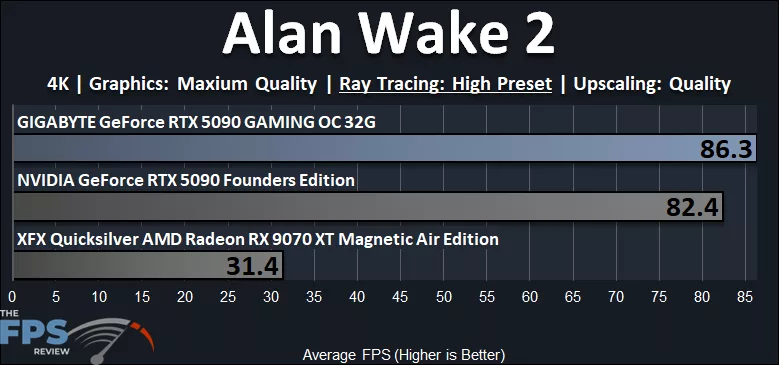
When we enable the “High” preset Ray Tracing (not the maximum here), the GIGABYTE GeForce RTX 5090 GAMING OC 32G is playable with an 86 FPS average, and we are using DLSS Quality upscaling. We had to use “High” RT so that we could compare results with the Radeon RX 9070 XT, though the maximum “Ultra” RT is very playable as well on the GIGABYTE GeForce RTX 5090 GAMING OC 32G with DLSS Quality at 4K. The GIGABYTE GeForce RTX 5090 GAMING OC 32G is 5% faster than the GeForce RTX 5090 FE and 175% faster than the Radeon RX 9070 XT, which is not playable at all.
Battlefield 6
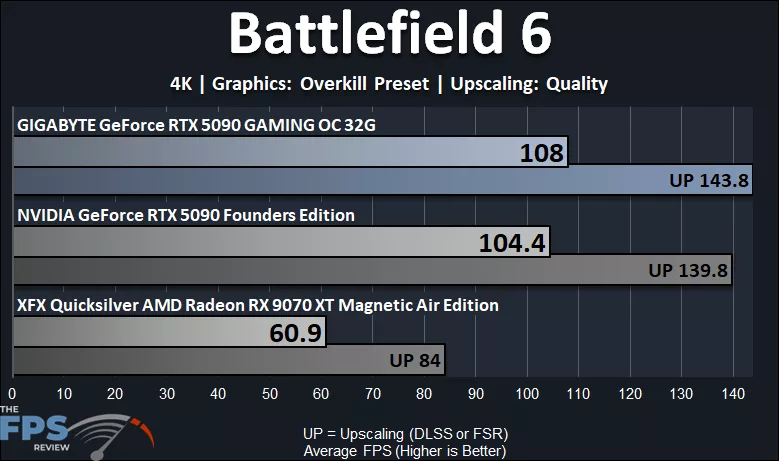
In Battlefield 6, the GIGABYTE GeForce RTX 5090 GAMING OC 32G is very playable at 4K native resolution at over 100FPS! When we turn on DLSS Quality upscaling, performance is over 140FPS. The Radeon RX 9070 XT can barely provide a smooth 60FPS at 4K native, and you would need FSR Quality to make it playable at 84FPS. The GIGABYTE GeForce RTX 5090 GAMING OC 32G is 3% faster than the GeForce RTX 5090 FE, and with DLSS, it is also 3% faster. The GIGABYTE GeForce RTX 5090 GAMING OC 32G is 77% faster than the Radeon RX 9070 XT.
Clair Obscur: Expedition 33
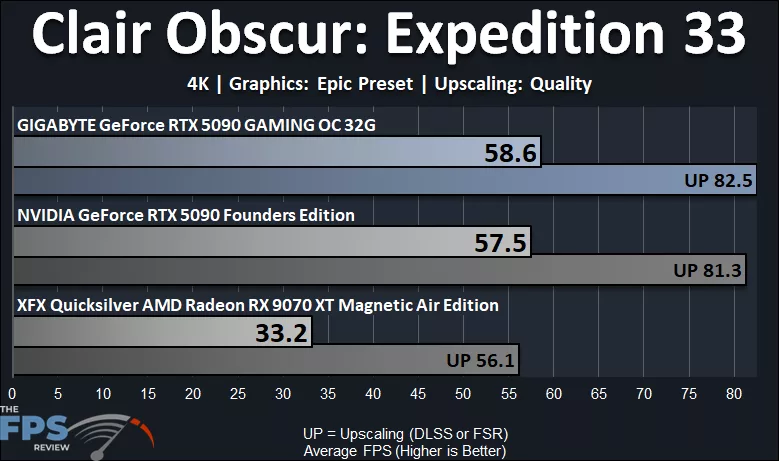
Clair Obscur: Expedition 33 is a tough game to run because it uses Unreal Engine Nanite and Lumen. Running this game at 4K native resolution at the “Epic” quality setting takes a toll, even on the GeForce RTX 5090, as it cannot run the game even at 60FPS average. The 1% lows are also much lower in this game because of it. This game will require that you use DLSS Quality Upscaling at 4K in order to get a smooth gameplay experience at 80FPS average, and high enough 1% Lows on the GeForce RTX 5090. The GIGABYTE GeForce RTX 5090 GAMING OC 32G is 2% faster than the GeForce RTX 5090 FE at native resolution and 1.4% faster with DLSS. The GIGABYTE GeForce RTX 5090 GAMING OC 32G is 77% faster than the Radeon RX 9070 XT. The Radeon RX 9070 XT struggles in this game; even with FSR Quality, it is not playable. You’ll either need more aggressive FSR, or to lower the in-game settings at 4K.
Crimson Desert
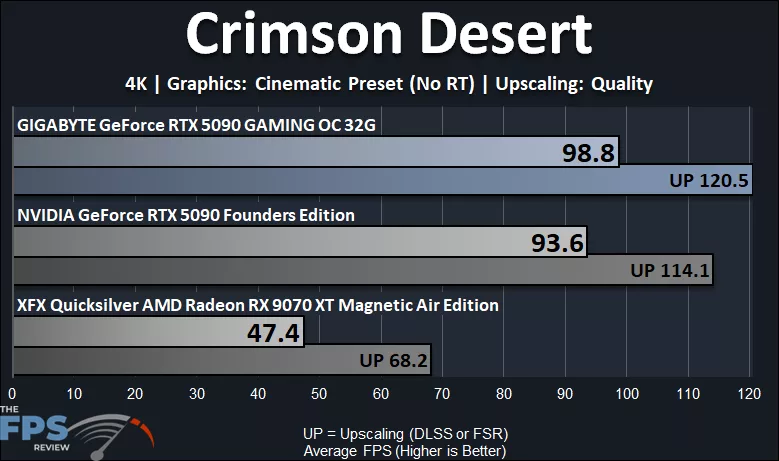
We are using patch version 1.18.00 in Crimson Desert, which is very recent, and thus we can get a good feel for performance on this game now, which we did not have in our initial launch review of the GeForce RTX 5090. Note that while we are using the “Cinematic” quality preset, we have disabled the Ray Tracing option for this test above. The GIGABYTE GeForce RTX 5090 GAMING OC 32G allows a very smooth and playable performance at 4K native resolution with 98FPS average. Enabling DLSS Quality boosts that up to 120FPS, and either way, this game is super smooth and looks great on Cinematic at 4K, without RT, of course. The GIGABYTE GeForce RTX 5090 GAMING OC 32G is 6% faster than the GeForce RTX 5090 FE, and with DLSS Quality it is also 6% faster. The GIGABYTE GeForce RTX 5090 GAMING OC 32G is 108% faster than the Radeon RX 9070 XT. The Radeon RX 9070 XT is not playable without FSR at 4K. You will need at least FSR Quality to get above 60FPS at 4K on it in Cinematic quality.
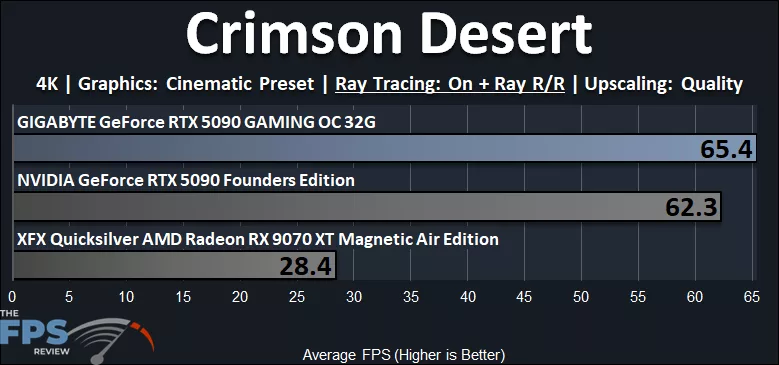
In the above graph, we have now enabled both Ray Tracing options in this game. In addition, and this is important, we have also enabled NVIDIA Ray Reconstruction on the GeForce RTX 5090 and AMD Ray Regeneration on the Radeon RX 9070 XT. This is necessary to receive the full benefits of Ray Tracing in this game, but turning on these features drastically drains performance. We do have DLSS Quality and FSR Quality Upscaling enabled in this graph as well. The GIGABYTE GeForce RTX 5090 GAMING OC 32G is able to get us just over 60FPS average at these settings, and the same with the GeForce RTX 5090 FE. The GIGABYTE GeForce RTX 5090 GAMING OC 32G is a bit more playable and smoother, and is 5% faster than the GeForce RTX 5090 FE. Unfortunately, the Radeon RX 9070 XT just cannot handle RT + Ray Regeneration in this game, and performance tanks. Even with the most aggressive FSR, it is unplayable. You simply won’t be playing with RT + RR on the Radeon RX 9070 XT at 4K here. The GIGABYTE GeForce RTX 5090 GAMING OC 32G is 130% faster than the Radeon RX 9070 XT.
Cyberpunk 2077
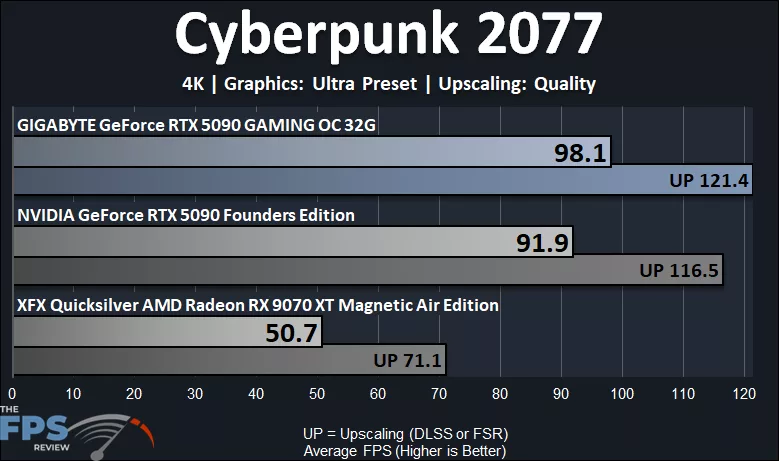
In Cyberpunk 2077, we are running at 4K native resolution with “Ultra” settings. The GIGABYTE GeForce RTX 5090 GAMING OC 32G smashes this game and provides near 100FPS average at Ultra 4K. Enabling DLSS Quality boosts that up to 120FPS. The Radeon RX 9070 XT struggles at 4K and will require FSR Quality to get to smooth framerates at 4K Ultra. The GIGABYTE GeForce RTX 5090 GAMING OC 32G is 7% faster than the GeForce RTX 5090 FE, and with DLSS it is 4% faster. The GIGABYTE GeForce RTX 5090 GAMING OC 32G is 93% faster than the Radeon RX 9070 XT.
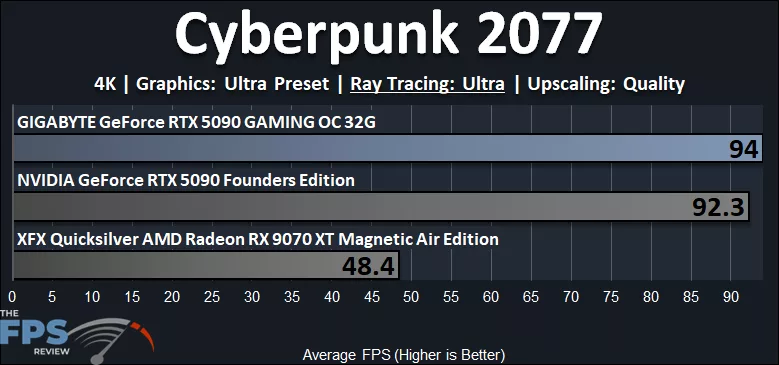
In this graph, we have turned on the “Ultra Ray Tracing” option here. The GIGABYTE GeForce RTX 5090 GAMING OC 32G easily allows a playable gameplay experience with DLSS Quality Upscaling enabled at 94FPS. The GIGABYTE GeForce RTX 5090 GAMING OC 32G is 2% faster than the GeForce RTX 5090 FE. The Radeon RX 9070 XT, however, is not playable. You will either need aggressive FSR upscaling mode here, or to lower the RT settings at 4K. The GIGABYTE GeForce RTX 5090 GAMING OC 32G is 94% faster than the Radeon RX 9070 XT.
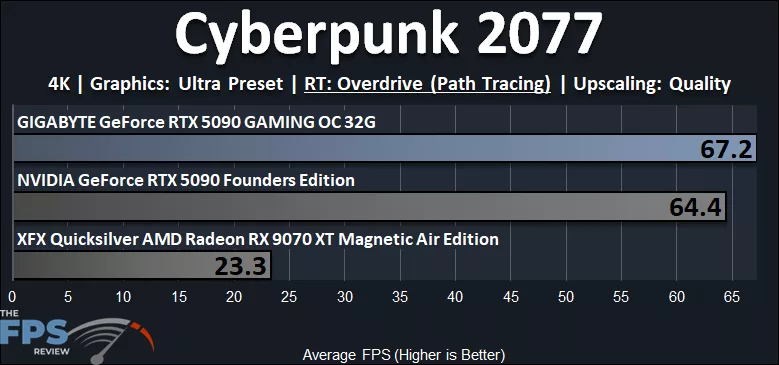
In this graph, we have turned on the “Overdrive Ray Tracing” option here, which enables Path Tracing! We do have DLSS Quality Upscaling and FSR Quality Upscaling enabled. The GIGABYTE GeForce RTX 5090 GAMING OC 32G allows a playable experience with DLSS Quality Upscaling enabled at 67FPS. It is a bit smoother than the GeForce RTX 5090 FE. The GIGABYTE GeForce RTX 5090 GAMING OC 32G is 4% faster than the GeForce RTX 5090 FE. With a more aggressive “Balanced” DLSS Upscaling, performance is even better and looks great. The Radeon RX 9070 XT is not playable at all, even with the most aggressive FSR; Path Tracing is out of the question. The GIGABYTE GeForce RTX 5090 GAMING OC 32G is 188% faster than the Radeon RX 9070 XT.
Discussion (10 replies)
Join Discussion →This price is just too high. The current price retail is now exceeding the scalper prices at release-time...... I thought I paid way too much for mine, which now feels like a bargain. The current situation has just put these video cards out of reach......and this card is at Gigabytes low end of 5090s......ouch.
I've got the lowly MSI Ventus 3X OC, but I only paid $2,600 for it around launch. I had to buy it as part of an MSI bundle to do it, but I still got the card for what was about MSRP at the time. The prices of 5090's (and most everything else) now is utterly insane. I make good money at my job, but I wouldn't be able to justify a top end gaming build right now.
Your at ******* Alienware and Falcon Northwest pricing a few years ago just to DIY a top end PC build now.
Finally!
It is indeed a good card, but I'm having power issues. I set a PL at 80% so I don't damage anything.
I bought a Wireview pro II to measure the amps on each pin and pin 3 always reads low while pin 6 will read high, even higher than 10a which causes the WVP2 to cut the power.
I'm using the stock cable that came with the card plus 4x 6+2 PICe cables (straight cables, none have two plugs). My PSU didn't come with a native 12VHPRW cable.
So I'm looking for advice on a quality cable I can buy or maybe I should just buy a new PSU. It's a Seasonic Platinum 1300W.
Nice to see tje new round of testing done. :)
You should check and see if a 12 pin cable is available for your unit. Cablemods makes some if I recall correctly, but a lot of PSU manufacturers started making them as well. That said, depending on how old your unit is, I'd go ahead and replace it. The fact is, transient response for the high end video cards tends to damage some older PSU's over time. Granted, the 3090 is the king of doing that, but the 4090 and 5090 aren't slouches for it either.
Getting a newer high quality PSU with the proper connector is NEVER a bad idea.
I agree. I do need to replace it. Speaking of the 3090, that's what I had in this system originally.
Since my favorite PSU reviewer hasn't done any PSU reviews in a while I don't know what to buy honestly.
I was using a CORSAIR HX1200i (2025) power supply I purchased last December, so it's rather new. I used the native 16-pin cable with it. I didn't have any issues, but I do not have a Wireview, so I couldn't see per-pin Voltages. That uneven Voltage across the pins is the common issue with RTX 5090s, so I am not surprised, and that is what can cause them to burn up. I would highly suggest a high-quality power supply from a good manufacturer. I would hate to spend that much money on a 5090 and risk it. My suggestion: go with the PSU upgrade.
Does this GB card suffer from the same TIM gel slippage some of their other 5090's suffer from, and the over application of of TIM?
My MSI card thus far feels solid, but I am using an Lan Li edge 1300 watt platinum power supple with special PSU ports and cables for the 5090 and like cards I am running and so far knock on wood it's been a beast. And I loved working with the edge power supply as well. bonus the new editions have a detachable USB 2 header splitter/bank you can use to get more USB2 header ports in your system. (Mine is integrated.)
I intend to water cool this thing, but it'll be a while before I get around to doing it. Probably a month+ as I will be working 30 days straight starting tomorrow out of town.
Ordered this PSU.