
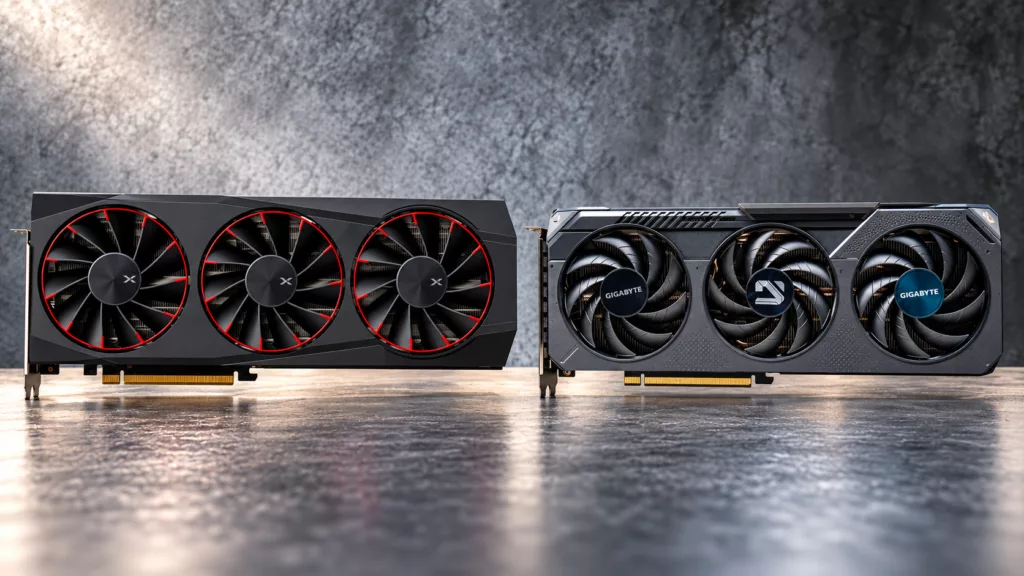
The GPU market got weird enough this week that a Radeon RX 9070 XT now costs less than a GeForce RTX 5060 Ti 16GB at Newegg, and TechSpot put the two head to head to prove how lopsided that is. AMD’s OEM-only RX 9050 4GB also finally got tested, and China’s Lisuan LX 7G100 got its most thorough Western review yet. On the rest of the bench, Corsair revived the C70 as the Warthog, NZXT brought back its S series at $49, and two 540 Hz monitors showed that OLED and IPS are both chasing esports players.
Radeon RX 9070 XT vs GeForce RTX 5060 Ti 16GB
Written reviews:
Consensus summary: TechSpot went shopping for a 16GB RTX 5060 Ti in Australia, then checked Newegg. In the US, the 5060 Ti 16GB starts around $780, while Radeon RX 9070 XT models start around $740, so the faster card is now the cheaper one.The performance gap is significant: 81 percent in 007 First Light at 1440p Medium (121 vs 67 fps) and 60 percent in Spider-Man 2 at 1440p Very High (130 vs 81 fps).
Even on Australian pricing, where the 5060 Ti is still $100 roobucks cheaper, it costs 48 percent more per frame at 1440p and 57 percent more at 4K. The 5060 Ti’s GDDR7 is running more than 80 percent over MSRP, against at least 23 percent for the GDDR6-equipped 9070 XT. Local AI builders are also soaking up GeForce stock, since NVIDIA remains the default for that software ecosystem.
FPS Review take: If you are buying a card for games at today’s prices, this is not a close call. The caveat is local AI work, where CUDA still earns NVIDIA its premium. The memory side of the squeeze is worth watching, given our report that Micron has reportedly stopped producing the 2GB GDDR7 modules used on some RTX 50 cards. For a sense of what the 5060 Ti’s 16GB buys you over the 8GB model, see our RTX 5060 Ti 16GB vs 8GB performance testing.
AMD Radeon RX 9050 4GB
Written reviews:
Video reviews:
- Hardware Unboxed: https://www.youtube.com/watch?v=5MRybPTFDnU
Consensus summary: Only an OEM system gets you this card. It keeps the 8GB model’s 1,024 stream processors, but halves the bus to 64 bits with 18 Gbps GDDR6, for 144 GB/s of bandwidth. That is why Hardware Unboxed had to buy a CyberPowerPC desktop to test it. Across 18 games at 1080p, the 8GB RX 9050 averaged 37 percent faster. TechSpot found the Arc B570 44 percent faster on average. The most telling result was Rainbow Six Siege X, where the 4GB card fell from 180 to 111 fps without coming close to filling its VRAM. That points at bandwidth, not just capacity.
Testing ran on a best-case PCIe 5.0, DDR5 platform. A follow-up inside the $750 CyberPowerPC box, with a Ryzen 5 5500 limited to PCIe 3.0 and single-channel 8GB DDR4, could look considerably worse. TechSpot’s verdict is blunt: it should have been called the RX 9040.
FPS Review take: AMD already kept review samples of the RX 9050 away from the press, and a second, slower card wearing the same name does not help that look. If a budget prebuilt lists an “RX 9050,” check the memory spec before you check out.
Lisuan LX 7G100
Written reviews:
PC Games Hardware: https://www.pcgameshardware.de/Moore-Threads-MTT-S80-Grafikkarte-280817/Tests/Lisuan-LX-7G100-Review-Test-Benchmarks-vs-Geforce-Radeon-Arc-1554588/
Video reviews:
PC Games Hardware (German): https://www.youtube.com/watch?v=gdTYU5qx0TU
Consensus summary: PCGH’s deep dive covers a 12GB, 192-bit GDDR6 card built on TSMC N6. It is rated at 24.6 TFLOPS only when its dual-issue trick kicks in, and 12.3 TFLOPS otherwise. It has no dedicated ray tracing or matrix units. In PCGH’s 14-game 1080p raster suite, the card finished 23 percent ahead of a GTX 1060 6GB but delivered only a third of an RTX 5060’s performance. Games that require hardware ray tracing, like Doom: The Dark Ages, will not run, and idle power sits around 59W.
It is still a clear improvement over Moore Threads’ MTT S80, with better compatibility and lower power draw. That matters more to Lisuan than the price, which is about 2,688 yuan (roughly $401) for the retail version.
FPS Review take: Nobody outside Asia should be shopping for one, but a new GPU vendor getting most modern games to boot on its first try is a milestone. The drivers will decide whether the second generation deserves a spot on this list for performance rather than novelty.
Sony INZONE M10S II
Written reviews:
- Tom’s Hardware: https://www.tomshardware.com/monitors/gaming-monitors/sony-inzone-m10s-ii-27-inch-540-hz-qhd-oled-gaming-monitor-review
- PC Gamer: https://www.pcgamer.com/hardware/gaming-monitors/sony-inzone-m10s-ii-review/
- GamesRadar+: https://www.gamesradar.com/hardware/tvs-monitors/sony-inzone-m10s-ii-review/
- Tom’s Guide: https://www.tomsguide.com/computing/monitors/sony-inzone-m10s-ii-review
- TechRadar: https://www.techradar.com/gaming/sony-inzone-m10s-2-review
Consensus summary: Everyone agrees Sony’s 27-inch 540 Hz QHD OLED is about as fast as monitors get. Tom’s Hardware saw 350 to 540 fps in Doom Eternal with perfect motion resolution. Its 720 Hz mode drops to 1280×720, and 24.5-inch windowed modes are also on offer. The matte coating won praise from Tom’s Hardware and GamesRadar+. GamesRadar+ did note that it gets harder to clean as it gets grubby, and that the side-mounted OSD controls make the panel wobble. Tom’s Guide measured it well short of Sony’s claimed 1,500-nit peak. PC Gamer called it one of the best ultra-high-refresh monitors available, while pointing out that $1,099 also buys a 32-inch 4K OLED or a 39-inch 5K2K panel.
FPS Review take: This is a monitor for people whose esports rank matters to them, and at that it may be the best there is. Everyone else should weigh it against the 5K2K OLED from our August 29 Weekender, where the Alienware AW3926QW landed at the same $1,099.
It is a notable step up from the 480 Hz original M10S Sony launched in 2024.
Acer Nitro XV273U F5
Written reviews:
- Tom’s Hardware: https://www.tomshardware.com/monitors/gaming-monitors/acer-nitro-xv273u-f5-27-inch-qhd-540-hz-gaming-monitor-review
Consensus summary: Tom’s Hardware gave Acer’s 27-inch QHD IPS panel an Editor’s Choice and called it the first LCD it would compare to an OLED for gaming feel. At 540 Hz, motion blur and perceived input lag effectively disappeared. A 1,000 Hz mode trades resolution for speed, and the picture is noticeably soft there. Native contrast came in around 2,000:1, close to VA territory, with about 90 percent DCI-P3 coverage and accurate calibration results. The misses are the absence of USB ports and HDR that looked good but offered no more contrast than SDR.
FPS Review take: For competitive players who do not want to think about OLED burn-in, this is the most interesting LCD in a while. It is also a useful counterpoint to the INZONE above: the gap between fast OLED and fast IPS is narrower than it was a year ago.
Corsair Warthog
Written reviews:
- KitGuru: https://www.kitguru.net/components/cases/leo-waldock/corsair-warthog-case-review/
- TechPowerUp: https://www.techpowerup.com/review/corsair-warthog/
- Igor’s Lab: https://www.igorslab.de/corsair-warthog-rs-im-test-kampfansage-mit-200-mm-lueftern-und-vengeance-c70-dna/
Video reviews:
- Gamers Nexus: https://www.youtube.com/watch?v=zgPOenXO7Vg
- KitGuru Tech: https://www.youtube.com/watch?v=CPy7aV3oMtw
- der8auer: https://www.youtube.com/watch?v=g2nK91I8IHY
Consensus summary: Reviewers loved the C70-meets-Halo styling.
KitGuru gave it 8.5/10, calling the styling a triumph built on a heavily modified Frame 4000D, but rated cooling “so-so.” It also flagged that the side panels must come off before the top cover, and that it costs a small fortune. TechPowerUp found the fan-equipped RS version quiet and capable, with huge radiator support and a pegboard cable system that makes clean builds easy. It did find the panel clip design fiddly. The Warthog is $179.99, and the RS is $199.99. Igor’s Lab measured 68°C CPU and over 63°C GPU at 50 percent fan speed. It also found that installing a top 360 mm radiator meant removing the rear fan.
FPS Review take: We called the Warthog a Computex highlight back in June, and the reviews confirm the charm survived production. You are paying a nostalgia tax over a plain 4000D, but a steel case with real handles is a rare thing in the fish tank era.
NZXT S5 RGB
Written reviews:
- Guru3D: https://www.guru3d.com/review/nzxt-s5-rgb-review/
- TweakTown: https://www.tweaktown.com/reviews/11607/nzxt-s5-rgb-mid-tower-chassis/index.html
- Igor’s Lab: https://www.igorslab.de/nzxt-s5-rgb-im-test-kompakter-atx-mid-tower-mit-seitlichem-360-mm-luefter/
Video reviews:
- JayzTwoCents: https://www.youtube.com/watch?v=KYBTYu3sJo4
- Frank’s Bench: https://www.youtube.com/watch?v=KkYGmLm_9CQ
Consensus summary: NZXT’s revived S series costs $49.99, or $59.99 for the Deluxe with two extra 120 mm fans. It ships with a pre-installed 360 mm single-frame reverse RGB fan on the side intake. Guru3D liked the solid steel build and the panoramic glass, plus support for ten fans and a top 360 mm radiator. It named price as the case’s strongest advantage. TweakTown called it a strong value for first-time and budget ATX builders. It gave credit to NZXT for being upfront about the trade-offs: no BTF support, limited storage, and no GPU anti-sag bracket.
FPS Review take: With memory prices doing what they are doing, a $50 case that includes a 360 mm fan block is exactly where budget builders should be saving money. It is the anti-Warthog, and there is room in the market for both.
MSI PRO B550M-P (2026)
Written reviews:
Consensus summary: Our review wraps up MSI’s trio of refreshed AM4 boards. This one is the no-frills microATX option at $75 to $89, and it adds PCIe Gen4 x16, a Gen4 primary M.2 slot and a second Gen3 M.2. There is no Wi-Fi and no VRM heatsinks. Even so, VRMs averaged 57°C through 20-plus minutes of Cinebench R23 multicore with no throttling. The practical gotchas: the second M.2 slot and the top x1 slot both sit under the graphics card. Fan headers are also scarce if you run an AIO.
FPS Review take: This is the same board as the PRO B550M-P WiFi6E we reviewed earlier this month minus the wireless module. It is an easy home for the AM4 parts on your shelf, especially as AM4 keeps refusing to die.
Gamdias Thor P2 1350P
Written reviews:
Consensus summary: On paper, Gamdias’ first high-wattage flagship looks aggressive: 1350 W of ATX 3.1 power, Rubycon capacitors and a 12-year warranty for under $200. TechPowerUp found the electrical performance does not match the marketing.
FPS Review take: A 12-year warranty is only as good as the unit behind it. Some background adds to the caution: the Thor P2 series launched without Cybenetics certification, after Cybenetics publicly accused Gamdias of using unauthorized Cybenetics badges on its HELIOS P2 line. At this wattage, we would stick with a proven platform.
Logitech G Pro X3 Superstrike
Written reviews:
- Club386: https://www.club386.com/logitech-g-pro-x3-superstrike-review/
- The Shortcut: https://www.theshortcut.com/p/logitech-g-pro-x3-superstrike-review
Video reviews:
- Ben Rowlands: https://www.youtube.com/watch?v=P2ReuVfZHqc
Consensus summary: Seven months after the X2, the X3 keeps the same inductive HITS clickers and drops 2g, to 59g. Club386 measured an average click latency of 0.12 ms at 1K polling, less than half the X2’s 0.31 ms. The Shortcut found it even easier to recommend than the X2. It noted the mouse is also more expensive, at $199.99, and not as smooth as Razer’s Viper V4 Pro. Both outlets agree the in-hand changes are subtle.
FPS Review take: We covered the full PRO series launch this week. X2 owners can sit this one out. New buyers, though, should skip the older model, since the latency gains are measurable even if your aim will not notice.
Silent Hill: Townfall PC Performance
Written reviews:
Video reviews:
- TechPowerUp: https://www.youtube.com/watch?v=kOlzRgW7YTg
- zWORMz Gaming: https://www.youtube.com/watch?v=SgoUw8zr6ww
Consensus summary: TechPowerUp ran 35 GPUs through the Steam early access build of Screen Burn’s first-person, stealth-focused entry. It runs on Unreal Engine 5 with DirectX 12 and Lumen. The ray tracing checkbox does not actually turn ray tracing on or off. It switches Lumen between software and hardware modes, so the “off” results are not pure raster. Settings live in a binary blob with no editable config file, so there is no tweaking past the menu. zWORMz Gaming’s RTX 4060 run flags familiar UE5 stutter. TechPowerUp nonetheless rated the game’s atmosphere highly.
FPS Review take: A locked-down config file on a UE5 game is a strange choice, since ini tweaks are how PC players usually fix traversal stutter.
Discussion
Join Discussion →No replies yet. Be the first to reply on the forum.