
The Half-Life 2 RTX Remix Demo launched today but be prepared for another Remix project that can bring most GPUs to their ray-tracing knees. Valve has been celebrating the Half-Life franchise for the last couple of years with a free 25th-anniversary release of the first game with updates and fixes for modern PC systems, a documentary video with its developers detailing their experiences in making the historical game, and a number of online events. Let’s not forget the seemingly endless rumors along with bits of information about unfinished demos that manage to pop up regarding unreleased levels or a long-awaited 3rd game.
Valve has also been fueling the fire for fans of Half-Life 2 by releasing its episodes for free but formally announced in 2023 that a collaboration between the mod community, specifically Orbifold Studios, and NVIDIA was in the works to create a Half-Life 2 RTX Remix project. This latest remix project follows the very successful Quake II RTX (our review here) and Portal RTX projects but all of these have something in common, those with anything less than the most powerful GPUs will have a difficult time playing this game at 1440p, let alone 4K, at 60 FPS or higher. However, for those who can play it with max settings, there’s a pretty spectacular experience to be had.
Per Orbifold Studios:
“Experience the award-winning game that has captivated millions of players worldwide with its immersive story, thrilling combat, and mind-bending physics, fully overhauled with full ray tracing (also known as path tracing), new hand-crafted, physically based textures, enhanced high-poly models, and updated lighting, powered by NVIDIA DLSS 4 with Multi Frame Generation, all in stunning 4K.”
Recommended Settings
The good news is that NVIDIA has provided recommended settings to help users get the best experience in playing the demo. The demo is available to download from Steam here and the minimum recommended GPU is a GeForce RTX 3060 Ti.
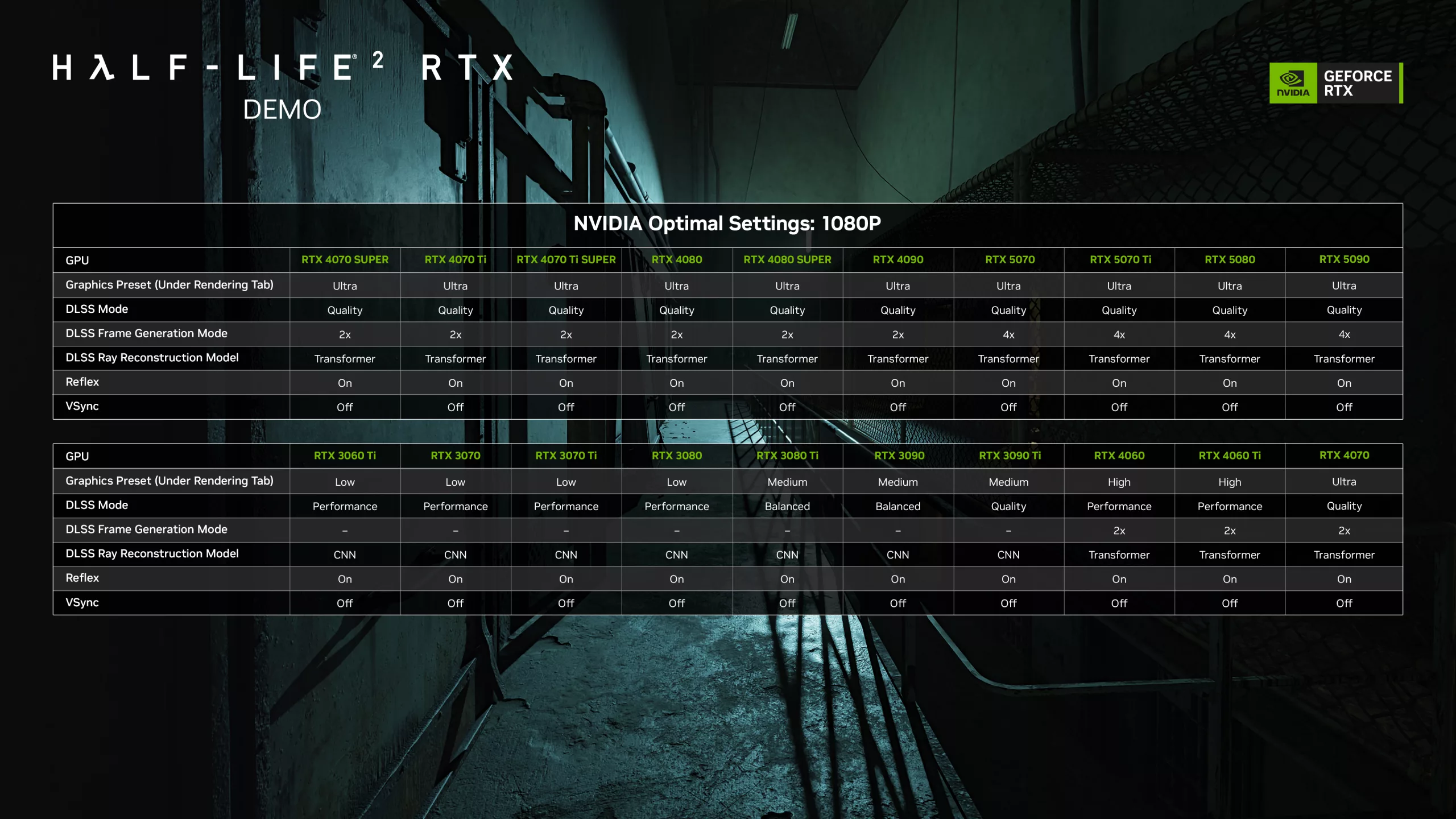
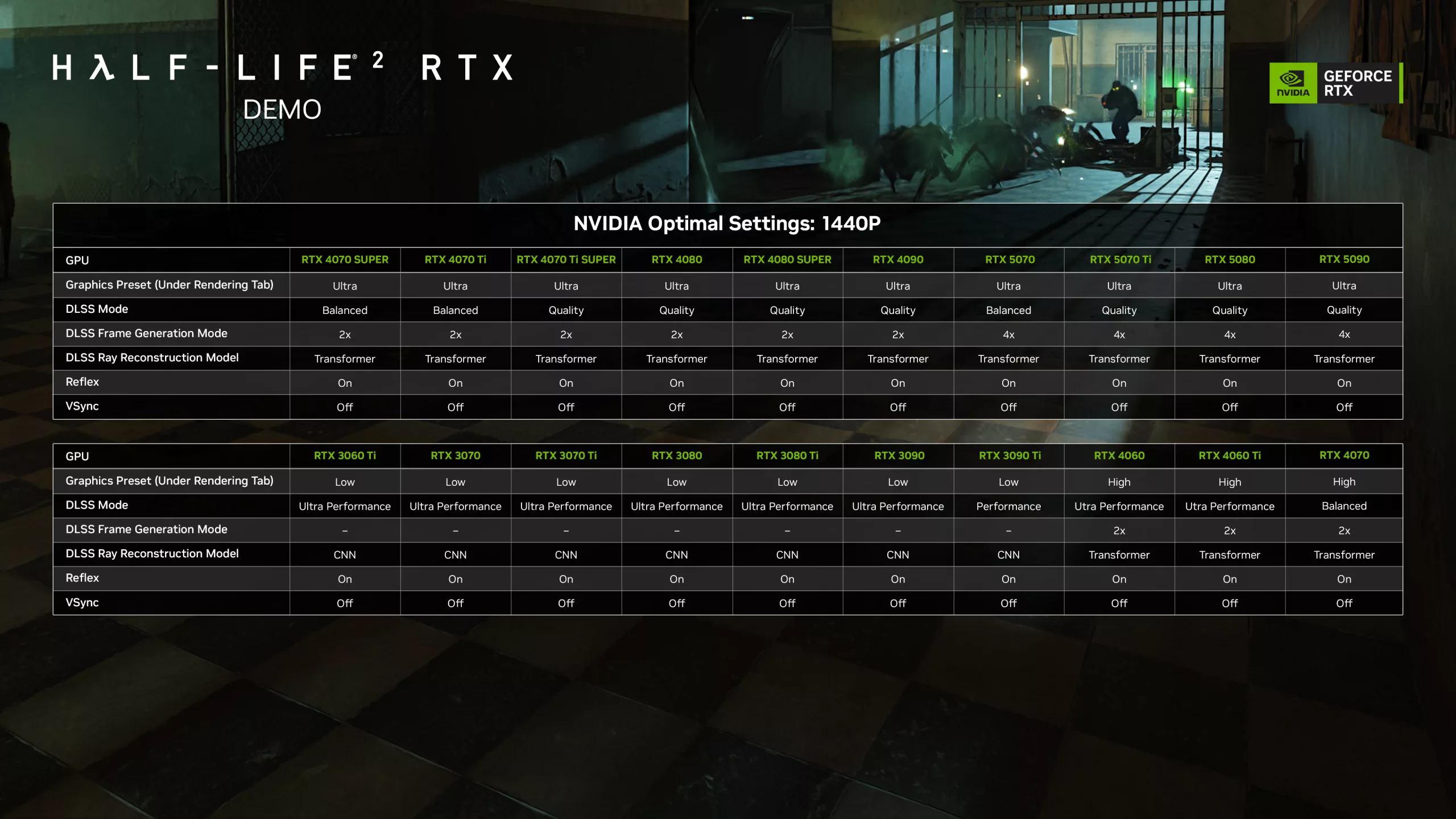
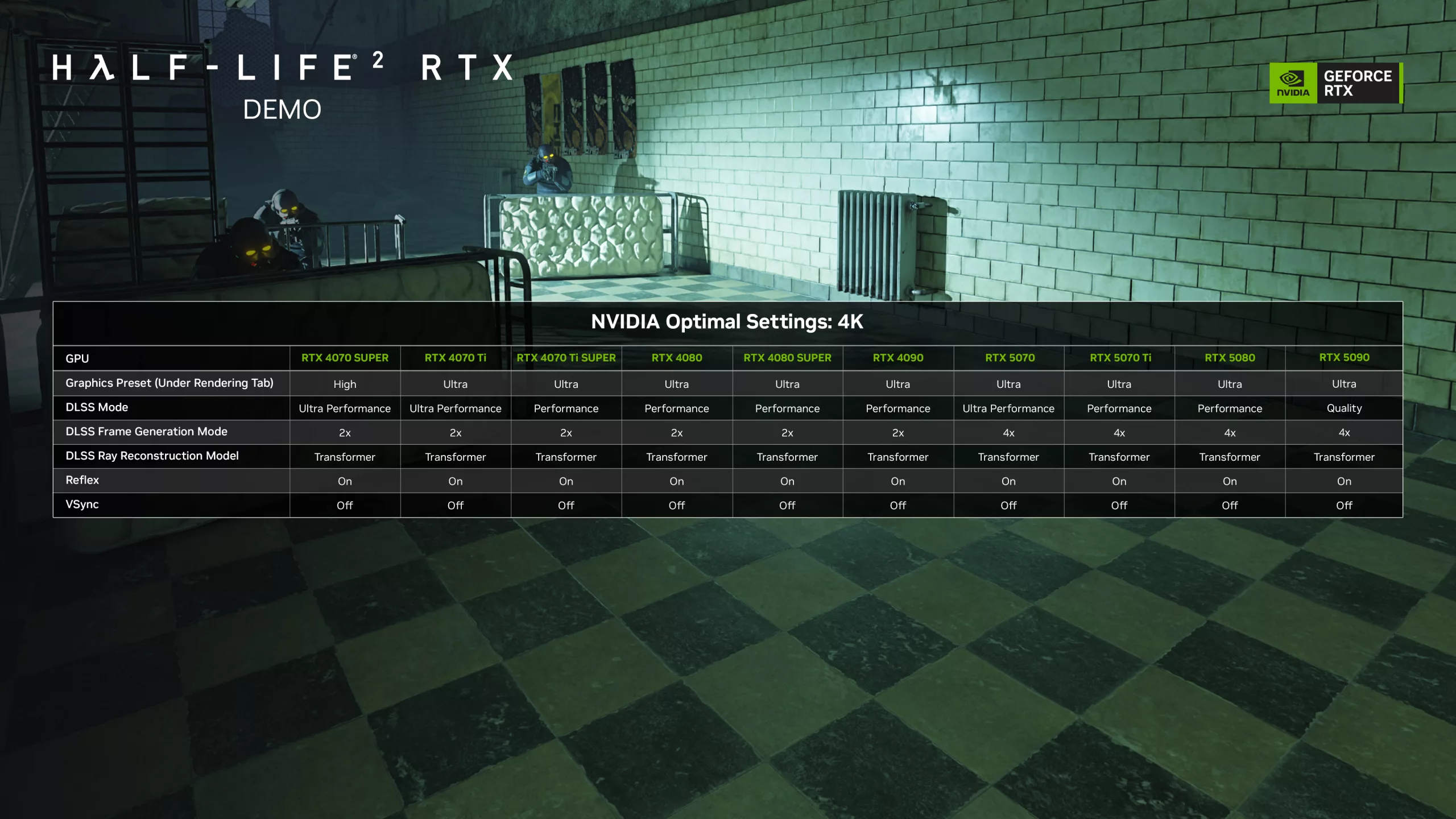
User reviews on Steam are currently understandably mixed given the demanding nature of the demo. Odds are probable there will be optimization updates to help ease the pains of struggling graphics cards but much like other RTX remix projects this one too has been made to push the envelope with ray tracing effects and technology.
Known issues:
- Build size reads as 82.8 GB~, but is only 41.4 GB on disk
- Steam Hotkey for Screenshots (F12) will crash Half-Life 2 RTX. We recommend using NVIDIA app’s Alt+F1 screenshot feature, NVIDIA app’s Alt+F9 video recording feature, or OBS “Display Capture” to take screenshots and video.
- When Desktop Capture is active in NVIDIA app’s settings (Alt+Z –> settings cog –> Video capture) video recording can at times cease working in the Half-Life 2 RTX demo, requiring users to restart the demo. To prevent this, please disable Desktop Capture in NVIDIA app’s settings.
- Blood splatters from bullet impacts are unreplaced/low resolution.
- Father Grigori’s eyes occasionally face away from the player.
- Father Grigori occasionally will not throw the player the shotgun in d1_town_02. If this occurs, please reload a save from before exiting to the rooftop.
- When using certain performance overlays alongside DLSS Frame Generation, crashes can occur
- AR2 secondary fire and suit battery assets have temporary placeholders
Discussion (16 replies)
Join Discussion →Alright, I bite. Valve did such a good job with Source engine that with the path-tracing added to it looks fantastic! Yeah steep hardware requirements but the details on the paint cans alone are just mesmerizing!
Well installed it and the latest NV driver and the game is totally crash happy when it comes to the menu or changing Alt-x settings. Looks great though when it's not crashing.
Last night my game froze ALOT. I was using 572.70 driver. So this morning realized there was a new driver.....played this AM smooth as silk. Using RTX 4090 with an AMD 5800X3D. I have settings at Ultra, DLSS Quality at 4K. The game looks amazing. It looks like a recent release or compared to some recent games, better! I also disabled background processes like Afterburner, GPUZ, etc. I am running nvidia frameview to look at performance. Later today I'm going to run the game on a new RTX 5070 I got for testing....well see what DLSS4 has to offer.
Ran the game with a RTX 5070 DLSS Quality, 3x FrameGen,Ultra settings. PC has a 9800X3D and 32 GB of memory@6000M/T. Game looks great but simply cannot run at 4K. Dialed down to 1440p and the game ran very well with 90sFPS registered on Frameview. Again the settings had 3x FrameGen in DLSS4 so.....anyway 5070 is OK as long as you don'tb run 4K, I suppose dialing down the Ray Tracing may allow 4K.....
A lot of eye candy but didn't really wow me as I thought it would. I also thought it would work my 5090 a little harder, but temps and wattage were fine.
My computer made it about 4 minutes in, before the keyboard decided to quit working (only in the game) and I had to kill the game. I figured it would be buggy, but solid keyboard support I would have thought would be more or less baked in by now...
Mine's still pretty crash-happy. Was playing it a bit yesterday, both at default settings and then some things tweaked to max in the alt-x menus and while it did look great, was still fairly unstable.
I have it installed but haven't even gotten around to updating the GPU drivers to try it out.
Well there is this to keep in mind https://wccftech.com/nvidia-gpu-driver-572-xx-is-reportedly-causing-serious-problems-for-rtx-40/
Totally aware about that one but I seem to be lucky in that regard. No issues whatsoever there. Nope this looks more like a typical Windows crash. game freezes, tap the mouse and screen goes white with a Windows notification that the program is not responding. Pretty frustrating on that level, happens a lot, and so far I haven't been able to narrow down a pattern. Atm, I've only tested this on my 4090 rig but with the GPU underclocked, default clocks, or OCd and it hasn't made a difference.
Otherwise, everything else is performing as it always has.
I was getting some random crashes with my AMD card, driver crash game crash... since I rebuilt knock on wood it's been much MUCH better. :)
My rigs are pretty rock solid as well so usually if something comes up and I have a decent idea of where to look so I'm really leaning towards the game exe on this one and not driver, yet. Driver crashes for me usually are indicated with something mentioning the driver or DX/display device but what I'm getting seems more like the game and Windows not getting along. At some point this week I'll put it on my laptop which has an Intel CPU and we'll see how that goes. Maybe the game doesn't like 5800X3Ds. It's been a little while (maybe 3-6 months) since I last updated motherboard BIOS/firmware.
Last week I was able to put in around 30 minutes with it on my laptop and it was even more crash happy than the 4090 rig. Again, every up to date so not really sure why. When it ran, it ran great but could barely get to the main menu let alone play.
However, a success story, tested it on the 4080 SUPER rig yesterday and played for about an hour before it crashed. Was a able to play first time loading too which is a first for all three rigs. Loving the graphics though.
[URL unfurl="true"]https://store.steampowered.com/news/app/2477290/view/530968239863236628?l=english[/URL]
"Our latest update fixes some scenarios where users were experiencing crashes..."
"We are investigating an issue where some game overlays can cause crashes when used with the Half-Life 2 RTX Demo. We recommend disabling overlays before starting the demo, but can confirm players looking to measure performance can use FrameView without risking a crash."
"Some players are reporting a crash during the first-time they start the game, due to issues with shader compilation. If you experience this, please start the game again."
"Steam Hotkey for Screenshots (F12) will crash Half-Life 2 RTX. We recommend using NVIDIA app’s Alt+F1 screenshot feature, NVIDIA app’s Alt+F9 video recording feature, or OBS 'Display Capture' to take screenshots and video."
Also saw they posted this: https://store.steampowered.com/news/app/2477290/view/536596558933657279?l=english
My poor 3090...
"Thanks for playing the Half-Life 2 RTX demo and sharing your feedback. It has given our mod team a lot of insight on what we should change for the final release."
"We released the Half-Life 2 RTX Demo as a way to get feedback from the community early to build the best remaster we can–we thank you for taking the time to play it, and letting us know what you want to see from Half-Life 2 RTX."
Other than crashing, I was enjoying the game when I could play it. Looking forward to trying again this weekend.
Edit: The only overlay I had was MSI AB. I'll turn it off in my next round.
Yep, MSI AB was the culprit. Enabled my GPU settings and closed and then everything was fine. Had a blast completeing the first chapter this weekend. Game looks incredible and was able to enjoy on all three rigs. Can't way to play the second chapter this weekend and waiting for the full release.