
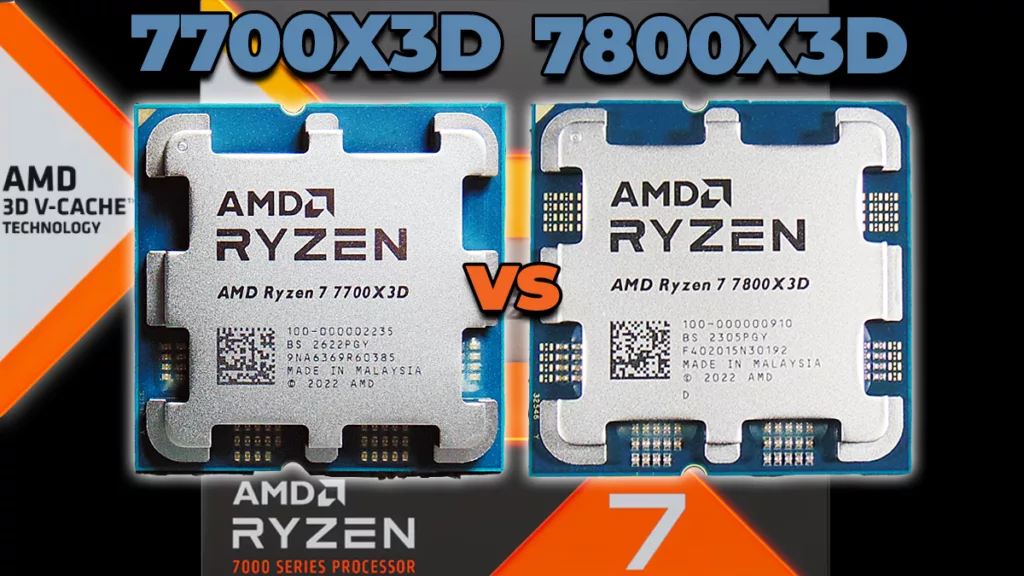
AMD quietly filled in a gap in its own back catalog by not sending out review samples to any outlet, so we went out and bought one to see the how it performs. The result is the most interesting value question on AM5 right now: we bought a retail Ryzen 7 7700X3D, ran it against the 7800X3D, and the gap in games is small enough that the $120 price difference does most of the talking. Elsewhere the week belonged to boards and chassis, with two ASUS X870E refreshes landing 48 hours apart, a genuinely strange partitioned Phanteks case earning an award, and GamersNexus declining to recommend Fractal’s newest enclosure over Fractal’s older ones.
AMD Ryzen 7 7700X3D vs Ryzen 7 7800X3D
Written reviews:
- The FPS Review: https://www.thefpsreview.com/2026/09/07/amd-ryzen-7-7700x3d-vs-ryzen-7-7800x3d-cpu-review/
Consensus summary: We bought a retail Ryzen 7 7700X3D rather than taking a sample (Ed: You mean, AMD sampled nobody on this one so we had to buy it if we wanted to review it?) and ran it head to head against the 7800X3D. The two chips are the same part apart from clocks: 8 cores and 16 threads, Zen 4, 96MB of 3D V-Cache, a 120W TDP and a 162W PPT on both, with the 7700X3D dropping to a 4GHz base and 4.5GHz boost against the 7800X3D’s 4.2GHz and 5GHz. In non-gaming work the 7700X3D runs roughly 5 to 7 percent behind in both single and multi-core. In games the gap often vanishes, with average frame rate differences as low as 1 percent and a ceiling around 4 to 7 percent depending on title and settings. The 1 percent lows showed the widest spread, up to about 8 percent at worst and near parity at best. Against a $329 MSRP versus the 7800X3D’s $449 launch price, that is a 27 percent discount for a difference most players will never notice while actually playing.
FPS Review take: This is the first in a series, with non-X3D comparisons and a full standalone review still to come, so read it as the gaming half of the picture rather than the final word. AMD keeps backfilling older sockets with new SKUs, and a Zen 4 X3D part launching in the middle of the Zen 5 era is a longevity signal worth weighing if you are deciding whether to build on AM5 now. If you are looking one generation up instead, our Ryzen 7 9850X3D vs Ryzen 7 7800X3D gaming comparison asks the same question about the newer chip.
Alienware AW3926QW
Written reviews:
- TechSpot: https://www.techspot.com/review/3166-dell-alienware-aw3926qw/
- TechRadar: https://www.techradar.com/computing/monitors/alienware-aw3926qw
- Tom’s Hardware: https://www.tomshardware.com/monitors/gaming-monitors/alienware-aw3926qw-39-inch-wuhd-oled-gaming-monitor-review
- PC Gamer: https://www.pcgamer.com/hardware/gaming-monitors/alienware-aw3926qw-review/
Video reviews:
- The Display Guy: https://www.youtube.com/watch?v=BKSKfHnnBLU
- TFTCentral: https://www.youtube.com/watch?v=fKbs-_nR2fI
Consensus summary: The second wave of testing has landed on this one, and it reads as a harder sell on refresh rate and an easier one on everything else. TechSpot, arriving two weeks behind the initial wave, concludes this is the 39-inch OLED to buy. TechRadar’s angle is the price gap: the only other 39-inch 5K2K OLED currently available, LG’s UltraGear Evo GX9, sits at $1,799 against Alienware’s $1,099, which makes a $1,099 OLED look like a bargain in a category that has never had one. The consistent reservation is the 165 Hz ceiling, which looks like a step backward next to 240 Hz 32-inch 4K panels, though reviewers keep landing on the same rebuttal: 5,120 by 2,160 is enough GPU load that few systems will ever approach it, and the dual-mode options reach 330 Hz at lower resolutions for anyone who insists.
FPS Review take: The thing worth carrying forward is not the monitor, it is the RGB-stripe subpixel layout on a WOLED panel, which is the change that finally makes a large OLED tolerable for text work and is the spec to look for from here on. Be honest about the GPU bill before you get excited, because 5K2K is roughly 4K plus a third.
Koorui G2741L
Written reviews:
Consensus summary: PC Gamer scored it 85 and treats it as a legitimately cheap route into 4K: a 27-inch IPS panel at 3,840 by 2,160, dual-mode with 160 Hz at 4K and 320 Hz at 1080p, 400 nits, HDR400, 95 percent DCI-P3 and 100 percent sRGB, for $350 or £290. The compromises land where you would expect, with no speakers, no USB and IPS blacks that are not black, but the panel is described as punchy with HDR enabled and the color accuracy is rated well above what the price suggests. The real reservation is external: OLED has come down far enough that PC Gamer flags it as the competition at nearly the same money, and the dual-mode switch means scrolling a single-button menu rather than hitting a dedicated toggle.
FPS Review take: Useful as the other end of the display market in the same week, because it makes the actual decision visible: $350 for 4K at 160 Hz, or roughly triple that for the OLED experience. For anyone running a mid-range card, the 1080p 320 Hz mode is the more honest half of the dual-mode pitch anyway.
ASUS ROG Strix X870E-E and X870E-A Gaming WiFi7 NEO
Written reviews:
- Overclockers.com (X870E-E): https://www.overclockers.com/asus-rog-strix-x870e-e-gaming-wifi7-neo-motherboard-review/
- Overclockers.com (X870E-A): https://www.overclockers.com/asus-rog-strix-x870e-a-gaming-wifi7-neo-motherboard-review/
Consensus summary: Overclockers.com tested both NEO refreshes two days apart and handed each its Approved stamp. The X870E-A carries a 16+2+2 power design at $465.99 and is called well balanced for gamers, with the reviewer’s position being that the $50 to $70 premium over rival boards is worth paying if you keep hardware for a long time. The X870E-E steps up to 18+2+2, five M.2 sockets, 5 Gbps LAN and the ALC4080 codec at $559.99, and the review is blunt that price is its only real flaw, since most users will not perceive what the extra money buys. Both boards trained memory to at least 9600 MT/s with current AMD APUs, ran without stability or compatibility trouble under load and overclocking, and handled ARGB across mixed-brand fans and modules through Armoury Crate.
FPS Review take: The gap between the two is the cleanest illustration this week of how X870E pricing actually works: nearly $100 separates them and the difference is a handful of power phases and connectivity that most AM5 builds never touch. If you are shopping this tier, our ASRock X870E Challenger WiFi review shows what the same chipset looks like when a vendor targets value instead, and our GIGABYTE X870E AERO X3D DARK WOOD review covers the opposite end of the aesthetic argument.
ASRock B860 Challenger Wi-Fi
Written reviews:
- TechPowerUp: https://www.techpowerup.com/review/asrock-b860-challenger-wi-fi/
- TweakTown: https://www.tweaktown.com/reviews/11590/asrock-b860-challenger-wi-fi-an-entry-level-challenger/index.html
- Wccftech (White variant): https://wccftech.com/review/asrock-b860-challenger-wifi-white-motherboard-review-budget-friendly-intel-200s-plus-ready/
- FunkyKit (White variant): https://www.funkykit.com/reviews/motherboards/asrock-b860-challenger-wifi-white-motherboard-review/
Consensus summary: Everyone lands in the same place on positioning: this is the entry rung of the LGA 1851 ladder, judged on whether a budget B860 board is enough for Arrow Lake and the newer 200S Plus parts rather than on any performance claim. The platform frames the trade-offs, with the B860 chipset contributing up to 14 PCIe 4.0 lanes, native DDR5-6400 support with XMP headroom past 8000 MT/s, and up to 192GB across two slots. Wccftech’s verdict on the White variant is that it is budget-friendly and 200S Plus ready.
FPS Review take: Challenger remains ASRock’s most consistently sensible line, and we have covered both sides of the split: our ASRock X870E Challenger WiFi review on the AMD side, and our MSI MPG B860I EDGE TI WIFI review for what B860 looks like when the budget goes up. Worth remembering that LGA 1851 takes LGA 1700 coolers, though some need an offset kit for proper mounting pressure.
Phanteks EX5 Max
Written reviews:
Consensus summary: SweClockers gave the EX5 Max its Excellent award and treats the compartmentalised layout as the actual product rather than a gimmick: the thermal zones largely deliver what Phanteks claims, falling short only in extreme scenarios, with the caveat that the GPU still leaks heat into the radiator path. The chassis is described as solid yet light because so much metal has been cut away, roomy and easy to build in, and generous for the money at 2,599 SEK (Ed: That’s 268 Yankee-bucks, did you ask about VAT?). The fans are the weak point, fine at normal speeds but unpleasant near maximum RPM where they begin to sing at certain frequencies, which is fixable with Fan Control or similar software. The screen that separates the Max from the EX5 Plus left no meaningful impression beyond the price, and going past the standard configuration takes more screws than it should. Removable dust filters are missing.
FPS Review take: The most interesting case of the week precisely because it divides people, and the honest reading of that review is that the Max premium buys a display the reviewer could not find a use for. Get the Plus and spend the difference on fans you will actually be willing to run at full tilt.
Fractal Design Summit
Written reviews:
- GamersNexus: https://gamersnexus.net/cases/fractal-summit-case-review-thermal-benchmarks-noise-cable-management
- TechPowerUp: https://www.techpowerup.com/review/fractal-design-summit-ambience-blackout-tg/
- SweClockers: https://www.sweclockers.com/artikel/43082-fractal-design-summit-hoga-berg-och-djupa-dalar
Video reviews:
- Gamers Nexus: https://www.youtube.com/watch?v=yEb_4Y58jaY
Consensus summary: GamersNexus could not recommend the Summit over its competition for anything other than its appearance, finding that it does nothing exceptional internally and does not beat Fractal’s own previous bests. GPU thermals were the sticking point, with the Antec Flux Pro averaging 38 degrees over ambient and the Meshify 3 managing 41, both ahead of the Summit. The value case is where it comes apart: the top Summit is $200, while the Meshify 3 uses the same fans, cools better and starts around $155, the Ambience Pro RGB was discounted below the Summit at the time of writing, and the North XL, Lian Li Lancool 217 and Antec Flux Pro all undercut it while shipping large stock fan counts.
FPS Review take: GamersNexus names the Lancool 217 as one of the alternatives, and we reviewed the walnut wood version if you want to see what that money buys instead. Fractal is not making bad cases here, it is making more expensive versions of cases it already sells, which is a harder problem to fix than a thermal deficit.
Antec Flux Rear
Written reviews:
Video reviews:
- KitGuru Tech: https://www.youtube.com/watch?v=Ep7kQAg0glw
Consensus summary: KitGuru scored the Flux Rear 7.5 out of 10 and landed on competent rather than compelling. The reverse-fan layout moves air effectively and the case ships with five fans, so a CPU cooler is the only thing left to buy, while the tool-free design and decent cable access make the build easy. Build quality was called marginal and the absence of a PWM fan hub was flagged as an obvious omission. The closing verdict is that it does a reasonable job for £85 (Ed: That’s 115 Yankee-bucks) without doing anything memorable enough to score higher.
FPS Review take: Five fans in the box at £85 is a real answer to the current state of fan pricing, and a reverse-mount layout is exactly the sort of thing worth trying when the airflow budget is tight. Go in knowing the chassis is aiming at adequate rather than excellent.
Fractal Design Refine 2
Written reviews:
- Tom’s Hardware: https://www.tomshardware.com/peripherals/gaming-chairs/fractal-design-refine-2-review
- TechPowerUp: https://www.techpowerup.com/review/fractal-design-refine-2/
- APH Networks: https://aphnetworks.com/reviews/fractal-design-refine-2-fabric-dark
- PC Perspective: https://pcper.com/2026/09/fractal-refine-2-gaming-chair-review-ergonomic-luxury/
- CGMagazine: https://www.cgmagonline.com/review/hardware/fractal-refine-2-chair-review/
Video reviews:
- Ahnestly: https://www.youtube.com/watch?v=2BV2eV1GBAY
- Modders Inc Tech Reviews: https://www.youtube.com/watch?v=HNsWNCDapMA
Consensus summary: The verdicts split between enthusiasm and shrug. PC Perspective frames it as ergonomic luxury and TechPowerUp calls it nearly perfect while questioning the price, but Tom’s Hardware supplies the useful dissent: Fractal clearly acted on feedback from the original Refine, yet the changes are minor enough that existing owners have no reason to upgrade. Where Tom’s does endorse it is positioning, calling the $640 Refine 2 a genuine midpoint between racing-style chairs like SecretLab’s Titan Evo NanoGen and pricier task chairs like Steelcase’s Karman, with a price to match. The recurring practical note across reviews is that tilt behaviour depends heavily on the sitter’s height and weight.
FPS Review take: Not our usual beat even though we’ve reviewed, uhh, one chair over the years, but it was one of the three most-reviewed products of the week. If your chair budget has drifted toward office-furniture money anyway, the comparison worth making is against a used task chair rather than against another gaming chair.
ASUS ROG Azoth Extreme Edition 20
Written reviews:
Consensus summary: Igor’s Lab ran the ROG anniversary board through the site’s full measurement routine and came away positive with one asterisk. On correctness it is spotless: 100 percent key coverage and rollover, no ghosting or chattering across the base matrix, modifiers, WASD and arrow clusters, for an overall score of 97.9 points. On speed it is mid-pack rather than elite, averaging 15.2 ms end to end wired at 1,000 Hz and 15.6 ms with 8,000 Hz polling on the dongle, with the adapter and standard dongle configurations between 16.9 and 17.9 ms. Another observation is that latency stayed consistent across every connection mode tested, and the review also covers how the acoustics shift with a Keebmat, alternate switches and different keycap sets.
FPS Review take: Consistency across wired, dongle and 8K polling beats a headline latency figure, and this board behaves the same wherever you plug it in. If you are buying a gold-accented anniversary keyboard, you were never shopping on milliseconds.
MSI FORGE GM340 Wireless and FORGE GK600 TKL Wireless MARS
Written reviews:
- FunkyKit (GM340 mouse): https://www.funkykit.com/reviews/mice-keyboards/msi-forge-gm340-wireless-mouse-review/
- FunkyKit (GK600 TKL MARS keyboard): https://www.funkykit.com/reviews/mice-keyboards/msi-forge-gk600-tkl-wireless-mars-special-edition-keyboard-review/
Consensus summary: FunkyKit ran both halves of MSI’s budget FORGE line through back-to-back reviews and came away positive on both. The GM340 is a 57g ambidextrous mouse with a PAW3311 sensor good for 12,000 DPI, switches rated to 50 million clicks, up to 82 hours of battery, and tri-mode connectivity across SWIFTSPEED 2.4GHz, Bluetooth and USB-C, at $39.99. The review makes a point of the restraint: the only RGB is a single LED near the scroll wheel indicating the DPI step, which keeps it usable at a desk that is not a gaming desk. The GK600 TKL Wireless MARS is the more interesting of the pair, a hot-swappable 5-pin linear board with PBT MARS-themed keycaps, multi-layer sound-dampening foam and silicone gaskets producing a muted thocky profile rather than a sharp click, a 1.06-inch info display, Windows and Mac compatibility and the same tri-mode connectivity, at around $74.99 against a $99.99 list. The reviewer notes no software is required, with everything configured through FN combinations on the board itself.
FPS Review take: Hot-swap sockets, gasket mounting and dampening foam at $75 is the part worth flagging, because those were enthusiast-tier features two years ago and they have now reached the budget shelf. The no-software configuration is the other quiet win: one fewer background utility is worth real money to anyone who has counted how many peripheral daemons are running on their machine.
PowerColor ALPHYN AM10 Wireless Gaming Mouse
Written reviews:
- The FPS Review: https://www.thefpsreview.com/2026/09/08/powercolor-alphyn-am10-wireless-gaming-mouse-review/
Consensus summary: We (Ed: Don’t you mean that you did this?) ran the AM10 as a daily driver for a week across work and gaming, wired and on 2.4GHz. The hardware has not changed since its February 2025 launch; the price has. PowerColor moved it to a permanent $49.99 MSRP from $99.99 and states this is not a promotion and has no end date. The PAW3395 sensor earns its place on a budget mouse, tracking cleanly with 26,000 DPI of headroom for anyone running high sensitivity, and the six buttons and shape disappeared across full work days. The one real omission is a free-wheel scroll mode, a genuine daily-use compromise on a mouse that will spend as much time in spreadsheets as in firefights, and a feature that lives one price tier up. Wired and 2.4GHz were indistinguishable in use.
FPS Review take: A rare case where a product is worth revisiting purely because of a price change: at $99.99 the AM10 was competing with Logitech and Razer at their strongest and lost that fight, and at $49.99 the comparison set is entirely different. A first-generation effort from a board partner is a much easier recommendation at half the money, and it lands in the same bracket as MSI’s FORGE pair above.
Discussion
Join Discussion →No replies yet. Be the first to reply on the forum.