
Test Setup
The GPU Test Bench and Benchmarking Refresher is located here.
Bench hardware is listed below. More information on our GPU testing can be found here.
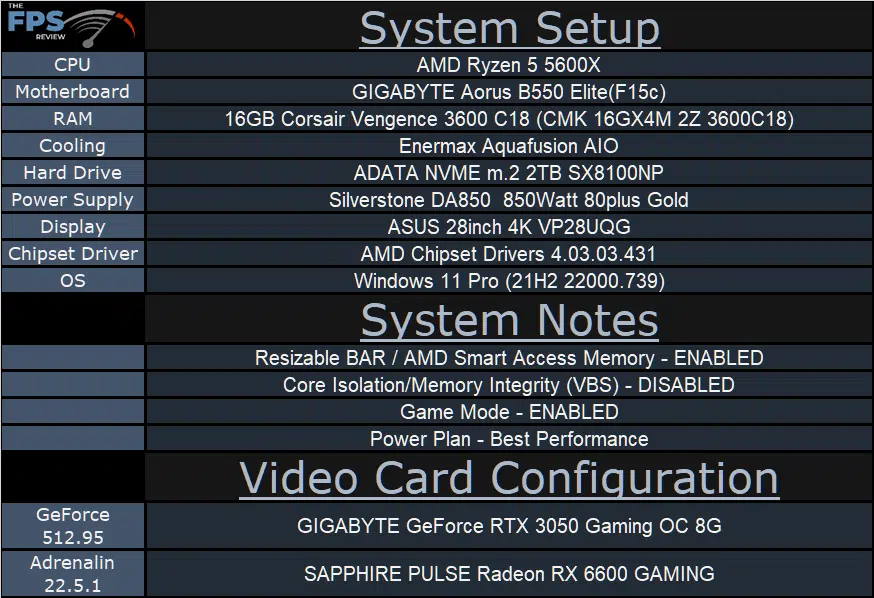
We are using the motherboard’s current default BIOS settings on the latest official release BIOS. We have enabled PCI-Express Resizable BAR in the motherboard BIOS. This means we are utilizing Resizable BAR on NVIDIA GPUs and AMD Smart Access Memory on AMD GPUs in all of our testing. We have enabled DOCP in the BIOS for the memory.
We are using a fresh install of Windows 11 Pro with the latest Windows Updates, and drivers installed including the latest chipset drivers from AMD. We are using the “Best Performance” power profile in Windows Settings. We have Hardware Accelerated GPU Scheduling at the default setting, which is ENABLED. VBS is DISABLED and Game Mode is ENABLED.
Discussion (2 replies)
Join Discussion →I use this card in my back up PC. Very impressed with gaming on a 3440 X 1440 monitor with some games at fairly high settings.
Thanks for the review @magoo! This looks like a great budget-friendly 1080p card that can deliver impressive results and even stretch a little bit into 1440p with a few compromises here and there.