
Test Setup
We will be utilizing our test system based on the 12900K CPU and the MSI MEG Z690 UNIFY motherboard to test memory today.
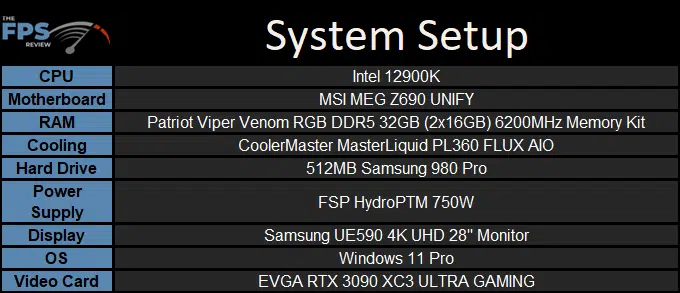
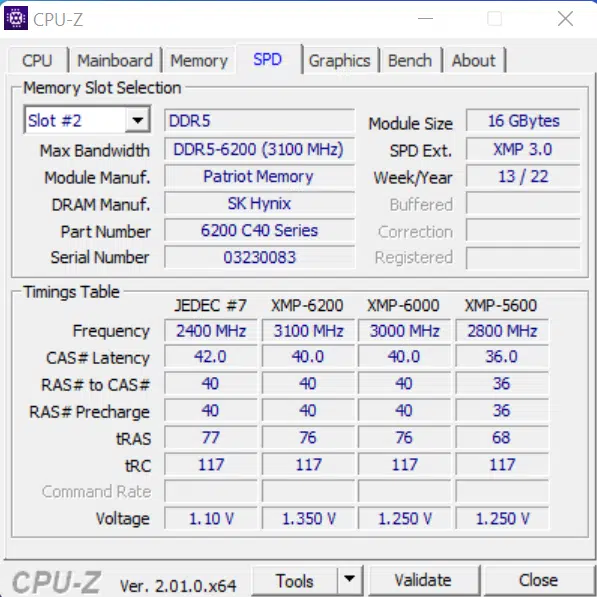
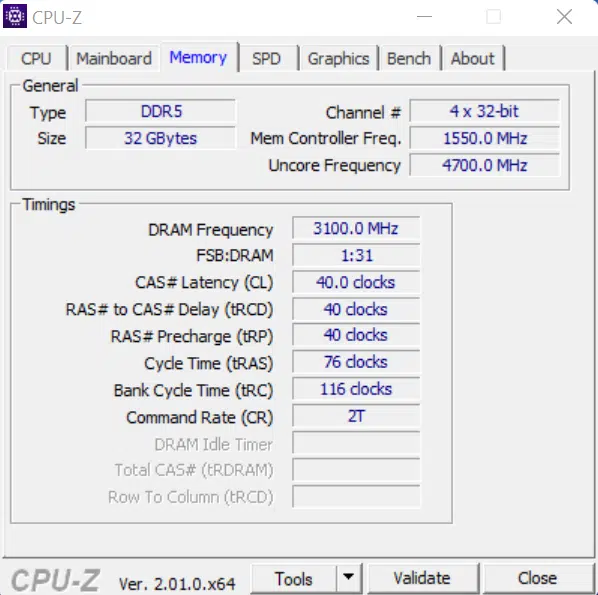
Our testing will include looking at the Patriot Viper Venom RGB DDR5 32GB (2x16GB) 6200MHz in its default (4800MHz) and XMP (6200MHz) configurations and comparing them to a 32GB set of CORSAIR DOMINATOR PLATINUM RGB modules that clock in at 5600MHz sporting timings of 36-36-36-76 which will give us an interesting contrast to see how much the latency plays into performance on this platform.
Overclocking
The brief word on overclocking on these modules is that they were quite uncooperative with us. We pulled various levers to see if we could draw just a little more performance out of them, but going even one notch higher on memory speed (to 6400MHz) or tightening the timings just a hare (to CL36 or CL38) had the modules raising their middle fingers in our general direction.
Discussion (5 replies)
Join Discussion →Ohhhh.. DDR5 reviews... Just in time for gaining knowledge on what to get when AM5 / Zen4 stuff starts rolling out. I've been reading that CL isn't the end-all-be-all value to OC on with DDR5. CL40 is faster than CL36, as the frequency gains (6200 @ CL40 vs 5600 @ CL36) outweigh the latency.
Buildzoid has a great video on the subject: [embedded media]
BuildZoid's video certainly is informative, and it's also important to mention that it's not just the frequency gains, but also being able to tighten all of the timings that come after the '6200-40-40-40' primaries.
It's also worth mentioning that DDR5 is currently very strongly stratified by manufacturer, and if looking to push performance, out of Micron, Samsung, and Hynix, one should try to find modules with Hynix DRAM ICs if at all possible. Additionally, I'd recommend paying attention to module cooling if pushing performance as well!
Well, as with prior generations, Intel vs AMD platform architecture will probably make a difference here in performance. If you go back to the DDR1 days looking at the Athlon vs P4 Northwoods, the former cared a LOT about latency while the latter did not. Thus, I wouldn't extrapolate the observed performance generalities on Alder Lake to Zen4 until testing is done.
My extrapolation is: it depends on how much L3 cache is available and how well it's implemented. DDR5 in it's best implementations is already "I win" levels of performance.
I just wanted to support Space_Ranger's suggestion of watching the Buildzoid video. I watched it when it came out, very informative. The general rule of thumb with DDR5 moving forward is going to be for more MT/s, but as David suggested, how much these things affect Intel vs AMD platform can be different.