
Synthetic Benchmarks
PCMark 10
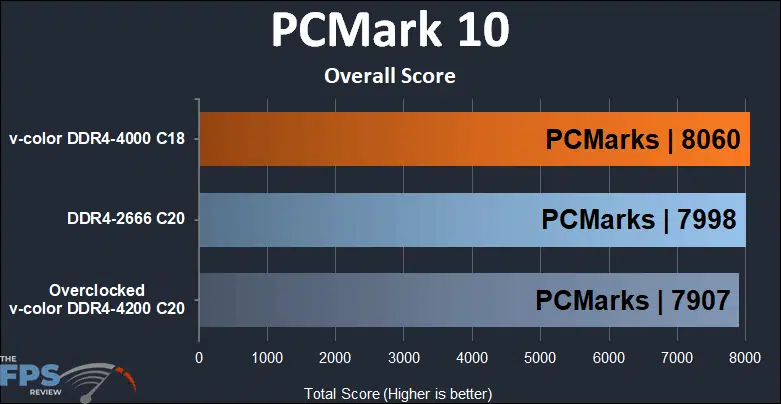
Starting off the benchmarking ceremonies, we begin to see that the stock clocked Skywalker Plus DDR4 64GB (2x32GB) 4000MHz Memory takes the lead by less than 1% over the base DDR4 clock speeds and a 2% lead above overclocking itself.
Geekbench 5 (Multicore)
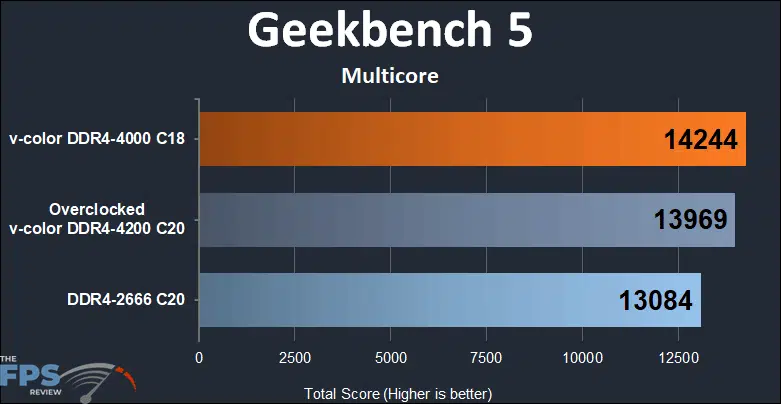
Moving on to Geekbench 5’s multicore test, we see the Skywalker Plus DDR4 64GB (2x32GB) 4000MHz Memory pull out a win at its stock configuration over the base DDR4 speeds and the overclocked version of itself.
Geekbench 5 (Single Core)
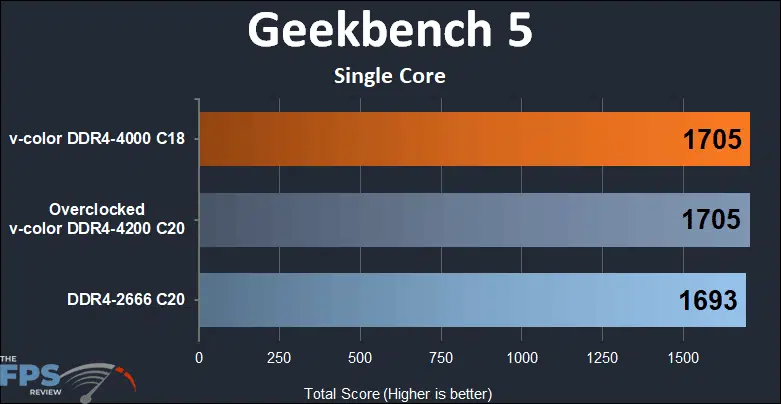
Dropping down to the single core Geekbench 5 test, we see the Skywalker Plus DDR4 64GB (2x32GB) 4000MHz Memory tie itself when overclocked, both running a fraction faster than the base DDR4 speeds.
AIDA64 Memory Read
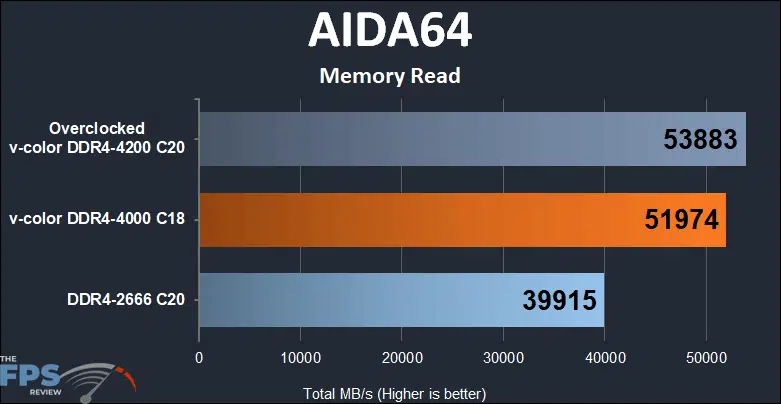
Looking at pure memory read speed, the Overclocked Skywalker Plus DDR4 64GB (2x32GB) 4000MHz Memory predictably comes out on top, showing a 35% boost over the base DDR4 clocks.
AIDA64 Memory Write
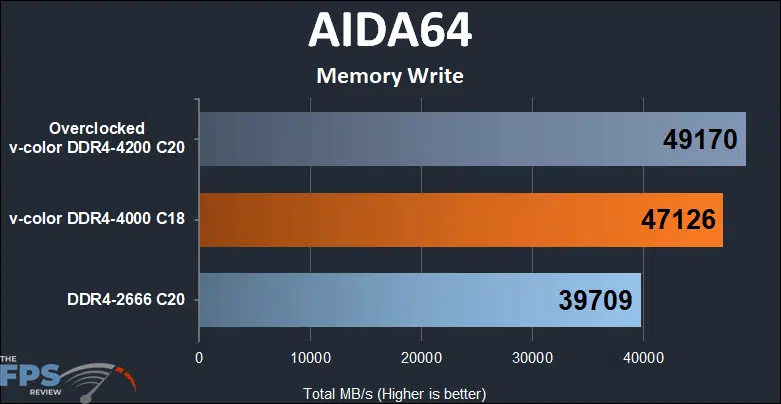
On the AIDA64 memory writing side of things, we see the Overclocked Skywalker Plus DDR4 64GB (2x32GB) 4000MHz Memory produce a 23.8% gain over the base DDR4.
AIDA64CPU Queen
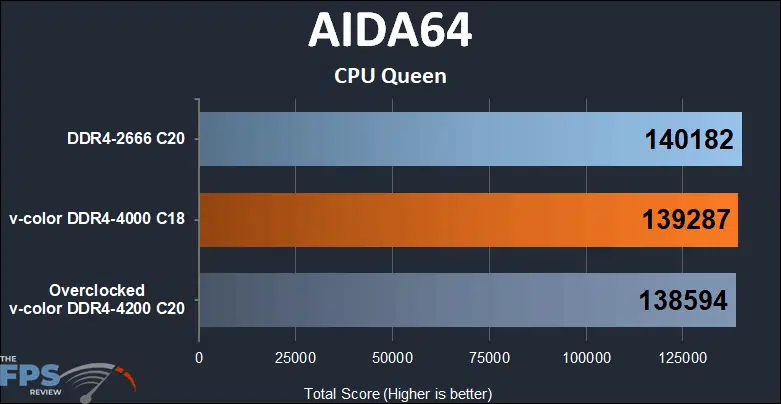
With AIDA64’s CPU queen, we are starting to see where having a synchronized infinity fabric starts to make a difference in performance with the base DDR4-2666 configuration tarring and feathering the Skywalker Plus DDR4 64GB (2x32GB) 4000MHz Memory.
AIDA64 SHA3
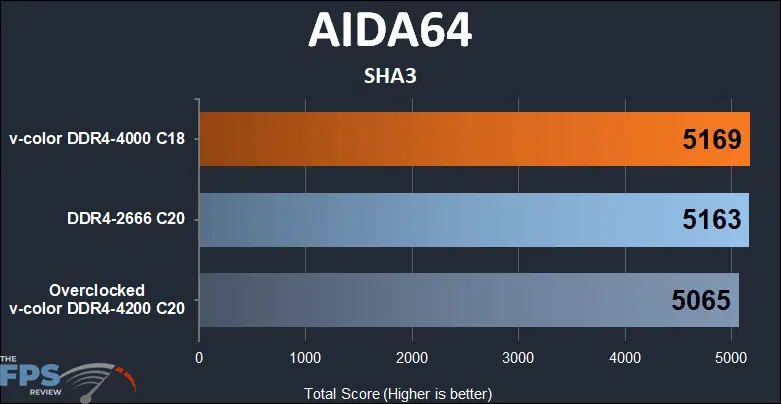
With the AIDA64 SHA3 test, we see just an academic difference between the Skywalker Plus DDR4 64GB (2x32GB) 4000MHz Memory and the base DDR4-2666. Overclocking shaved a couple of percent off its performance, likely again due to the infinity fabric synchronization.
CineBench R23 (Multi Core)
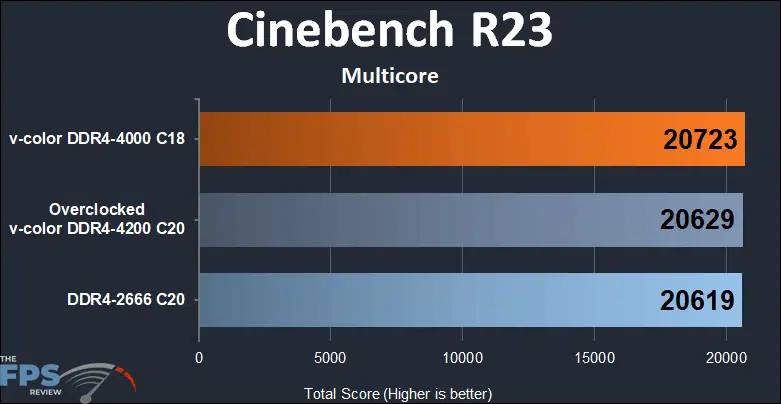
In Cinebench R23’s multicore test, the Skywalker Plus DDR4 64GB (2x32GB) 4000MHz Memory at stock turns in a slightly faster score than the overclocked value. The base clocked DDR4-2666 slips into last place by a rounding error.
CineBench R23 (Single Core)
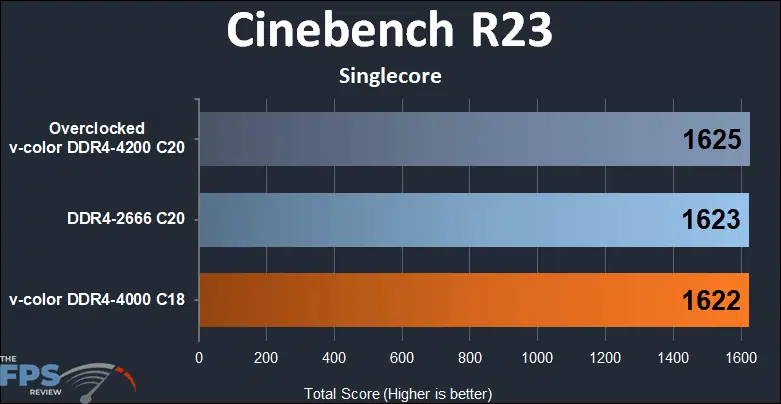
In Cinebench R23’s single-core test, across the board, we have what we would call an academic tie. A difference of 3 points on a scale of 1625 could be attributed to the reviewer yawning at different times during the test.
Blender Monster
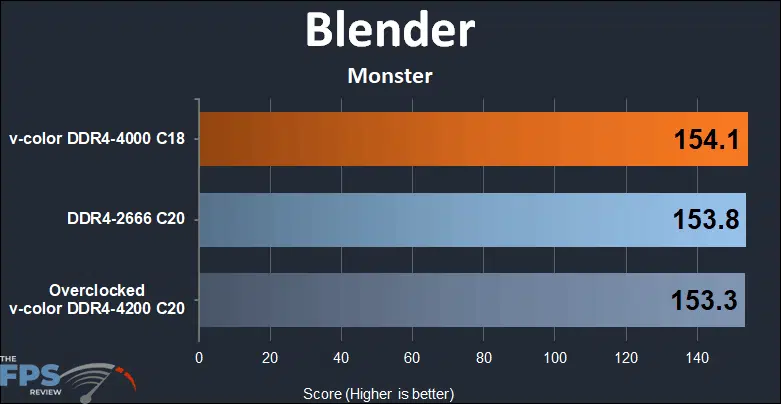
Getting the Blender out for its Monster test, we again find the Skywalker Plus DDR4 64GB (2x32GB) 4000MHz Memory in the lead by a rounding error over the base clocked DDR4-2666 and itself when overclocked.
Blender Classroom
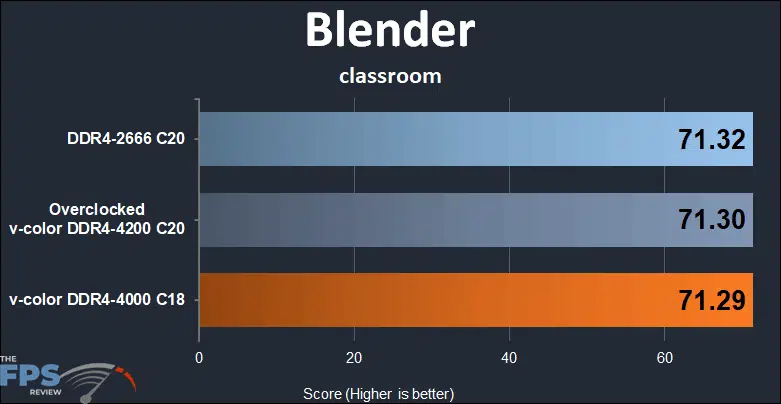
Blender’s classroom *appears* to shake things up a bit, but we’re talking about getting the hundredth’s place involved to even determine if there was a difference in score.
Blender Junkshop
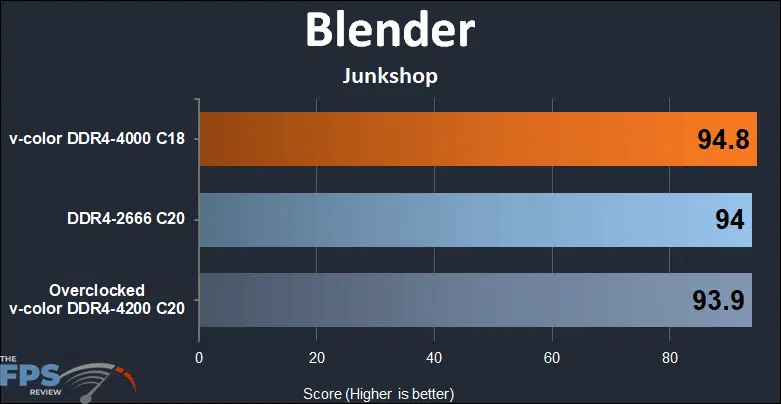
Moving on to Blender’s Junkshop, we see a 1% difference between the configurations.
VRay 5
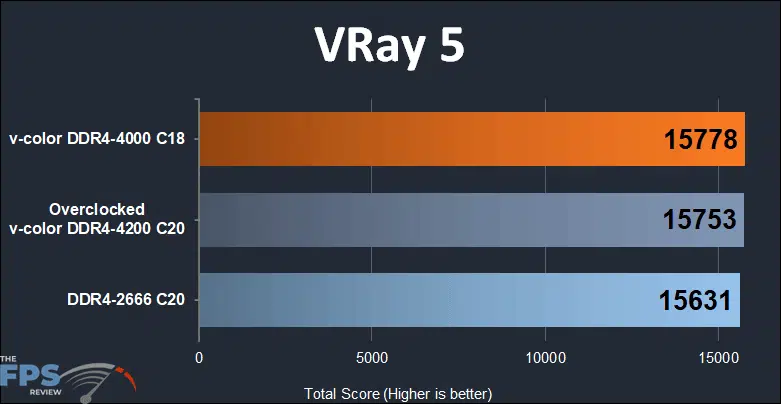
To round out the synthetic testing, VRay 5 puts another victory in the hands of the Skywalker Plus DDR4 64GB (2x32GB) 4000MHz Memory over its overclocked self and the base configured memory.
Discussion (4 replies)
Join Discussion →Nice writeup. You need a new mousepad for the photos - the scratches/marks on that one is detracting.
I can't really get a grasp of what these modules look like. In the photos on the mousepad, they look matte black with just a plain top. Installed it looks like a mirrored finish? The box has rainbows on it, and you mention the RGB pattern on the box, and the company name is v-color, so you might make an assumption that RGB is there (I mean, what doesn't have it anymore?) but it isn't clear if the modules have RGB along the top edge or not -- there's no mention, and it doesn't seem to appear in the photo. You do mention they are highly polished, so I can imagine the photography was difficult.
The modules look drastically different on their web site photos:
And the elephant in the room - it says Skywalker, but is there actually a Star Wars tie-in or something?
On their web site they offer custom engraving on the face of the heatsinks. That could be fun.
Hmm. Good point. I only mentioned the lack of RGB in the conclusion page, probably should have on first page (ahem.. may see that edit shortly).
On the photography side, there's a few color options - we have the silver ones and it is like photographing a mirror. So much so, you'll see that the "etching" on the v-color stock photos have the words and part numbers photoshopped in as opposed to attempting to take a picture of the etching. Take a look at either the installation or conclusion page (same picture) and you'll see the mirrored reflection of the motherboard's power connectors on the side of the memory. Ugh on the pad though - it's a lightbox and black plastic seems to scuff very very easily. Sigh.
The photography isn't bad - just hard to get an idea of what that product looks like. It's a challenging piece of equipment to portray accurately.
Believe it or not, taking a picture of the product outside might actually work well. I've often found outdoor shots can look very good due to the global illumination factor. Try a both in the sunlight picture, and one in the shade, and see what looks the best, might work well for shiny objects.