
Synthetic System Benchmarks
We are going to start with synthetic system application benchmarks on this page. Gaming performance will be shown later on. Note that the graphs are arranged from fastest to slowest and contain all the CPUs on each graph for a large comparison. The Ryzen 5 7600X is highlighted in orange.
PCMark 10
Standard PCMark Benchmark

In PCMark 10 the Ryzen 5 7600X is near the top of the stack, coming in right under the Core i9-12900K, and even beats the Core i7-12700K and Ryzen 9 5950X. It’s 17% better than the AMD Ryzen 5 5600X, so that’s an improvement over the last generation.
PCMark Application Benchmark

In this graph, we are looking at PCMark 10’s Applications Benchmark. This test is very specific, it tests the performance of Microsoft Office, using Excel, Word, PowerPoint, and even Edge. We are using Microsoft Office 2021 for these tests. The new Ryzen 5 7600X is at the top of the charts here, coming in only second to the new 7900X. It beats the Core i9-12900K and Ryzen 9 5950X. Compared to the last generation Ryzen 5 5600X it’s a 25% performance improvement.
Geekbench 5

In Geekbench 5 Multi-Core benchmark the new Ryzen 5 7600X is sitting above the Ryzen 7 5800X3D and 5800X, which is interesting because those CPUs do have more cores. However, it is beat by the Intel Core i5-12600K. Compared to the last generation Ryzen 5 5600X the new 7600X is 42% faster.
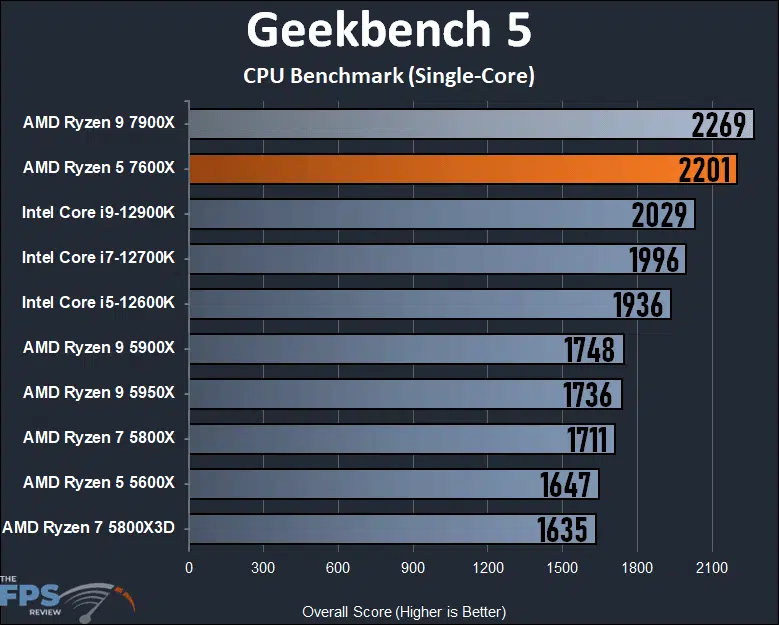
When it comes to Single-Core performance, the Ryzen 5 7600X is again only second to the 7900X. It beast the pants off the Core i9-12900K and a bigger boost over AMD’s last generation Ryzen 5000 series CPUs. Compared to the Ryzen 5 5600X the 7600X is 34% faster.
Discussion (13 replies)
Join Discussion →My opinion. If you're currently on Zen2+ or Zen3 on anything less than a 5800X3D, and all you do is game, then the 5800X3D is the best bang for the buck upgrade. That CPU is a gaming powerhouse.
I kind of have mixed feelings about these mid-tier Zen4 CPU's. At least from a gaming perspective. It would cost significantly more to build a 7600X system, for inarguably less gaming performance, than it would be to build a cheaper 5800X3D system. Especially with AMD saying they were going to continue development of X3D AM4 parts.
They kind of put themselves in a tough situation with their product stack.
Yes, for gaming, I agree.
The question one has to ask is what is their intention and use case. What workloads will they need? If all you do is gaming on the PC, then you have your answer. However, if you do much more, or throw other certain kinds of workloads at the CPU, then perhaps there is value. It depends on your needs.
Yar, tough sell to migrate from AM4 to AM5 currently (though if I was building new I'd for sure go AM5).
Looking forward to see how the 7000X3D's perform, but think I won't be migrating until the second revisions come out.
It's nice to see that these lower cost 6C/12T chips can still keep up in gaming, at least if you aren't trying to do TOO much in the background (like encode streams)
I bet these will find their way into a lot of decent gaming machines.
I'm betting they won't find their way in to much of anything until cheaper X670 boards come out, or B-series is released. The value isn't quite there yet. Especially with DDR5 costs, PSU and cooling requirements.
Yep, I think the single chip B650/E will be the way to go. All those extra USB and PCIe connections on the expensive X670/E will be limited by the bridge between the 2 chipsets.
B650 + 7_00X3D will be the best early AM5 for gaming.
If you game at 4k you are better off getting a 5600X.
BTW thanks a lot for using settings one would actually use for gaming. Not Low/mid 720p/1080p settings like many reviews out there.
I think both have value.
Using minimum settings and low resolution you see the potential performance a CPU might have if you have a really fast GPU.
This is valuable for theoretical comparisons and to get an idea how "future proof" the CPU is.
Benchmarking a CPU at real world settings is easier to understand for those who don't get the fact that they will in all likelihood be GPU limited, and helps minimize the arguing over irrelevant performance differences no one will ever actually experience in their CPU due to this GPU limitation.
Honestly, if I had to pick just one, I'd pick the CPU benchmark at minimum settings and low resolution. Using that and GPU benchmarks I can project what my performance will be in almost any combination of hardware. if I only have the latter, I can only really predict how it will perform in that one CPU/GPU combination.
So yeah. I like to see both, but if I had to pick just one, I'd pick the "everything graphical at minimum settings and resolution using an overkill top end GPU" just to try to isolate the CPU performance, because that is honestly more useful.
If I have that CPU isolated data I can look at a CPU benchmark and at a GPU benchmark separately and just pick the minimum framerate of the two, and know that is likely a reasonable prediction of how they will perform together. This is of much greater value to me than real world benchmarks on a system with a GPU I may or may not ever use.
I also see value in both results, low rez, and high rez, for both reasons. That's why I include 1080p, 1440p, and 4K, I think it's all relevant, and important to see scaling between resolutions, comparing CPUs. I'm rather excited about the fact that we represent that, that way anyone reading can hone in on the resolution they take value from, and make up their own mind. I think it gives an overall bigger picture of CPU performance, and I'm very happy people get value out of that in our reviews.
More than the resolution, my issue is low settings. Normally I see cpu benches even at 720p low and those exacerbate the impact of the mobo/cpu.
I recall asking Kyle at several times to do hi-res/high settings on the CPU/Mobo reviews as it would reflect a more real world scenario (which was policy). Never happened.
Thankfully you got all my bases covered.
That's why you look at both the GPU and CPU reviews, and - if you have CPU reviews run at low settings, and GPU reviews with overkill CPU/Platform to avoid it being the limiting factor - you can just take the minimum framerates of each review, and use that as a pretty reasonable predictor of what the combination of that CPU and GPU will look like.
The theory is to make the component under review the bottleneck to see what it is truly capable of so you can understand that particular component, rather than having the results confounded with the system as a whole.
Or just give the reader all the info you can in each review and let them decide what's important to them :p
I'll never argue against more information :p