
Test Setup
Bench hardware is listed below. More information on our GPU testing can be found here.
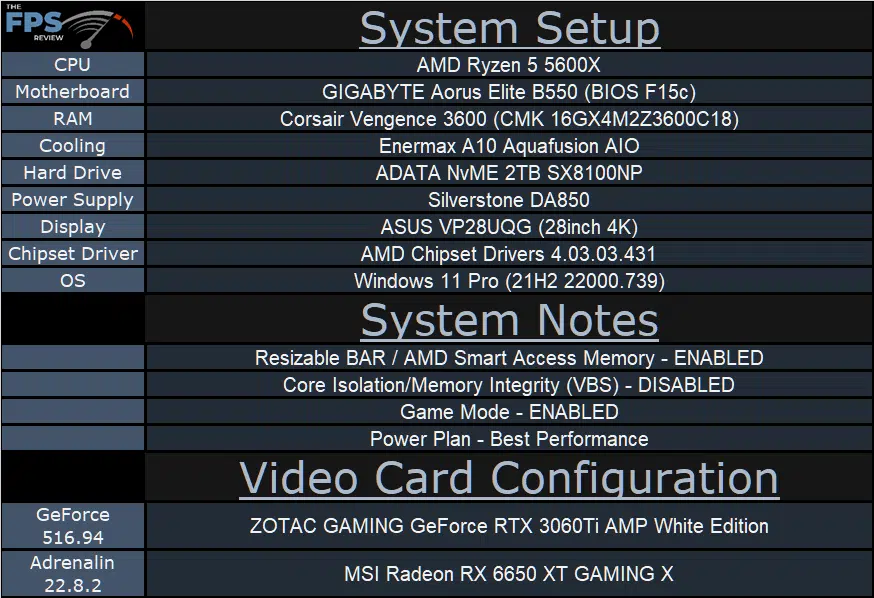
We are using the motherboard’s current default BIOS settings on the latest official release BIOS. We have enabled PCI-Express Resizable BAR in the motherboard BIOS. This means we are utilizing Resizable BAR on NVIDIA GPUs and AMD Smart Access Memory on AMD GPUs in all of our testing. We have enabled DOCP in the BIOS for the memory.
We are using a fresh install of Windows 11 Pro with the latest Windows Updates, and drivers installed including the latest chipset drivers from AMD. We are using the “Best Performance” power profile in Windows Settings. We have Hardware Accelerated GPU Scheduling at the default setting, which is ENABLED. VBS is DISABLED and Game Mode is ENABLED.
Discussion (2 replies)
Join Discussion →Thanks, @magoo for the great review. This card is pretty much right in the middle of the product stack that is known for being NVIDIA's bulk sales so it's nice to see the card do well at 1440p.
Good review, @magoo thanks! Only on your site I found detailed information on this card. Tell me how this card is in terms of noise level in games at standard settings without overclocking?