
Conclusion
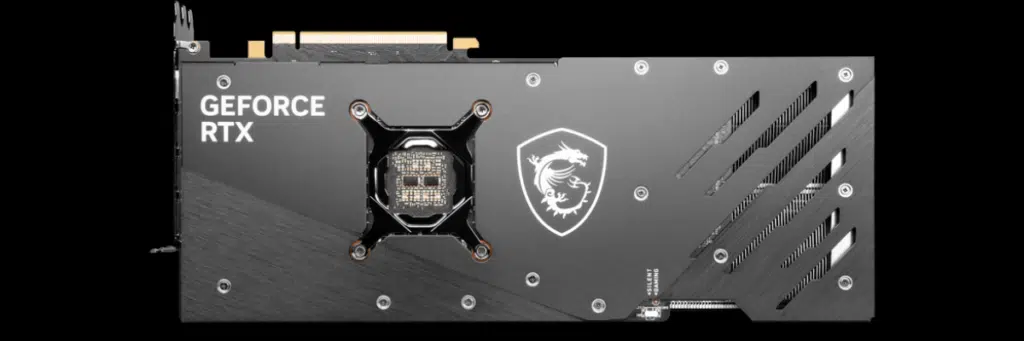
MSI’s new entry into the GeForce RTX 40 series family is here, we have put the MSI GeForce RTX 4080 16GB GAMING X TRIO video card through the wringer in 4K performance, Ray Tracing, and DLSS compared among many video cards. The MSI GeForce RTX 4080 16GB GAMING X TRIO is a new video card from MSI positioning itself as an enthusiast gamer-focused high-end video card sporting the new GeForce RTX 4080 Ada Lovelace GPU for $1309.99 MSRP. In MSI’s product stack, this sits toward the top, right under the SUPRIM. It is packed with features and robust for overclocking.
The MSI GeForce RTX 4080 16GB GAMING X TRIO uses MSI’s TRI FROZR 3 thermal solution and has a factory overclocked Boost Clock of 2595MHz on the GeForce RTX 4080 GPU. It comes equipped with 16GB of GDDR6X memory making 4K gaming enjoyable. The video card is capable of overclocking, and utilizes the new 16-pin PCIe 5 power connector. It is slightly larger than a Founders Edition but stays cool and quiet with the custom design. It has just the right amount of RGB without being gaudy. It’s geared for 4K gaming, can take on Ray Tracing, and supports NVIDIA DLSS 3 Frame Generation.
Performance
In Call of Duty Modern Warfare II the MSI GeForce RTX 4080 16GB GAMING X TRIO was able to provide a smooth and enjoyable gameplay experience at 4K with maximum settings nearing 100FPS. This beat the RTX 3090 Ti by 23% and the RTX 3080 Ti by 39%. Overclocking added even more performance, taking it up another 7% beyond 100FPS. In addition, DLSS can be used to really take the framerates to new heights at 4K. In F1 2022 we were able to play this game at 4K with maximum settings and experienced a whopping 153FPS! This beats every video card, and with DLSS got us to 200FPS!
In Dying Light 2 we were able to really enjoy this game well at 4K and the maximum settings, proving us with over 70FPS of smooth gameplay. Overclocking improved performance by 7% further giving us more. We don’t need upscaling in this game with this card, but with DLSS it brought performance up to 120FPS. In Far Cry 6, we were able to have smooth gameplay at over 100FPS at maximum settings, and overclocking improved performance by 9%.
Cyberpunk 2077, as demanding as it is was playable at over 60FPS with “Ultra” settings without having to use upscaling, and this at 4K. This was the only video card that could give us 60FPS at 4K without upscaling. Overclocking improved performance by 8% and brought us to nearly 70FPS. With DLSS performance exceeded 70FPS. In Watch Dogs Legion we were able to play at 4K with maximum settings and experienced smooth performance at over 80FPS. Overclocking improved performance by 8% and DLSS got us to 120FPS at 4K.
With Ray Tracing there were some games that were still challenging at 4K for the video card, but DLSS was able to make up that difference when it was needed. In F1 2022 we were able to play the game at 4K with maximum Ray Tracing, at near 60FPS. It was the only video card to provide a playable experience in this game at 4K with maximum Ray Tracing. You can also use DLSS upscaling to get near 100FPS. Overclocking improved performance by 9%.
Dying Light 2 and Cyberpunk 2077 and Watch Dogs and Metro Exodus Enhanced were the four games that with Ray Tracing enabled at 4K were not playable without upscaling. Though they were not playable, this was still the fastest video card with them, and Overclocking helped in every situation. However, with these games, you will need to use DLSS upscaling even on the MSI RTX 4080 16GB GAMING X TRIO in order to play at 4K with “Ultra” Ray Tracing. With DLSS performance is at or above 60FPS, so the games are enjoyable and smooth as long as you are using DLSS at 4K. Another option is to play at 1440p, and then you won’t need upscaling to play with maximum Ray Tracing.
Power, Temp, and Overclocking
First, to overclocking, our overclocking experiences were very positive on the MSI GeForce RTX 4080 GAMING X TRIO video card. We were able to increase the Power Target by +15% which gave us more headroom with TDP/TGP. In addition, we could control fan speed, Core Clock, and Memory clock. We were actually able to hit 3GHz on this video card, which is an amazing overclock from the default specs. However, it wasn’t quite stable, but were able to get a taste of performance at 3GHz and it was incredible.
In the end, we backed down to a +200 Core Clock which resulted in a 2970MHz smooth and consistent clock speed. This is an 8% GPU frequency overclock from the default 2745MHz we experienced on the video card. Compared to the reference NVIDIA spec of 2505MHz this is a very high clock speed. In addition, we managed to increase the memory up to 26GHz from 22.4GHz which is also a great overclock for GDDR6X memory. Combined we saw between a 7-10% performance increase from the overclock.
What was also exciting was that the power increase from the overclock directly matched the performance gain we got, which shows a very efficient GPU and board power. In terms of board power the MSI GeForce RTX 4080 16GB GAMING X TRIO was very efficient, having a lower power than the RTX 3090 Ti, RTX 3090, and RTX 3080 Ti. Another plus was the MSI TRI FROZR 3 thermal solution, which kept the video card cool and quiet while running. It had a lot of thermal headroom, and we can say that the thermal solution is not holding back overclocking.
Final Points
The MSI GeForce RTX 4080 16GB GAMING X TRIO video card is a robust and capable video card in MSI’s GeForce RTX 4080 lineup. This enthusiast-class gamers video card can provide 4K raster-based performance in games without the need for upscaling at framerates that exceed 60FPS, and depending on the game much faster. You will be able to play the latest and upcoming games at 4K with maximum settings. Ray Tracing will still be a question mark, as it will just depend per game on what that performance looks like at 4K on this video card. With Ray Tracing some games may be fast enough without upscaling, but then there may be other games that are very demanding and will require upscaling, such as DLSS, to be playable at 4K.
Alternatively, however, in those situations, you could lower the resolution to 1440p, and then those games should be playable with Ray Tracing without upscaling. DLSS is very good these days, however, it produces top-notch image quality (actually the best out of all the upscaling methods) and with GeForce RTX 4080 you have the option for DLSS 3 Frame Generation. If you are a 4K gamer, and you want Ray Tracing as well you really shouldn’t be afraid of DLSS to get that awesome gameplay experience, and this card can provide that.

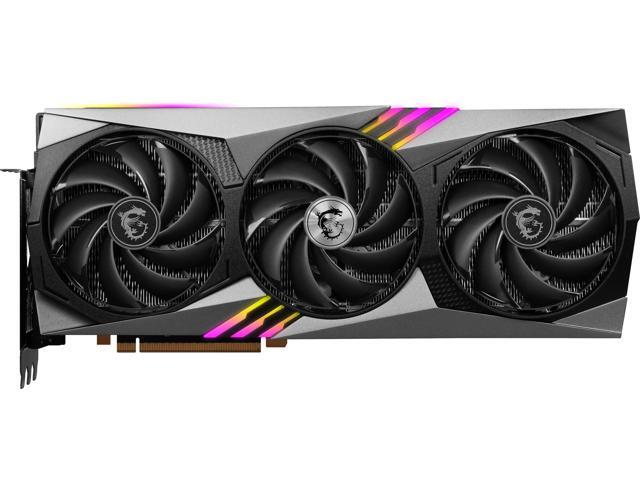


The MSI GeForce RTX 4080 16GB GAMING X TRIO is made well, and in our experience overclocks very well. It has some extra headroom to push it further, and it is built well so that it will remain cool and quiet. It is also not a gas guzzler, it ends up being a power-efficient video card and you don’t have to worry about needing a 1000W PSU for your system, this will get by just fine on 750-850W. Just be sure you spec out the video card length and distance correctly for your case, it is bigger than the Founders Edition. Other than size, this video card has all the markings of a robust enthusiast video card with overclocking potential that will allow high-resolution 4K gaming.
Discussion (19 replies)
Join Discussion →Now this is just one result, but it's the one singled out on the summary page where the above statement is also located, and going back to the game benches it looks fairly typical:
Ok.. 10% less power - check. But 39% isn't anywhere close to twice as fast, is it?
Other than that one bit of math, which I admit I'm not certain I'm correct on even - good writeup. Looks like a great card. I'm still suspect on the pricing but it's definitely bringing the game.
*edit*
Is this graphic correct:
The 3080Ti and 4080OC Board Powers are identical, while the 4080 chip draws almost 100W more power? Also curious, the 3080Ti draws less board power than a 3090?
Makes me wonder - what's on the Ampere boards that is causing them to draw so much power aside from the GPU itself? Or is it just bad readouts from GPU-Z or on-board monitoring?
I know GDDR6X is going to use some decent power, but all these cards (except the AMD) are using it to various degrees.
How much does it cost????
I averaged the performance gain. And the power savings is even more in other games, Cyberpunk 2077 is where the power efficiency was rated, and that was the worst-case scenario, in reality, the power savings in other games over the 3080 is even greater. There are games where it sits under 300W.
Just eyeballing it, but even an average gain was somewhere in the 30% range? Not 100%, which would be "double". Nothing hit 100% that I saw compared to the 3080Ti.
If you have to ask...
That really is the correct answer to this question. 4090 looks like a better deal, and for some of those AIBs, about the same price.
I can see how that can be confusing, I think some of that was with DLSS 3 Frame Generation in mind. I've updated the text accordingly in both reviews.
Hmm, I'm dissapointed I can only find 4K benchmarks, and while those have some interest, from other reviews I seen that the 4080 sometimes get's beaten by 3000 series cards at lower resolutions.
Also somewhat dissapointed there are no test results with a 3080 which this card is supposed to replace even if the price would suggest otherwise.
There are some 1440p scores and a comparison with the RTX3080 as well
My Founders Edition review has two pages of 1440p results.
After scanning through this review... this generation of cards I think are actually bringing 4k to the upper tier gaming to be a easily enjoyable experience.
Not so.
This card gives roughly 75% of a 4090 in performance at 4K.
If the card is more than msrp then it is not worth it. May as well buy a 4090.
Didn't we just say the same thing? :unsure:
ASUS RTX 4080 STRIX OC
$1450
16 GB, GDDR6X, 256-bit
[/TR]
[/TABLE]
I honestly didn't notice an issue with 4K gaming and my 3090 Ti with everything maxed out, but the 4090 is a lot smoother.
$1309.99 MSRP
Oofta! With pricing like that who knew you could offer something that makes the top-tier card look appealing? It's a nice card but other than power savings I'm not sure what the incentive to get one over a 4090 would be. I can understand picking it over a 3080/3090/3090 Ti but not a 4090.
I'm still pretty happy with my Hybrid 3090 Ti. For giggles, I ran my OC settings on it on Sunday for a few hours with CP 2077 (Driver 525 and latest 1.61 build), RT med, DLSS performance, and just about everything else completely maxed (sans any post-processing like motion blur which I always turn off completely) and it was holding 60-66 FPS at 4K (2160-2175 MHz), with a max temp ~61c. At its stock settings (2040-2050 MHz), and so quiet, it averages 50-60+, with occasional dips in the high 40s and temps ~50-60c, but still a very enjoyable experience.