
Overclocking MSI GeForce RTX 4080 16GB GAMING X TRIO
Default GPU Frequency
With both NVIDIA and AMD GPUs, the GPU frequency is dynamic. NVIDIA has GPU Boost, and AMD has its Game Clock and Boost Clock quoted frequencies. Typically, GPUs today can exceed the “Boost Clock” dynamically. We need to find out what the GPU frequency is while gaming. To do this we will record the GPU clock frequency over time while playing a game. We use Cyberpunk 2077 for this with a very long manual run-through at “Ultra” settings recording GPU-Z sensor data.
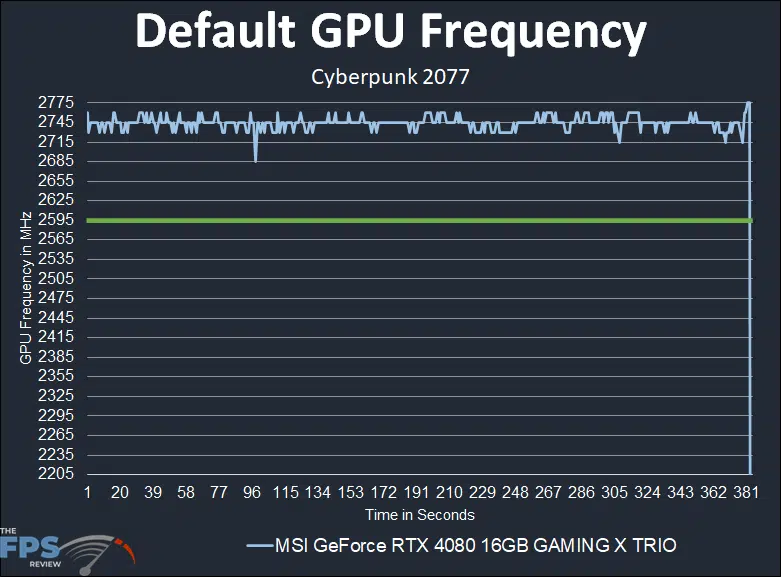
The MSI GeForce RTX 4080 16GB GAMING X TRIO has a factory overclocked GPU Boost of 2595MHz. In the graph above we can see that the clock speed is running faster than the GPU Boost, NVIDIA GPU Boost is dynamically clocking the clock speed upwards beyond the rated speed. The clock speed started out at 2760MHz but averaged primarily around 2745MHz while gaming. The clock speed was also not consistent, it did fluctuate a bit dynamically as you can see. This behavior differs from the Founders Edition which was consistent and solidly delivered a GPU Boost of 2775MHz. Therefore, even though this card has a factory overclock, in actual gameplay its overall GPU Boost is slightly less than the Founders Edition specifically a 30MHz difference. It’s not enough though to make a gameplay difference. We tried both the SILENT and GAMING BIOS modes and had exactly the same behavior.
Overclocked
To overclock the MSI GeForce RTX 4080 16GB GAMING X TRIO, we are using the manufacturer-provided overclocking software which in this case is MSI Afterburner. This is our highest stable overclock shown below.
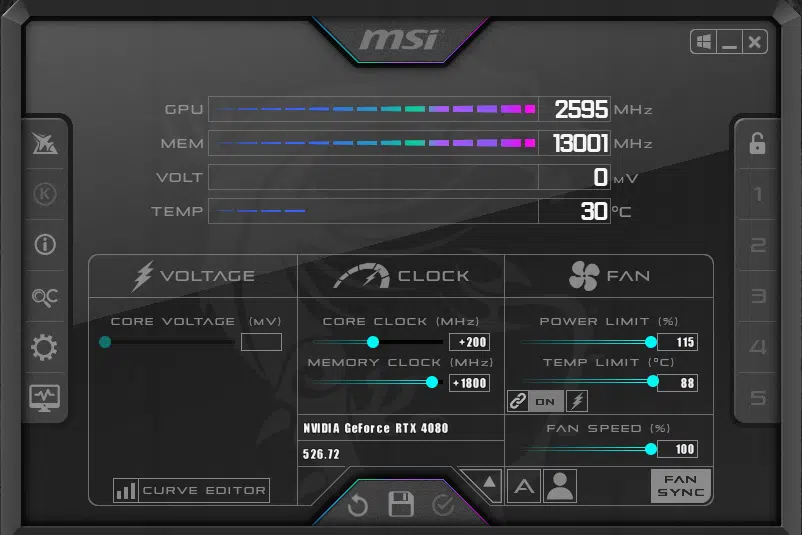
The first thing to note is that we were able to increase the Power Limit by +15% up to 115% from the default 100%. This provided a bit of power headroom for overclocking. In addition, we set the fans to 100% to ensure the highest overclock. Our final stable overclock ended up being +200 on the Core Clock and the Memory Clock at +1800. This brings the rated GPU Boost up to 2795MHz. This brings the memory up to a very high 26GHz from the default 22.4GHz, bringing the memory bandwidth up to 832GB/s versus the default 716.8GB/s.
Overclocking the core was a lot of fun because we were chasing that 3GHz mark, and we came very close. In fact, we did manage to exceed 3GHz just slightly at +250 Core Clock briefly. We actually got 3015MHz briefly, but it did end up locking up. While we could not sustain 3GHz on the video card, our final result is still very close as you will see below with the Core Clock at +200.
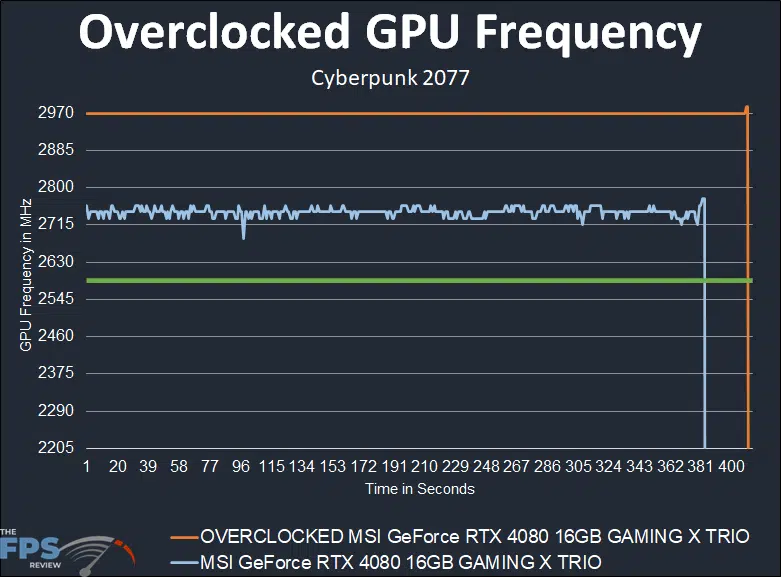
With our final stable overclock of +200 on the Core Clock and +15% power, this resulted in a solid consistent line at 2970MHz while gaming! That is nearly 3GHz, it’s so close. What’s important about this overclock is how much more stable it is over the default behavior. This is a solid consistent line, there are no dynamics to the clock frequency, it’s solid 2970MHz performance. This is also with the memory running at its overclock of 26GHz as well, which is all around very impressive. At 2970MHz versus the default 2745MHz, we are getting an 8% GPU clock speed increase, or 225MHz. Our final overclock is 2970MHz/26GHz (GPU/Mem).
Discussion (19 replies)
Join Discussion →Now this is just one result, but it's the one singled out on the summary page where the above statement is also located, and going back to the game benches it looks fairly typical:
Ok.. 10% less power - check. But 39% isn't anywhere close to twice as fast, is it?
Other than that one bit of math, which I admit I'm not certain I'm correct on even - good writeup. Looks like a great card. I'm still suspect on the pricing but it's definitely bringing the game.
*edit*
Is this graphic correct:
The 3080Ti and 4080OC Board Powers are identical, while the 4080 chip draws almost 100W more power? Also curious, the 3080Ti draws less board power than a 3090?
Makes me wonder - what's on the Ampere boards that is causing them to draw so much power aside from the GPU itself? Or is it just bad readouts from GPU-Z or on-board monitoring?
I know GDDR6X is going to use some decent power, but all these cards (except the AMD) are using it to various degrees.
How much does it cost????
I averaged the performance gain. And the power savings is even more in other games, Cyberpunk 2077 is where the power efficiency was rated, and that was the worst-case scenario, in reality, the power savings in other games over the 3080 is even greater. There are games where it sits under 300W.
Just eyeballing it, but even an average gain was somewhere in the 30% range? Not 100%, which would be "double". Nothing hit 100% that I saw compared to the 3080Ti.
If you have to ask...
That really is the correct answer to this question. 4090 looks like a better deal, and for some of those AIBs, about the same price.
I can see how that can be confusing, I think some of that was with DLSS 3 Frame Generation in mind. I've updated the text accordingly in both reviews.
Hmm, I'm dissapointed I can only find 4K benchmarks, and while those have some interest, from other reviews I seen that the 4080 sometimes get's beaten by 3000 series cards at lower resolutions.
Also somewhat dissapointed there are no test results with a 3080 which this card is supposed to replace even if the price would suggest otherwise.
There are some 1440p scores and a comparison with the RTX3080 as well
My Founders Edition review has two pages of 1440p results.
After scanning through this review... this generation of cards I think are actually bringing 4k to the upper tier gaming to be a easily enjoyable experience.
Not so.
This card gives roughly 75% of a 4090 in performance at 4K.
If the card is more than msrp then it is not worth it. May as well buy a 4090.
Didn't we just say the same thing? :unsure:
ASUS RTX 4080 STRIX OC
$1450
16 GB, GDDR6X, 256-bit
[/TR]
[/TABLE]
I honestly didn't notice an issue with 4K gaming and my 3090 Ti with everything maxed out, but the 4090 is a lot smoother.
$1309.99 MSRP
Oofta! With pricing like that who knew you could offer something that makes the top-tier card look appealing? It's a nice card but other than power savings I'm not sure what the incentive to get one over a 4090 would be. I can understand picking it over a 3080/3090/3090 Ti but not a 4090.
I'm still pretty happy with my Hybrid 3090 Ti. For giggles, I ran my OC settings on it on Sunday for a few hours with CP 2077 (Driver 525 and latest 1.61 build), RT med, DLSS performance, and just about everything else completely maxed (sans any post-processing like motion blur which I always turn off completely) and it was holding 60-66 FPS at 4K (2160-2175 MHz), with a max temp ~61c. At its stock settings (2040-2050 MHz), and so quiet, it averages 50-60+, with occasional dips in the high 40s and temps ~50-60c, but still a very enjoyable experience.