
Power and Temp
To test the power and temperature we perform a manual run-through in Cyberpunk 2077 at “Ultra” settings for real-world in-game data. We use GPU-Z sensor data to record the results. We report on the GPU-Z sensor data for “Board Power” and “GPU Chip Power” when available for our Wattage data. For temperature data, we report the GPU (Edge Temp of the GPU or Package Temp) as well as Hot Spot (Junction Temperature) when available for our temperature data.
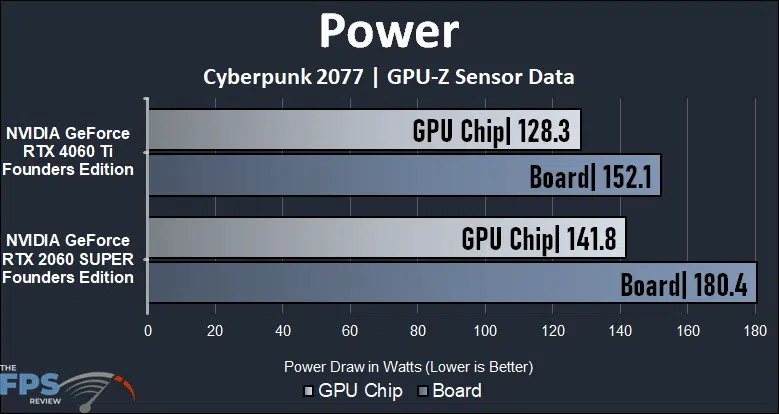
The GeForce RTX 4060 Ti performs a lot better than the older GeForce RTX 2060 SUPER, yet utilizes a lot less power, it is much more power efficient. You will actually gain power efficiency with the new generation which is a big benefit. The GeForce RTX 4060 Ti uses 16% less board power than the GeForce RTX 2060 SUPER and 10% less GPU Chip power, or 28W less board power or 13.5W less GPU Chip power.
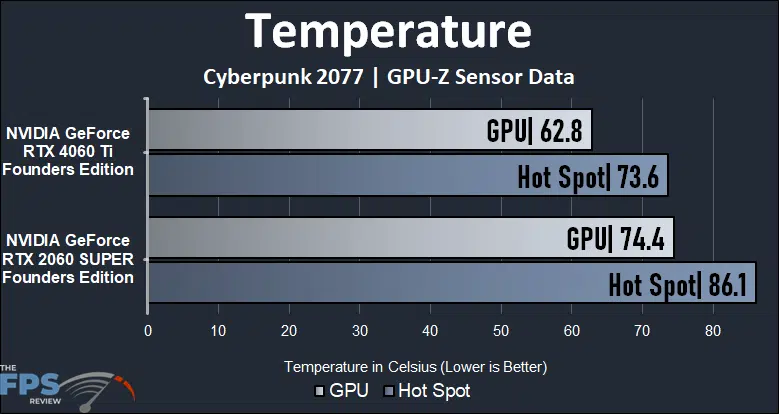
Both video cards are NVIDIA Founders Edition video cards, but the newer GeForce RTX 4060 Ti runs much cooler, especially on the Hot Spot temperatures. The GPU, or edge temperature, is 11.6 degrees cooler on GPU temp and the Hot Spot temperature is 12.5 degrees cooler.
Discussion (6 replies)
Join Discussion →Love the review and thank you.
Doing some numbers something stood out to me and it REALLY shows when you compare the target max MHZ between the two cards.
the 4060 is pushing 2535 and the 2070 is pushing 1650, This is a raw difference clock per clock of 53.6.
When we are NOT doing RT work the % of improvement for games at 1080p averages out to 45.3%. This leads me to believe most actual improvement to performance and efficiency is through process node efficiency and not redesign or IPC improvement of the actual rasterization cores. But when you take into account that they ALSO doubled the cuda cores to reach that number... is even more interesting.
This is weird... They doubled the cuda core count
Increased peak MHZ by 53.6%
Nicely brought down the power envelope.
But for DOUBLE the cuda cores running at just over 50% the mhz rating... if the IPC remained the same I would have expected a more linear progression in performance.
So it seems like they DID make some changes to the cuda cores themselves, for efficiency but had to claw back performance through more cores and more mhz taking away some of that efficiency gain. Actually theoretically 100% of the potential gain considering the real performance improvement is more in line with the MHZ as opposed to the DOUBLED cuda core count.
Something does not smell right here with these numbers. We're missing a part of the story. The end user is getting lesser performant cores core to core... if the had left the core counts equal and counted on only generational improvements (not including DLSS I didn't crunch those numbers) a 2070 to 4060 would have been a rasterization downgrade.
I need to run similar numbers for AMD's cards in a generational comparison.
Would have been interesting to include these 3 cards also in the comparison & make it a 5 way battle
2060 12gb
3060 12gb
4060 ti 16gb
Idea is to identify bottlenecks with 8gb vram
For example in Ratchet & Clank in 1080p ultra (RT off) the 2060 12gb almost matches the 8gb 4060 ti !!!
Search engine optimization rules the day - will probably focus on more 1:1 matchups for now. The aim here is to look at upgrade scenarios....
Great writeup!
Grim brings up a good point - the 4060 shows about a 50% improvement in performance, but that 50% increase in clock speed ~and~ core count - the math doesn't seem to add up without drawing the conclusion that you just need to pack more slower (yet more efficient) cores to make Turing work. It's an interesting thing to note, if nothing else. Maybe that's why JSH is saying Moore's law is dead...?
Also - for ~most~ people (not enthusiasts here who chase the absolute top of the performance curve) - I usually recommend they upgrade to something that doubles their existing GPU performance. In the past that was every 2-3 generations, at roughly the same tier/price they had previously paid. Now, starting with RTX, that has been thrown out the window.
nVidia obviously wants you to pay a premium for Raytracing performance. I've never thought it was worth it, but to those that do - it's your money, buy what you like. But for folks that have cards from Pascal and newer, it's been hard to recommend anything to upgrade to without utterly blowing through budgets or accepting much smaller (rasterizing) performance gains.
Thanks, @Brent_Justice for the great comparative write-up. It's bummer about the PCIe and VRAM details but otherwise a solid upgrade in keeping at the exact same price point.
I had gotten a 2080 SUPER back then as a slight upgrade to a 1080 Ti and also so I could enjoy using G-Sync with an LG C9. While mostly a sideways move it had some impressive improvements for the day with RT and DLSS when gaming at 1440p. It even cost me somewhere around $50-100 less than what I paid for the 1080 Ti and only needed 2x 8-pin connectors vs 3x 8-pin for the 1080 Ti. I always cringed at the "SUPER" name but otherwise really had a good experience with that card.
Very nice review, thank you. I've been looking to get a lower tier card at some point for a back up rig again, and this review does help.