
Path Traced Indirect Lighting Performance Compared
On this page we are now going to look at how Path Traced Indirect Lighting affects Ray Tracing performance in Alan Wake 2. In this game, Path Tracing is only used for the Indirect Lighting graphics, not global illumination like Cyberpunk 2077 2.0. This means that we shouldn’t see the large drop or burden on performance that is experienced in Cyberpunk 2077 here. In this game, Path Traced Indirect Lighting might actually be usable, so let’s see what it costs to enable it.
To test this, we again chose to set custom settings for the Ray Tracing options. We started with the High Preset, and then manually lowered the Path Traced Indirect Lighting option from OFF, to Low to Medium to High to see the impact it makes on performance.
4K – Native Rendering with DLAA
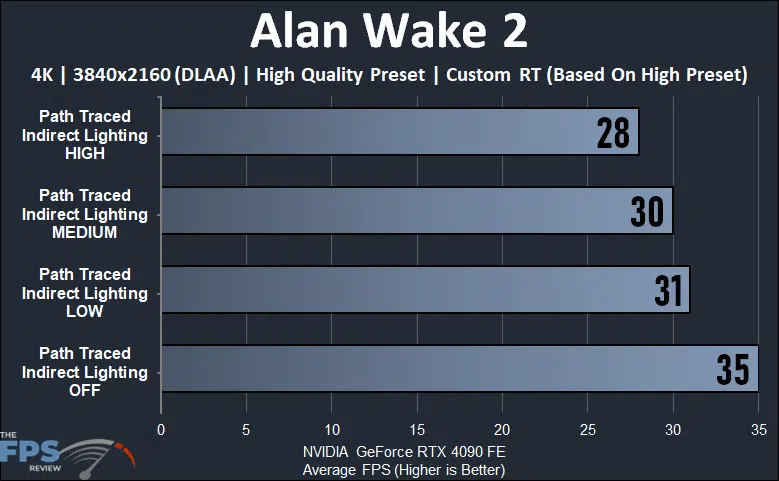
As we can see, with Path Traced Indirect Lighting turned OFF, we start out at 35 FPS with High Ray Tracing options, and Ray Reconstruction is on as well. We are running at 4K display resolution and 4K rendering resolution here. Then, when we enable Path Traced Indirect Lighting we see a drop of only 11% performance. That is very small, considering. Moving up to Medium Path Traced Indirect Lighting the drop is even less at 3%, and then moving up to High drops performance 7%. Therefore, comparing High Path Traced Indirect Lighting to not having it all, is a total performance burden or drop of 20% without DLSS upscaling enabled. Let’s see what DLSS upscaling does below.
4K – Quality DLSS (2560×1440 Rendering Resolution)
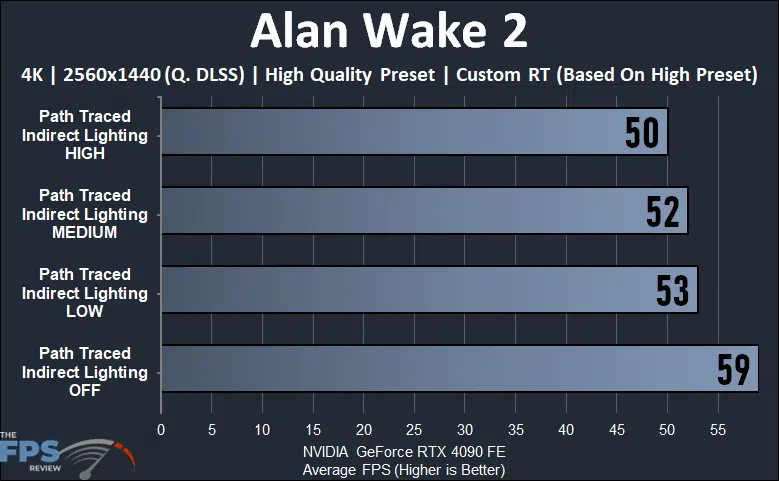
DLSS upscaling certainly improves performance, and without Path Traced Indirect Lighting we almost hit 60 FPS at 4K display resolution with Quality DLSS upscaling. Turning on LOW Path Traced Indirect Lighting drops performance 10%, slightly less than without DLSS. The difference between Medium and Low is very small, Medium only drops performance 2%. Going up to High drops performance 4%. Therefore, enabling High Path Traced Indirect Lighting from OFF is a total drop of 15% when DLSS upscaling is enabled, which is less of a burden or drop without using DLSS upscaling.
Discussion (7 replies)
Join Discussion →Thanks for the detailed write-up. I'm sorely tempted to get this game even though I'm not really into the story due to how amazing it looks. I've been seeing videos popping up and I'm surprised at how good it can look in different parts.
Thank you as well for the write up. I got this game free with my video card. Plays great in 4K on my 4080 with max settings. After hearing about how demanding this game would be I am pleasantly surprised.
Ok so you were testing at 4k which is standard these days... but what video card were you using? Yes it was an Nvidia card... or was the intent here just to show how the options impacted an nvidia 4000 series video card?
[URL unfurl="true"]https://www.thefpsreview.com/2023/10/28/alan-wake-2-graphics-settings-performance-tested-and-compared/2/#ftoc-heading-3[/URL]
How the heck did I miss that?! Soorry my bad. I thought I went through every page looking for that exact table. My bad.
All of the graphs are labeled with GeForce RTX 4090 on them. It's written on every single graph.
Yea I read this and was like. what graphs... I went back and looked and I scrolled down... to the Join our discussion link... and NEVER went past the ad jump to see the pages link. The navigation thing at the top I always miss and almost never use because it doesn't look like there's anything to it. So yea I completely flubbed that one... thought it was a 1 page short article and didn't catch anything else.