
Overclocking ASUS TUF Gaming GeForce RTX 4070 Ti SUPER
To overclock the ASUS TUF Gaming GeForce RTX 4070 Ti SUPER video card we are going to use ASUS’s GPU Tweak III utility. The latest version 1.7.2.3 supports the new SUPER series of GPUs. We are able to increase the Power Target, and we can also increase the GPU Voltage with this utility, which worked great. It has hardware monitoring and an OSD that is extremely useful in honing in our overclock ability. We can also save overclock profiles and enable enhanced sliders to extend the range we have available for GPU Boost Clock and Memory Clock. We can also manually set fan speeds, or leave it on automatic, and for our overclocking we left it on automatic.
Highest Overclock
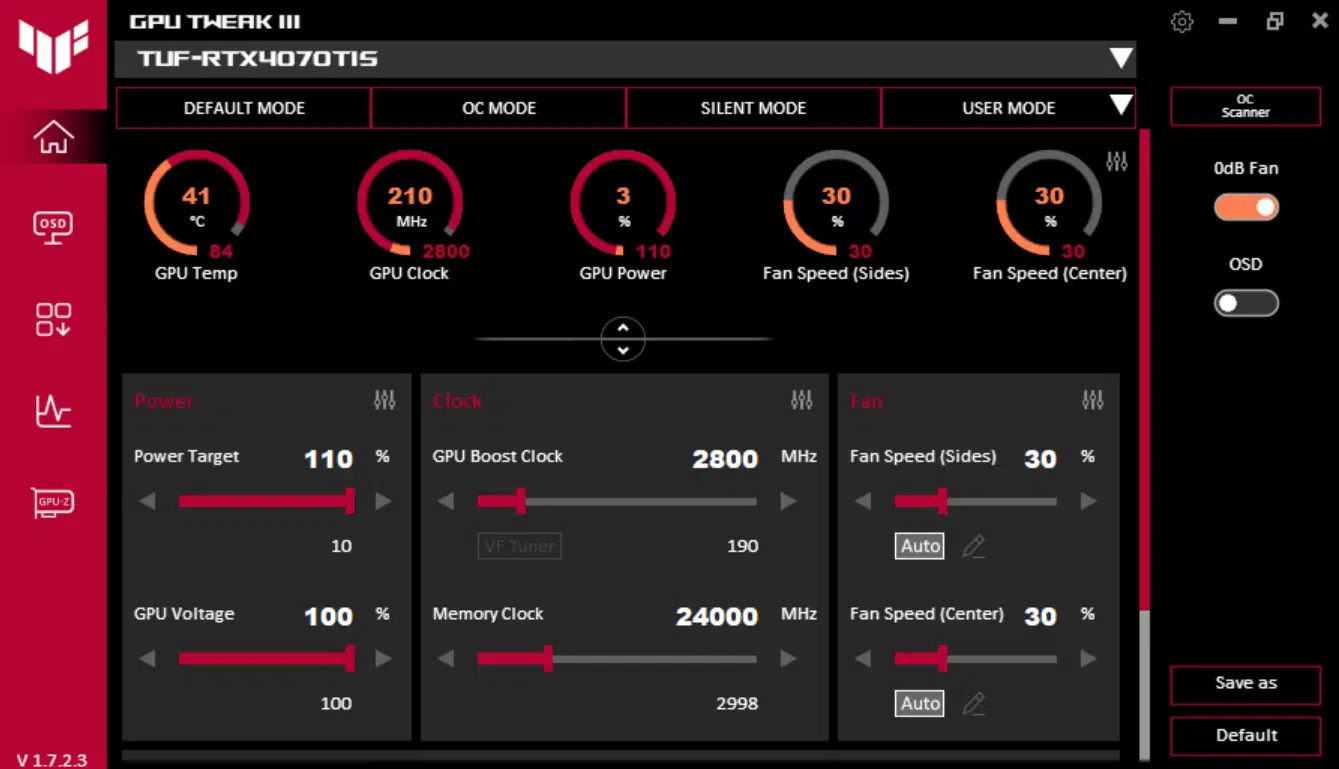
With ASUS GPU Tweak III we were able to raise the Power Target up by 10% from 100% to 110% on the ASUS TUF Gaming GeForce RTX 4070 Ti SUPER. We left the fans on automatic, we did not need to increase their speed for overclocking, which kept them quiet while overclocked. We were also able to increase GPU Voltage by 100mv, and this did help stabilize a higher GPU frequency than without. We were able to push the clock up from 2985MHz up to 3000MHz stable, as you will see below, with the Voltage increased.
Our final stable overclock was to set the GPU Boost Clock at 2800MHz with the GPU Voltage at +100mv, which you will see below gives us a stable and consistent 3000MHz GPU clock speed. For the memory, we were able to increase it from 21Gbps up to 24Gbps, increasing the memory bandwidth from 672GB/s to 768GB/s, quite a nice bump in memory bandwidth. This is all with auto fans, and the temperatures were not hot at all. Let’s see what this translates to below.
Overclocked GPU Frequency Compared
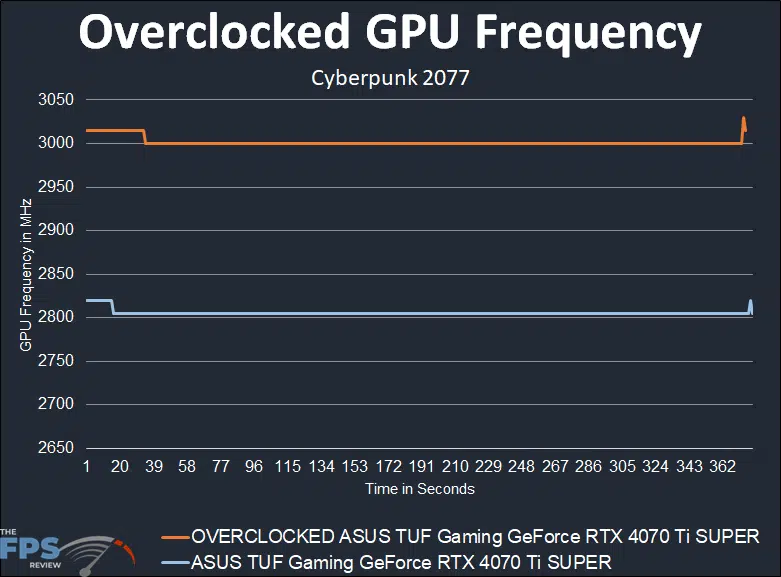
By default, the ASUS TUF Gaming GeForce RTX 4070 Ti SUPER has a boost clock set at 2610MHz, which is the NVIDIA reference spec. By default, the ASUS TUF Gaming GeForce RTX 4070 Ti SUPER boosts to 2805MHz very consistently out-of-the-box. This means that out-of-the-box the ASUS TUF Gaming GeForce RTX 4070 Ti SUPER is boosting the clock by 7% already from the reference clock speed. This is thanks to the cooling on the ASUS TUF Gaming GeForce RTX 4070 Ti SUPER and the power headroom.
It still had quite a bit of headroom left, by setting the GPU Boost Clock to 2800MHz but leaving the Voltage at default, our clock speed rose to 2985MHz while gaming. By simply increasing the Voltage +100mv it rose to 3000MHz (3GHz) and remained there during gaming. Therefore, we did manage to get it to 3GHz stable as our highest overclock with Voltage added. This is also with the memory overclocked to 24Gbps.
Our final overclock therefore that we used in our testing is 3000MHz/24Gbps (GPU/Mem).
Discussion (3 replies)
Join Discussion →Nice review. Interesting that there is still interplay between the AMD lineup and Nvidia's lineup. Seems like some of that AMD fine wine is still a factor.
This leaves me a much better taste than the RTX4070Super. I was considering getting a RTX4070Ti for a while, this makes it much more tempting.
I'm surprised on how many titles it can run at 4K even without DLSS
This is the card that I think stands out the most of the bunch. Basically just a cut-down 4080 at the price many were saying a 4080 should've launched at. I'm glad to see it performed so well and that it really had a knock down / drag out fight with the 7900 XT, at least until ray tracing came into play, as both are good cards. I'm also pleasantly surprised to see the trend continue with some newer cards where you can apply your power/voltage increases and over clocks while leaving the fans at auto. If I didn't have 3090 Ti's in my other two rigs I'd order one.