
Test Setup
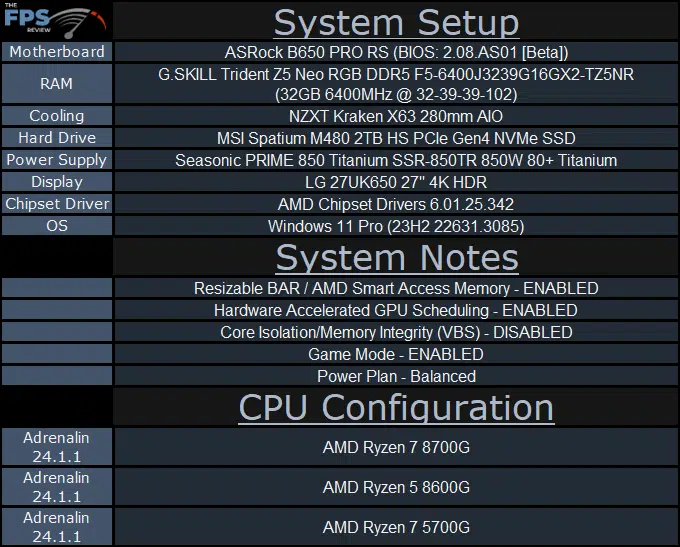
We used two different systems for testing, an AM4 platform for the Ryzen 7 5700G and an AM5 platform for the Ryzen 7 8700G and Ryzen 5 8600G. First, the AM4 platform for the Ryzen 5 5700G utilized an ASUS TUF GAMING X570-PLUS (WI-FI) motherboard using BIOS 5003, this was the latest BIOS. Memory consisted of G.SKILL Trident Z Neo 32GB DDR4 at 3600MHz CL16. We used the same AIO cooler on all three APUs, an NZXT Kraken X63 280mm AIO as well as the same Seasonic PRIME 850W Titanium PSU and MSI Spatium M480 2TB PCIe Gen4 NVMe SSD.
For the AM5 platform, we used the ASRock B650 Pro RS motherboard with a new BETA BIOS that was released to fix the AMD STAPM issue. This new BIOS updates AMD AGESA to ComboAM5 1.1.0.2b and as you can see in the image below, disables STAPM on Phoenix AM5 processors. This means we will get full performance for prolonged periods of time, without throttling as was occurring before this BIOS update. An official non-BETA version should be coming, as well to other motherboards as well to fix the issue, as it is a problem on every motherboard with the older AGESA.

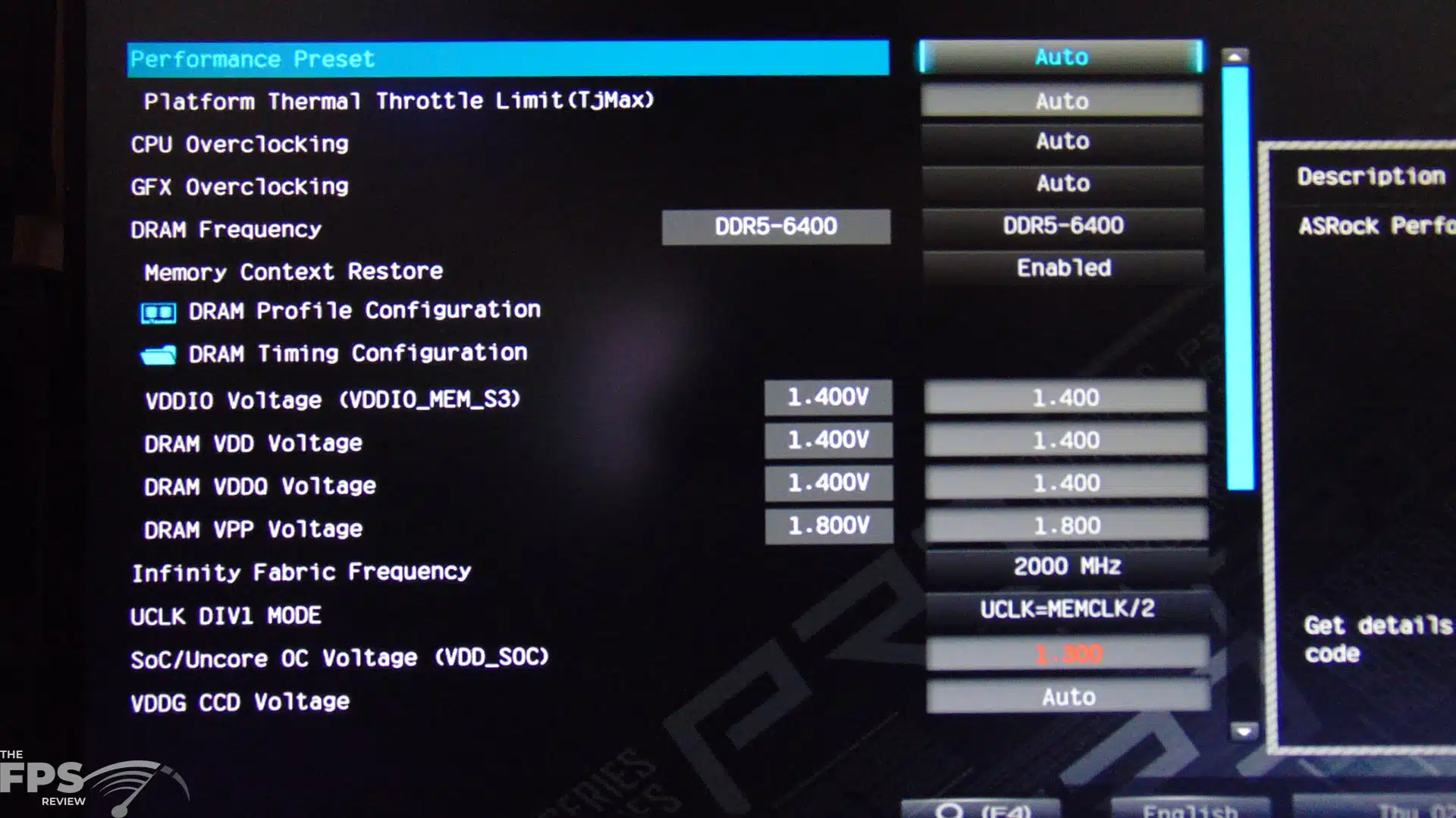
In addition, in an email, AMD made it clear that the default FCLK behavior (Infinity Fabric Frequency) will be 2000MHz for the Ryzen 8000G series APUs, we will directly quote them below:
“Hi Brent, I wanted to follow-up and clarify on the note about FCLK from yesterday. We do believe most parts will be stable and provide the best performance at 2400 FCLK. That being said the default behavior will remain at 2000 FCLK without manual intervention. Thus, results with 2400 FCLK would require specific and direct user intervention. To accurately represent the default behavior when EXPO is loaded, please keep FCLK at 2000.” -AMD
This is quite clear, the default behavior will be 2000MHz FCLK, and anything else will require direct user invention, therefore for our testing, we will keep it at the default 2000MHz FCLK, which means UCLK DIV1 Mode will be UCLK=MEMCLK/2 for our testing, as is shown in the screenshot below.
Discussion (4 replies)
Join Discussion →Nice so if you wanted to build a little system to connect to the TV and be your streamer/light gamer this could do it well it seems. And I expect it would fill the role for QUITE a long time.
Heck with the grunt available it isn't out of expectation to run a small home SAN off of it as well. No need to give up PCIE lanes for a GPU. Huh..
Is the 8700 worth the $100 uptick? Sure it's faster and has more cores, but for people looking at APU anyway cost is always a factor.
Also does FSR upscaling impact visual quality enough to really notice? I assume 1080p with FSR is upscaled 900p or is it 720p?
I'm sure that all depends on the quality setting. For the 8700G I'm betting texture size is more an issue.
Well, that's really up to you to decide if the IQ decrease is worth it. FSR affects IQ considerably at 1080p even at quality mode.