
Test Setup
Please read the information on our GPU testing procedures and methodology here. Note that our GPU Testing Bench has been upgraded to the Ryzen 7 7800X3D CPU and AM5 platform.
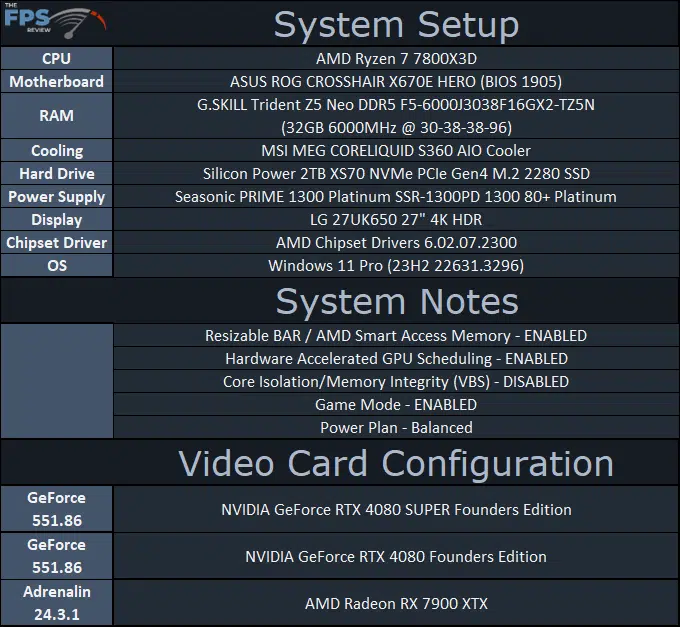
Note that we have the 1905 BIOS installed, which uses AGESA version Combo AM5 PI 1.1.0.2b. We are using the motherboard’s current default BIOS settings on the latest release BIOS. We have enabled PCI-Express Resizable BAR in the motherboard BIOS. This means we are utilizing Resizable BAR on NVIDIA GPUs and AMD Smart Access Memory on AMD GPUs in all our testing. We have enabled EXPO I in the BIOS for the memory.
We are using a fresh install of Windows 11 Pro with the latest Windows Updates, including the 23H2 Fall 2023 update. We have the latest drivers installed including the latest chipset drivers from AMD. We are using the “Balanced” power profile in Windows Settings. Hardware Accelerated GPU Scheduling is ENABLED in Windows. VBS is DISABLED and Game Mode is ENABLED.
Discussion (6 replies)
Join Discussion →Thanks @Brent_Justice for the great review. It's funny watching the 7900 RTX and this trade blows.
This will be an awesome guide for me with target goals with the new Zotac.
Just spent the last 3 hours gaming with Horizon Forbidden West and applied 180 to core and 500 to memory, with 110+, and had a completely stable 2850 MHz/24 GHz at 58c or lower/250W-180W. Thanks Brent again for the review. I can't explain enough at how impressed I am with this silicon's perf/power/heat efficiency. I was able to use x16/DLAA with a 47 FPS (a little rough) to somewhat solid 60 FPS (ideal) for this game which was not achievable before w/o using DLSS Quality.
Was that at 4k? I'm averaging 200fps on my box according to the amd control app.
Oh and I'm at 1440p. Just locked it to 144hz. No fsr or other trickery and 16x af.
Yep. The 4080 Super and 4090 are 4K only. The 3090 Ti is 5120x1440 and 4K. All three otherwise are nearly identical in terms of CPU/Mem/NVMe/Motherboards with slight variations.
Did some more tinkering yesterday and it appears the most I'm going to get out of the Zotac is 2895-2910 MHz. Tried the +230/+750 and it peaked at around 2910-2925 but wasn't stable. Backed it down to 220/+700 and is rock solid. Once again amazed at how cool it stays even when OCd. Basically, 57-60c, fans on auto, and sticking to almost entirely at 30%. Power usage hung between 180-220W when GPU usage was ~90-98%.