
Test Setup
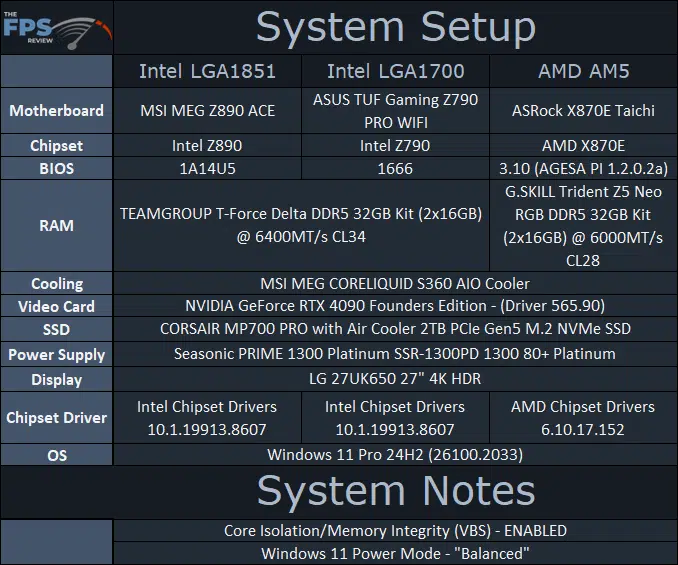
For all data WIndows 11 24H2 26100.2033 was used. We do have Windows 11 running in default settings, which means Core Isolation/VBS is turned ON. In addition, we are using the default “Balanced” power mode on all CPUs in Windows. Where noted (on the graphs) the Intel Arrow Lake CPUs are tested with both Balanced (B) and Best Performance (BP) power profile modes.
Our goal in this launch review is to provide a balanced, all-around review, showing the whole picture of multi-threaded and single-threaded workloads for productivity, and gaming. A future follow-up will be a gaming-focused review, with many more games.
AMD Setup
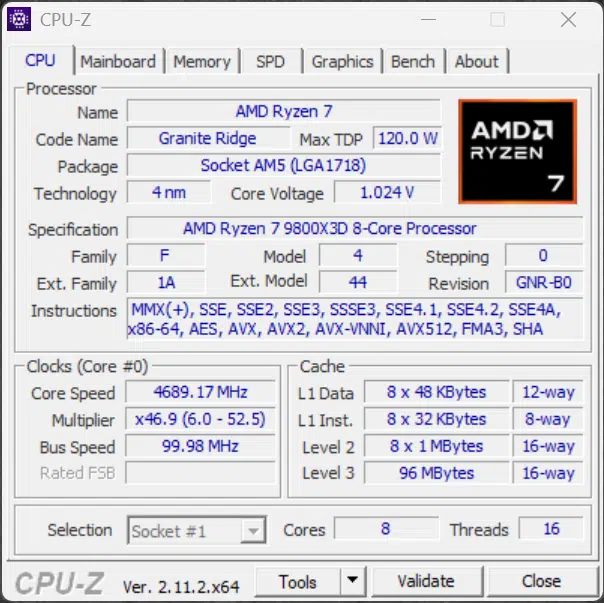
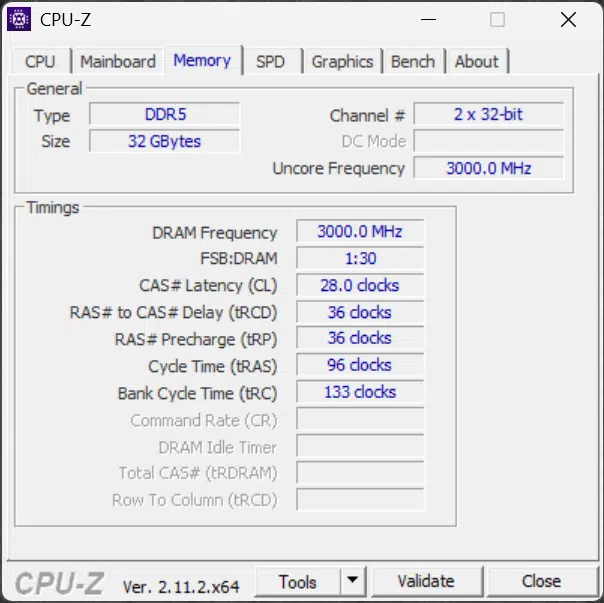
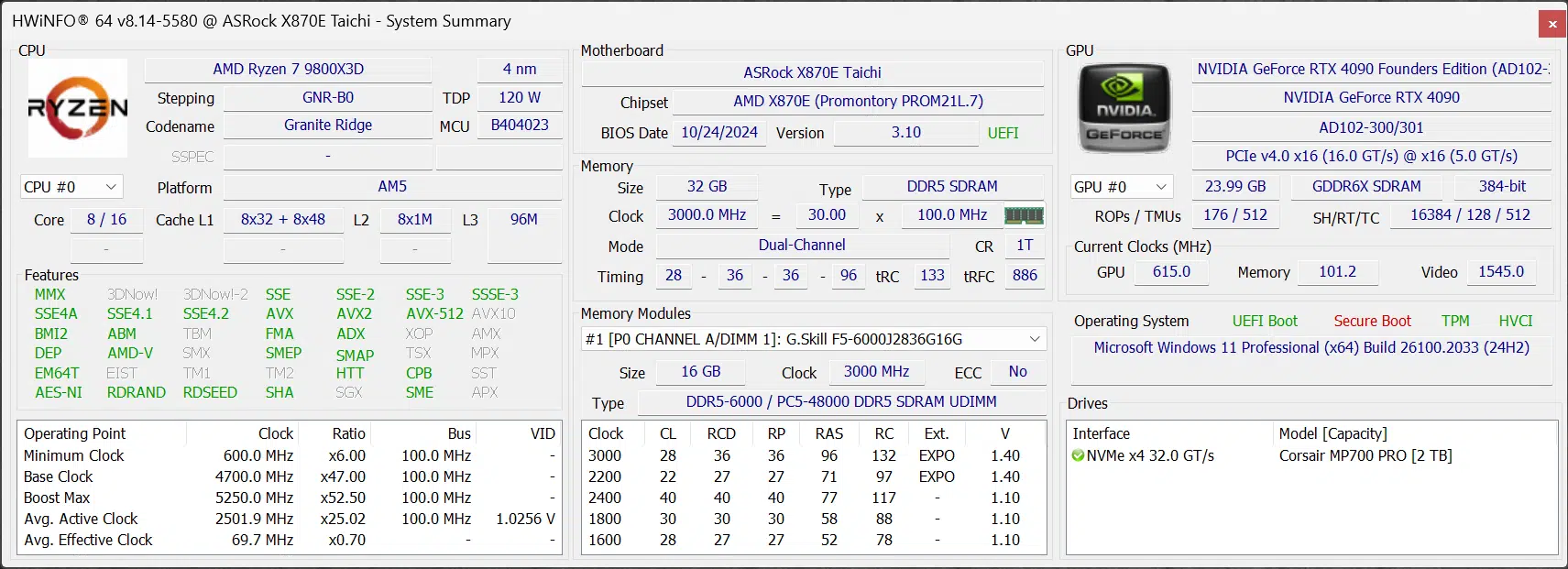
We are using an ASRock X870E Taichi motherboard for all AMD AM5 CPUs being tested. AMD does have a new AGESA version to use for the Ryzen 9000 series X3D CPUs, this is AGESA PI 1.2.0.2a. The new addition is the “a” at the end of the string, so make sure to look for that if you are going to purchase one of these CPUs, and upgrade your BIOS to this new AGESA version. AMD does state that the system will boot on the 1.2.0.2 AGESA, but the new “a” provides optimizations for X3D chips. We are using the latest official BIOS from ASRock, 3.10, which is using the new AGESA 1.2.0.2a.
We are also using G.SKILL Trident Z5 Neo RGB DDR5 32GB memory Kit provided by AMD, which runs at EXPO 6000MT/s and CL28 timings. We have also updated to the latest AMD chipset drivers found on the website, which is 6.10.17.152. Remember, these chipset drivers are important, they provide AMD’s PPM Provisioning Driver and 3D V-Cache Performance Optimizer drivers. We are also running Windows 11 24H2 (26100.2033) for all CPUs.
Intel Platforms
The Intel platforms are tested on a Z790 motherboard and Z890 motherboard for Arrow Lake, using the latest BIOS at the time of testing. All data was collected prior to the launch of Arrow Lake, and the software versions are shown in the table above. The Windows 11 version remains the same on all CPUs, including the 9800X3D.
Discussion (19 replies)
Join Discussion →Great review and the 9800X3D looks like a beast.
Yep, keeping my eye on this one and can't wait for the 9900X3D/9950X3D reviews to make my final decision for my 1st AM5 build.
After this review I am more excited about this gen than I have been before. The extra die space from these X3d's is having some add on benefit for performance that is hard to quantify (more space for heat?) but I don't care. This is kind of awaesome.
Just curious, what are you referencing here?
For pure gaming I'd still go with the 7800X3d, but the 9800X3D is better than the 9700X in every way. I don't really think we'll ever see a 9800X.
Hopefully we'll eventually see a 9700X3d or even a 7700X3d that's I would get myself.
I wonder what OC will bring to the table.
If going by recent rumors, anything from 200-400 MHz but so far as to how that will translate, added power draw, heat, etc., haven't heard anything credible yet.
I think he means this from Brent's review.
"In the 2nd Generation 3D V-Cache, AMD has re-designed the cache so that it is the same size as the CCD itself, eliminating the need for structural silicon."
@Brent_Justice
"In subsequent follow-ups, we will deep dive into gaming performance a lot more, with a very gaming-focused review with a lot more games, so stay tuned." - I bet you'll have a lot of fun doing this, very jealous!
Sorry if I missed mention of it, is there a separate review for that Trident mem kit coming up? I was doing some research on it this weekend as I prepare for the new build.
AMD is still using the same IOD - so 6000 C30 is basically it without tempting fate, same as at Zen 4 launch.
Some folks in the OC communities have been working on faster memory speeds but I haven't seen any real evidence of gains in effective performance.
Don't have one planned, but I've been using a similar kit since Zen 4 launched, it's my standard RAM kit for the AM5 platform, and I've been using it for every GPU review. Solid kit, no complaints, works perfectly great, it's the right configuration for the best Ryzen performance.
To be honest, I am quite looking forward to a 20 game performance roundup!
Done it before: https://www.thefpsreview.com/2023/11/20/intel-core-i9-14900k-vs-amd-ryzen-7-7800x3d-gaming-performance-in-20-games/
Basically in the review it was noted that the 3dvcache space is the same as the die space. Meaning that there is heat dissipation that can come downward into the 3dvcache layer. Allowing the actual processors to be pushed further.
nice work guys!
It would appear that placing the 3D cache on the bottom is allowing it to boost closer to it's full potential. This is good news. Now I can only hope even more than the 9950X has dual 3D cache on both of it's CCDs.
That makes a little bit of sense; still, it isn't likely to have near as much of an effect as having just gotten the 3D V-cache out of the way of the heatspreader IMO.
Disappointed in the lack of 2560x1440 and 3840x2160 numbers. I've done a lot of this type of testing over the years and 1080P just doesn't tell the whole story. Conventional wisdom says that when your GPU bound the CPU doesn't really matter, but I found that wasn't always the case. Often you'd get averages that seemed pretty close but the lows were lower and the highs higher on some CPU's.
On games like Cyberpunk 2077 where a few frames can make the difference between a playable frame rates and not, (even on a 4090) the CPU might make a difference. It sure did with earlier Ryzen family CPU's I tested.