
Test Setup
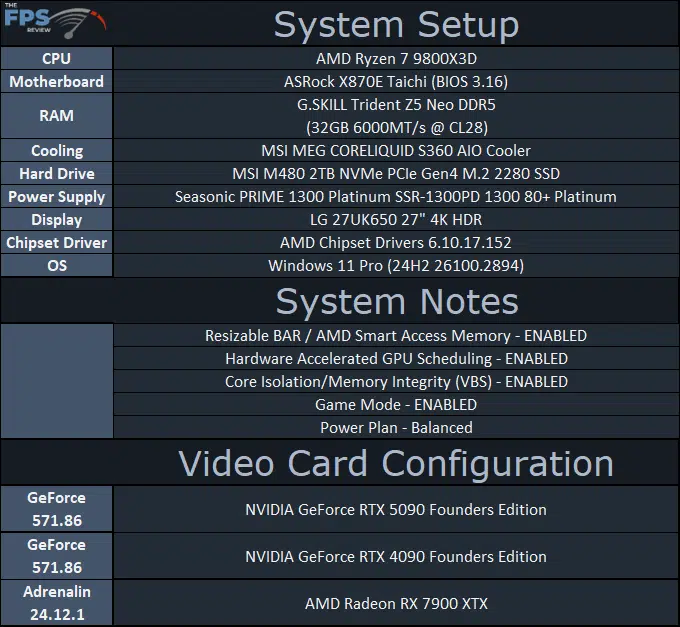
We are using an AMD Ryzen 7 9800X3D for testing. We are using the motherboard’s current default BIOS settings on the latest release BIOS. We have enabled PCI-Express Resizable BAR in the motherboard BIOS. We have enabled EXPO I in the BIOS for the memory. We are using a fresh install of Windows 11 Pro with the latest Windows Updates, including the 24H2 update. We have the latest drivers installed including the latest chipset drivers from AMD. We are using the “Balanced” power profile in Windows Settings.
NVIDIA provided a press driver for the NVIDIA GeForce RTX 5090, and we are using this driver (571.86) also on the NVIDIA GeForce RTX 4090 testing data. We are using the latest Radeon RX 7900 XTX driver available.
Discussion (7 replies)
Join Discussion →Thanks for the great write-up! As always, these end up being my reference templates for OCing whatever I end up with. Very torn on whether to invest the extra $500 for an AIO card like the Suprim SOC (read a couple of reviews and very, very similar performance-wise, just can be cooled more), or anything else for that matter. These FE cards seem amazing for their engineering and cooling capabilities. The next trick will be to try and snag one.
I'm waiting unitl March before I even think about it.
My question is, are there larger gains from CPU increase or memory increase? Can you decrease one to allow more power limit to increase the other? For example, if the GPU is the bottleneck, can mem clocks be reduced to increase power limit available to the GPU to eek out some extra MHZ?
Good question. @David_Schroth taught me years ago about lowering mem freq to free up some power for higher GPU clockrates. I'd imagine so but the silicon lottery also comes into play. I tend to lose out with the silicon side of things so using this strategy often helps when dialing things in.
Yes, GDDR7 like GDDR6X takes a lot of power, reducing memory allows the GPU to sustain a higher clock, HOWEVER, there is a cap based on the bin, so you hit a point that the GPU just can't do that clock speed, thus Voltage is needed to overcome that, and that increases power again by a lot on these GPUs in this node.
Good to know. Thanks @Brent_Justice!
That makes things more complex if the GPU clocks cap out at a certain place, especially if that is before you've reached the full power target for the card. If the GPU is only going to go to 3ghz and that's it regardless of any extra power limit on the card, might as well increase the mem clocks too.