
Gameplay Performance – 4K
On this page, we will be testing 4K resolution game performance on the Overclocked NVIDIA GeForce RTX 5090 FE video card. We will test both 4K native resolution, as well as DLSS Upscaling performance using the “Quality” DLSS preset on NVIDIA GPUs. For comparison, we will be comparing the NVIDIA GeForce RTX 4090 FE, and AMD Radeon RX 7900 XTX, which will utilize FSR Upscaling. Games are organized alphabetically, and all games are run with the highest quality settings, Ray Tracing will be tested on separate pages.
Alan Wake 2
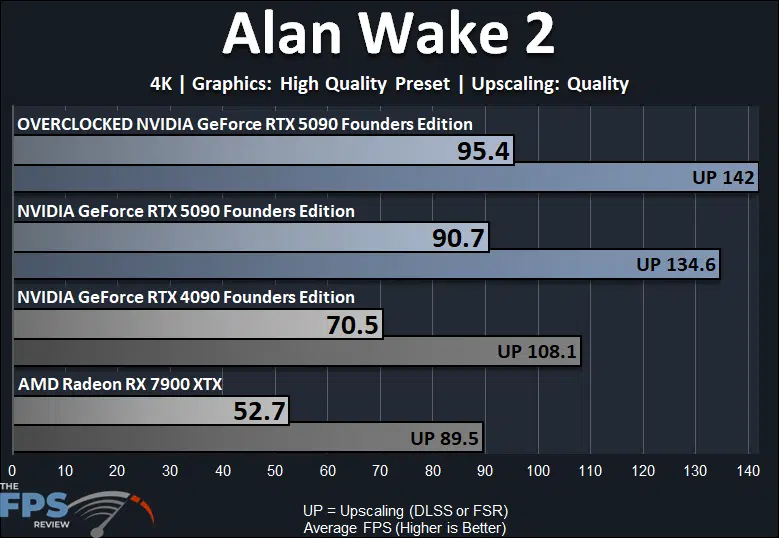
In Alan Wake 2 we are running the game at 4K with the “High” quality preset. The Overclocked NVIDIA GeForce RTX 5090 FE improves upon GeForce RTX 5090 FE performance by just 5% performance lift. The GeForce RTX 5090 FE was already playable in Alan Wake 2 at 4K, averaging 90FPS, the overclock just makes that average a bit higher, but the game still feels the same. DLSS to DLSS performance with the overclock has improved 5% as well, bringing it to 140FPS. The Overclocked NVIDIA GeForce RTX 5090 FE is now 35% faster than the GeForce RTX 4090 FE, so that has improved the scaling with the previous generation. The Overclocked NVIDIA GeForce RTX 5090 FE is 81% faster than the Radeon RX 7900 XTX.
Black Myth: Wukong
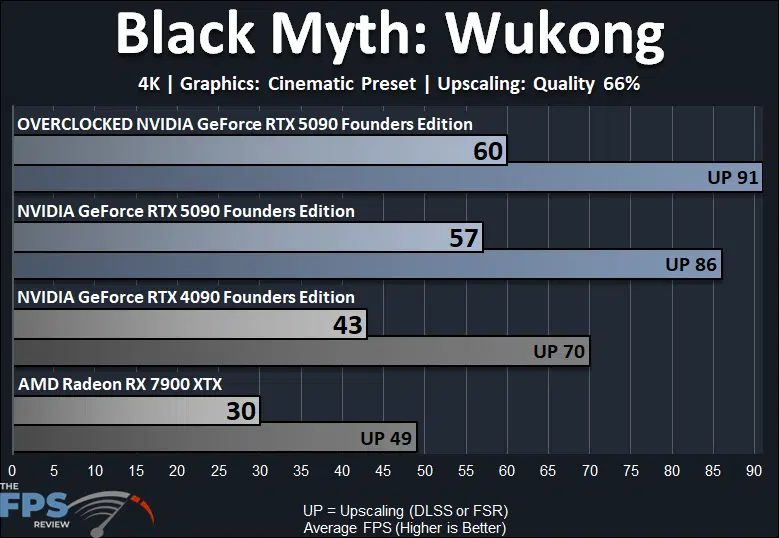
Black Myth: Wukong is very demanding at 4K and the “Cinematic” graphics preset. Overclocking the NVIDIA GeForce RTX 5090 FE does help in this game at 4K, just a little bit, bringing the average to 60FPS, which is definitely the best experience out of all the cards. The Overclocked NVIDIA GeForce RTX 5090 FE is delivering a 5% performance uplift over the GeForce RTX 5090 FE at default. You will want to enable DLSS at 4K in this game, and the Overclocked NVIDIA GeForce RTX 5090 FE is 6% faster than the RTX 5090 not overclocked with DLSS. The Overclocked NVIDIA GeForce RTX 5090 FE is 40% faster than the GeForce RTX 4090, so that margin is widened a bit, and it is 100% faster than the Radeon RX 7900 XTX.
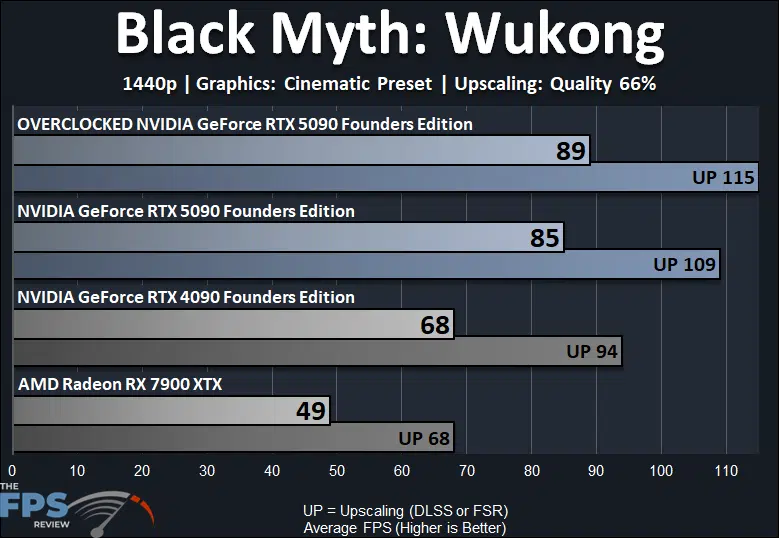
Because this game is so demanding, we lowered the resolution to 1440p and kept the “Cinematic” profile. The Overclocked NVIDIA GeForce RTX 5090 FE is still just 5% faster than the GeForce RTX 5090. However, the GeForce RTX 5090 FE is playable at 1440p regardless of whether it is overclocked or not, in this game. With DLSS enabled the DLSS performance of the Overclocked NVIDIA GeForce RTX 5090 FE is 6% faster than not overclocked. The Overclocked NVIDIA GeForce RTX 5090 FE is 31% faster than the GeForce RTX 4090 and 82% faster than the Radeon RX 7900 XTX.
Cyberpunk 2077
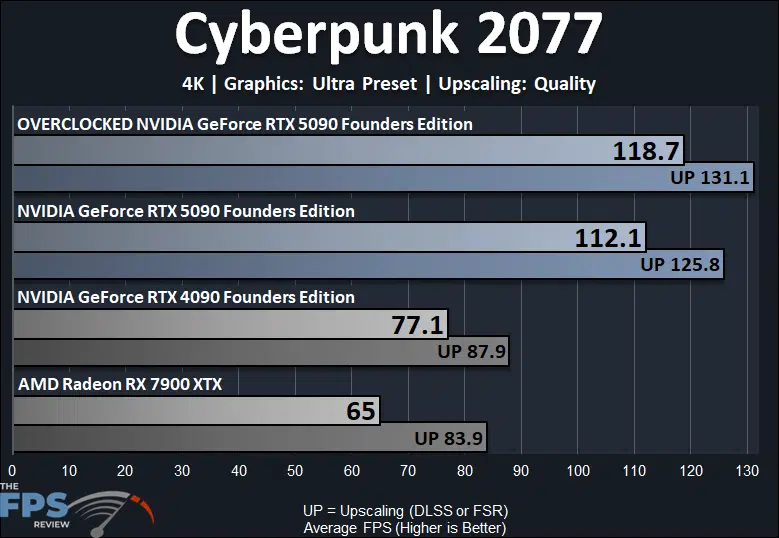
*Important Note* – We have updated Cyberpunk 2077 to the new 2.21 patch, which introduces support for DLSS 4 and the new Transformer DLSS model for Upscaling. We have re-tested both the GeForce RTX 4090 FE and GeForce RTX 5090 FE on this new version of Cyberpunk 2077 and we have enabled the “Transformer DLSS Upscaling” model for the upscaler on both video cards, so the new DLSS 4 Upscaler is being used on both. The Radeon RX 7900 XTX uses FSR, so it was not affected. The data in all the Cyberpunk 2077 graphs in this review are updated with these new benchmarks using the DLSS 4 Upscaler Transformer model.
In Cyberpunk 2077, the Overclocked NVIDIA GeForce RTX 5090 FE is 6% faster than the GeForce RTX 5090 not overclocked. With DLSS enabled the DLSS performance of the Overclocked NVIDIA GeForce RTX 5090 FE is 4% faster than the GeForce RTX 5090 FE. This game is already playable at 4K and Ultra settings on the GeForce RTX 5090, whether it is overclocked or not. The Overclocked NVIDIA GeForce RTX 5090 FE is 54% faster than the GeForce RTX 4090 FE, which is quite an uplift. The Overclocked NVIDIA GeForce RTX 5090 FE is 83% faster than the Radeon RX 7900 XTX.
Dying Light 2
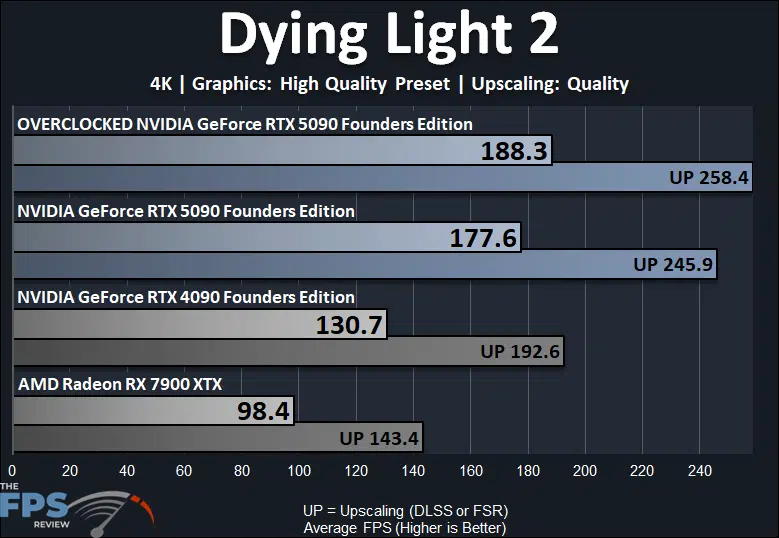
In Dying Light 2 the Overclocked NVIDIA GeForce RTX 5090 FE is 6% faster than the GeForce RTX 5090 FE not overclocked. The DLSS performance of the Overclocked NVIDIA GeForce RTX 5090 FE is 5% faster than the GeForce RTX 5090 FE not overclocked. The Overclocked NVIDIA GeForce RTX 5090 FE is 44% faster than the GeForce RTX 4090 and 91% faster than the Radeon RX 7900 XTX.
Horizon Forbidden West
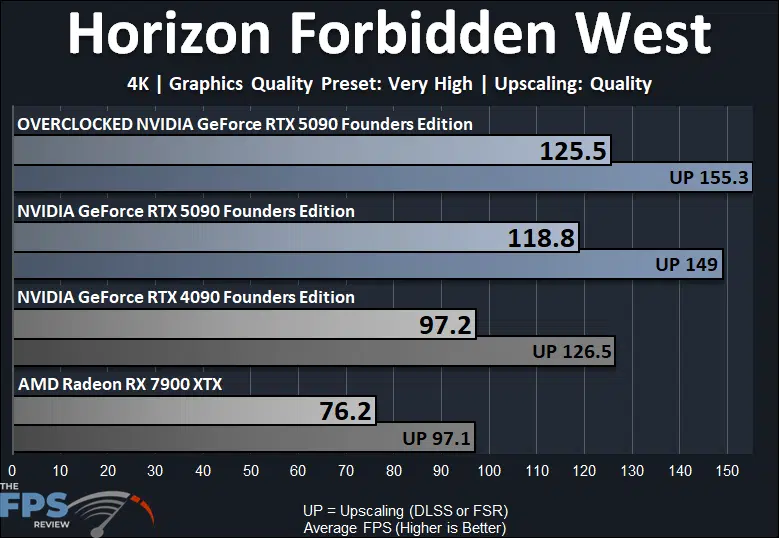
In Horizon Forbidden West the Overclocked NVIDIA GeForce RTX 5090 FE is 6% faster than the GeForce RTX 5090 not overclocked. With DLSS the DLSS performance of the Overclocked NVIDIA GeForce RTX 5090 FE is 4% faster than the GeForce RTX 5090 FE not overclocked. The Overclocked NVIDIA GeForce RTX 5090 FE is 29% faster than the GeForce RTX 4090 FE and 65% faster than the Radeon RX 7900 XTX.
Indiana Jones and the Great Circle
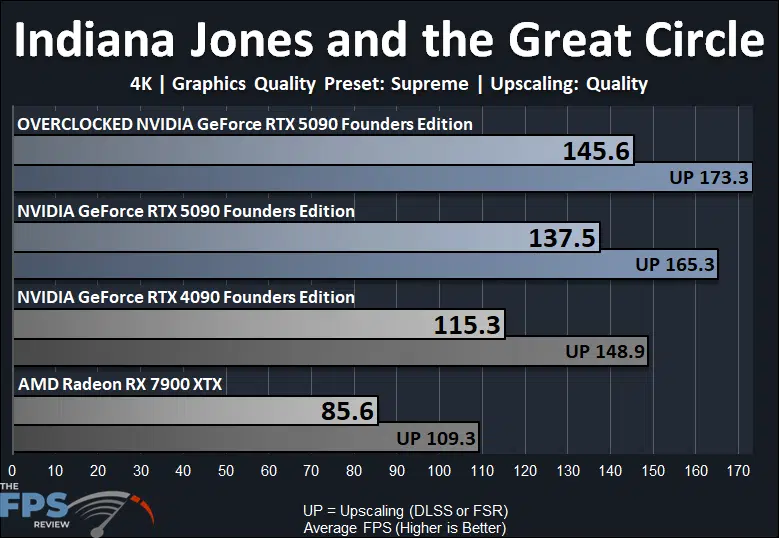
In Indiana Jones the Overclocked NVIDIA GeForce RTX 5090 FE is 6% faster than the GeForce RTX 5090 FE not overclocked. The DLSS performance of the Overclocked NVIDIA GeForce RTX 5090 FE is 5% faster than the GeForce RTX 5090 DLSS not overclocked. This game is more than playable at 4K Supreme settings, whether it is overclocked or not. The Overclocked NVIDIA GeForce RTX 5090 FE is 26% faster than the GeForce RTX 4090 FE and 70% faster than the Radeon RX 7900 XTX.
S.T.A.L.K.E.R. 2: Heart of Chornobyl
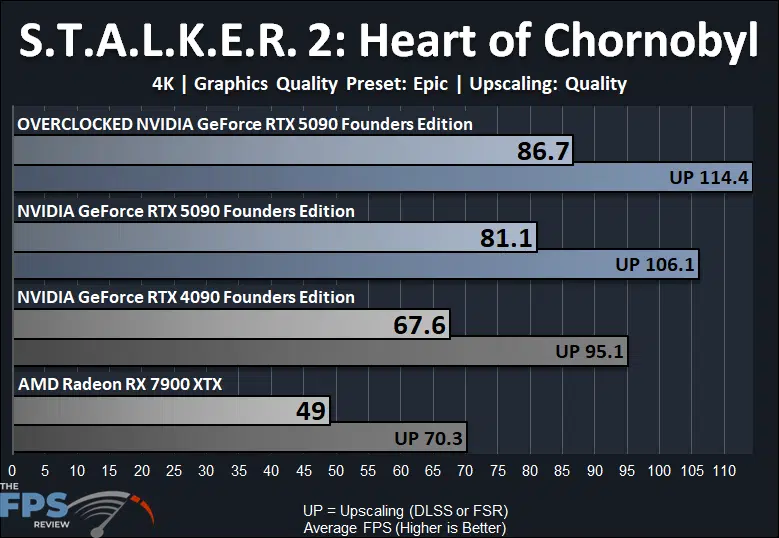
In Stalker 2 the Overclocked NVIDIA GeForce RTX 5090 FE is 7% faster than the non-overclocked GeForce RTX 5090 FE. This is the highest performance difference we experienced in our testing at raster gaming, without Ray Tracing. The DLSS performance of the Overclocked NVIDIA GeForce RTX 5090 FE is 8% faster than the DLSS performance of the non-overclocked GeForce RTX 5090 FE, again the highest result out of all the other games. The Overclocked NVIDIA GeForce RTX 5090 FE is 28% faster than the GeForce RTX 4090 FE and 77% faster than the Radeon RX 7900 XTX.
Discussion (7 replies)
Join Discussion →Thanks for the great write-up! As always, these end up being my reference templates for OCing whatever I end up with. Very torn on whether to invest the extra $500 for an AIO card like the Suprim SOC (read a couple of reviews and very, very similar performance-wise, just can be cooled more), or anything else for that matter. These FE cards seem amazing for their engineering and cooling capabilities. The next trick will be to try and snag one.
I'm waiting unitl March before I even think about it.
My question is, are there larger gains from CPU increase or memory increase? Can you decrease one to allow more power limit to increase the other? For example, if the GPU is the bottleneck, can mem clocks be reduced to increase power limit available to the GPU to eek out some extra MHZ?
Good question. @David_Schroth taught me years ago about lowering mem freq to free up some power for higher GPU clockrates. I'd imagine so but the silicon lottery also comes into play. I tend to lose out with the silicon side of things so using this strategy often helps when dialing things in.
Yes, GDDR7 like GDDR6X takes a lot of power, reducing memory allows the GPU to sustain a higher clock, HOWEVER, there is a cap based on the bin, so you hit a point that the GPU just can't do that clock speed, thus Voltage is needed to overcome that, and that increases power again by a lot on these GPUs in this node.
Good to know. Thanks @Brent_Justice!
That makes things more complex if the GPU clocks cap out at a certain place, especially if that is before you've reached the full power target for the card. If the GPU is only going to go to 3ghz and that's it regardless of any extra power limit on the card, might as well increase the mem clocks too.