
Power and Temp
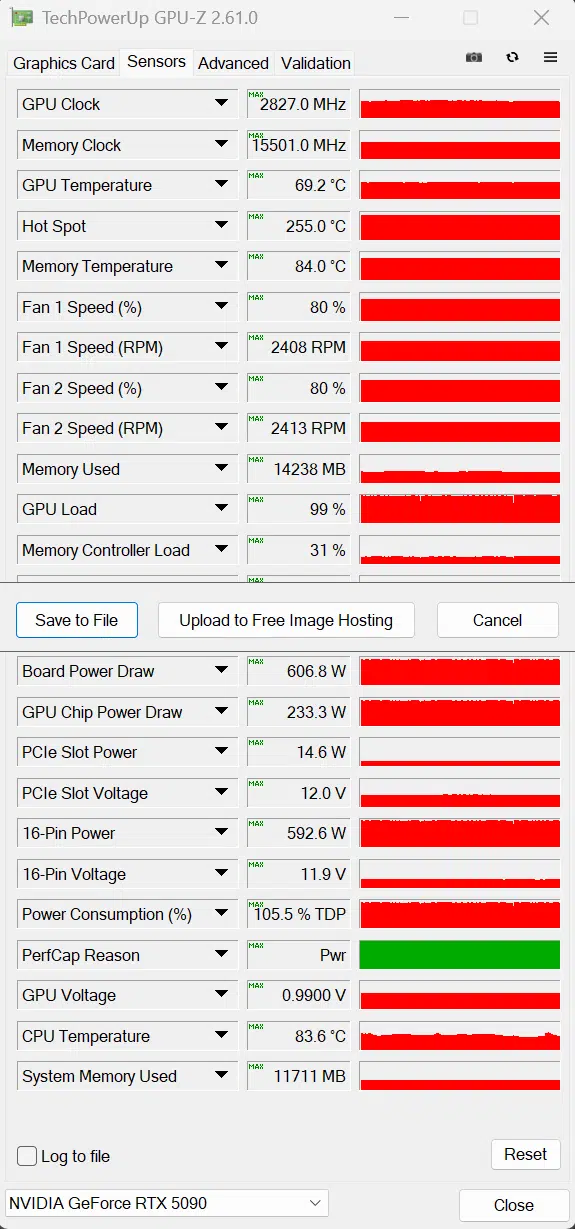
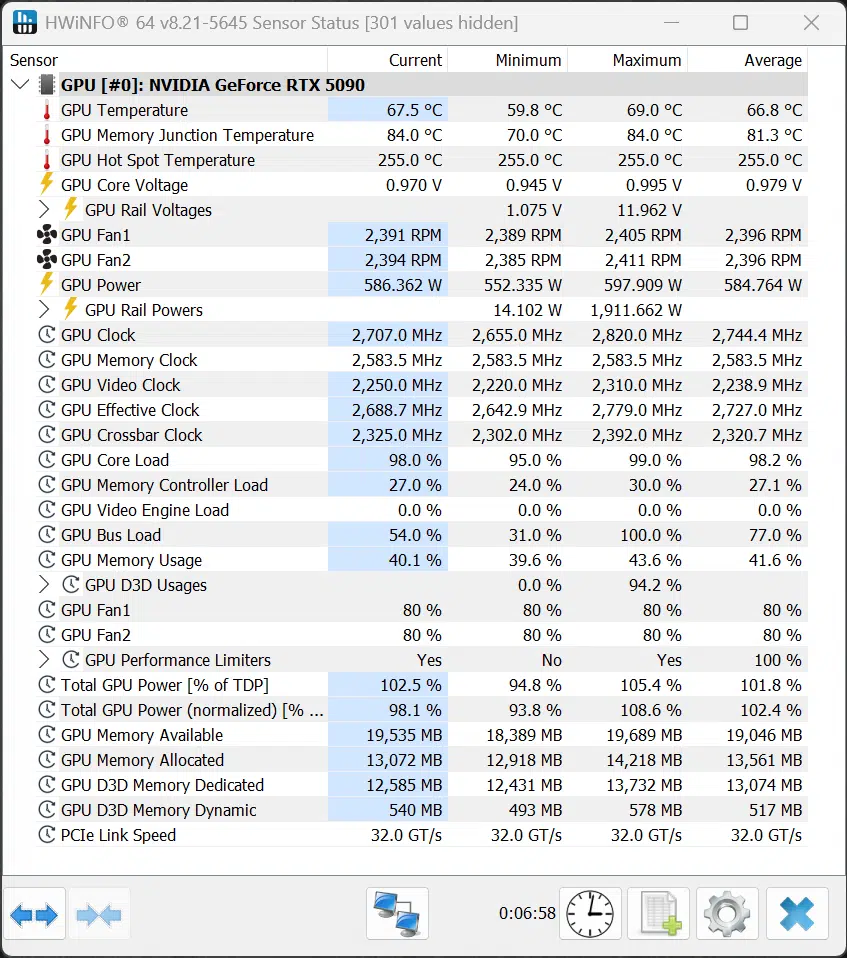
On this page, we will look at the power and temperature, that the Overclocked NVIDIA GeForce RTX 5090 Founders Edition runs at. We will utilize both GPU-Z and HWiNFO64 to collect data and look at the sensor information they both provide. Note that the GPU-Z version used doesn’t officially recognize the GPU, but most of the data looks correct, except for the Hot Spot temperature which is not supported on the GeForce RTX 5090. We will show our results in graphs, and we will also post the screenshots from GPU-Z and HWiNFO64 so that you can see all the data yourself and make comparisons. We collected the data running Cyberpunk 2077 at 4K and “Ultra” settings on all video cards.
Power
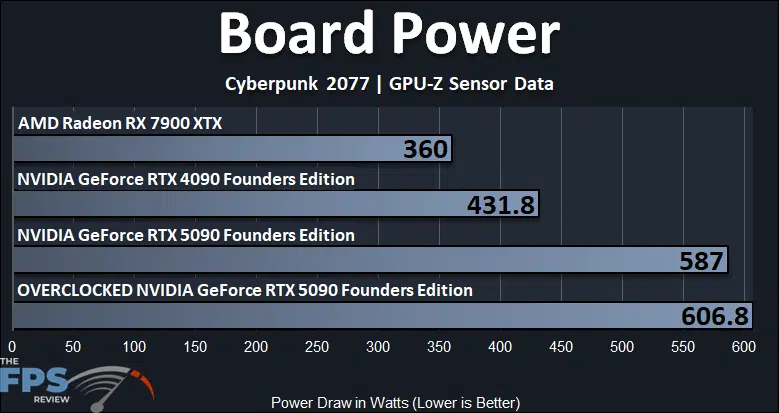
The TDP of the NVIDIA GeForce RTX 5090 Founders Edition is 575W. You can see when it is not overclocked it reaches a maximum board power of 587W. When we overclocked it, however, that rose quite a bit and exceeded 600W maximum up to 606.8W now, that wasn’t sustained, but it was the peak power usage with the overclock, which does exceed the TDP, especially with the Power Limit increased to 4% which is 600W.
The increase in power isn’t a ton though, this is only a 3% power increase (or 20W), which in the grand scheme of things, isn’t a lot, considering it’s already at a high place. Surely, if we had increased the Voltage, this power would increase a lot more, we could see 650W being common with the Voltage increased, and partner cards could even be pushed more to 700W potentially. At 606.8W, the Overclocked NVIDIA GeForce RTX 5090 FE uses 41% more power than the GeForce RTX 4090 FE, and that is quite a bit more.
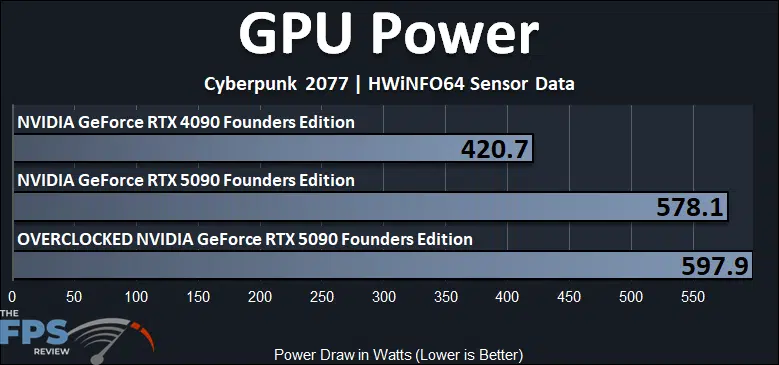
Another metric to check is HWiNFO64’s reporting of GPU Power. Here, we can see that the Overclocked NVIDIA GeForce RTX 5090 FE is hitting almost 600W, maxing out at 597.9W, a 3% power increase from the default power of 578.1W for GPU Power. This puts the Overclocked NVIDIA GeForce RTX 5090 FE 42% higher on GPU Power compared to the GeForce RTX 4090 FE.
Temperature
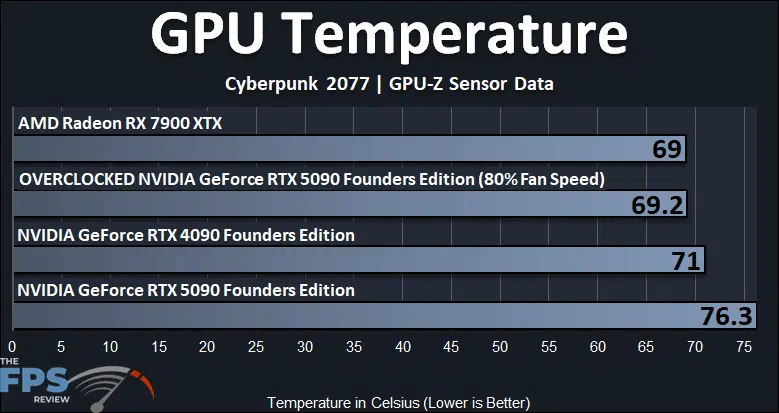
For the temperature reading, we are looking at GPU edge temperature here, and the Overclocked NVIDIA GeForce RTX 5090 FE is running a faster 80% locked fan speed, so it is going to run cooler. With the fans at 80%, the Overclocked NVIDIA GeForce RTX 5090 FE hits just 69c GPU temp, bringing it down even below the temp of the GeForce RTX 4090 FE. The fan increase really helped temperatures a lot, a 9% decrease in temperature.
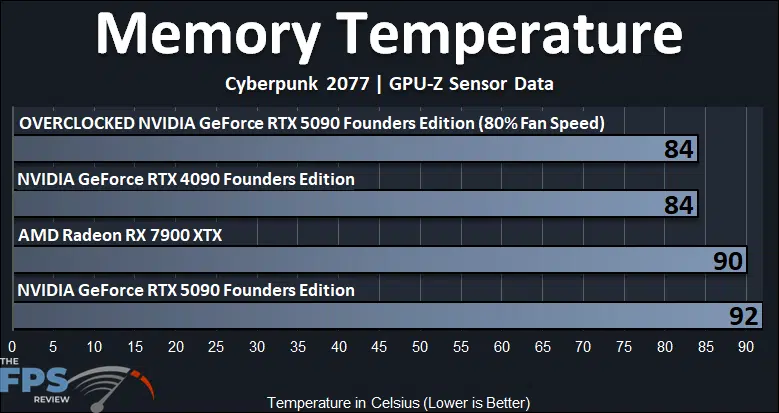
Another component that benefited a lot from the faster fan speed was the memory temperature. We noted a pretty high memory temperature of 92c on the NVIDIA GeForce RTX 5090 FE at default. With our memory overclock at 31Gbps, but the fan speeds at 80%, the memory temperature drops to 84c, the same as the GeForce RTX 4090 FE, with a 9% temperature reduction.
GPU-Z and HWiNFO64 Overclocked Screenshots
Below, you can note the GPU-Z and HWiNFO64 screenshots with the Overclocked NVIDIA GeForce RTX 5090 FE. Worth noting is that the GPU Voltage has dropped a little bit from the default GPU Voltage. At default, the GeForce RTX 5090 FE had a GPU Voltage between 1.0000V-1.0650V depending on the GPU load. In our overclock, we noted a GPU Voltage from 0.9900V-1.0350V when the video card was overclocked, so it had a bit of an undervolt automatically when overclocked.
Discussion (7 replies)
Join Discussion →Thanks for the great write-up! As always, these end up being my reference templates for OCing whatever I end up with. Very torn on whether to invest the extra $500 for an AIO card like the Suprim SOC (read a couple of reviews and very, very similar performance-wise, just can be cooled more), or anything else for that matter. These FE cards seem amazing for their engineering and cooling capabilities. The next trick will be to try and snag one.
I'm waiting unitl March before I even think about it.
My question is, are there larger gains from CPU increase or memory increase? Can you decrease one to allow more power limit to increase the other? For example, if the GPU is the bottleneck, can mem clocks be reduced to increase power limit available to the GPU to eek out some extra MHZ?
Good question. @David_Schroth taught me years ago about lowering mem freq to free up some power for higher GPU clockrates. I'd imagine so but the silicon lottery also comes into play. I tend to lose out with the silicon side of things so using this strategy often helps when dialing things in.
Yes, GDDR7 like GDDR6X takes a lot of power, reducing memory allows the GPU to sustain a higher clock, HOWEVER, there is a cap based on the bin, so you hit a point that the GPU just can't do that clock speed, thus Voltage is needed to overcome that, and that increases power again by a lot on these GPUs in this node.
Good to know. Thanks @Brent_Justice!
That makes things more complex if the GPU clocks cap out at a certain place, especially if that is before you've reached the full power target for the card. If the GPU is only going to go to 3ghz and that's it regardless of any extra power limit on the card, might as well increase the mem clocks too.