
Overclocking
The SAPPHIRE PULSE Radeon RX 9070 GRE GAMING OC has a higher Total Board Power of 240W compared to the reference AMD Radeon RX 9070 GRE spec of 220W. The SAPPHIRE PULSE Radeon RX 9070 GRE GAMING OC also has a high factory overclock out of the box of 2920MHz, compared to the reference spec of 2790MHz. Therefore, given these two facts, we aren’t sure what kind of headroom it will actually have, considering it is already clocked very high to begin with, but then also has more power headroom than we’ve previously experienced on the Radeon RX 9070 GRE. On this page, we will explore the default clock frequency the video card operates at, as well as our overclocking attempts utilizing AMD Radeon Software’s Performance Tuning.
Default Clock Speed
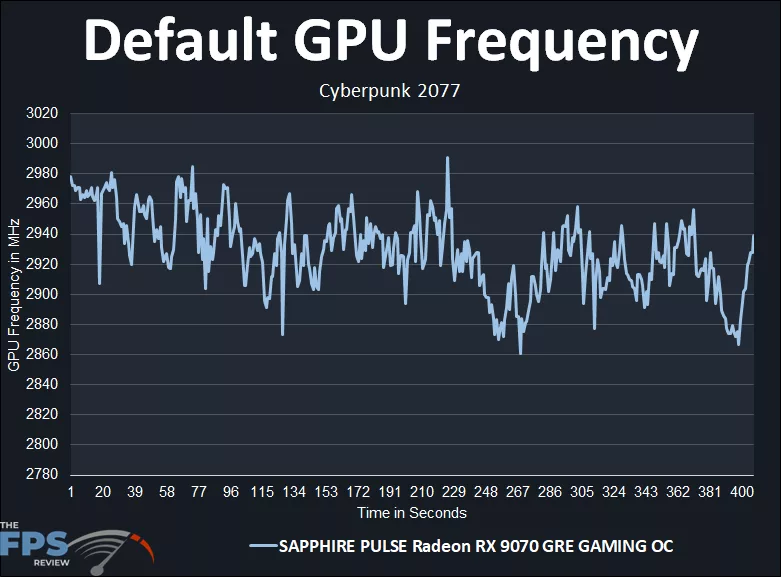
Let’s start by looking at the default GPU clock speed. The SAPPHIRE PULSE Radeon RX 9070 GRE GAMING OC has a default OC clock speed of 2920MHz. In the graph above, we can see that while gaming, it starts out right at 2980MHz, above that spec, but then starts diminishing while gaming and is up and down at 2860MHz at the absolute lowest, but that is just a peak; it seems to sustain somewhere between 2900MHz-2940MHz on average while gaming, which is hovering right around its 2920MHz spec. The exact average of the GPU clock speed was: 2927MHz! That is actually very good, and right in line with the default OC, and way above the reference 2790MHz of the AMD spec, about 5% higher in fact, or 137MHz.
Highest Overclock
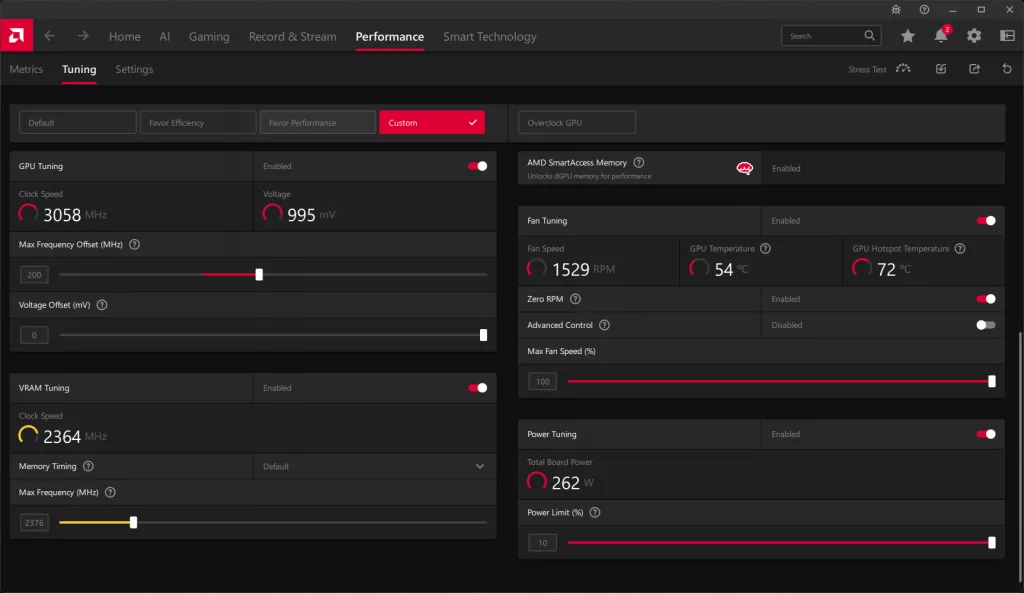
Utilizing AMD Radeon Software’s Tuning Control settings for GPU, we were only able to set up to a maximum of 10% Power Limit. Keep this in mind, however, the SAPPHIRE PULSE Radeon RX 9070 GRE GAMING OC is already operating at a 240W Total Board Power, which is 9% above the reference specification. Therefore, if we add 10% on top of that, we come to somewhere around 264W of Total Board Power we can now overclock within, which is pretty significant, especially compared to the reference 220W of the 9070 GRE.
We pushed up the Max Frequency Offset until the video card stopped gaining MHz frequency in-game. We then upped the Memory Frequency until it started to negatively affect the GPU frequency. We found that this resulted in about a 200MHz Max Frequency Offset, but of course, that doesn’t mean +200MHz, it’s just a headroom slider to allow the GPU to scale up if it wants to.
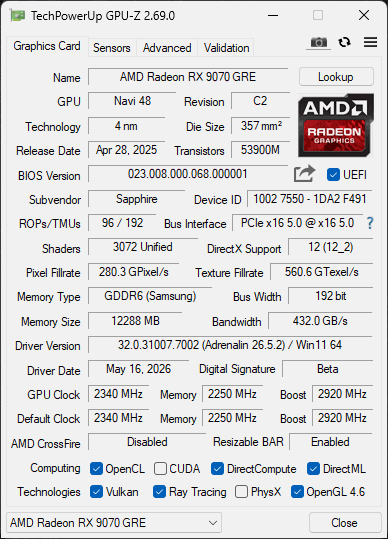
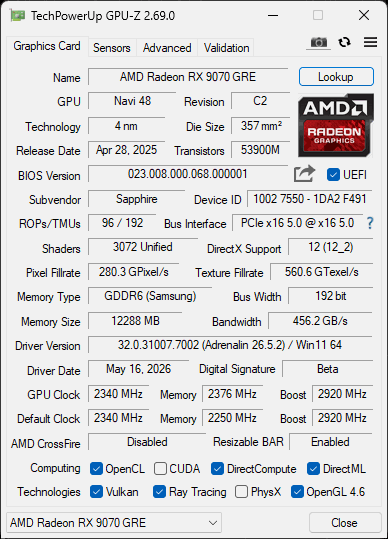
On the memory side of things, we were actually able to overclock the video card well past 18Gbps, 20Gbps, and 21Gbps were possible, BUT, this drastically reduced the GPU frequency since it capped out the Power Target of the video card. Therefore, to keep the GPU frequency UP, we had to keep the memory frequency tame, in this case, just 19Gbps compared to the default 18Gbps. That is a bandwidth of 456GB/s compared to the default 432GB/s.
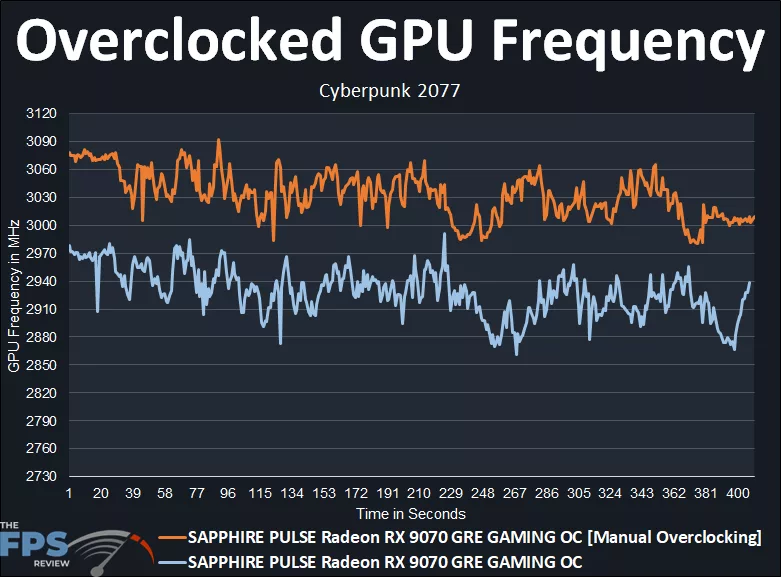
The graph above is the result of our overclock. You can see that it was boosting upwards from the default pretty far. We wanted to keep the GPU frequency higher, so that is why we capped the memory at just 19Gbps. The overclock starts around 3075MHz (yes, over 3GHz) and generally keeps to around 3000MHz-3060MHz, in that range. The exact average of the overclock is: 3033MHz!.
Yep, that is, we are averaging 3GHz on this overclock with the SAPPHIRE PULSE Radeon RX 9070 GRE GAMING OC video card and its heightened Total Board Power limit. Therefore, the overclock brought an increase of 106MHz on average, or 4%. However, don’t forget that the SAPPHIRE PULSE Radeon RX 9070 GRE GAMING OC was already overclocked to begin with, and if we compare the manual overclock with the AMD reference clock speed, then the actual overclock over reference is 9%.
Overclocking Game Performance
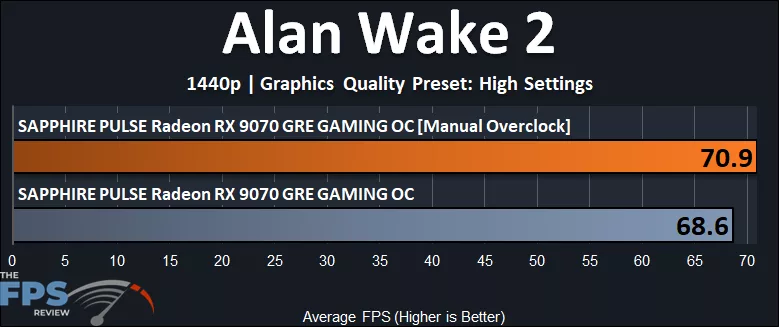
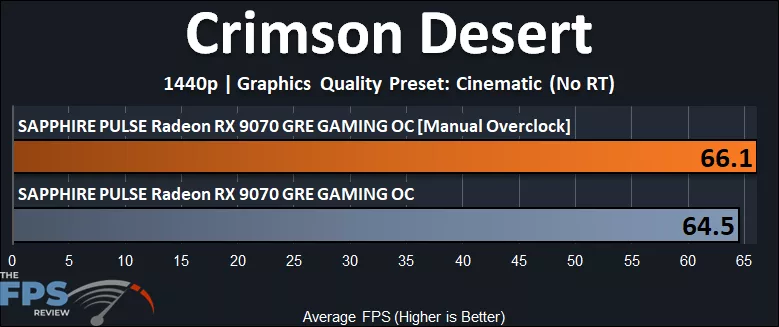
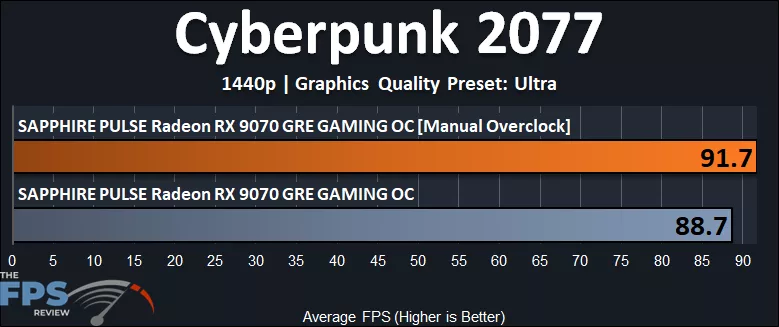
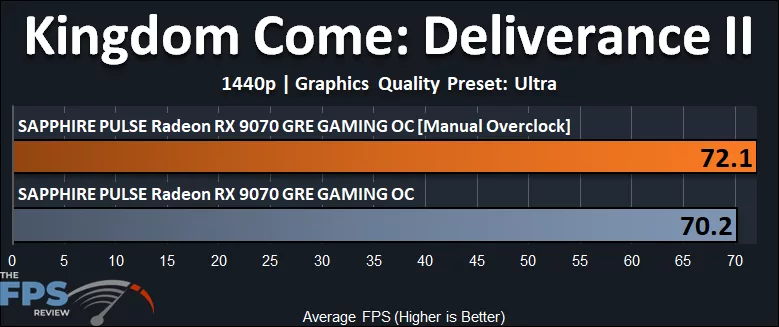
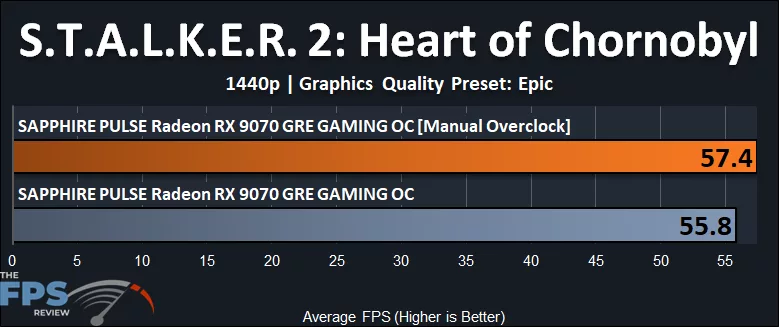
Below, you will see that the overclocking performance difference is only 3.3% at best, however. Even though the overclock was above 3GHz on this video card, it was already running as fast as possible, giving you everything it’s got, and the extra overclock didn’t help too much.
GPUz
Discussion
Join Discussion →No replies yet. Be the first to reply on the forum.