
Power and Temp
On this page, we will explore the power and temperature of the SAPPHIRE PULSE Radeon RX 9070 GRE GAMING OC in a game. We have also included the manual overclocked results as well, to see the difference the small 3.3% gain from overclocking adds to power and temp.
Power
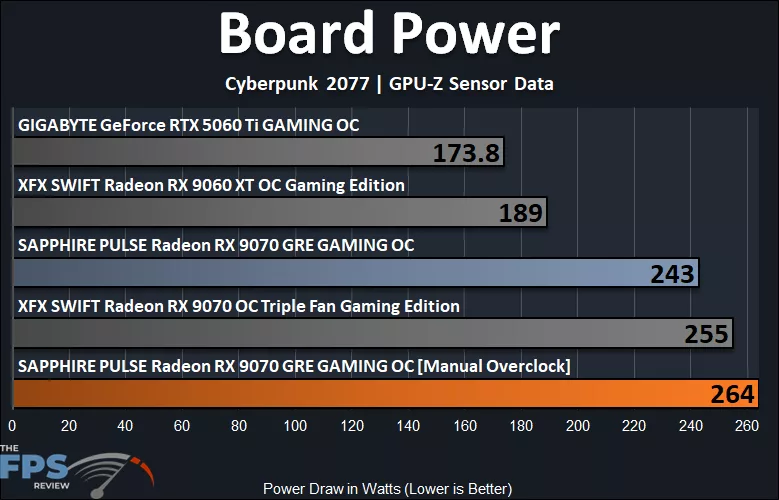
The Total Board Power of the SAPPHIRE PULSE Radeon RX 9070 GRE GAMING OC is 240W. In our testing, the maximum peak board power Wattage we hit was 243W, so I’d say this is very much in line with specs. At this rating, the SAPPHIRE PULSE Radeon RX 9070 GRE GAMING OC does use more power than the GeForce RTX 5060 Ti and Radeon RX 9060 XT, in fact, a lot more than the GeForce RTX 5060 Ti. However, it is less than the Radeon RX 9070.
The SAPPHIRE PULSE Radeon RX 9070 GRE GAMING OC uses 29% more power than the Radeon RX 9060 XT and 40% more power than the GeForce RTX 5060 Ti. However, it uses 5% less power than the Radeon RX 9070. When we overclock it, the power increases by 9%, which tracks with the +10% Power Target we set. That power gain really isn’t worth the 3.3% performance gain with this particular video card.
Temperature
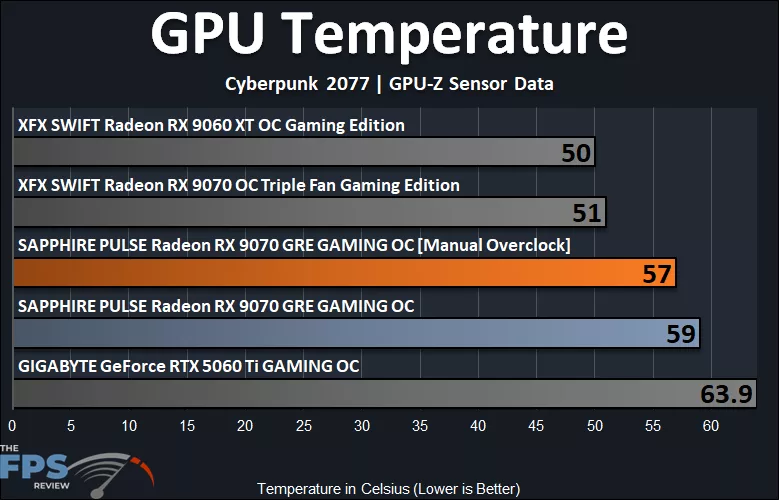
All the video cards used in this review are custom AIB video cards with custom cooling of different configurations, so the cooling will be determined by the individual card’s design. The SAPPHIRE PULSE Radeon RX 9070 GRE GAMING OC itself runs cooler than the GeForce RTX 5060 Ti. Though the SAPPHIRE PULSE Radeon RX 9070 GRE GAMING OC is pulling more Wattage, it actually runs cooler by 8% compared to the GeForce RTX 5060 Ti.
The SAPPHIRE PULSE Radeon RX 9070 GRE GAMING OC does run warmer than the Radeon RX 9060 XT and Radeon RX 9070, but not much higher, about 6 degrees warmer. Considering the small nature of the SAPPHIRE PULSE Radeon RX 9070 GRE GAMING OC compared to some of the bigger XFX Triple-Fan video cards, it is really nice to see the SAPPHIRE PULSE Radeon RX 9070 GRE GAMING OC run at just 60c.
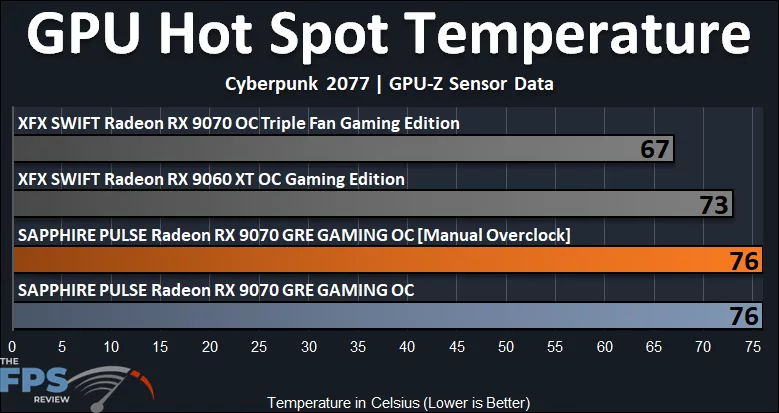
The Hot Spot temperatures, however, are the warmest on the SAPPHIRE PULSE Radeon RX 9070 GRE GAMING OC. We get a Hot Spot temperature of about 76c. This is warmer than the 9060 XT and 9070, which runs quite cool. However, the SAPPHIRE PULSE Radeon RX 9070 GRE GAMING OC is a small video card with Dual-Fans. Therefore, it is actually impressive that at 76c the SAPPHIRE PULSE Radeon RX 9070 GRE GAMING OC is running cooler on the Hot Spot than another recently reviewed Triple-Fan Radeon RX 9070 GRE we have looked at, which hit 81c.
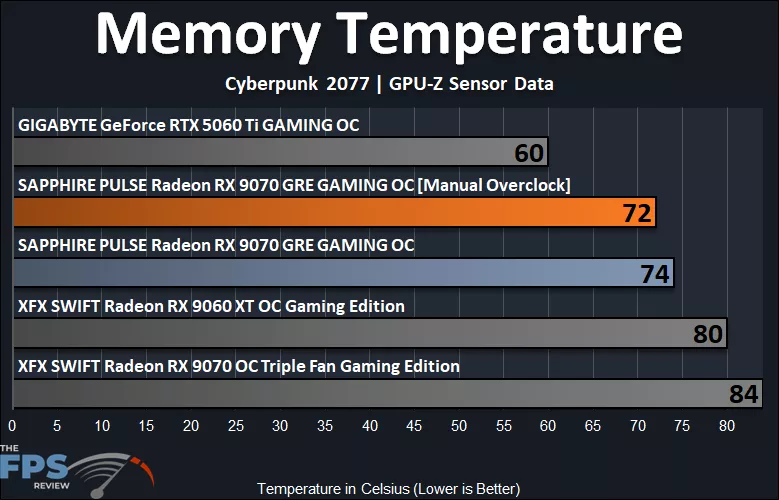
The memory temperatures are running very well on the SAPPHIRE PULSE Radeon RX 9070 GRE GAMING OC at just 74c. This is cooler than both the 9060 XT and 9070 Triple-Fan video card. It seems even on this compact video card, SAPPHIRE got its cooling right on the memory and GPU.
GPUz
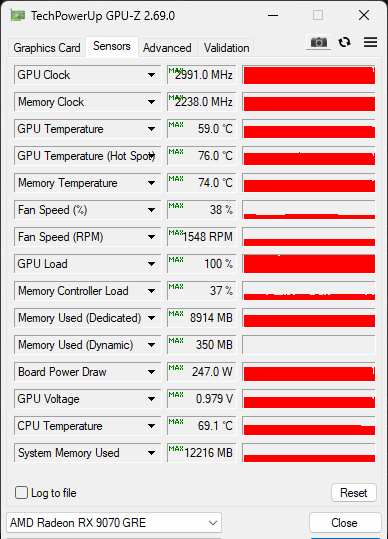
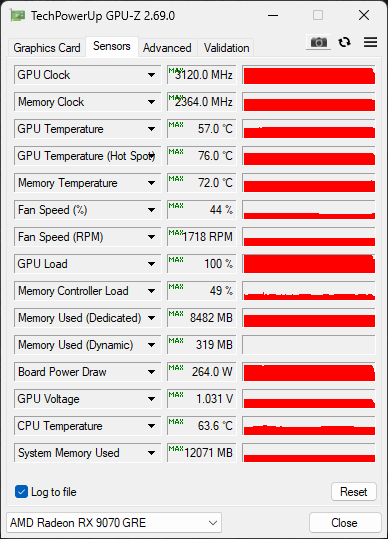
In GPUz, we can see that at default, the GPU Voltage of the SAPPHIRE PULSE Radeon RX 9070 GRE GAMING OC is 0.979V, and when overclocked, that did auto-increase to 1.031V. The default fan speed was around 38%, and when overclocked, it auto-increased to 44%.
Discussion
Join Discussion →No replies yet. Be the first to reply on the forum.