SAPPHIRE PULSE Radeon RX 9070 GRE GAMING OC Video Card Review

The FPS Review may receive a commission if you purchase something after clicking a link in this article.

Test Setup

System Setup

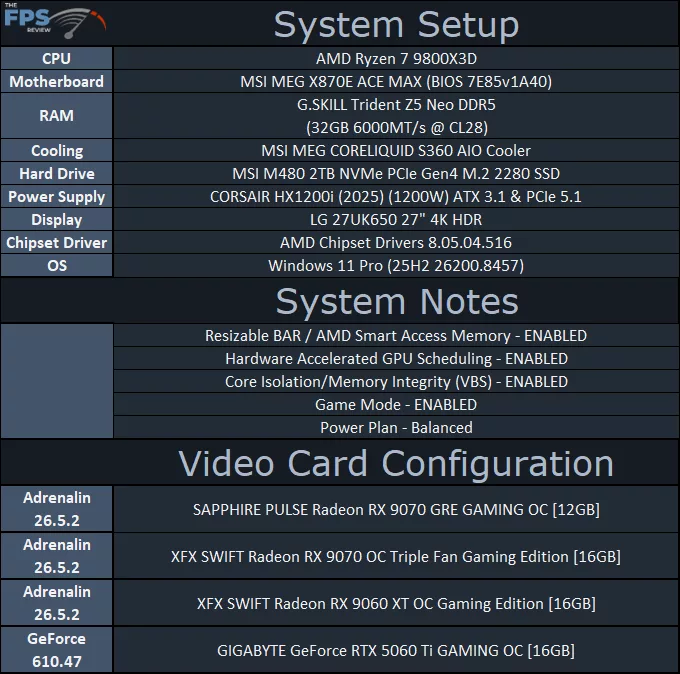
We are using an AMD Ryzen 7 9800X3D for testing. We are using the motherboard’s current default BIOS settings on the latest release BIOS. PCI-Express Resizable BAR is enabled. We have enabled EXPO I in the BIOS for the memory. We are using a fresh install of Windows 11 Pro with the latest Windows Updates. We have the latest drivers installed, including the latest chipset drivers.  We are using the “Balanced” power profile in Windows Settings, and Core Isolation/Memory Integrity (VBS) is enabled.

For AMD drivers, we are using AMD-supplied drivers for use with the Radeon RX 9070 GRE; these are indicated as Adrenalin 26.5.2. As stated per AMD’s review guide, these drivers are based on 26.5.2 and are newer than the 26.5.1 driver. We used 26.5.2 for all AMD video cards.

For the NVIDIA video card, we used the latest driver, which was GeForce 610.47.

All of the video cards being compared are AIB custom video cards, and some have factory overclocks, so please be aware. We are running the video cards at their out-of-the-box performance levels.

Join the discussion in The FPS Review Forums...

REVIEW OVERVIEW

The FPS Review Score
9.5

SUMMARY

The SAPPHIRE PULSE Radeon RX 9070 GRE GAMING OC is a great value compared to the GeForce RX 5060 Ti, offering more performance, and better value per dollar. The SAPPHIRE PULSE Radeon RX 9070 GRE GAMING OC offers a factory overclock and higher Total Board Power of 240W that makes a difference. It offers more performance over the Radeon RX 9060 XT and comes much closer to Radeon RX 9070 performance in terms of performance scaling. The SAPPHIRE PULSE Radeon RX 9070 GRE GAMING OC is also a compact video card, has a small size, and still cools extremely well to provide an excellent option for small builds, or tight spaces for 1440p gaming.
Brent Justicehttps://www.thefpsreview.com
Former managing editor of GPUs at HardOCP for 18 years, Brent Justice has been reviewing computer components since the late 90s, educated in the art and method of the computer hardware review, he brings experience, knowledge, and hands-on testing with a gamer-oriented and hardware enthusiast perspective. You can follow him on Twitter - @Brent_Justice You can sub to his YouTube channel - Justice Gaming https://www.youtube.com/c/JusticeGamingChannel You can check out his computer builds on KIT - @BrentJustice https://kit.co/BrentJustice

Recent News