
Battery Life
The battery life of the Steam Deck has received quite a bit of attention in online reviews and comments. The standard listed on Valve’s Steam Deck website is 2-8 hours of gameplay per charge. Our unit takes about 2.5 hours to charge from automatic low battery shutdown to fully charged.
The graphs show our experience playing games from a full charge to the low battery shutdown. We used default performance settings otherwise and a screen brightness of 75%.
The two games were chosen based on their performance draw on the GPU. Half-Life 2 which is an older game that is known for playability across many system configurations and Dying Light 2, a recent release that is graphically much more demanding. We set the framerate limiter at various levels and played the game until the battery ran out.
Dying Light 2 was played on preset “Low” settings using in-game FSR, and Half-Life 2 was played with all settings on “High”. Valve states that reducing the frame rate will prolong the battery life, so we took them up on it.
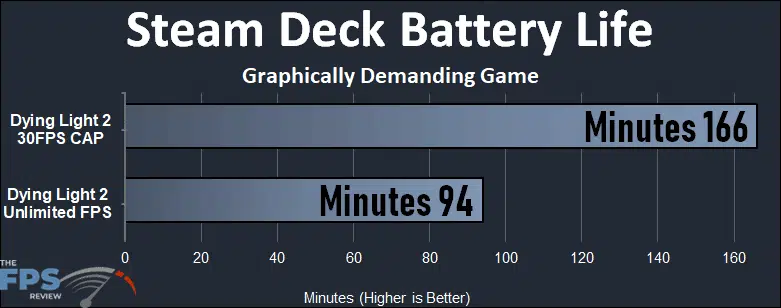
Dying Light 2 was chosen due to its much more demanding graphics. The game will play for 94 minutes with an unlimited framerate (averaging 42FPS) at 99% GPU utilization. Due to the framerate of 52 maximum in our test settings, the fixed framerate testing was set to 30 FPS. The battery was able to run for 166 minutes. Over an hour increase in time with less (78%) GPU utilization.
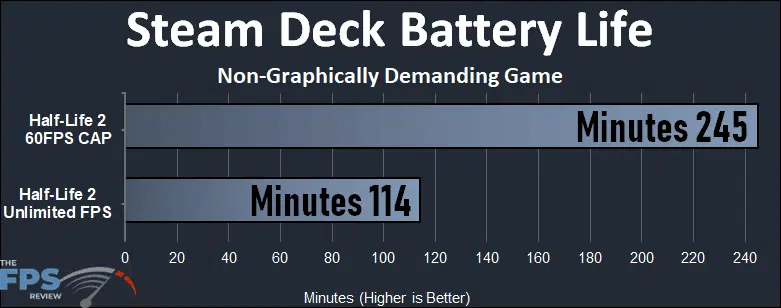
One can see by the graphing that Valve indeed has given good advice. Half-Life 2 will play for 114 minutes set on unlimited FPS. The GPU will run at 70% utilization with a framerate of over 240. If we reduce the framerate to a fixed 60FPS (30% utilization) the battery life will increase over 100% to 245 minutes.
Quite honestly, over the course of testing, 4 hours was the best we could achieve on the Steam Deck playing any of the games listed here today.
Discussion (5 replies)
Join Discussion →Great writeup. I placed an order back in February when they started shipping, supposedly mine will ship by end of year. Makes me eager to see it!
The Steam Deck is a great handheld, but the software development is the most important part of this. I'm really enjoying my Deck, and when I have time I'll be trying SteamOS on a desktop system.
I gotta say Valve got a lot right in its first try. The Deck is quite impressive. That said I think I'm going to wait for the next gen.
Zen3/RDNA3 combo should boost performance quite a bit. An 8inch ZERO BEZEL screen would be awesome. (why do portable gaming devices have such huge bezels?) and full HD please, thankyou.
BTW get rid of the useless touchpads, ok maybe leave one.
I've been using the right touchpad a lot, but a lefty might prefer to use the other one.
The 6800U handhelds that are supposed to be shipping by the end of the year are interesting. I think Valve's input is better than anything on the horizon, though.
My Steam Deck arrived yesterday. My thoughts:
Packaging was impressive. The unit feels solid and holds well. The controls are intuitively placed for the most part — I suspect the four rear buttons as they are accidentally hit by me often, but they don’t really do a lot by default either.
I’ve only played on it for about 30 minutes. The unit has spent almost the entire day downloading updates and a few games to try out on it.
So far I’ve had the unit lock up 5 times just while poking around while stuff downloaded. Every time I go to “non-Steam apps” it asks if I want to install Chrome. If I say yes — half the controls go non-responsive. The UI still mostly works though, and Chrome does not install - it kind of soft hangs. I had the unit lock trying to come out of Desktop mode and go back to Full Screen — it just went to black screen.
The haptics feel tight. The speakers sound good. The screen looks good. The controls feel decent.
I played Transistor for about 30 minutes — that went well. It even got my previous save games from the Desktop (cloud saves). The unit can deliver as long as you have modest expectations
I was also able to get Steam streaming to work from my PC - but that you have you be careful of, as the Deck resolution is so low that most text comes across illegible.
From my limited amount of play time, I was plugged into a normal USB jack - the battery continued to drain since it was not a PD port, after 30 min I went from full charge to about 80% while plugged into low power. While letting it download updates, after about 5 hours the battery was almost drained — despite being plugged into a low power port and not playing any games, just downloading stuff. The unit can not download or perform updates while in Sleep or Standby.
Will report after I get some more playtime. The build quality feels good, many games seem like they will do great even with the small screen (Transistor looked and played great), but the software still has quirks and battery / power management feels suspect right now.