
Test Setup
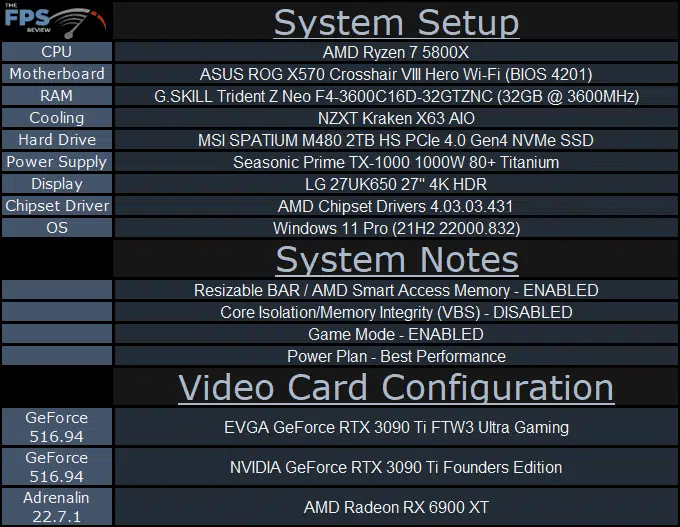
Please read our GPU Test Bench and Benchmarking Refresher for an explanation of our test system, procedures, and goals. Note that we now have a Ryzen 7 5800X in the system. More information on our GPU testing can be found here. Check out our KIT page where you can see all the components in our test system configuration for reviewing video cards.
System Setup
We are using the motherboard’s current default BIOS settings on the latest official release BIOS. We have enabled PCI-Express Resizable BAR in the motherboard BIOS. This means we are utilizing Resizable BAR on NVIDIA GPUs and AMD Smart Access Memory on AMD GPUs in all our testing. We have enabled DOCP in the BIOS for the memory.
We are using a fresh install of Windows 11 Pro with the latest Windows Updates, and drivers installed including the latest chipset drivers from AMD. We are using the “Best Performance” power profile in Windows Settings. Hardware Accelerated GPU Scheduling is ENABLED. VBS is DISABLED and Game Mode is ENABLED.
Discussion (3 replies)
Join Discussion →I find it interesting how there is this mad rush for vendors to get all of their GPU's sold now that they can have decent production numbers again. Yet the buyers that WOULD have been there are more or less waiting now. All of these vendors have been rolling in money with Mining money and now that's gone again and they are effectively floundering.
Been enjoying mine so far. Probably the last card I'll by to be honest.
I loved mine so much that I jumped on getting a 2nd hybrid model. Clocks on the hybrid are similar but stock #s start where the OC on this card end, but the ceiling is about the same.