
Power Temperature and Frequency
We will now test the power and temperature on each CPU, as well as the frequency on the Intel Core i9-13900K. To run these tests we ran Cinebench R23 for 10 minutes and took readings according to HWiNFO64, the latest version.
Power

This graph is quite shocking. The Intel Core i9-13900K skyrockets to a whopping 336.8W CPU package power while running full-load in Cinebench R23. When the CPU is being used to its maximum potential, the power demand is quite high, surpassing the previous highest power CPU, the 12900K. Compared to last generation’s 12th Gen Core processor Core i9-12900K the new Core i9-13900K is consuming 39% more power, 94W more. That’s just on a scale we’ve never seen before, to be honest. Think of it like this, the Core i9-12900K is almost as demanding as a 350W GPU like the GeForce RTX 3090.
Compared to the Ryzen 9 7950X, the Core i9-13900K consumes 43% more power, 101W more. Ask yourself if that power demand is worth the differences in performance you saw compared to the Ryzen 9 7950X in this review. Even the Intel Core i5-13600K is consuming more power than the Ryzen 9 7900X, and coming close to the 7950X on power consumption, and those CPUs are far apart in performance. The only saving grace is that you won’t always be pegging the CPU like this, especially when gaming. However, if you do use the CPU for things like rendering, or video editing, and it’s pegging all the cores, expect over 300W of power to be drawn.
Temperature
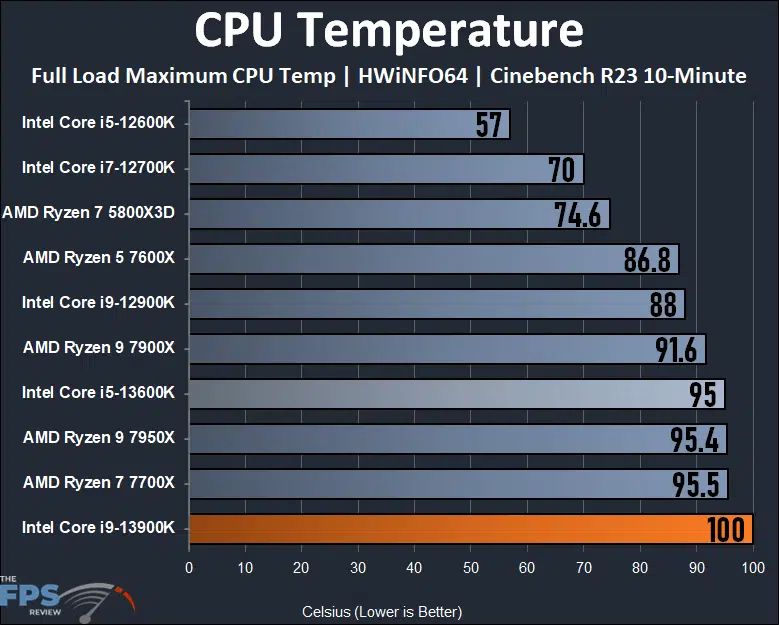
If you know it has high power, you also knew it had to have a high temperature. The Intel Core i9-13900K is the hottest running CPU on our graph running at 100c in Cinebench R23 pegging all cores. At 100c we are at the TJunction. This is the same behavior as the Ryzen 7950X, which also runs at its TjMax of 95c. However, the Intel CPU is definitely hotter, even if it’s running in a similar way. The Ryzen 7000 series CPUs will run at 95c, they are designed to do so to maximize clock speed. The Core i9-13900K is just in an entirely different ballfield, however. At 100c you are teetering on the brink of throttling, and this was with a 360mm AIO as well at full fan speeds. What’s also disturbing is just how hot the Core i5-13600K was as well, reaching 95c. These temps are not encountered while gaming, or at lighter loads, but at full-load, pegging the CPU, expect a hot running CPU that is hotter than the 7950X.
CPU Frequency
The performance-core Max Turbo Frequency and Intel Thermal Velocity Boost Frequency are up to 5.8GHz, the Intel Turbo Boost Max Technology 3.0 Frequency is up to 5.7GHz and the Performance-core Max Turbo Frequency is up to 5.4GHz on the Intel Core i9-13900K. The Efficient-core Max Turbo Frequency is up to 4.3GHz. What we want to know though is how high it can attain when running all cores at the same time. For this test, we again ran Cinebench R23 to see in HWiNFO64 what all the cores looked like.

You can see why the Intel Core i9-13900K is drawing so much power, it actually does sustain 5.5GHz on the performance-cores and 4.3GHz on the efficient-cores running full-load pegging the CPU at 100c. We also tested a single-core and it did boost up to 5.8GHz.
Discussion (16 replies)
Join Discussion →Brent, very well done with the review! This thing is a power monger (both in terms of performance and consumption!).
I'm torn though and not liking the current "Trend" from AMD and Intel with their strategy on becoming the performance king. Throwing more power a the device shouldn't be the way to achieve this.
I'm inclined to make my next CPU decision based on Performance per watt. I can deal with slower performance if it means I'm not going to be spending an arm and a leg with the Electric Company.
Nice review enjoyed reading it. Would have loved to have seen some 5900x and 5950x cpu comparisons since you had the previous gen intel ones. But chart space is a thing. :) Gotta make it so eyeballs can read it!
Looks like I'm keeping the 12700k a while longer, this thing runs hot enough as it is, don't need a bigger heater.
If the AMD GPU's don't make for a good upgrade I might just upgrade my AMD machine with a 5800X3D and leave it at that.
That's the most cost effective upgrade you can do strictly for gaming. Obviously not a slow CPU in any desktop task of course. But that's if you have a need for it; the 12700K ain't slow by any means!
Alas, my poor Haswell-E...
I think both AMD and intel dropped the towel on power efficiency (and nvidia too for that matter). To think that all of them at some point touted power efficiency for their next gen products. At least nvidia delivered with Maxwell and Pascal.
Think of it another way - compare a modern V8 that's more powerful (more torque and horsepower) across its RPM range than a similarly displacing V8 from thirty years ago, and then note that said modern V8 is not only more efficient when putting power down, but has cylinder deactivation and is more efficient at idle. Or, can be made significantly more powerful than the older V8 peak to peak tuned, but again peak to peak, the newer V8 uses more fuel. Because it can, not because it needs to.
We're seeing massive leaps in efficiency, and we're also seeing companies be able to push their parts closer to the limit stock.
Hey, I'm right there with you with my Ivy Bridge E. I was thinking of saving up for one of these this summer but now after seeing the gaming performance I'm rethinking it.
I do need to upgrade but I think I'll wait for the Ryzen 7000 3D versions. The only thing I know for sure is I'd like something that can last around 7-10 years as this has and since I've already got a rig with a 5800X3D it doesn't make sense to build another with the same, especially seeing it within a couple of frames of this processor at 4K gaming. Those 3930/4930/5930 K processors are still amazing after all this time but definitely getting long in the tooth.
I think this is closer to the truth.
The flip side of that coin is that stock power goes up when companies hit walls on other means to generate performance increases.
If you can't engineer it in more performance as part of the architecture, or throw more cores at it, then you hope like hell you can just push more power through it and boost the clocks.
It will continue to go up until people stop buying them. For the mass market - you aren't going to see 280W 13900K's in the average desktop computer in a cubicle for a call center, or in a POS cash register, or a laptop. All the chips in that market will continue to get more efficient -- because the cost of cooling is an overhead item they can cut out as the technology does get more efficient - the performance boosts just aren't as pronounced when the technology to run it has been fast enough for more than a decade now.
That part the V8 analogy still carries through - you don't see big Hellcat-driven minivans mass produced at the car lot, you see smaller displacement and more fuel efficiency and more gears in the transmission, while staying around a hp/torque level that seems "good enough" for the size of the car. The speed limit on the highways haven't changed in a long time, after all (but Americans have gotten fatter - hence turbochargers becoming more common ---- that's a bad joke, but only because part of that is at least true).
Those big, power hungry chips really only have two markets: big workstations that do serious work (pro content creation, engineering CAD, simulations, etc) - and gamers/enthusiasts. And in those markets - they won't really care about power until they start tripping breakers. And even then, good odds on them just saying "Oh well, I'll call the electrician" and still not caring.
Great review. This just drives home the point, if you use your rig for gaming primarily, and that's done in 4K, jumping up to the 13th Gen isn't really worth it since you are more GPU bound.
IMO the current price/performance cpu for 4k would be a 5800X3D. Might go as low as a 5600X if in a budget.
If you're on Intel... 7th-gen maybe, or have an AMD board that cannot take a 5800X3D, then it's a good upgrade if you also have a higher-end GPU. Especially keeping in mind that GPUs drive higher average framerates, while CPUs drive minimum framerates.
Well I went against my thoughts and got a 13900K as my buddy wanted my 12900K and offered me a fair deal. I thought about just going with a 13700K or 13600K, but I wanted to stick with an i9. Honestly when gaming this chip only gets about 5 degrees Celsius hotter than the 12900K using a NH-U12A cooler which isn't bad at all to me. Goes to show you what a good air cooler and a high airflow case can do to even a hot running chip.
This... is entirely relative to the load. Granted, that only matters if you do something that would benefit from more cooling - gaming and general desktop usage aren't going to really tax these CPUs.
Agreed, but I was just comparing it to my 12900K and what temps I had with that chip doing the same games/work loads. I'll probably never push this chip to its limits, but I never really did that with the 12900K either, just on occasion. I'm just impressed with the NH-U12A on how it has been effectively cooling this chip so far. I had some doubts, but it shows that air cooling isn't dead.