
Gameplay Performance at 4K with Ray Tracing
On this page we are going to focus on the 4K gameplay performance with Ray Tracing enabled on the Radeon RX 7900 XTX video card. We will include FSR and DLSS performance on the same graph in the games that are supported. We will use DLSS on NVIDIA GPUs and FSR on AMD GPUs. For video card comparisons we are using an AMD Radeon RX 6900 XT, NVIDIA GeForce RTX 4090 Founders Edition, and NVIDIA GeForce RTX 4080 Founders Edition. Our overclock is set at 3300MHz for the Max Frequency Slider in AMD Radeon Software, and memory is overclocked to 21GHz with Power Target at +15% and fans at 100%.
F1 2022
F1 2022 was released on June 28th, 2022 on the PC and uses Codemasters Ego engine. The game supports Ray Tracing, DLSS, AMD FidelityFX, and FSR. We are going to run the game with the highest quality settings of “Ultra High” and TAA+FidelityFX. We will enable all Ray Tracing options in the game to “On.” We will enable DLSS and FSR as needed at the Quality setting for both. We will utilize the built-in benchmark in the Imola track, in dry conditions with a far-chasing cam.
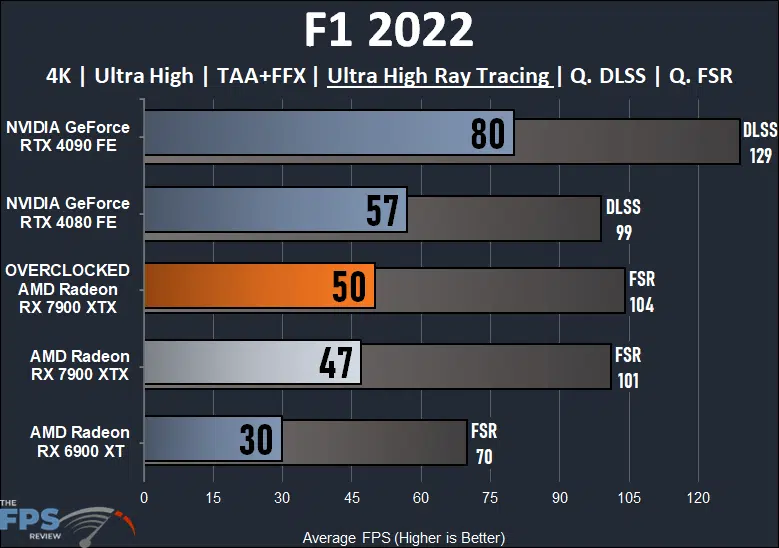
Now we have enabled “Ultra High Ray Tracing” in F1 2022 at 4K. Overclocking the Radeon RX 7900 XTX has improved performance in Ray Tracing by 6%. It brings performance from 47FPS to 50FPS, which is still not exactly a great gameplay experience, but it could be considered playable for some. It is still not enough to beat the GeForce RTX 4080 in Ray Tracing though, the overclocked Radeon RX 7900 XTX is 12% slower than the GeForce RTX 4080 and 38% slower than the GeForce RTX 4090. Compared to the Radeon RX 6900 XT the overclocked Radeon RX 7900 XTX is 67% faster. FSR is the key to making the game playable at 4K with Ray Tracing on the Radeon RX 7900 XTX overclocked, at 104FPS it does exceed performance over the GeForce RTX 4080 by 5%.
Dying Light 2
Dying Light 2 was released in February 2022 on the PC and uses Techland’s C-Engine. The game supports Ray Tracing, DLSS, and FSR2. This game supports Ray Tracing environmental effects including Ray Traced Soft Shadows, Ray Traced Ambient Occlusion, Ray Traced Global Illumination, and Ray Traced Reflections. We utilize the built-in preset option to set “HIGH-QUALITY RAYTRACING” which enables the game’s highest graphics settings plus the environmental effects explained above at the highest values. The game is run in DX12 Ultimate mode with ASYNC Compute turned on. For our benchmark, we are using a custom manual run-through at the end of the game hopping between rooftops, as well as free-roaming on the ground city level, as well as a forested area, in the daylight.
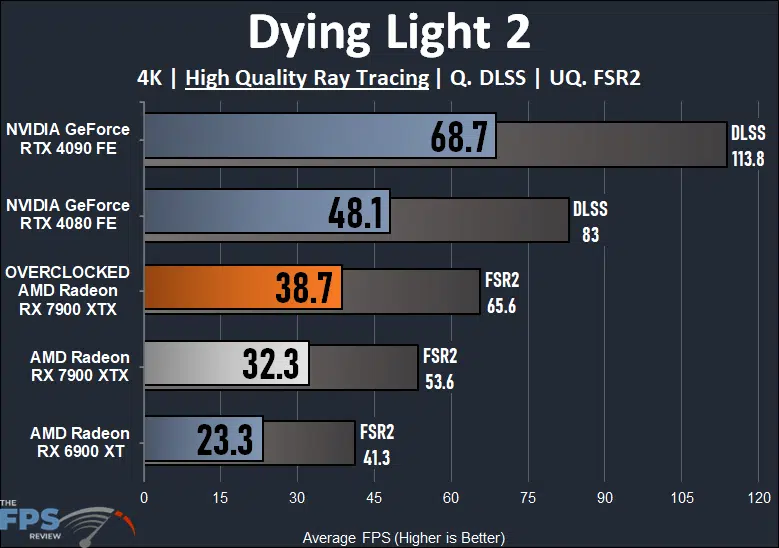
Dying Light 2 is very hard on the Radeon RX 7900 XTX, even overclocked. Overclocked the Radeon RX 7900 XTX is 20% faster than without, which is a pretty big increase, but that really only improves framerates from 32FPS to 38FPS, about 6FPS, which doesn’t equate to much here. The Radeon RX 7900 XTX overclocked is 20% slower than the GeForce RTX 4080 and is 44% slower than the GeForce RTX 4090. Compared to the Radeon RX 6900 XT the overclocked Radeon RX 7900 XTX is 66% faster. With overclocking, however, the Radeon RX 7900 XTX is very playable with FSR2 enabled. It improves performance by 22% with FSR2 versus FSR2 without the overclock. That is big enough that it takes performance from the lower 50’s, up to the mid 60’s which is playable at 4K. Therefore, overclocking really did help Ray Tracing performance here at 4K with FSR2 enabled.
Far Cry 6
Far Cry 6 was released in October of 2021 and uses the Dunia Engine. We utilize the built-in benchmark for testing. We have the HD Texture pack installed and turned on. We utilize the “Ultra” graphics preset which sets all options to the highest game settings. This game supports Ray Tracing via two DXR settings, one for Reflections and the other for Shadows, we turn on both for testing. This game supports FSR upscaling.
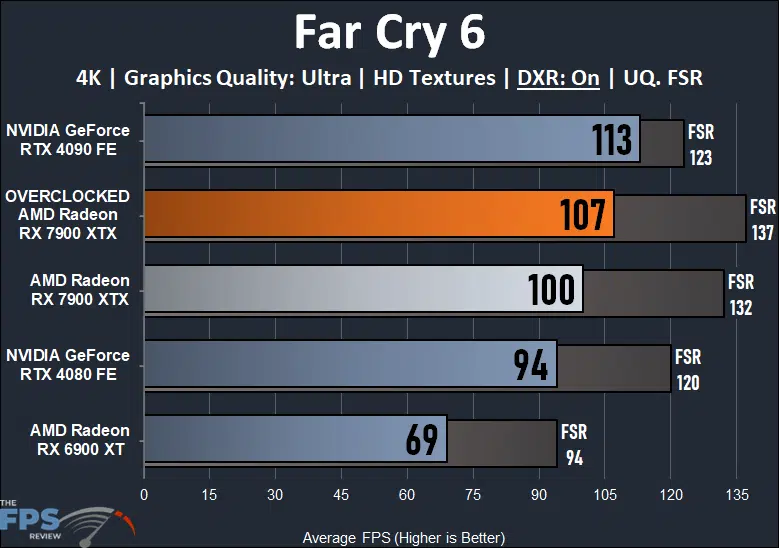
In Far Cry 6 we are running with both DXR options enabled at 4K. Overclocking the Radeon RX 7900 XTX brings performance up by 7%. It takes it from a playable 100FPS to 107FPS. At this performance level performance is now closer to RTX 4090 performance. The overclocked Radeon RX 7900 XTX is 14% faster than the GeForce RTX 4080 and only 5% slower than the GeForce RTX 4090. Compared to the Radeon RX 6900 XT the overclocked Radeon RX 7900 XTX is 55% faster. With FSR enabled, however, the overclocked Radeon RX 7900 XTX is the fastest video card on this graph.
Cyberpunk 2077
Cyberpunk 2077 was released in December 2020 and uses the REDengine 4. We have the game patched to version 1.52 and perform a long manual run-through driving in the game’s open world. We test using the Graphics Preset option to set graphics settings. We use the Ray Tracing Graphics Preset of either: “Ray Tracing: Low”, “Ray Tracing: Medium” or “Ray Tracing: Ultra” as indicated. This game supports DLSS and FSR.
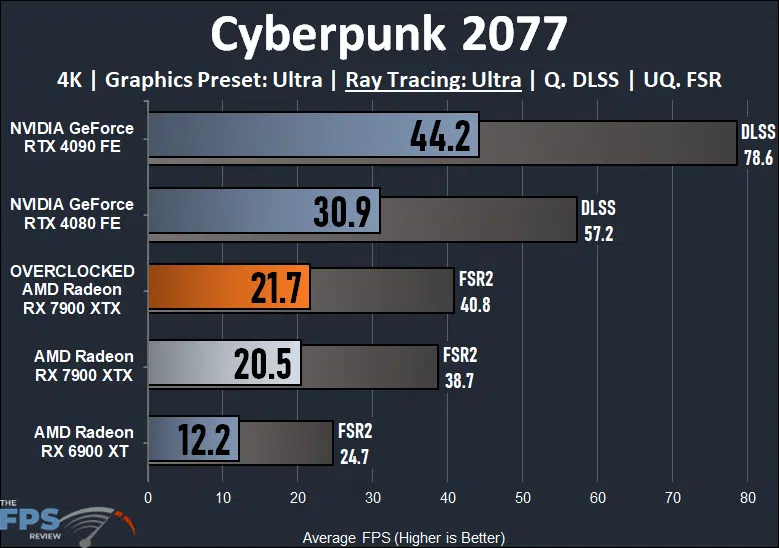
Cyberpunk 2077 is the other game that just tanks with Ray Tracing at 4K, and the overclocked Radeon RX 7900 XTX just doesn’t gain much here, just 6%, which only means about 1-2FPS. The overclocked Radeon RX 7900 XTX is 30% slower than the GeForce RTX 4080 and 51% slower than the GeForce RTX 4090. Compared to the Radeon RX 6900 XT the overclocked Radeon RX 7900 XTX is 78% faster. With FSR2 enabled performance is higher, but still not playable.
Watch Dogs Legion
Watch Dogs Legion was released on the PC in October of 2020 and uses the Disrupt game engine. We utilize the built-in benchmark for testing. We have the HD Texture pack installed and enabled for testing. We use the built-in graphics preset of “Ultra” for testing. We utilize the “Ultra” preset quality option for Ray Tracing. This game supports DLSS upscaling.
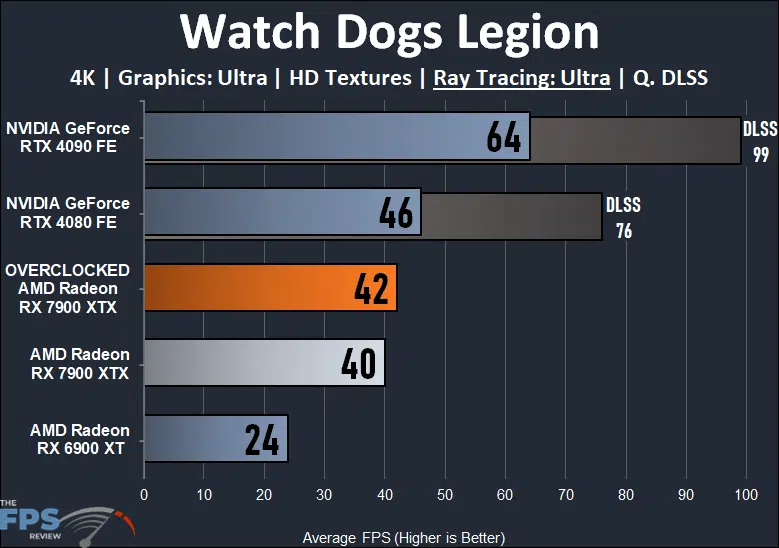
In Watch Dogs Legion at 4K with Ray Tracing we get a 5% performance uplift via overclocking the Radeon RX 7900 XTX. This does not create a playable experience, it is still unplayable at these settings. The overclocked Radeon RX 7900 XTX is 9% slower than the GeForce RTX 4080 and 34% slower than the GeForce RTX 4090. Compared to the Radeon RX 6900 XT the overclocked Radeon RX 7900 XTX is 75% faster.
Metro Exodus Enhanced
Metro Exodus Enhanced is being run with Shading Quality at “Extreme” and Ray Tracing at “Ultra.” This is a demanding game, that heavily focuses on Ray Tracing utilization, including Global Illumination. We are utilizing the built-in benchmark.
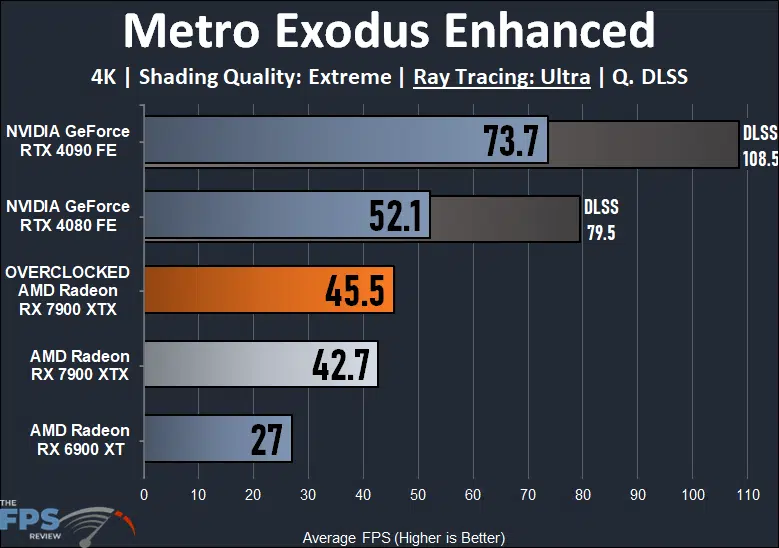
In Metro Exodus Enhanced at 4K with Ray Tracing overclocking the Radeon RX 7900 XTX improves performance by 7%. At this performance level, the game is not playable. The overclocked Radeon RX 7900 XTX is 13% slower than the GeForce RTX 4080 and 38% slower than the GeForce RTX 4090. Compared to the Radeon RX 6900 XT the overclocked Radeon RX 7900 XTX is 69% faster.
Discussion (9 replies)
Join Discussion →Thanks, @Brent_Justice for the OC review. Wow! A lot to unpack with this one with the new overclocking method that was needed. It's so awesome seeing the 7900 XTX really trading blows with the RTX 4080 and 4090. It definitely puts up a heck of a fight. Interesting too to see how they all share in the diminishing returns of extra power used vs performance gains. Still, though, my hat is off to AMD for such a nice card and I can't wait to see what they surpass it with.
Nice job. I don't tend to push my hardware much - thanks to you if a 7900xtx is ever in stock at msrpi can push it if I need to.
You would think a circa 2005 game at 4k wouldn't strain my 6900xt. The 7900xtx should do much better.
Same here... I just upgraded from a 6900xt to 7900xtx to try and keep my framerate locked at 160fps on my 3840x1600 ultrawide on the only game I really play, Path of Exile. 1% CPU utilization, 99% GPU utilization. ?♂️ Still can't lock it 100% of the time. The quest continues.
Depends on the game - a lot of them aren't terribly well optimized and can make anything struggle a bit, especially if you are a stickler about maintaining 60/120FPS rock solid
I play Rift a lot, it's 10+ years old now. 60% of the time it sits at 144Hz, but if I'm in a hub area or in a raid my 3080 can struggles to maintain 60, and I see it dip into the 40's on occasion. Not because the card is slow, just because the game isn't terribly well optimized (most MMOs aren't, especially when you get a lot of people in one area). Thankfully, MMOs aren't nearly so sensitive to dips in FPS, and with VRR I tend to not even notice any more unless it gets really bad.
I have a feeling that certain games are just going to be that way until the hardware is ludicrously overpowered for the software (and I would argue an Ampere card certainly qualifies as much faster than anything the developers intended to be running the game in my example)
Anyone have thoughts on pushing the best 4k fps with City of Heroes? I was lagging and down to 30-35 fps in a recent itrial. My monitor only does 60hz so I don't ask for much.
Wow you're running COH on a 5950 off of NVME with 128 gig of ram and a 6900xt and you are dipping down to 35 fps. I'm thinking it's a game engine limitation at this point rather than a hardware limitation. If I remember correctly isn't COH a 32 bit process so it can't use more than 4 gig of ram? And I'm betting it's only hitting a few of your cores. Honestly other than more straight light single threaded speed I don't think you're going to eek more out of that engine than what you have? Maybe with one of the new intel procs able to hit 6ghz?
Pretty much, just to ensure I am clearly communicating, under most circumstances COH is ay 60 fps. I get the drops when on a melee character in league (more than 1 team of 8) situations. COH has a lot of flashy powers with their own visuals and sounds. I recall some discussion, a few years back, about updating the code to x64, I dont recall if that actually happened. Hmmm just launched it and see it is x64 in task manager. You are correct about it doing most of the work on one thread with 2 more that get some use and a few more that get minor use. (according to a forum post on the homecoming site by a dev). Its hard to tell if I am running into a CPU (single core) wall or GPU wall.
CoH is ancient and maintained by volunteers who reverse engineered the engine. It’s a minor miracle that it runs at all, let alone as well as it does
Does undervolting help in increasing clock speeds ?