
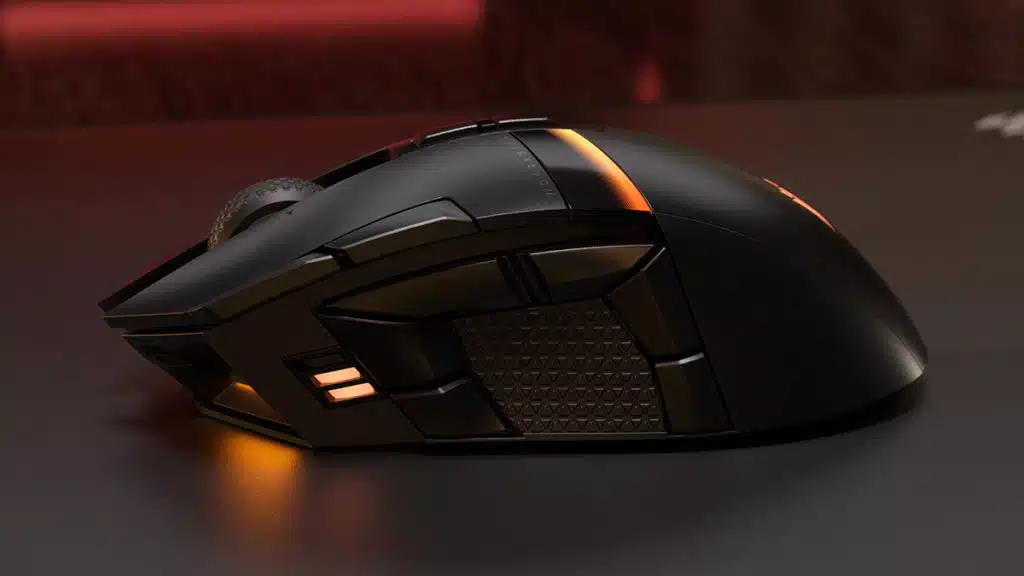
Corsair has announced that the DARKSTAR WIRELESS is now available to purchase through the Corsair webstore and its worldwide network of authorized online retailers and distributors for $169.99. Designed primarily for use with MMO games, the DARKSTAR WIRELESS is a SLIPSTREAM WIRELESS/Bluetooth mouse that features 15 programmable buttons, six of which are within a thumb’s reach through its side cluster, as well as RGB lighting and a 26,000 DPI optical sensor. Corsair says that the mouse offers up to 80 hours of playtime on a single charge.

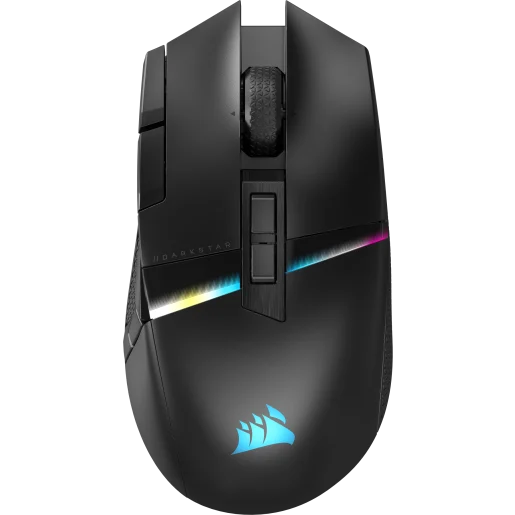
Corsair DARKSTAR WIRELESS RGB MMO Gaming Mouse Features
- 15 Programmable buttons
- Unique six-button side cluster
- Ideally placed side thumb grip to alleviate strain
- Sub-1ms SLIPSTREAM WIRELESS or Bluetooth
- CORSAIR MARKSMAN 26,000 DPI optical sensor
- Lightning-fast CORSAIR QUICKSTRIKE buttons
- Up to 80 hours of battery life
From a Corsair press release:
With an astounding 15 programmable buttons, DARKSTAR puts all your spells and actions within easy reach, including a perfectly situated six-button side cluster that puts a half-dozen buttons around a central textured grip. Your thumb is now utilized for maximum effectiveness and control, while reducing strain during long gaming sessions.
DARKSTAR has the wireless connectivity options to let you play the way you want, without compromising speed or responsiveness. Experience 2,000Hz hyper-polling over sub-1ms SLIPSTREAM WIRELESS, or connect to a host of devices with versatile Bluetooth. DARKSTAR’s long-lasting battery puts you in the game up to 80 hours at a time, and you can keep the battle going while you charge when plugged in via USB.
When you need to rely on your mouse against the strongest enemies, DARKSTAR is more than up to the task. Its ultra-accurate CORSAIR MARKSMAN 26,000 DPI optical sensor tracks every movement and mouse flick with pinpoint precision, and is customizable in single DPI steps. DARKSTAR comes armed with spring-loaded CORSAIR QUICKSTRIKE buttons, enabling you to click in rapid-fire succession without a millisecond’s delay, all registered on instantaneous optical switches.
High-level players need to program their mouse to their exact specifications, and players of any skill level want to program DARKSTAR’s amazing RGB. That’s where powerful CORSAIR iCUE software comes in. With the newly redesigned iCUE 5.0, you can personalize your mouse’s RGB lighting effects, set DPI, assign macros, surface calibrate the sensor, and more. Save your settings to five onboard profiles, for convenient access no matter where you’re playing.
With so many programmable buttons in a delightfully ergonomic design overflowing with RGB, DARKSTAR enables you to expand what’s possible in your games.
Discussion (14 replies)
Join Discussion →Too bad you'll need iCUE on your system to use its buttons.
That's not the bad part, I used some Corsair mice, all had mousewheel issues after a couple months
I've got a rather old Corsair mouse that works pretty well. Durability hasn't been my main issue with Corsair mice. Although, they do show wear on the buttons and the finish faster than Logitech mice do. Then again, that's also a "me" problem as I use computers and related peripherals more than a healthy person ever should.
Yea as far as durability is concerned my corsair mouse and keyboard have been great. My headset has had some wear issues on the headphones, luckily I could replace the ear cups with after market replacements, but the head band pad is wearing poorly after a couple years so that's a concern.
For me Corsair and Logitech are top of mine with Microsoft mice (when they made them) still right in the running. Razer is bottom barrel trash for me as far as durability is concerned.
Fwiw, I got the new version of Icue and it seems it can accept plug-ins now.
Still using a Corsair keyboard which works well enough, though my S and D keycaps are showing some wear damage. As an AZERTY user I do have more limited options for keyboards then others.
My glorious mouse seems to be holding up decently other then some normal wear and tear.
That is a very accurate assessment of Razer's quality.
Never been a fan of the multi button mice, but then again I'm not a MMO player either.
Even as an MMO player I don't want to deal with all of those buttons, PLUS... wireless kills it for me. Wireless invariably fails right when you need it to work. Unless it can operate wired not interested at all.
"DARKSTAR’s long-lasting battery puts you in the game up to 80 hours at a time, and you can keep the battle going while you charge when plugged in via USB."
I even went to their website and missed that. Could have merit then. As long as it can stand up to a rage squeeze and desk slam or twenty.
My G703 has served me well and is wireless. Battery life is outstanding as well.
I've had mixed experience with Corsair peripherals. Their head phones haven't lasted very long but their mice and keyboards generally have. Although, the mice and keyboards show considerable wear after a short time. Logitech is better for the most part with their mice and keyboards holding up a bit better for me. However, their Pro headphones are the worst design I've ever seen. I've had two sets fall apart on me after only a few months.
I've had issues with Corsair wireless mice over the past few years that were within the return window thankfully. Never really had an issue with their wired mice, but you're right that they seem to wear out quicker than the Logitech mice I've owned.
I have a pretty old set - an M65 mouse and a K70 keyboard -- both are probably 5-6 years old now? Both still work great, but as part of my COVID bored-out-of-my-mind housekeeping purge, they both had gotten so disgusting over the years I finally just replaced them because I couldn't clean them well enough to my liking.
I have them in the closet as standby / spares, but can't complain at all about craftsmanship or longevity of the things. Neither of them look new any longer, but physically they held up better than that rubberized stuff Logitech tends to use. My only complaint was the coating on the mouse - it was kinda like Line-X or truck bed liner - really rough, almost like it has grit in it. It hurt the heck out of my fingers for the longest time - until I built up calluses and most of the sharper edges kinda wore down.
Case in point, the replacement mouse was a Logitech MX Vertical - maybe a bit more than a year ago (I think I made a post here about it). It's not the full on rubber coating that the older ones had (the one that turned into snot), but it does have a slightly rubberized texture - kinda like a Rubbermaid container. It's already worn off and really shiny in spots. Battery life is excellent though and I haven't had an issues with it running dead while using it. The vertical aspect helps a lot, not 100% effective at taming wrist pain, but much improved although it did take a while to get used to it.