
Test Setup
Please read the information on our GPU testing procedures and methodology here. Note that our GPU Testing Bench has been upgraded to the Ryzen 7 7800X3D CPU and AM5 platform.
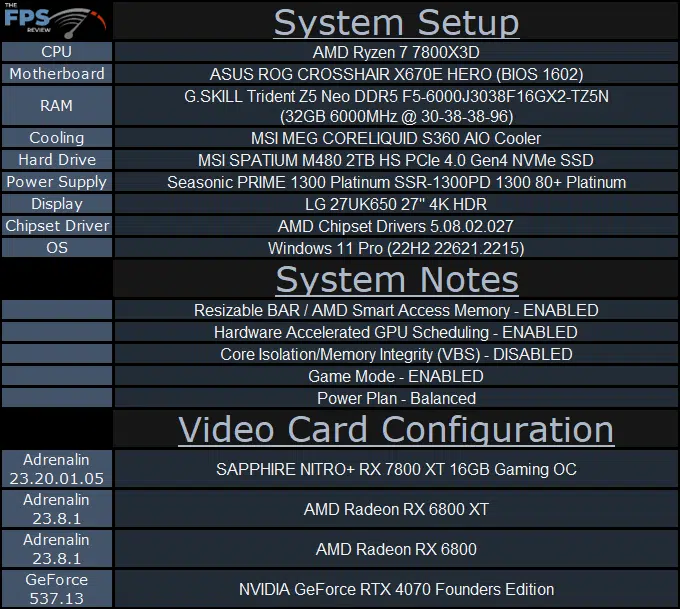
Note that we have the 1602 BIOS installed, which uses AGESA version Combo AM5 PI 1.0.0.7c. We are using the motherboard’s current default BIOS settings on the latest release BIOS. We have enabled PCI-Express Resizable BAR in the motherboard BIOS. This means we are utilizing Resizable BAR on NVIDIA GPUs and AMD Smart Access Memory on AMD GPUs in all our testing. We have enabled EXPO I in the BIOS for the memory.
We are using a fresh install of Windows 11 Pro with the latest Windows Updates, including the 22H2 Fall 2022 update. We have the latest drivers installed including the latest chipset drivers from AMD. We are using the “Balanced” power profile in Windows Settings. Hardware Accelerated GPU Scheduling is ENABLED in Windows. VBS is DISABLED and Game Mode is ENABLED.
When comparing video cards in this review, we are using an AMD Radeon RX 6800 XT, Radeon RX 6800, and NVIDIA GeForce RTX 4070 Founders Edition. Keep in mind launch prices by MSRP for comparison, the Radeon RX 6800 XT launched at $649, the Radeon RX 6800 launched at $579, and the GeForce RTX 4070 FE launched at $599. The Radeon RX 7800 XT has a launch MSRP of $499. The SAPPHIRE NITRO+ Radeon RX 7800 XT 16GB GAMING OC has an MSRP of $549.
We are going to compare the video cards by launch MSRP compared to the previous generation, and the current generation, to see the performance improvement at similar price segments generation-to-generation.
Discussion (7 replies)
Join Discussion →So AMD gives you close to RTX 4070Ti at less than RTX4070 price.
Time for an nvidia price drop yeeeeeeeeeeey ;) :D :D(y)
The only thing killing my desire for an AMD Graphics solution is the power draw.. sweet jesus they need help in efficiency in the worst way!
[URL unfurl="true"]https://www.microcenter.com/product/670769/sapphire-technology-amd-radeon-rx-7800-xt-nitro-plus-triple-fan-16gb-gddr6-pcie-40-graphics-card[/URL]
Is this worth the $70 premium over the Asrock? Yeah the boost on the Sapphire is higher but is $70 higher? https://www.microcenter.com/product/670429/asrock-amd-radeon-rx-7800-xt-challenger-overclocked-dual-fan-16gb-gddr6-pcie-40-graphics-card
edit - the Asrock 3 fan edition might be a closer match and it's still $50 cheaper : https://www.microcenter.com/product/670431/asrock-amd-radeon-rx-7800-xt-phantom-gaming-overclocked-triple-fan-16gb-gddr6-pcie-40-graphics-card
I thought no one cared about power in a desktop. That's why everyone is getting 1kW+ PSUs isn't it?
Yeah, it's funny when the exact same people who defended the nvidia 30 series power draw and said it wasn't important are now the ones bitching about Radeon power draw.
I don't care if a card draws a lot of power. Just give me the performance.
Ok s
Don't get me wrong, I care about efficiency. I just chuckle when I see people saying "I need a 1K+ PSU for my 4090 at 600W that's melting connectors" and then see people say "OMG 270W is too much!" in the same forum.
To be fair - this card is throwing out 4070 FE / Titype numbers, and nVidia pulls that at about 200W-260W depending on which side of that performance delta you want to flip over to (based on reviews published on this site, if you want to go check). AMD takes about 270W for the same performance. So yeah, it's a fair point that nVidia has a bit of an efficiency edge - but it isn't by a landslide.
In a mobile device, yeah 10-20W matters a good deal. In a desktop? That's almost a rounding error. Even if you are comparing it to the 4070, 70W at this range is significant, but not anything you'd have to go out of your way to build around - not like, say, a card that pulls 500W anyway... All the cards in this weight class (4070s and 7800s) are 200-300W cards - what we would have been top of the line with respect to thermal power a few years ago. But comparing it to today's power hungry top tier cards, these aren't anything terrible.