
Cyberpunk 2077 2.0 Ray Reconstruction On vs. Off Performance
Ray Reconstruction is the new key component of DLSS 3.5, and now we will look at how it performs toggling it between ON and OFF. For these tests, we ran in the Ray Tracing: Overdrive mode and enabled DLSS Super Resolution to Auto. We then either toggled Ray Reconstruction ON or OFF. Let’s see how it affects performance. We will be using the built-in benchmark for testing performance.
Video Cards included are NVIDIA GeForce RTX 4060 Founders Edition, NVIDIA GeForce RTX 4060 Ti 8GB Founders Edition, NVIDIA GeForce RTX 4070 Founders Edition, ASUS TUF Gaming GeForce RTX 4070 Ti 12GB OC Edition, NVIDIA GeForce RTX 4080 Founders Edition and NVIDIA GeForce RTX 4090 Founders Edition. We will test each one at different resolutions, as is appropriate for the video card, RTX 4060/4060 Ti at 1080p, 4070/4070 Ti at 1440p, and RTX 4080/4090 at 4K.

The NVIDIA GeForce RTX 4060 runs at 35.9FPS with Ray Reconstruction OFF. When we enable and turn ON Ray Reconstruction, performance improves by 7%.

The NVIDIA GeForce RTX 4060 Ti 8GB runs at 49.2FPS with Ray Reconstruction OFF. When we enable and turn ON Ray Reconstruction, performance improves by 7%.

The NVIDIA GeForce RTX 4070 runs at 49.8FPS with Ray Reconstruction OFF. When we enable and turn ON Ray Reconstruction, performance improves by 6%.

The NVIDIA GeForce RTX 4070 Ti runs at 64.3FPS with Ray Reconstruction OFF. When we enable and turn ON Ray Reconstruction, performance improves by 4%.
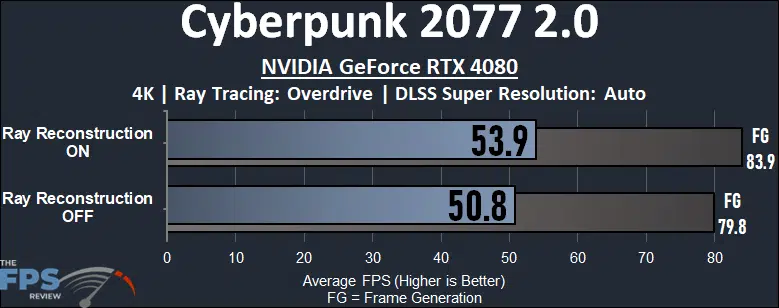
The NVIDIA GeForce RTX 4080 runs at 50.8FPS with Ray Reconstruction OFF. When we enable and turn ON Ray Reconstruction, performance improves by 6%.
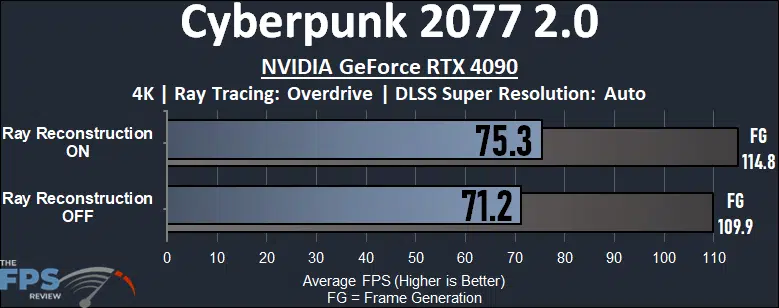
The NVIDIA GeForce RTX 4090 runs at 71.2FPS with Ray Reconstruction OFF. When we enable and turn ON Ray Reconstruction, performance improves by 6%.
Discussion (12 replies)
Join Discussion →So I have a question. Why is it you went with DLSS set to Auto? Controlling every other variable other than DLSS by forcing a setting seems like it would make getting good back to back tests with different cards difficult because you're likely not getting a true apples to apples comparison based on run?
Also did you note any trouble having your settings actually stick between tests/cards? I've seen at least one review that noted that was an issue for them.
Otherwise nice write up. :)
Auto does not dynamically change the render target, or quality level while playing the game. Auto selects the quality mode based on the display resolution you are running at, for example, Quality DLSS at 1440p, 1080p, and Performance at 4K. So 1080p and 1440p were at Quality technically, since that's what mode it uses. Therefore all the performance is comparable at the same resolution, the key factor is comparing by resolution when DLSS is on Auto. That is why are graphs are separated like they are, with each card testing its features at the same resolution, per graph. So it is comparable.
Since this was not a GPU vs GPU comparison, this was fine because I'm testing game feature performance, not GPU vs GPU performance. In addition, NVIDIA recommended Auto for testing, to keep everything fair when testing feature sets. We wouldn't have done this if we were cross-comparing video cards.
In addition, Auto is the "default" setting when enabling the Quick Presets, which we used. We like to use default preset options when possible, because it represents what the end-user/gamer will be using, and is a quick way for someone to match up with us and compare results. Auto is the default DLSS setting, so it's a real-world test.
Now, in our GPU reviews that we do, we manually use the Quality setting for every resolution regardless, and we will continue to do so, therefore look to those video card reviews to see what Quality DLSS mode performs like when comparing GPUs. This review wasn't about comparing DLSS quality modes, or GPUs to each other.
Just remember, you CAN use Auto to compare video cards, at the same resolution. You just can't compare them cross-resolutions, if using Auto.
Cyberpunk 2077 is notorious for changing settings or reverting back to enabling FSR or DLSS and settings not sticking. It is a constant pain in the butt me and Rick have to endure it. We just have to triple-check our settings. I've known about it for a long time.
NVIDIA's DLSS magic sauce packets are the answer. I'm glad that NVIDIA has continued to invest in new DLSS technology and it shows. Granted most of us would like a simple approach with a big hammer but at the rate new graphical features are being added to games that 's just not a realistic approach, especially in terms of cost.
Can't wait to try all this on this weekend.
Its getting really hard to hate DLSS 3.5
DLSS ray reconstruction seems like the holy grail, better IQ and a little boost on performance. Well done nvidia.
BTW IQ screenshots would be welcome.
Here are a few from the 4090 rig in my signature. I had to compress them a bit to upload but all are in 4K. Brent had to keep all settings uniform in order to have accurate results across all cards but the following screenshots were taken using Advanced settings at max, basic off, and DLSS Quality. Aside from compression artifacts, I will say that screenshots these days are somewhat subjective due to the display they are being seen on. I really cannot accurately explain the "wow" factor of seeing this game in HDR on an LG C2. Turning off HDR to take these screenshots is like giving the game a kind of visual handicap but they do still look nice imho.
Oh just to add, turning all this stuff on and at max, pluc OC settings on the 4090, made the card power hungry! In one of the screenshots you can see the 4090 consuming 489W! On average though, during this canned bench run, which we all know isn't the most demanding, it averages around 458-475W.
Makes me consider getting at least a RTX 4070Ti.
Thank god I'm poor and can't afford one. :D ;) :p
What's DRS?
Dynamic Resolution Scaling. Something I turn off in any game that has it. Basically, the game will alter the render resolution in order to keep FPS higher. It's not exclusive to NV. Starfield even has it and so do some Halo games. If I'm going to alter anything about a game's render resolution I'll do it via DLSS and use the quality setting.
[URL unfurl="true"]https://halo.fandom.com/wiki/Dynamic_resolution_scaling#:~:text=Dynamic%20resolution%20scaling%20is%20a,which%20aren't%20as%20demanding.[/URL]
They have been dropping in price and we could see some decent deals around BF or the holidays.
We can all thank the RX7800XT for that.
It first rose to prominence with the 8th-gen consoles, and then we started seeing it in more and more PC games. A f*ckton of games across all platforms have it now. I never really understood the need for it on PC. Makes sense for consoles. The games that don't do it so well, you can see the resolution change right before your eyes, and it's kinda jarring. It's weird to be playing a game with the resolution always changing. That's what the 8th-gen consoles had to do to keep framerates up though. In scenes where the rendering load was greater and the minimum framerate couldn't be maintained, the resolution would drop in order to maintain the framerate. When the rendering loads lightens, the resolution goes back up. The tech never seemed to work as well on PC as on consoles. Fine by me cuz we don't need it on PC anyways.
Some games this isn't so bad on... but most yeah, it's not great and I'd rather take the hit in FPS than I would having everything suddenly shift to a blurry mess.
I've tried it a few times and it looks like a bad youtube streaming.