
CPU Frequency, Power, and Temperatures
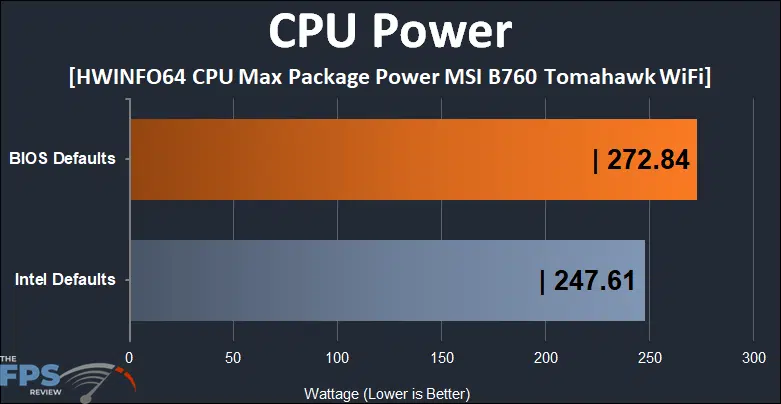
The CPU power results are exactly what we expected. Using Intel defaults, the power limit is supposed to be around 241w give or take. When using MSI’s power limits, we see a relatively small increase in power consumption. However, we do not get a performance uplift much or if at all. However, this is partly because we are more or less at the limit of the AIO cooling used for our testing here.
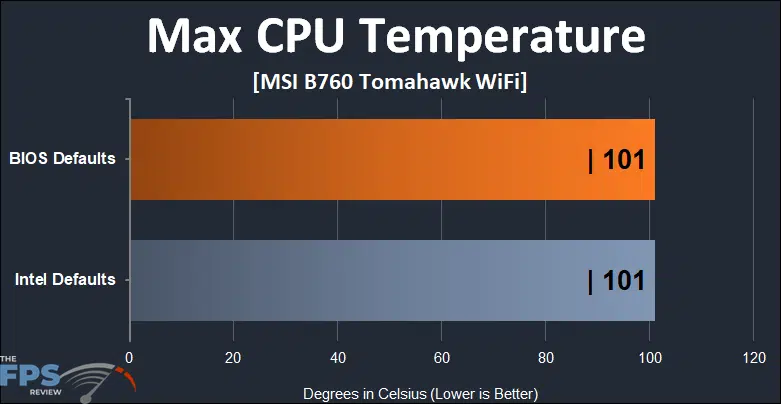
As you can see, the temperature maximums were identical between MSI and Intel’s power settings. As a result, we can’t really get any more performance for our increased power limits as we are effectively limited by our cooling.
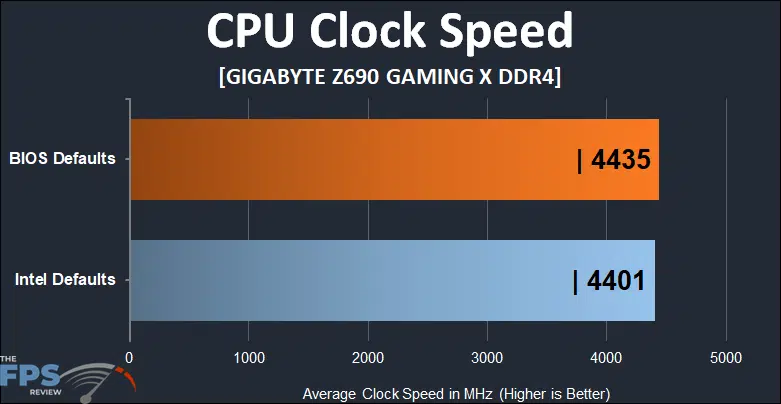
When looking at average CPU clocks, we can see broadly similar averages using the two power profiles. Again, I think this comes down to the limitations of our cooling. With more cooling, we might see some increase in clocks. This isn’t an issue with the MSI board either as I’ve broadly seen the same results from this CPU on multiple motherboards at this point.
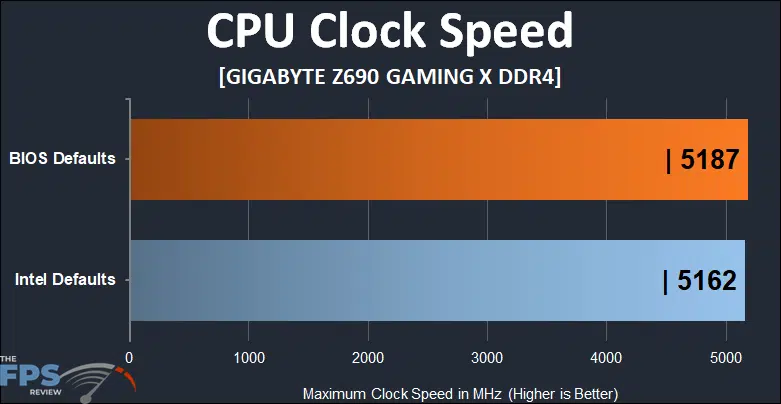
In contrast, our maximum clocks are pretty good but unfortunately, MSI’s power limit increase doesn’t net us much here either. Only about 25MHz which as we saw in the benchmarks didn’t help or even hurt performance in some cases.
Discussion (6 replies)
Join Discussion →Thanks for the review and also good to know about the budget 2.5G NICs.
They have to cut the costs somewhere. To be fair, this isn't normally going to be an issue. I think Realtek NICs are fine most of the time. Most people aren't running 16+ port managed switches in their homes like I do.
The Realtek 2.5Gbit NICs might even be more reliable for some folks than the Intel ones, if going by internet complaints. I know I've seen some weird behavior off and on myself with the i225 and i226 NICs that are very atypical of Intel network controllers.
Yeah. I was kinda taken-aback at the level of complaints made against the current Intel i225/i226 solutions. Intel used to have rock solid adapters, and was what you'd strive for getting.
I'm just surprised it's been going on this long. You don't hear those complaints from the Linux community really, and on the Windows side it seems to be a driver / firmware thing.
Main symptom I've seen personally is that the interface just drops its connection and ceases passing traffic, seemingly at random, but regularly enough to be annoying. Fixing it is as simple as disabling and re-enabling the interface in Control Panel, or unplugging and replugging the cable.
Either way, complaints have largely died down, but Intel is likely going to have to get another spin with another name ("Odd-Windows-Release-Syndrome") to regain consumer faith. Could be that they just move up to producing 5Gbit controllers.
The i225v and i226v's are indeed problematic. I've had my share of issues with those as well. Though more recently, I've had fewer issues with them as the firmware problems have been pretty well ironed out.
More recently, I've had good luck with Aquantia, Marvell, and newer Realtek adapters. This adapter, as I recall is an older one.