
System Benchmarks
Sandra Dhrystone
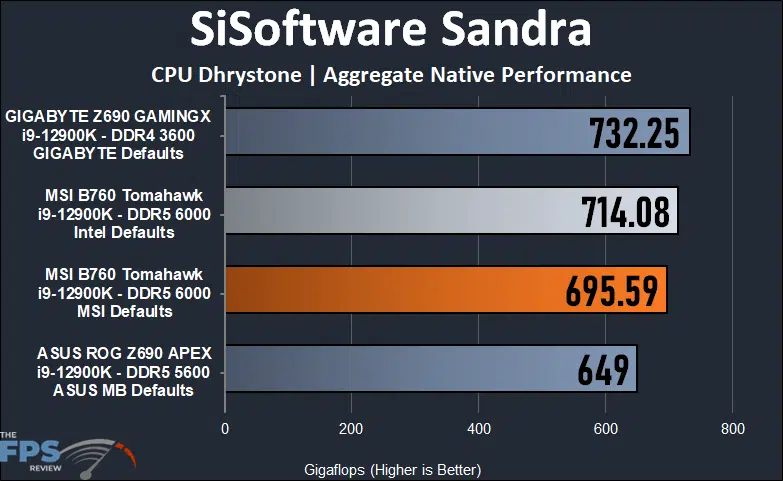
In this test, our MSI MAG B760 TOMAHAWK WIFI managed a result of 714.08GFLOPS using Intel’s default power settings and 695.59GFLOPS using MSI’s.
Sandra Whetstone
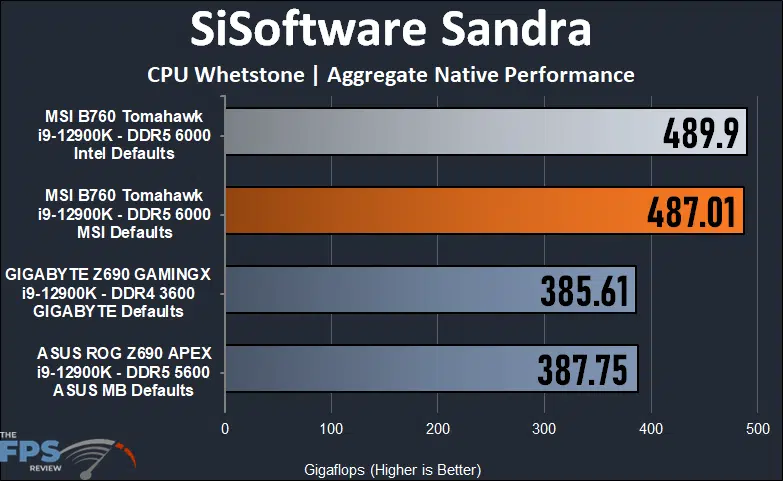
In our Sandra Whetstone test, the MSI MAG B760 TOMAHAWK WIFI achieved a result of 489.9GFLOPS using Intel’s settings and again, fell using MSI’s settings coming in at 487.0GFLOPS. Interestingly, these results are far ahead of the other test systems.
Cinebench R23 – Single Thread
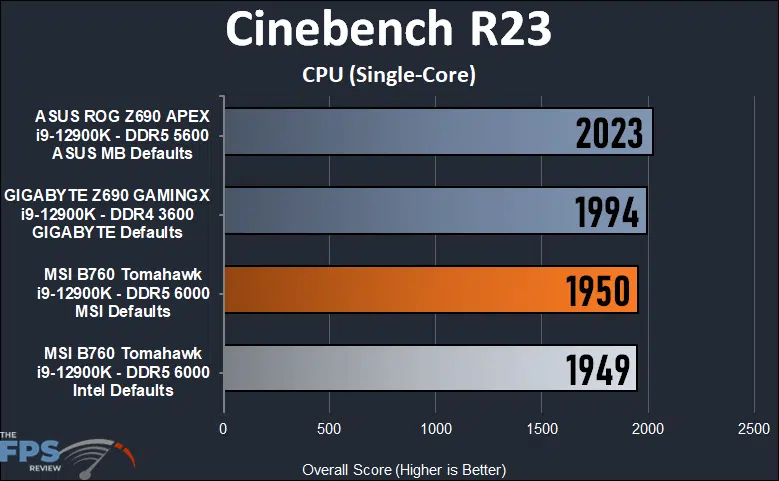
In Cinebench R23, our MSI MAG B760 TOMAHAWK WIFI scored 1,950 points using MSI’s default settings and 1,949 points using Intel’s. This marks one of the rare cases where the MSI settings actually provide a performance uplift albeit a small one. Unfortunately, this puts it behind the other test systems.
Cinebench R23 – Multithread
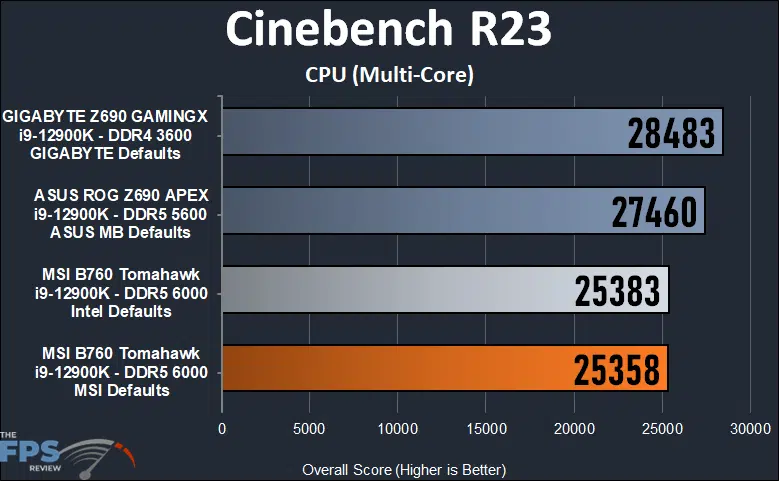
In this test we see the MSI MAG B760 TOMAHAWK WIFI achieve scores of 28,533 points using Intel’s defaults and 28,483 using MSI’s. In this case, the numbers are well below the other test systems.
Discussion (6 replies)
Join Discussion →Thanks for the review and also good to know about the budget 2.5G NICs.
They have to cut the costs somewhere. To be fair, this isn't normally going to be an issue. I think Realtek NICs are fine most of the time. Most people aren't running 16+ port managed switches in their homes like I do.
The Realtek 2.5Gbit NICs might even be more reliable for some folks than the Intel ones, if going by internet complaints. I know I've seen some weird behavior off and on myself with the i225 and i226 NICs that are very atypical of Intel network controllers.
Yeah. I was kinda taken-aback at the level of complaints made against the current Intel i225/i226 solutions. Intel used to have rock solid adapters, and was what you'd strive for getting.
I'm just surprised it's been going on this long. You don't hear those complaints from the Linux community really, and on the Windows side it seems to be a driver / firmware thing.
Main symptom I've seen personally is that the interface just drops its connection and ceases passing traffic, seemingly at random, but regularly enough to be annoying. Fixing it is as simple as disabling and re-enabling the interface in Control Panel, or unplugging and replugging the cable.
Either way, complaints have largely died down, but Intel is likely going to have to get another spin with another name ("Odd-Windows-Release-Syndrome") to regain consumer faith. Could be that they just move up to producing 5Gbit controllers.
The i225v and i226v's are indeed problematic. I've had my share of issues with those as well. Though more recently, I've had fewer issues with them as the firmware problems have been pretty well ironed out.
More recently, I've had good luck with Aquantia, Marvell, and newer Realtek adapters. This adapter, as I recall is an older one.