
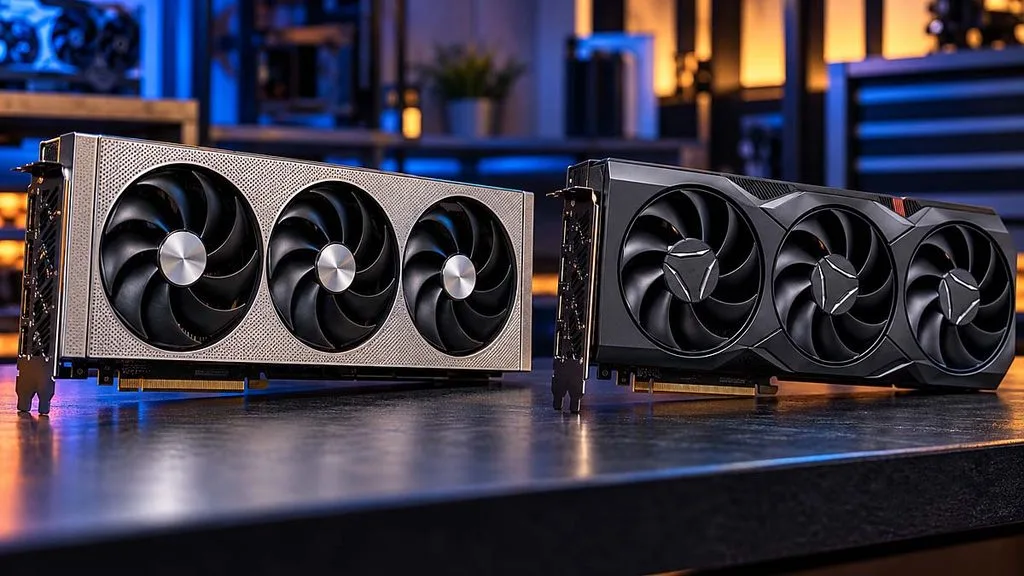
The most interesting result this week wasn’t a new product. It was an old flagship refusing to retire. TechSpot ran 51 games and found the Radeon RX 7900 XTX now trades blows with the RX 9070 XT almost everywhere. Elsewhere, we re-ran the Ryzen 9 9900X3D through our late-2026 test suite, Phantom Blade Zero arrived with a PC version reviewers liked less than the game itself, and HAVN’s smaller HS 360 VGPU drew the week’s biggest pile of case reviews.
Radeon RX 9070 XT vs Radeon RX 7900 XTX (51 Games)
Written reviews:
Video reviews:
- Hardware Unboxed: https://www.youtube.com/watch?v=nq-TZsKEzGM
Consensus summary:
Across 51 games, the two cards land in a near tie, and only five titles show a gap larger than 10%. The 7900 XTX’s extra memory bandwidth and 24GB of VRAM win some 4K rasterization runs. The 9070 XT pulls ahead once ray tracing is on and runs FSR 4.1 more cheaply through FP8 acceleration; AMD’s figures put the upscaling cost at roughly 1.3 ms versus 3.1 ms at 4K.
With the 9070 XT around $900 new and used XTX cards selling for $800 to $1,100, the verdict is to buy the 9070 XT, and current XTX owners should stay put.
FPS Review take: The real story is how well both RDNA flagships have aged since launch day, a theme we have seen across our own XFX Swift Radeon RX 9070 XT review and our XFX Mercury Radeon RX 7900 XTX review. If you landed an XTX years ago, congratulations: you got a card that’s still playing in the current high-end bracket. (Ed: Not bad for a GPU some called a stopgap.)
AMD Ryzen 9 9900X3D
Written reviews:
Consensus summary:
Retested with fresh October 2026 data, the 12-core 9900X3D is a gaming chip first. It beats the standard Ryzen 9 9900X by up to 32% in Hogwarts Legacy and by 31% in Alan Wake 2’s 1% lows, and it sits within 1 to 2% of the Ryzen 9 9950X3D in most titles while drawing less power. In content creation it trails even the 9900X, but it still clears the 8-core X3D parts there. At today’s $510 to $550 street pricing, it is the value pick for gamers who also stream or multitask.
FPS Review take: This one is ours, and it completes our late-2026 refresh of the entire Ryzen 9 9000 stack. Read it alongside our Ryzen 9 9950X3D review and our Zen 4 vs Zen 5 Ryzen 7 X3D gaming comparison to see where every X3D chip lands.
TCL 27C2A Pro
Written reviews:
- Tom’s Hardware: https://www.tomshardware.com/monitors/gaming-monitors/tcl-27c2a-pro-27-inch-qd-mini-led-4k-gaming-monitor-review
Consensus summary:
Tom’s Hardware calls this $600, 27-inch 4K QD-Mini LED a complete package. It has 2,304 local dimming zones, a dual-mode 4K 160 Hz / 1080p 320 Hz switch, and MPRT strobing that can run alongside Adaptive-Sync. Its accurate sRGB, DCI-P3, and even Adobe RGB modes make it usable as a print reference out of the box. The one real complaint is a wobbly panel mount on the stand.
FPS Review take: OLED gets all the attention, but a Mini LED that is brighter than any OLED, color-accurate enough for photo work, and $600 is the kind of monitor more of our readers actually buy.
Phantom Blade Zero PC Performance
Written reviews (Bring your translator):
- ComputerBase: https://www.computerbase.de/artikel/gaming/phantom-blade-zero-benchmark-test.100022/
- PC Games Hardware: https://www.pcgameshardware.de/Phantom-Blade-Zero-Spiel-74287/Specials/CPU-GPU-Benchmark-Performance-Fps-1557577/2/
Video reviews:
- Daniel Owen: https://www.youtube.com/watch?v=zVo1RJph08I
- BenchmarKing: https://www.youtube.com/watch?v=0sIIVX23KIw
Consensus summary:
Reviewers agree the Unreal Engine 5 game looks good thanks to strong art and base visuals, not its ray tracing. PCGH saw frame rates nearly halve when moving from raster to RT, along with ugly traversal stutter. ComputerBase found Radeon surprisingly strong in pure rasterization, with an RX 9070 GRE beating an RTX 5070 Ti at 1440p. RT is far cheaper on GeForce, though. ComputerBase also flags a list of PC-specific problems: long shader compilation, a noisy in-game denoiser that only DLSS Ray Reconstruction cleans up, odd FSR 4.1 artifacts, and Arc crashes with RT enabled.
FPS Review take: A very good game with a “needs another patch” PC port is becoming a 2026 genre of its own. If you are on Radeon, leave RT off and keep an eye on the FSR 4.1 fix.
HAVN HS 360 VGPU
Written reviews:
- TechPowerUp: https://www.techpowerup.com/review/havn-hs-360-vgpu/
- KitGuru: https://www.kitguru.net/components/cases/leo-waldock/havn-hs-360-vgpu-case-review/
- Club386: https://www.club386.com/havn-hs-360-vgpu-review/
- TweakTown: https://www.tweaktown.com/reviews/11639/havn-hs360-vgpu-mid-tower-chassis/index.html
Video reviews:
- Gamers Nexus: https://www.youtube.com/watch?v=OgHTveiHy4Y
- KitGuru Tech: https://www.youtube.com/watch?v=_VvkjgCmcpY
- Hardware Canucks: https://www.youtube.com/watch?v=ybciZAcMgnM
Consensus summary:
Everyone agrees the smaller follow-up to the HS 420 is built like a tank. Reviewers praise its cable management and new support for rear-connector motherboards, and TweakTown thinks it justifies its price. The sticking points are also unanimous: the case is expensive at £239.99 / $279, ships with no fans, and the fan hub has no ARGB control. The glass airflow divider is where findings split. Club386 measured cooler, quieter GPU temps with it installed, though short of HAVN’s 7.5°C claim, while KitGuru saw no benefit at all.
FPS Review take: This is a premium showpiece for vertical-GPU builders, and the PCIe Gen 5 riser is a big part of what you are paying for. If you skip the vertical mount, the cheaper standard HS 360 makes more sense.
Corsair RM1200e (2026)
Written reviews:
- Igor’s Lab: https://www.igorslab.de/en/corsair-rm1200e-1200-watt-2026-review-new-label-new-oem-pinprotect-gpu-protection/
- KitGuru: https://www.kitguru.net/components/power-supplies/zardon/corsair-rm1200e-2nd-gen-2026-psu-review/
Consensus summary:
The second-generation RM1200e moves to a CWT platform (earlier versions used HEC), earns Cybenetics Platinum, and adds Corsair’s PinProtect per-pin overcurrent monitoring on the 12V-2×6 connector. The warranty also grows to 10 years. Igor’s Lab found high average efficiency and low noise but higher ripple on several minor rails than the original unit. It stresses that none of these results carry over to older RM1200e units.
FPS Review take: Per-pin monitoring on the GPU connector is the feature worth paying attention to after the 12V-2×6 saga. Just make sure the box says 2026 if that is the version you are buying.
ASUS ROG Maximus Z890 Apex
Written reviews:
- TechPowerUp: https://www.techpowerup.com/review/asus-rog-maximus-z890-apex/
- TweakTown: https://www.tweaktown.com/reviews/10899/asus-rog-maximus-z890-apex-motherboard-memory-monster/index.html
Consensus summary:
The two-DIMM Apex remains the memory overclocker’s board of choice. TweakTown says DDR5-10000 is “no longer mythical” with proper cooling and a capable memory controller, and it rates the VRM as top-notch. The DIMM.2 card adds two more M.2 slots. The catch has not changed since launch: it is a deep-pocketed enthusiast board with a price to match.
FPS Review take: For most Arrow Lake builders, a board like our MSI MAG Z890 Tomahawk WiFi II covers everything they need for a fraction of the cost. The Apex is for people chasing leaderboard memory clocks.
Razer Blade 18 (RTX 5090)
Written reviews:
Consensus summary:
TechSpot calls the $5,400 Blade 18 one of the quietest and most portable 18-inch gaming laptops it has tested. It pairs a 175W RTX 5090 Laptop GPU with a Core Ultra 9 290HX Plus and a dual-mode 240/440 Hz panel. The complaints are pointed for the price: an IPS rather than OLED display, only 32GB of RAM, a PCIe 4.0 SSD, and hot running. TechSpot suggests the RTX 5080 model may be the better buy at $400 less.
FPS Review take: Desktop-class gaming in a slim 18-inch chassis is impressive, but RAM-crunch pricing has pushed flagship laptops into used-car territory. Razer promised a lot when it unveiled this generation, and it mostly delivers.
Samsung Portable SSD P9
Written reviews:
Consensus summary:
Samsung’s USB4 drive delivers on the box claims: 4,000MB/s reads, about double the T9’s sequential throughput, and the coolest running temperatures in StorageReview’s test group thanks to its new metal shell. The weak spot is long writes. The cache runs out after about 150GB, speeds sag from there, and a hard-filled drive needed a format to recover rather than restoring itself with idle time. At $649.99 for 2TB, it is expensive, but rival prices have climbed alongside it.
FPS Review take: For offloading camera cards or carrying a game library around, read speed and thermals matter most, and the P9 nails both. If you regularly dump hundreds of gigabytes in one go, look at its rivals. (Ed: It’s been a while since our own ORICO K20 Mini portable SSD review, and the class has gotten a lot faster, and pricier, since.)
Corsair Warthog
Written reviews:
- Tom’s Hardware: https://www.tomshardware.com/pc-components/pc-cases/corsair-warthog-case-review
- TechPowerUp: https://www.techpowerup.com/review/corsair-warthog/
- KitGuru: https://www.kitguru.net/components/cases/leo-waldock/corsair-warthog-case-review/
- TweakTown: https://www.tweaktown.com/reviews/11626/corsair-warthog-rs-mid-tower-chassis/index.html
Video reviews:
- Gamers Nexus: https://www.youtube.com/watch?v=zgPOenXO7Vg
- KitGuru Tech: https://www.youtube.com/watch?v=CPy7aV3oMtw
Consensus summary:
Reviewers love the jerry-can military styling and rugged steel construction of what is essentially a heavily reworked Frame 4000D. Opinions on cooling vary. TweakTown found the RS trim’s twin 200mm intakes kept its test system comfortable. Tom’s Hardware measured below-average noise-normalized GPU cooling, and KitGuru calls the cooling just so-so. Everyone agrees you pay a steep premium for the theme.
FPS Review take: We have been fond of this one since Corsair brought the Warthog back at Computex, and the reviews confirm it is a style purchase first. If it makes you smile, that is a valid reason to buy a case.
360mm AIO Three-Way: Cougar LQX Pro 360 vs DeepCool LT360 Vision vs Montech CyberFlow 360
Written reviews:
Consensus summary:
KitGuru’s head-to-head crowns the DeepCool LT360 Vision as the best all-rounder: it is the quietest at full speed (46 dBA) and posts a 63°C delta when noise-normalized to 40 dBA. The Cougar LQX Pro 360 trails by just 1°C and matches its 5.25GHz sustained PBO clocks. The Montech CyberFlow 360 is the cheapest of the three but lands at the bottom of KitGuru’s entire chart. It runs 11°C hotter than the DeepCool at the same noise level and sustains only 5.11GHz under PBO.
FPS Review take: 360mm AIOs are usually so closely matched that features and price decide it (Ed: Unless you’re in the US, then you’re not getting the DeepCool)-, which makes a clear loser like the CyberFlow genuinely useful information.
Chieftec Iceberg Pro 360 RGB
Written reviews:
Consensus summary:
HWBusters rates the Iceberg Pro 360 a good AM5 performer, close to the front-runners in its 23-cooler chart, with a Cybenetics THETA Gold rating. Interlocking fans make wiring easy, and the centrifugal VRM fan gets its own PWM control. Fiddly AMD bracket installation and cable clutter around the pump head hold it back. At its roughly $94 equivalent price, the ARCTIC Liquid Freezer III Pro 360 and Ocypus Sigma L36 offer more performance per dollar.
FPS Review take: The VRM fan is a genuinely useful extra for builds with heavily loaded power stages. Otherwise, this is a buy-it-on-sale cooler in a very crowded segment.
Discussion
Join Discussion →No replies yet. Be the first to reply on the forum.