
Gaming Performance: (D-S)
We are testing only at 1080p to isolate performance. We are using an NVIDIA GeForce RTX 5090 Founders Edition video card with driver version 595.97. All games are generally run in their highest settings, though some of the games have had to be lowered to “High” settings so that we could get a more meaningful CPU-limited test. We are running at 1080p native resolution, and no Ray Tracing is turned on in the games that have the option.
Importantly, we are using ALL manual run-throughs for every game here except two. For Call of Duty: Black Ops 7 we are using the built-in multiplayer benchmark, and for DOOM: The Dark Ages, we are also using the “Reckoning” benchmark. However, we are using Frameview to caputure 1% Lows in these games. For every other game, we are using long manual run-throughs in-game of actual gameplay. We are also recording AVG FPS and 1% Lows and reporting them in the graphs. We have tested a total of 14 games.
In all of our graphs to follow, the bars are arranged from the fastest MT/s speed down, so 8800MT/s is on top, with 7200MT/s on the bottom, and this arrangement is locked in independent of the performance shown; they are not arranged by result, but rather the DDR5 memory speed.
Dying Light: The Beast
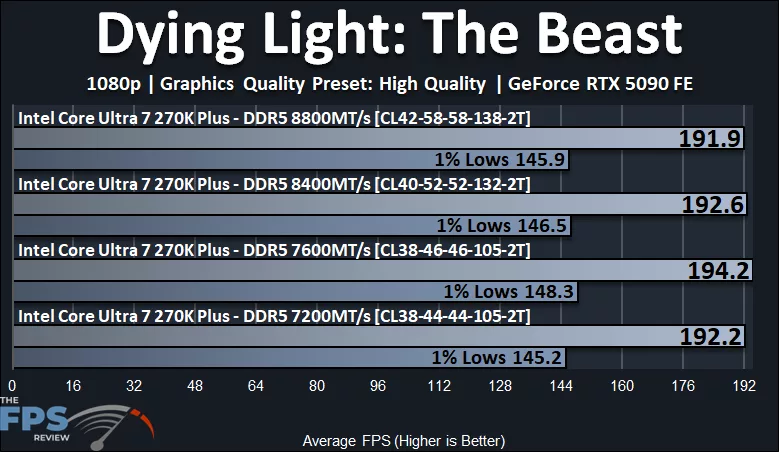
In Dying Light: The Beast, the 7600MT/s UDIMM at CL38 is once again the fastest, providing an advantage of 1% over 7200MT/s, with 1% Lows 2% faster. The slowest is 8800MT/s CUDIMM CL42 memory, and the 1% Lows match that of 7200MT/s at tighter timings.
Hogwarts Legacy
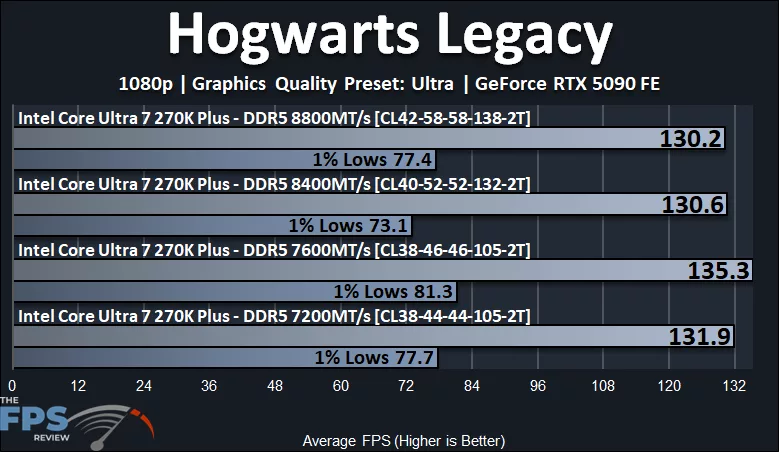
In Hogwarts Legacy, the 7600MT/s UDIMM CL38 memory is 3% faster than 7200MT/s UDIMM CL38, and 4% faster than 8400MT/s and 8800MT/s CUDIMM memory. What is more impressive, though, is the 1% Low differences. The 7600MT/s UDIMM memory has a 1% Low performance gain of 5% over the 7200MT/s CL38 memory, so that’s neat. The 8400MT/s CL40 CUDIMM memory tanks a bit in 1% Lows, so the 7600MT/s memory is a whopping 11% faster.
Horizon Forbidden West
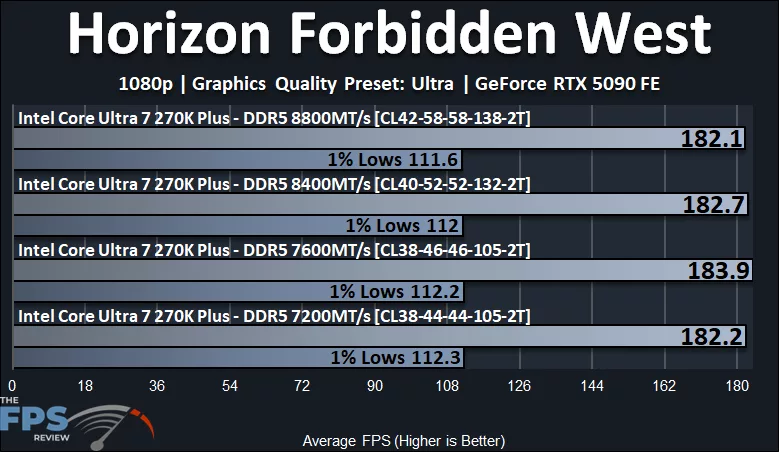
In Horizon Forbidden West, the 7600MT/s CL38 memory is slightly faster at 1% faster than the 7200MT/s CL38. While the 8400MT/s and 8800MT/s CUDIMM memory regresses, the bandwidth makes it equalize to 7200MT/s performance at tighter timings.
Kingdom Come: Deliverance II
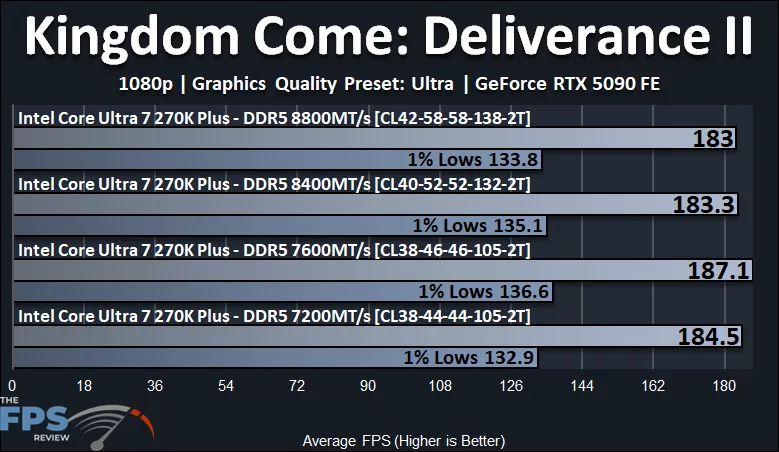
In Kingdom Come Deliverance II the 7600MT/s CL38 memory is 1.4% faster than 7200MT/s at CL38. However, the 1% Lows get a nicer kick in the pants at a 3% performance advantage. The 8400MT/s and 8800MT/s CUDIMM memory gets a slight regression in performance.
Mafia: The Old Country
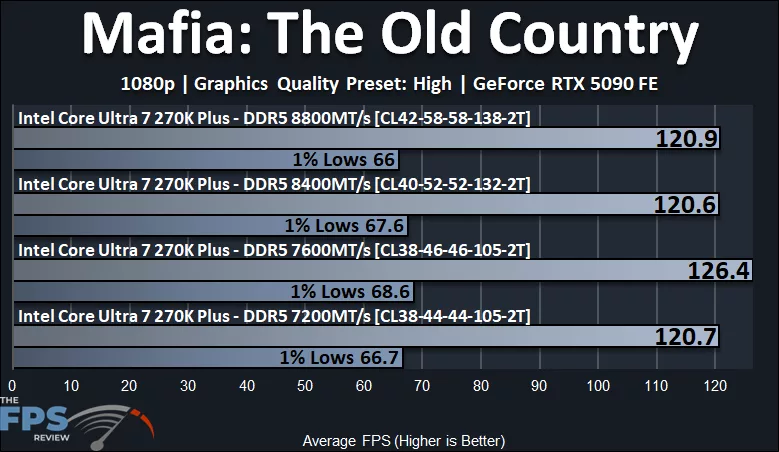
Mafia The Old Country surprised us, the 7600MT/s CL38 UDIMM memory gets a comfy 5% performance advantage over 7200MT/s CL38. The 8400MT/s and 8800MT/s CUDIMM settle into around 7200MT/s performance due to the timing.
Resident Evil Requiem
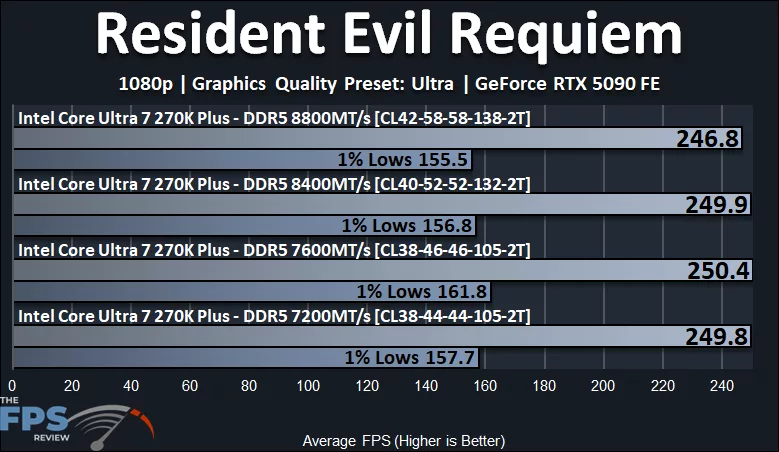
In Resident Evil Requiem, the performance remains very tight, with the 7600MT/s UDIMM CL38 memory taking a slight lead. The 1% Low difference is a little higher, with a 3% advantage over the 7200MT/s CL38 memory.
S.T.A.L.K.E.R. 2: Heart of Chornobyl
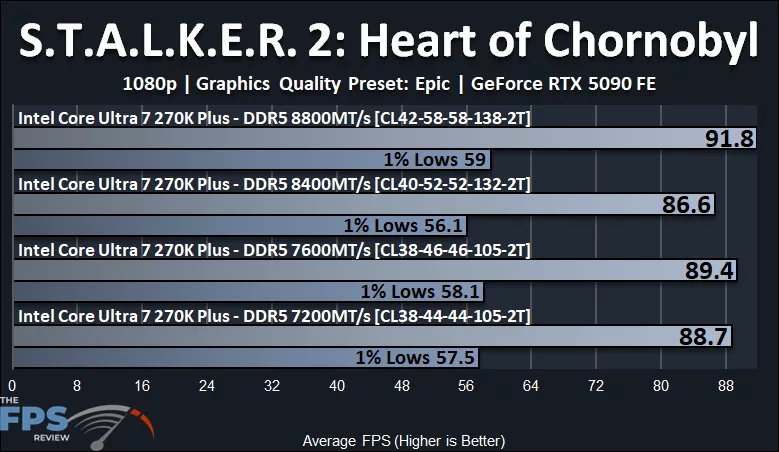
S.T.A.L.K.E.R. 2: Heart of Chornobyl had an atypical result in our testing, as it actually resulted in the 8800MT/s CUDIMM CL42 memory providing the highest AVG result of 91.8FPS and the highest 1% Lows of 59FPS. At this performance level, the 8800MT/s CUDIMM memory had its second win in a game out of 14. It was 3% faster than 7200MT/s UDIMM CL38 memory, and 3% faster than 7600MT/s, and 6% faster than 8400MT/s. The 1% Lows were also slightly beating the rest.
Discussion (12 replies)
Join Discussion →Pretty much what I expected to see to be honest.
Try buying some???
Need a loan.....LoL
Would have been interesting to have some "run of the mill" 6000MT/s RAM like alot of folks use (because its affordable) to compare as a baseline......?
Some serious hot deals on Arrow plus combos right now. AIOs, Lego Batman, PSUs, boards. Also, 270K is below MSRP and the second best seller on Amazon today. Been a long time since a Intel CPU cracked the top 5.
Just wanted to point out that actual overclockers may take offense at there being no information available on the values for NGU, D2D and Ring. If those were kept at default then the memory overclocks are almost pointless due to there being a bottleneck in the flow of data between the CPU and RAM sticks. For anything over 8000 MT/s, NGU multiplier needs to be 34, D2D should ideally be 35 or higher and ring from 42 to 46 would be ideal. It's unfortunate that Intel did not make it so that these values are optimized automatically as RAM speed is increased.
My own 245KF was able to do NGU 34, D2D 35 (latest BIOS kept it at 30 despite setting a higher value) and ring 42. Sadly, the CPU is out of the socket of the mobo as I was trying to sell it so any benchmark data I have is inaccessible at the moment unfortunately.
Regarding the RAM timings, the sticks should be able to 7200C34 and 7600C36. The 8000+ timings seem to be ok.
Just did a web search on this, have yet to find a review that did the NGU/D2D/Ring overclocking, ect. Currently have my 265KF at 70.1ns latency. Wondering if 270K can get it any lower, or if I should even waste the $$?
The only low latency Arrow Lake champ right now is 250K/KF.
You may gain ~10 fps plus future APO/iBOT game/application support with 250KF.
There's unfortunately a rather glaring problem with the testing here which is comparing a kit using 16GB modules to one using 24GB. Subtimings are important and almost every single higher capacity module has higher cell refresh timings than an equivalent speed/primary latency lower capacity. That is absolutely the case here which throws off the results and in turn the conclusion. If one is trying to compare speed and primary timings the kit capacities really need to be the same.
What kinda latency are you getting with your setup??
y-cruncher score comparison 6000C42 vs. 8200C38 (NGU is 32 or 34, D2D is above 30 and Ring is 42)
6000C42:
8200C38:
Another multicore scaling benchmark here: https://forums.anandtech.com/threads/arrow-lake-builders-thread.2622775/post-41610100
I haven't really done a lot of optimization as real life kept getting in the way. I did replace a 265K with the 270K Plus and they both performed within margin of error of each other when it came to latency using the same settings. I imagine best case scenario for latency with ARL is going to be based on bins more than SKU.
From what little tweaking I've done NGU seems to make a lot less difference than D2D. Subtimings on memory can also make a pretty big difference. The board I'm using has had some weird issues with DRAM timings so once I found stable numbers I just left it, but this is high up on my list for when I get time.
Skatterbencher puts out my favorite writeups (and also has videos) for CPU tweaking: https://skatterbencher.com/2025/06/18/skatterbencher-87-core-ultra-7-265k-overclocked-to-5700-mhz/
They've done more recent ones with the 270/250 as well.
Ok, upgraded to a 270k, and another new motherboard, since I bent socket pins (Rookie move, first time ever...) Proc clocks almost exactly like my 265KF, 56P core, 49 E core (265KF was 56/50. 41 cache, 33 NGU/D2D, Running 48gb Kingston Renegade 8400 @ 38-49-49-56 timings, same 71.3 ms latency as with 265KF as well. Seems to run cooler, and extra 4 cores. XTU benchmark went up nicely, as well as my 3DMark bench's. Have yet to run PCMark bench yet. All in all, runs well in a dead end platform, should keep me happy for @ least 4 yrs i'd hope.