
Synthetic System Benchmarks
On this page, we will show synthetic benchmarks, some that test a variety of system use-case scenarios, and others that test specific multi-core and single-core/thread workloads to hone in on performance differences. In all of our graphs to follow, the bars are arranged from the fastest MT/s speed down to the slowest, so 8200MT/s is on top, with 4800MT/s on the bottom, and this arrangement is locked in independent of the performance shown; they are not arranged by result, but rather by the DDR5 memory speed in every graph.
AIDA64
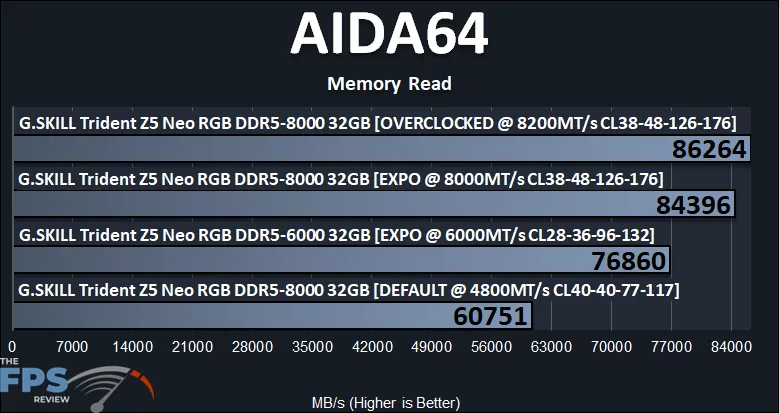
In AIDA64, we can see the raw bandwidth that each DRAM frequency provides for read performance. The largest jump is anything above 4800MT/s, as that provides the least amount of bandwidth at 60.7GB/s. Moving up to 6000MT/s improves bandwidth by 27% up to 76.8GB/s. We get a smaller improvement moving up to 8000MT/s; the improvement is 10%, moving it up to 84.3GB/s. Overclocking to 8200MT/s only improves bandwidth by another 2%. 8000MT/s is fast, for sure, but it isn’t as large of a leap in bandwidth as you might expect it to be.
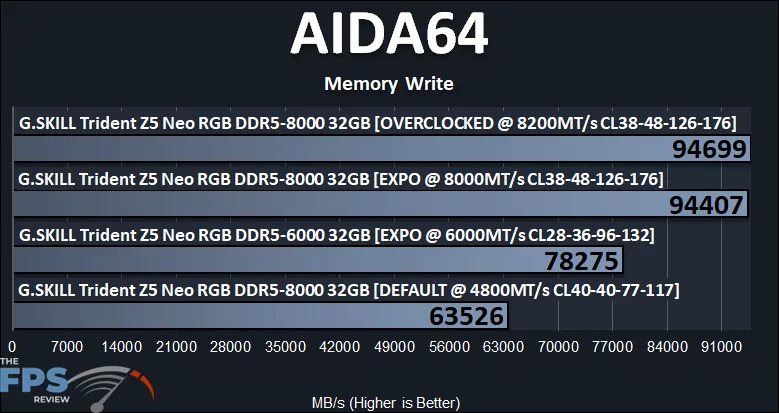
Looking at the write performance, however, things change a lot. We can see that 8000MT/s does make a larger difference in write bandwidth. At 4800MT/s, it is achieving 63.5GB/s. Moving up to 6000MT/s improves that by 23%, moving it up to 78.2GB/s. When we use the 8000MT’s kit, memory bandwidth is improved by a larger 21% over 6000MT/s, taking us to 94.4GB/s of write bandwidth. 8200MT/s only brings it up 0.3% more.
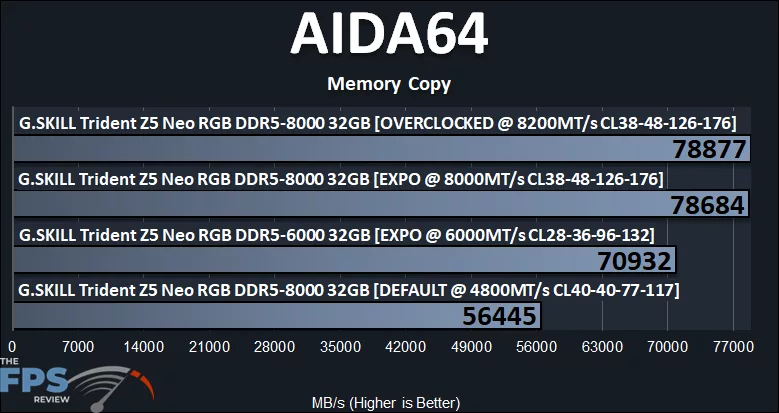
In memory copy performance: at 4800MT/s we get about 56.4GB/s of bandwidth, and then increasing to 6000MT/s improves that by 26% up to 70.9GB/s. When moving up to an 8000MT/s kit, that increases bandwidth by 11% up to 78.6GB/s of bandwidth. Moving to 8200MT/s improves memory copy by just 0.2%.
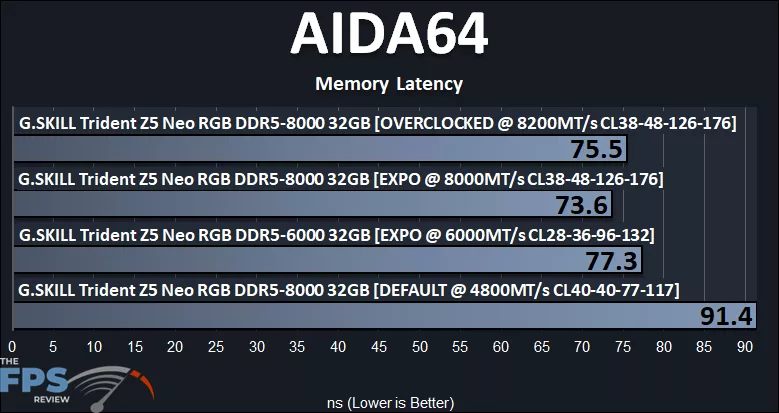
Looking at memory latency, with the kit at 4800MT/s CL40, memory latency is very high at 91.4ns. We get a very large improvement using the 6000MT/s CL28 kit down to 77.3ns, a 15% decrease in latency. We even see a further improvement using the 8000MT’s kit at CL38 at 73.6ns, a 5% decrease in latency. At 8200MT’s CL38, the latency creeps back up slightly, but still below 6000MT’s at CL28.
Geekbench 7
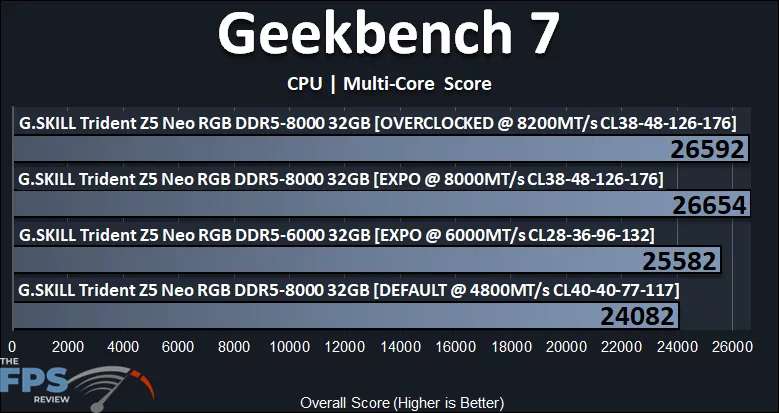
We are using the new Geekbench 7 benchmark and using the Multi-Core score. We can see that with the RAM at the default 4800MT/s, the score is 24082. When we install the 6000MT/s kit at CL28, that score increases by 6% for more performance. Furthermore, using the 8000MT/s kit at 8000MT/s, that score increases again by a smaller 4%, but it is a slight increase. When we overclock the RAM to 8200MT/s, there is a slight regression, but it is still a bit faster than 6000MT/s at CL28.
PassMark PerformanceTEST
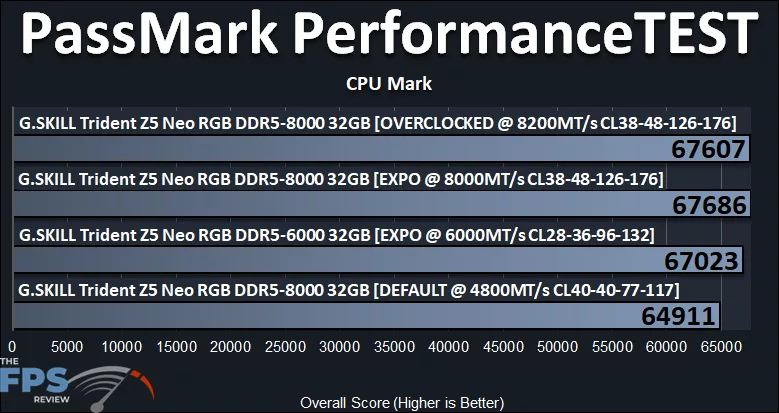
In PassMark PerformanceTEST CPU Mark, the RAM at 4800MT/s pulls in a score of 64911. When we put in the 6000MT/s RAM, performance increases by 3%. Using the 8000MT/s RAM, the score is only slightly improved by 1%. Overclocking the RAM yields about the same performance as 8000MT/s.
Discussion (6 replies)
Join Discussion →Only once did you call the ram DDR6 in the conclusion so well done!!
lol - fixed
It's less errors than an AI would make doing that sort of summary! ;)
.........and the memory cost more than the rest of the setup, less the gpu,.....well there's the nvme, too.
I don't see how anyone starting up a build can afford it.
No AI was used in my writing, or at all.
Yea that's the rub... like I have a 64 gig setup before all this went sideways... I built everything in my sig but the GPU (did that this year.) Feel like my system today would be closer to 10k than the 6 I used to build it out. (Thanks to the video card... well 5 because I sold the old video card.)